Zowie XL2546X vs OLED for CS2: Which to Buy?
The questionWhere do these come from?
27” 240hz+ OLED or Zowie (budget <$500) for CS2?
Title! i have a 4K 27inch 160hz monitor and want something I can use pretty much exclusively for CS2.
For a CS2-only monitor, the XL2546X's DyAc strobing is the sharper tool if your fps holds near 240; a 1440p 240Hz OLED wins everything else.
The BenQ Zowie XL2546X is the better pure CS2 tool if you can hold frame rate close to 240 fps and use DyAc strobing. A 240Hz OLED is the better monitor for everything else, and for CS2 players who run uncapped or variable frame rates it is closer than the spec sheet suggests. Pick by what the screen does the other 80% of the day.
The short comparison
| BenQ Zowie XL2546X | 27-inch 1440p 240Hz OLED | |
|---|---|---|
| Panel | 24.5-inch 1080p fast TN, 240Hz | 27-inch 1440p WOLED or QD-OLED, 240Hz |
| Motion clarity | Best with DyAc strobing on | Best without strobing; no strobe mode |
| Image quality | Weak: TN colour and angles | Strong: true black, wide contrast |
| Main catch | Poor for movies and general use | Burn-in care, lower pixel density at larger size |
Where the XL2546X actually wins
Without strobing, a 240Hz OLED beats 240Hz TN and IPS on motion clarity because its pixels switch faster. Blur Busters forum discussion, including a reply from a staff-level poster, says this plainly. The same threads say that once strobing is on, a strobed TN can reach lower perceived motion blur (MPRT) than OLED. A Blur Busters thread on OLED vs TN covers the argument and a more recent thread on going back to BenQ fast TN shows CS2 players split: one prefers strobed 240Hz, another finds DyAc roughly on par with OLED.
Be honest about the evidence: this is forum discussion and secondary coverage, not a rigorous CS2 lab test. A summary of RTINGS’ review of the XL2546X by MacMyths reports strong motion handling at high refresh rates and high input lag at 60Hz, with no complete numerical table to quote. Do not treat any specific millisecond figure for this model as established.
The condition that decides it: frame rate
Strobing only looks clean when fps matches the strobe rate. If your CS2 frame rate dips and swings well below 240, DyAc’s advantage shrinks, and OLED’s strobe-free clarity holds up better. If your PC sits at or above 240 fps in CS2, the XL2546X plays to its strength. Also note that DyAc is a backlight strobe: BenQ says it adds no input lag, and forum owners generally report not noticing a difference, but that is a claim and anecdote, not a measurement.
Just want the recommendation?
Skip to the picksWhen the OLED is the right call
- If the monitor is also your daily screen for video, single-player games or photo work, TN will feel like a downgrade every hour you are not in a match.
- If you prefer 1440p and a 27-inch image, a 1080p 24.5-inch panel is a real step down in sharpness, and many CS2 pros still choose 24.5-inch on purpose.
- If you run uncapped fps well under 240, OLED gives the fast response without needing a locked frame rate.
The ASUS ROG Strix OLED XG27AQDMG and the MSI MAG 271QPX QD-OLED E2 are the two common 27-inch 1440p 240Hz OLEDs in this class. Pricing moves too often to quote, so check whether either currently fits your ceiling. Neither has a strobing mode, and both carry the usual OLED care routine: pixel refresh cycles, avoiding static elements, and possible text fringing on WOLED. For a deeper OLED-vs-OLED split, see 480Hz WOLED vs 360Hz QD-OLED for CS2.
What to skip
Skip the XL2546X if it will be your only monitor for movies, streaming and creative work: its TN colour and viewing angles are the cost of the motion performance, and nothing in DyAc fixes that. Skip it as well if your CS2 fps routinely sits far below 240, since the strobe benefit depends on matching frame rate. The OLEDs are not a bad buy; they are simply the wrong tool if the only goal is the sharpest possible tracked motion in CS2. Neither OLED here is a skip.
Practical setup notes
Use DisplayPort or HDMI at full 240Hz, set the game to a stable cap just above the strobe rate if your PC cannot hold uncapped fps, and use the on-monitor DyAc toggle in the Zowie OSD to compare on and off in an offline map before committing. The XL2546X is also commonly paired with a second, better-looking monitor so the esports panel only runs during matches; that is the cleanest answer if you want both.
What is still unresolved
No independent CS2-specific test of XL2546X against these OLEDs was found, and a published numerical input-lag comparison across them was not located. If the decision is close, the return window is the real test: run one week of matches on each.
The bottom line
Neither is wrong; the use case separates them:
Top pick
Buy this
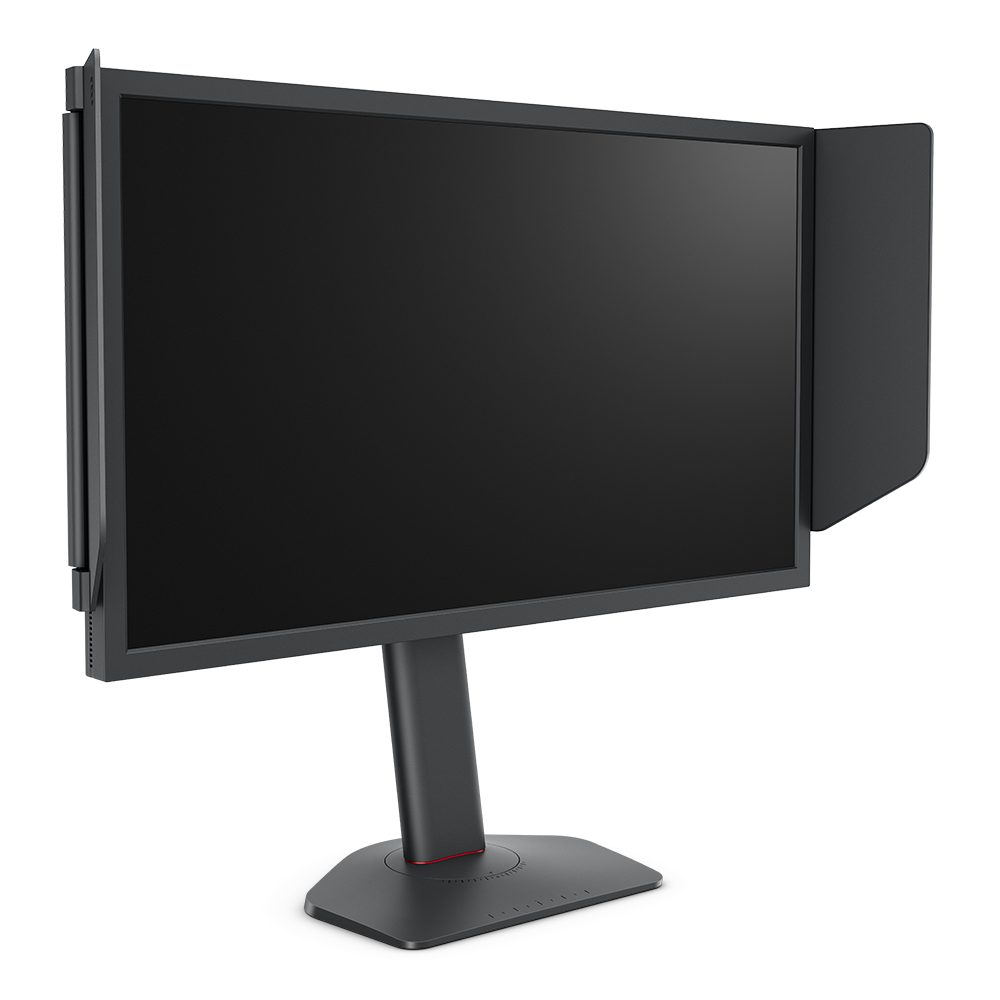
BenQ Zowie XL2546X+ 24.1 DyAc 2 280Hz Fast TN Gaming Monitor for Esports | 280Hz, Fast TN Panel, DyAc 2 Technology, XL Setting to Share, Black eQualizer, Color Vibrance, S Switch, Shielding Hood
BenQ
DyAc strobing is the one feature OLED cannot match for motion clarity in a fixed-fps esports workload, per Blur Busters discussion and RTINGS-based coverage.
The esports panel the question is about: a 24.5-inch 1080p 240Hz TN with DyAc backlight strobing. Drawback: TN colour and viewing angles, and strobing only pays off when fps stays near the refresh rate.Available at Amazon(paid link) — opens Amazon in a new tab. Price and availability shown there.The alternative
It depends
ASUS ROG XG27AQDMG 27 Inch 1440p 240Hz Glossy OLED Gaming Monitor | Custom Heatsink, Anti-Flicker, Uniform Brightness, 0.03ms, G-SYNC Compatible, 99% DCI-P3, for PS5 and Xbox
ASUS
Wins if the monitor is also used for movies, single-player games and desktop work; loses to strobed TN on eye-tracked blur in CS2.
The OLED rival: 27-inch 1440p 240Hz WOLED with near-instant pixel response and real contrast. Drawback: no strobing mode, and WOLED text fringing and burn-in care come with it.Available at Amazon(paid link) — opens Amazon in a new tab. Price and availability shown there.
Recommended products
Ordered by how well each one fits the situations above. Each link below is a paid link.
BenQ Zowie XL2546X+ 24.1 DyAc 2 280Hz Fast TN Gaming Monitor for Esports | 280Hz, Fast TN Panel, DyAc 2 Technology, XL Setting to Share, Black eQualizer, Color Vibrance, S Switch, Shielding Hood
BenQ
Buy — DyAc strobing is the one feature OLED cannot match for motion clarity in a fixed-fps esports workload, per Blur Busters discussion and RTINGS-based coverage.
The esports panel the question is about: a 24.5-inch 1080p 240Hz TN with DyAc backlight strobing. Drawback: TN colour and viewing angles, and strobing only pays off when fps stays near the refresh rate.Available at Amazon(paid link) — opens Amazon in a new tab. Price and availability shown there.ASUS ROG XG27AQDMG 27 Inch 1440p 240Hz Glossy OLED Gaming Monitor | Custom Heatsink, Anti-Flicker, Uniform Brightness, 0.03ms, G-SYNC Compatible, 99% DCI-P3, for PS5 and Xbox
ASUS
It depends — Wins if the monitor is also used for movies, single-player games and desktop work; loses to strobed TN on eye-tracked blur in CS2.
The OLED rival: 27-inch 1440p 240Hz WOLED with near-instant pixel response and real contrast. Drawback: no strobing mode, and WOLED text fringing and burn-in care come with it.Available at Amazon(paid link) — opens Amazon in a new tab. Price and availability shown there.
Sources
Pages consulted while researching this article. None of these are affiliate links.
- MacMyths: BenQ Zowie XL2546X excellent motion, limited image quality (summarising RTINGS) — macmyths.com
- Blur Busters forum: OLED motion blur performance vs TN — forums.blurbusters.com
- Blur Busters forum: Reasons to switch back to BenQ FastTN? — forums.blurbusters.com
- Blur Busters forum: BenQ XL2546 (240Hz + DyAc) finally available — forums.blurbusters.com