PG27AQDP 480Hz WOLED vs 360Hz QD-OLED for CS2
The questionWhere do these come from?
PG27AQDP or XG27ACDNG coming from QD-OLED (MSI 341CQPX)
Hi, I've been using the MSI 341CQPX for about 8 or 9 months now and I've been really happy with it. But I started playing Counter Strike again in March after an 8 year break and I realized that 34 inches is just too big for CS.
For CS2, the 480Hz PG27AQDP is the pick; its WOLED colour is a small step down from QD-OLED that you'll see mainly in bright rooms and saturated content.
The ASUS ROG Swift OLED PG27AQDP is the better choice if CS2 is what you mostly play. Its 480Hz WOLED panel gives up some colour and near-black polish to a QD-OLED, and that loss is real but small. If you have been on a QD-OLED ultrawide, expect to notice it for a few days and then stop noticing it in a competitive shooter. If you edit photos, watch HDR content in a bright room, or care about saturated colour more than frames, the 360Hz QD-OLED is the better monitor.
This page rests on published reviews. Nobody here has used these monitors. RTINGS and Tom’s Hardware measured the numbers quoted below.
The comparison at a glance
| Verdict | What decides it | The catch | |
|---|---|---|---|
| ASUS PG27AQDP (26.5-inch, 1440p, 480Hz WOLED) | Buy | 0.03ms GTG at full 2560x1440 and 480Hz (Tom’s Hardware); RTINGS response time score 9.9 | WOLED colour volume sits behind QD-OLED; RTINGS flags noticeable VRR flicker |
| Alienware AW2725DF (27-inch, 1440p, 360Hz QD-OLED) | Consider | QD-OLED colour and glossy clarity; RTINGS response time score 9.9 | 360Hz ceiling; no HDMI 2.1 bandwidth, so use DisplayPort |
| 500Hz QD-OLED (MSI MPG 272QR QD-OLED X50) | Consider | QD-OLED colour with the highest refresh | Costs more for a 480 to 500Hz step |
Is 480Hz over 360Hz worth it for CS2?
Both panels sit at roughly 1440p and respond almost instantly, so the difference is the refresh interval. 360Hz is about 2.8ms per frame and 480Hz is about 2.1ms, a gap of roughly 0.7ms. That is a small difference. RTINGS rates the PG27AQDP and the Alienware both 9.9 for response time, so pixel speed is not what separates them.
The 480Hz panel only pays off if your PC actually delivers frames near that rate. CS2 at 1440p needs a strong CPU to hold anywhere near 360 to 480fps, and if you average 250fps, neither monitor’s ceiling is your limit. Check your own frame rate before treating 480Hz as a deciding factor.
The PG27AQDP’s 480Hz mode runs at full 1440p, per Tom’s Hardware, so you are not dropping resolution to reach it.
What you give up on colour moving from QD-OLED to WOLED
This is the worry for anyone coming from a QD-OLED ultrawide, and it deserves a straight answer. The two panel types make light differently. QD-OLED uses quantum dots to produce saturated red and green, which generally gives wider colour volume, especially at higher brightness. WOLED filters a white emitter, which is where the gap in saturation at brighter levels comes from. The PG27AQDP uses ASUS’s MLA+ optics to push brightness higher than other OLED monitors, according to RTINGS, which narrows that gap in brightness but does not remove the colour-volume difference.
In practice, the difference shows up in:
Just want the recommendation?
Skip to the picks- saturated reds and greens in bright scenes and HDR content
- photo and video editing where gamut coverage matters
- a side-by-side comparison, where a QD-OLED looks richer
It mostly does not show up in CS2, where map colours are muted and you are tracking silhouettes. RTINGS gives the PG27AQDP a 9.9 for SDR picture, so out of the box SDR is not a weak area.
Banding and near-black gradients
Banding on OLED is mainly about near-black gradients and dark-grey uniformity, and it varies by individual unit. Neither panel type is immune. Where reviewers differ from the folklore is that the gap is subtle and depends on calibration and the unit. The cited reviews do not directly compare banding between these two models, so treat claims of one type being clearly worse as unproven. If your unit shows visible blotchiness in dark scenes, that is a return or RMA question, not something a setting fixes.
CS2 maps are bright enough that near-black banding rarely appears in play. It is more likely to show in dark movies or games.
Room light and coating
QD-OLED panels lift blacks to a greyish tone under strong ambient light, because the panel lacks a polariser-like layer that WOLED panels use differently. WOLED is generally considered to hold blacks better in a lit room. RTINGS notes the PG27AQDP’s coating has fewer mirror-like reflections than the PG27AQWP-W successor. If your desk faces a window, that matters more than the colour gap. If you play in a dark room, the Alienware’s glossy clarity is the advantage; RTINGS makes the same room-light point when comparing the Alienware against a matte-coated Samsung.
Known flaws to weigh
RTINGS lists noticeable VRR flicker on the PG27AQDP, some software bugs, and high input lag at 60Hz. The VRR flicker shows when frame rates fluctuate, which is a reason to cap CS2 frame rate steadily or run with VRR off. Input lag at 60Hz is irrelevant if you play at high refresh.
The Alienware has its own VRR flicker per RTINGS, and it needs DisplayPort for full performance.
Also worth knowing: a successor, the PG27AQWP-W with a tandem OLED panel and 540Hz, has been reviewed by RTINGS. If brightness and HDR matter more than the matte coating, look there before buying.
Who should skip what
- Skip the 480Hz WOLED if you edit colour-critical work or watch lots of HDR in a bright room. The QD-OLED wins there.
- Skip paying for the 500Hz QD-OLED if CS2 is the goal. It buys colour, not a perceptible competitive edge over 480Hz.
- Nothing here is a bad product. All three are fine monitors; the choice is colour versus a small refresh advantage.
The ultrawide transition itself
Moving from an ultrawide to a 16:9 27-inch means a smaller field of view in other games and a different pixel density. At 1440p on roughly 26.5 to 27 inches, text is sharper than on a 34-inch ultrawide of the same resolution height, but OLED text fringing can appear on either panel type’s subpixel layout. If you use the monitor for work text as well, check the reviews for text clarity before deciding.
The bottom line
Both are defensible — the split is what you do with it:
Top pick
Buy this
ASUS ROG PG27AQDP 27 Inch 1440p 480Hz OLED Gaming Monitor | Custom Heatsink, 0.03ms, G-SYNC Compatible, WOLED, DisplayHDR 400, AI Assistant, True 10-bit, 99% DCI-P3, for PS5 and Xbox
ASUS
RTINGS scores it 9.9 for response time and Tom's Hardware lists 0.03ms GTG at full 2560x1440 at 480Hz, which is the strongest CS2 spec in this comparison.
The subject: a 1440p 480Hz WOLED that suits you if CS2 is the main use and you want the fastest panel without paying for a 500Hz QD-OLED. The drawback is WOLED colour volume and near-black behaviour, which sit a step behind QD-OLED.Available at Amazon(paid link) — opens Amazon in a new tab. Price and availability shown there.The alternative
It depends
Alienware AW2725Q 27" 4K QD-OLED Gaming Monitor – 240Hz, 0.03ms GTG, HDR
Alienware
Right if colour, glossy clarity and a dark room matter more than the step from 360Hz to 480Hz, which few players will perceive in CS2.
The direct rival: a 27-inch 1440p 360Hz QD-OLED that keeps the colour you are used to from a QD-OLED ultrawide. It gives up 120Hz of refresh and needs DisplayPort for full performance since it lacks HDMI 2.1 bandwidth.Available at Amazon(paid link) — opens Amazon in a new tab. Price and availability shown there.
Recommended products
Ordered by how well each one fits the situations above. Each link below is a paid link.

ASUS ROG PG27AQDP 27 Inch 1440p 480Hz OLED Gaming Monitor | Custom Heatsink, 0.03ms, G-SYNC Compatible, WOLED, DisplayHDR 400, AI Assistant, True 10-bit, 99% DCI-P3, for PS5 and Xbox
ASUS
Buy — RTINGS scores it 9.9 for response time and Tom's Hardware lists 0.03ms GTG at full 2560x1440 at 480Hz, which is the strongest CS2 spec in this comparison.
The subject: a 1440p 480Hz WOLED that suits you if CS2 is the main use and you want the fastest panel without paying for a 500Hz QD-OLED. The drawback is WOLED colour volume and near-black behaviour, which sit a step behind QD-OLED.Available at Amazon(paid link) — opens Amazon in a new tab. Price and availability shown there.Alienware AW2725Q 27" 4K QD-OLED Gaming Monitor – 240Hz, 0.03ms GTG, HDR
Alienware
It depends — Right if colour, glossy clarity and a dark room matter more than the step from 360Hz to 480Hz, which few players will perceive in CS2.
The direct rival: a 27-inch 1440p 360Hz QD-OLED that keeps the colour you are used to from a QD-OLED ultrawide. It gives up 120Hz of refresh and needs DisplayPort for full performance since it lacks HDMI 2.1 bandwidth.Available at Amazon(paid link) — opens Amazon in a new tab. Price and availability shown there.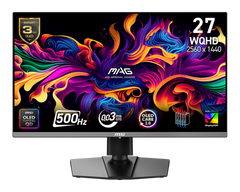
msi, MAG 272QP QD-OLED X50, 27-Inch, WQHD, 2560x1440, Gaming Monitor, Quantum Dot OLED Panel, 500Hz, 0.03ms, DisplayHDR True Black 500, HDMI 2.1, DP 1.4a, USB C (15WPD), Tilt/Height Adjustable, Black
msi
It depends — 500Hz versus 480Hz is a 4% refresh difference, so the extra spend buys QD-OLED colour rather than measurable CS2 advantage.
The 500Hz QD-OLED alternative that pairs top refresh with QD-OLED colour, at a higher cost. Only worth it if you refuse to trade colour for speed.Available at Amazon(paid link) — opens Amazon in a new tab. Price and availability shown there.

Sources
Pages consulted while researching this article. None of these are affiliate links.
- RTINGS: ASUS ROG Swift OLED PG27AQDP review — rtings.com
- Tom's Hardware: Asus ROG Swift PG27AQDP OLED 480 Hz review — tomshardware.com
- RTINGS: Dell Alienware AW2725DF review — rtings.com
- RTINGS: ASUS ROG Swift OLED PG27AQWP-W review — rtings.com