ROG PG34WCDM: Worth It as an Ultrawide OLED Upgrade?
The questionWhere do these come from?
Which should I get
Currently have a LG 5k2k 45 inch, and its great, but there was some cons. The 165hz is fine, but having the 4kdual mode being limted to 165hz is a let down, as well as the zoomed in 1080p full wide mode.
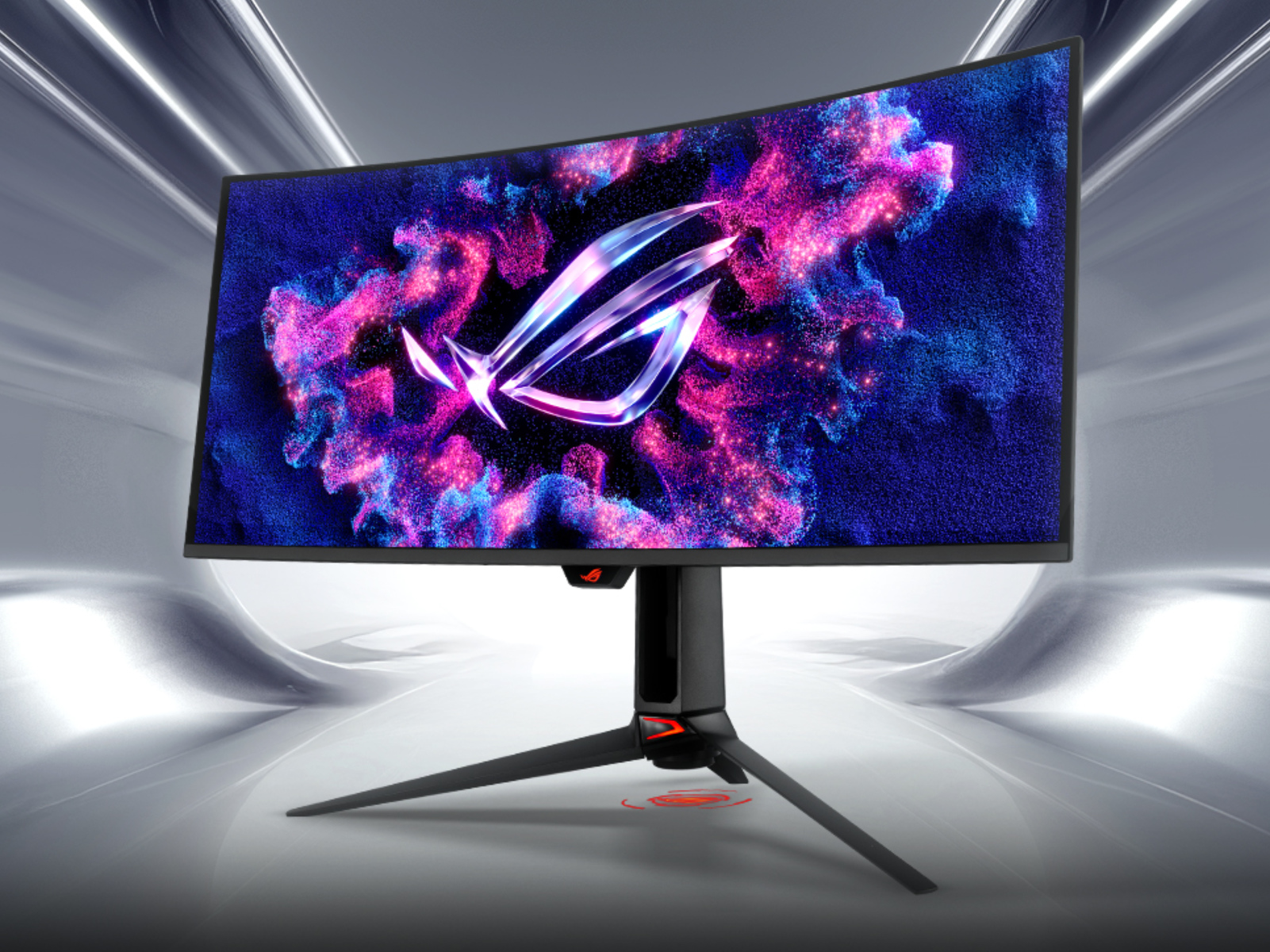
The ROG Swift OLED PG34WCDM is a worthwhile jump to 240Hz WOLED ultrawide if you value a matte finish; QD-OLED rivals win on colour.
The ROG Swift OLED PG34WCDM is a worthwhile upgrade if you want to stay on a 34-inch 3440x1440 ultrawide and get a real jump in contrast, response time and refresh rate. It runs at 240Hz on an LG WOLED panel. Pick the QD-OLED ROG Strix XG34WCDMTG instead if colour in a dim room matters more to you than a matte coating.
What the PG34WCDM actually offers
ASUS’s own spec page lists a 33.94-inch WOLED panel, 3440x1440, 800R curvature, 240Hz maximum refresh, 0.03ms GtG response and 99% DCI-P3. It also lists DisplayPort 1.4 with DSC, two HDMI 2.1 ports, VESA DisplayHDR 400 True Black certification and a 2-year warranty that includes panel burn-in. ASUS gives a 1,300 cd/m² peak HDR figure, which is a manufacturer claim measured on a small window. Treat it as a ceiling, not what a full-screen scene delivers.
On independent testing, RTINGS scored it 9.0 for PC gaming and gave top marks for black levels and response time. It also flagged two things worth knowing: burn-in risk with static elements, and visible VRR flicker when frame rates change. Guru3D’s review confirms the panel is a matte-finish LG WOLED.
Note that some listings and forum posts mention 360Hz. The ASUS spec pages show 240Hz for this model, so a 360Hz figure belongs to a different monitor.
How it compares
| Verdict | What decides it | The catch | |
|---|---|---|---|
| ROG Swift OLED PG34WCDM | Buy | 240Hz WOLED, matte finish, burn-in covered by warranty | VRR flicker in uneven frame rates (RTINGS) |
| ROG Strix OLED XG34WCDMTG | Consider | Samsung QD-OLED, 240Hz, 1800R curve, 1,000 nits peak HDR claim | No full independent review found; different panel trade-offs |
| Samsung Odyssey OLED G8 G85SB | Consider | Cheaper route to a 34-inch QD-OLED | Lower refresh ceiling than 240Hz |
Where the upgrade is big
Moving from an LCD or an older, slower OLED ultrawide, the gains are black levels, near-instant pixel response and a high refresh ceiling. At 3440x1440, a recent mid-to-high-end GPU can use 144 to 240Hz in esports and many single-player titles. DisplayPort 1.4 with DSC handles 240Hz at this resolution, while the HDMI 2.1 ports suit consoles.
Just want the recommendation?
Skip to the picksWhere the upgrade is small
If your current LG ultrawide is already an OLED at 144Hz or higher, the real change is 240Hz and possibly a better panel generation. That is a smaller step than the title suggests. Check whether your current monitor has a firmware or settings workaround for its specific complaint (flicker, brightness limiting, VRR behaviour) before spending, because the PG34WCDM does not escape VRR flicker either, going by RTINGS.
The rival to weigh: QD-OLED
The XG34WCDMTG uses a Samsung QD-OLED panel with a gentler 1800R curve, per Notebookcheck, and ASUS lists 240Hz, 0.03ms GtG, 1,000 nits peak HDR and 99% DCI-P3. QD-OLED panels generally pair strong colour with a glossier finish that shows more room reflections and can look slightly raised in black in bright rooms. That general trait is widely reported, but this site found no independent lab numbers for this specific monitor. Choose it if the room is dim and you favour saturated colour. Stay with the PG34WCDM if a window or lamp sits near the screen, or if you prefer the more tightly curved, matte look.
The cheaper Samsung option
A Samsung 34-inch QD-OLED such as the Odyssey OLED G8 (G85SB) costs less but tops out below 240Hz. It is not the wrong buy; it is a narrower fit. If your GPU rarely exceeds about 175 fps at 3440x1440, you lose little. If you chase competitive frame rates, the missing refresh headroom is the whole reason to pay for the ASUS.
Which one to skip
Nothing here deserves a skip. All three are fine panels; the difference is refresh ceiling (240Hz versus lower), finish (matte WOLED versus glossier QD-OLED) and how much you want to spend.
What to do before buying
Avoid static HUD elements at full brightness for hours, use the monitor’s pixel-shift and refresh features, and rely on the warranty coverage for burn-in rather than assuming it is impossible. Burn-in terms vary by product and region, so confirm them on the listing and with ASUS support before purchase. This page rests on published specs and reviewers’ measurements, not hands-on use.
The bottom line
Neither is wrong; the use case separates them:
Top pick
Buy this
ASUS ROG PG34WCDN 34 Inch 1440p 360Hz Ultrawide RGB OLED Gaming Monitor | Tandem RGB QD-OLED, RGB Stripe Pixel, OLED Care Pro, DisplayHDR 500 True Black, USB-C 90W, 0.03ms
ASUS
ASUS lists 240Hz, 0.03ms GtG, 99% DCI-P3, two HDMI 2.1 ports and a 2-year warranty that includes burn-in, and RTINGS scored it 9.0 for PC gaming.
The monitor the question is about: a 34-inch 3440x1440 LG WOLED ultrawide with 240Hz, a matte finish and a warranty that covers burn-in. Drawback: RTINGS flagged visible VRR flicker when frame rates swing.Available at Amazon(paid link) — opens Amazon in a new tab. Price and availability shown there.The alternative
It depends
ASUS ROG XG34WCDMTG 34 Inch 1440p 240Hz Ultrawide QD-OLED Gaming Monitor | 0.03ms, G-SYNC, Google TV Built-In WiFi 6, Dolby Vision,99% DCI-P3, DisplayHDR 400, for PS5 and Xbo
ASUS
ASUS lists 1,000 nits peak HDR and 99% DCI-P3, but the QD-OLED panel type is a different trade-off (colour and black depth versus the PG34WCDM's matte WOLED), and independent measurements were not found.
The newer rival from the same maker: a Samsung QD-OLED 34-inch at 240Hz with a gentler 1800R curve and Google TV built in. Choose it over the PG34WCDM in a dim room where colour volume matters most; no full independent lab review turned up in research.Available at Amazon(paid link) — opens Amazon in a new tab. Price and availability shown there.
Recommended products
Ordered by how well each one fits the situations above. Each link below is a paid link.
ASUS ROG PG34WCDN 34 Inch 1440p 360Hz Ultrawide RGB OLED Gaming Monitor | Tandem RGB QD-OLED, RGB Stripe Pixel, OLED Care Pro, DisplayHDR 500 True Black, USB-C 90W, 0.03ms
ASUS
Buy — ASUS lists 240Hz, 0.03ms GtG, 99% DCI-P3, two HDMI 2.1 ports and a 2-year warranty that includes burn-in, and RTINGS scored it 9.0 for PC gaming.
The monitor the question is about: a 34-inch 3440x1440 LG WOLED ultrawide with 240Hz, a matte finish and a warranty that covers burn-in. Drawback: RTINGS flagged visible VRR flicker when frame rates swing.Available at Amazon(paid link) — opens Amazon in a new tab. Price and availability shown there.ASUS ROG XG34WCDMTG 34 Inch 1440p 240Hz Ultrawide QD-OLED Gaming Monitor | 0.03ms, G-SYNC, Google TV Built-In WiFi 6, Dolby Vision,99% DCI-P3, DisplayHDR 400, for PS5 and Xbo
ASUS
It depends — ASUS lists 1,000 nits peak HDR and 99% DCI-P3, but the QD-OLED panel type is a different trade-off (colour and black depth versus the PG34WCDM's matte WOLED), and independent measurements were not found.
The newer rival from the same maker: a Samsung QD-OLED 34-inch at 240Hz with a gentler 1800R curve and Google TV built in. Choose it over the PG34WCDM in a dim room where colour volume matters most; no full independent lab review turned up in research.Available at Amazon(paid link) — opens Amazon in a new tab. Price and availability shown there.Samsung 34' Odyssey G85SB Series QD-OLED Ultra WQHD Curved Gaming Monitor, 175Hz, 0.03ms, DisplayHDR True Black 400, AMD FreeSync Premium Pro, Advanced Game Streaming, LS34BG850SNXZA
Samsung
It depends — Its refresh ceiling is below the PG34WCDM's 240Hz, so it only makes sense if you rarely run games above roughly 175 fps.
A cheaper-tier alternative if staying with a 34-inch ultrawide OLED but spending less; it is a Samsung QD-OLED at a lower refresh rate than the ASUS. Gives up refresh headroom to get there.Available at Amazon(paid link) — opens Amazon in a new tab. Price and availability shown there.
Sources
Pages consulted while researching this article. None of these are affiliate links.
- RTINGS: ASUS ROG Swift OLED PG34WCDM review — rtings.com
- Guru3D: ASUS ROG Swift OLED PG34WCDM review — guru3d.com
- ASUS: ROG Swift OLED PG34WCDM specifications — rog.asus.com
- ASUS: ROG Strix OLED XG34WCDMTG specifications — rog.asus.com
- Notebookcheck: ROG Strix OLED XG34WCDMTG debuts — notebookcheck.net