How to Check NZXT H6 Flow Water Cooling Compatibility
The questionWhere do these come from?
PC upgrading possibility
I have issues with cooling, my parts are all close to each other, have almost no space to breathe and ventilators also are meh.
The H6 Flow fits top-mounted 240, 280, or 360 mm AIOs and a rear 120 mm radiator, but not front-right, bottom, or 420 mm radiators.
Checking whether a water cooler fits the NZXT H6 Flow comes down to six checks, done in order: the case model, the radiator size and mounting position, the thickness clearance, the radiator’s real dimensions, the airflow layout for the rest of the build, and the motherboard connectors. Work through them before buying and the checks converge on the same answer NZXT’s own specifications give: a 240, 280, or 360 mm radiator mounted at the top fits, a 120 mm radiator fits at the rear, and nothing fits at the front-right, the bottom, or in a 420 mm size.
Step 1: Confirm you have the H6 Flow, not the H6
Check the label on the case or the box before using any measurement below. NZXT sells a separate H6 (2026) chassis with model numbers beginning CC-H62, and its clearances are different from the H6 Flow’s. The original H6 Flow and H6 Flow RGB, introduced in 2023, carry model numbers beginning CC-H61: CC-H61FB-01, CC-H61FW-01, CC-H61FB-R1, or CC-H61FW-R1. Both standard and RGB H6 Flow versions share the same radiator clearances. The newer H6 (2026) allows up to 67 mm for the combined top radiator and fans and limits top-radiator length to 400 mm, versus the H6 Flow’s 30 mm radiator and roughly 60 mm combined guidance below. Everything past this step assumes a CC-H61 case. NZXT’s H6 Flow specification sheet, NZXT H6 (2026) specifications.
Step 2: Match a radiator size to a supported position
| Radiator size | Supported position | Officially supported | Fan layout |
|---|---|---|---|
| 120 mm | Top or rear | Yes | 1 × 120 mm |
| 240 mm | Top | Yes | 2 × 120 mm |
| 280 mm | Top | Yes | 2 × 140 mm |
| 360 mm | Top | Yes | 3 × 120 mm |
| 420 mm | None | No | 3 × 140 mm |
A 360 mm AIO occupies the entire top mounting area. A 280 mm model uses the two 140 mm mounting positions, and a 240 mm model uses two of the three 120 mm positions. Do not assume the three angled front-right fan mounts can take a radiator: NZXT states they are fan-only. The two bottom 140 mm positions are also fan-only, not radiator mounts. NZXT also lists a 140 mm radiator as compatible with the top, though standalone 140 mm AIOs are uncommon in practice.
A rear 120 mm AIO is technically compatible but offers far less radiator area than the top-mounted sizes, so it mainly makes sense if you already own a 120 mm cooler or need to keep the top panel completely open. For a new CPU-cooling purchase, a top-mounted 240, 280, or 360 mm AIO makes better use of the case’s available mounting space. H6 Series radiator compatibility table.
Step 3: Measure thickness, not just radiator size
Length and position are not the only limits. NZXT specifies a 30 mm maximum top-radiator thickness and describes the expected combined radiator-and-fan thickness as approximately 60 mm. A thicker assembly can collide with the motherboard’s rear-I/O housing, CPU power connectors, or VRM heatsinks. Check two numbers before buying:
- The radiator itself should be no thicker than 30 mm.
- The radiator plus installed fans should total about 60 mm or less.
As a compatible reference point, the NZXT Kraken Core 360 RGB has a 397 × 120 × 27 mm radiator and a 26 mm-thick fan assembly, for a nominal combined thickness of 53 mm — inside both limits. It also supports the AM5 socket used by the Ryzen 5 7600X, and NZXT’s own installation guide shows that cooler top-mounted in the H6 Flow (2023). H6 Flow technical specifications, Kraken Core specifications, NZXT installation instructions.
Just want the recommendation?
Skip to the picksStep 4: Verify the radiator’s actual dimensions, not its size class
A third-party 360 mm AIO is not automatically compatible just because “360 mm” is in the name — that label describes the fan class, not the radiator’s complete outer dimensions. Look up the manufacturer’s length, width, thickness, end-tank shape, and tube-exit position for the specific model. An unusually thick radiator or a tall motherboard VRM cover can still create a collision even when the fan size matches.
Step 5: Choose a size and airflow layout for your hardware
Size the radiator to your CPU, not just to the largest position the case allows. A 360 mm AIO is compatible with the H6 Flow, but a Ryzen 5 7600X does not require one simply because it is an X-series part: AMD specifies a 105 W default TDP, recommends a premium air cooler, and lists 95°C as the maximum operating temperature. A capable 240 or 280 mm AIO is a legitimate option; a 360 mm unit adds radiator surface and can hit the same temperatures at lower fan speed. Actual results still depend on the specific cooler, ambient temperature, motherboard power settings, thermal-paste application, and fan curve. AMD’s Ryzen 5 7600X specifications.
For a build pairing that CPU with an RX 7800 XT, use the airflow arrangement NZXT documents for an AIO build:
- Keep the three included front-right 120 mm fans as intake.
- Install the top AIO fans in push orientation, exhausting upward through the radiator.
- Add two 140 mm bottom intake fans to feed fresh air toward the graphics card.
- Add one 120 mm rear exhaust fan.
NZXT tested that layout with a 360 mm Kraken X73, a Core i9-12900K, and an RTX 3090 — not with a Ryzen 7600X and RX 7800 XT — so treat it as the manufacturer’s airflow layout rather than a temperature prediction for different hardware. A top-mounted radiator does not consume the front-right fan positions and keeps the radiator out of the airflow directly in front of the graphics card. The H6 Flow permits GPUs up to 365 mm long, but RX 7800 XT cards differ by manufacturer, so check the length of the exact Sapphire, PowerColor, XFX, ASUS, Gigabyte, or other board before ordering the case. NZXT H6 Series FAQ.
Step 6: Confirm connectors, clearance, and orientation
Before ordering, confirm each of the following rather than relying on the advertised radiator class alone:
- The cooler includes the correct socket bracket — AM5 for a Ryzen 7600X.
- The motherboard has the pump, PWM fan, USB, SATA-power, or 5 V ARGB connections that particular AIO requires.
- The motherboard’s VRM heatsinks, rear-I/O cover, and CPU power plugs stay clear of the top radiator-and-fan assembly once installed.
- The radiator sits above the pump block. NZXT warns that mounting the entire radiator below the pump can reduce performance or cause pump failure.
If a third-party cooler exceeds the measurements from Step 3, physical fit cannot be promised without a case-specific confirmation from its manufacturer. If it falls within the limits but still contacts a motherboard heatsink, the realistic fixes are a thinner fan-and-radiator combination, a different motherboard, or another cooler — not forcing the top panel into place.
The bottom line
Two options, and the revision you own picks one:
Top pick
Buy this
NZXT Kraken Core 360 RGB - 360mm AIO CPU Cooler - Black
NZXT
Its 27 mm radiator and 26 mm fan assembly total 53 mm, within the H6 Flow’s published top-clearance limits, and NZXT shows it installed in this case.
Its 397 × 120 × 27 mm radiator and 26 mm fan assembly fit within the H6 Flow’s published top-clearance limits, and it includes AM5 mounting hardware. The drawback is that it occupies the entire top mount and requires a 5 V ARGB connection for lighting.Available at Amazon(paid link) — opens Amazon in a new tab. Price and availability shown there.The alternative
Buy this
NZXT F140Q - 140mm Quiet Airflow PC Case Fan - Black
NZXT
The article recommends two 140 mm bottom intake fans in NZXT’s documented AIO airflow layout to direct fresh air toward the graphics card.
Two of these fill the H6 Flow’s bottom 140 mm intake mounts and direct air toward a hot graphics card such as an RX 7800 XT. The drawback is that they are sold individually and require two PWM connections or a suitable splitter.Available at Amazon(paid link) — opens Amazon in a new tab. Price and availability shown there.
Recommended products
Ordered by how well each one fits the situations above. Each link below is a paid link.
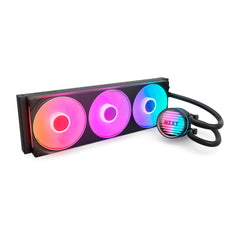
NZXT Kraken Core 360 RGB - 360mm AIO CPU Cooler - Black
NZXT
Buy — Its 27 mm radiator and 26 mm fan assembly total 53 mm, within the H6 Flow’s published top-clearance limits, and NZXT shows it installed in this case.
Its 397 × 120 × 27 mm radiator and 26 mm fan assembly fit within the H6 Flow’s published top-clearance limits, and it includes AM5 mounting hardware. The drawback is that it occupies the entire top mount and requires a 5 V ARGB connection for lighting.Available at Amazon(paid link) — opens Amazon in a new tab. Price and availability shown there.
NZXT F140Q - 140mm Quiet Airflow PC Case Fan - Black
NZXT
Buy — The article recommends two 140 mm bottom intake fans in NZXT’s documented AIO airflow layout to direct fresh air toward the graphics card.
Two of these fill the H6 Flow’s bottom 140 mm intake mounts and direct air toward a hot graphics card such as an RX 7800 XT. The drawback is that they are sold individually and require two PWM connections or a suitable splitter.Available at Amazon(paid link) — opens Amazon in a new tab. Price and availability shown there.
Sources
Pages consulted while researching this article. None of these are affiliate links.
- NZXT H6 RGB+ im Test — ComputerBase — computerbase.de
- NZXT H6 Flow RGB Review: Quirky Cool — Tom's Hardware — tomshardware.com
- NZXT H6 Flow Chassis Review: Finished Build — Guru3D — guru3d.com
- H6 Flow (2023) Specs – NZXT Support Center — support.nzxt.com
- NZXT H6 Series FAQ – NZXT Support Center — support.nzxt.com
- Kraken Core (2025) Specs – NZXT Support Center — support.nzxt.com
- Installing the Kraken Core – Connecting the Radiator and Fan — support.nzxt.com
- AMD Ryzen 5 7600X Desktop Processor Specifications — amd.com
- H6 (2026) Specs – NZXT Support Center — support.nzxt.com