MS-01: The Cheapest Barebone With Socketed DDR5 SO-DIMM
The questionWhere do these come from?
Looking for the cheapest barebone Mini PC (DDR5 SO-DIMM) for a Gemma 31B home server. Thoughts on this setup?
I’m looking to set up a dedicated, budget-friendly home LLM server to run Gemma 31B (likely at a Q3 or Q4 quant).
The MS-01's entry Core i5 barebone tier is the cheapest way to get socketed DDR5 SO-DIMM and PCIe expansion for a local-model box.
The cheapest way into a MINISFORUM MS-01 that still has socketed DDR5 SO-DIMM slots is the entry Core i5 barebone tier — Minisforum’s own product page lists it as the i5-12600H configuration, though earlier retail listings show an i5-12450H barebone at the same price point. Every tier of the MS-01, from that i5 up through the i9-13900H flagship, ships with the identical two DDR5 SO-DIMM slots and identical three M.2 slots, so buying the cheapest CPU tier costs you nothing on the memory or storage side — you’re paying only for clock speed and core count, not for expansion room.
Every CPU tier gets the same RAM and storage slots
The MS-01’s “barebone” designation means no RAM, no storage, and no OS — not no CPU. The mobile-class Core i5/i9 chip is soldered to the board regardless of which tier you buy, which is different from a true bare-socket board. What you’re actually saving money on by choosing the i5 tier over the i9-13900H tier is CPU performance, full stop. The two DDR5 SO-DIMM slots, the three M.2 NVMe slots, the dual 10GbE SFP+ ports, and the PCIe 4.0 expansion slot are identical across every configuration Minisforum sells. If your goal is reusing SO-DIMM sticks and NVMe drives you already own, the i5 tier gets you into that chassis for the least money with zero compromise on the part that matters to you.
The DDR5 speed ceiling the spec sheet doesn’t emphasize
Minisforum’s officially validated memory configuration for the MS-01 tops out at 64GB (2x32GB), and the platform’s memory controller is rated for DDR5-5200 — not the DDR5-5600 that Minisforum’s own bundled kits and many aftermarket SO-DIMMs are labeled at. ServeTheHome’s teardown of the board found that faster-rated 5600 modules run, but the platform doesn’t officially certify anything past 5200. That matters if you’re moving SO-DIMMs over from another machine: sticks rated at 5600 or 6000 will work but clock down, so there’s no reason to buy speed you can’t use. ServeTheHome also tested 96GB (2x48GB) successfully, even though Minisforum does not list that capacity as supported — worth knowing if the existing RAM you want to reuse is a pair of 48GB modules, but treat it as working-in-practice rather than a guaranteed configuration.
Three M.2 slots, and one thing to check before you move drives over
Storage is genuinely bring-your-own: three M.2 NVMe slots, with Minisforum and independent coverage both citing up to 24TB combined capacity across them. The primary slot also accepts a U.2 drive through an adapter if you’re repurposing enterprise storage, and ServeTheHome noted that only the primary slot has heatsink clearance — the other two sit under the fan shroud with none, which is worth a thought if you’re dropping in drives that already run hot under sustained write loads, since a home local-model box is likely to have the model weights, a vector store, and whatever else you’re running all living on the same NVMe.
Where the MS-01 actually sits against the alternatives
| Verdict | RAM for your own SO-DIMM sticks | Networking | The catch | |
|---|---|---|---|---|
| MINISFORUM MS-01 | Buy | 2x DDR5 SO-DIMM, 64GB officially validated (96GB reported working, unsupported) | Dual 10GbE SFP+, dual 2.5GbE RJ45 | CPU is soldered per tier; PCIe slot is single-slot, low-profile only |
| MINISFORUM MS-A1 | Consider | 2x DDR5 SO-DIMM, up to 96GB officially supported | Dual 2.5GbE only, no 10GbE | Ships with no CPU at all — bare AM5 socket |
| Beelink SER9 | Skip | LPDDR5X soldered to the board in standard configurations | Single 2.5GbE | Memory isn’t socketed in the common build — fails the requirement outright |
Skip the Beelink SER9 if socketed memory is the actual requirement
The SER9 is the mini PC most people land on by default for a home local-model box, because its Ryzen AI 9 HX 370 and Radeon 890M iGPU are genuinely faster for prompt processing than anything the MS-01’s Iris Xe graphics can do, as ServeTheHome’s and WCCFTech’s reviews of the SER9 both found. But the standard SER9 configuration solders LPDDR5X-7500 directly to the board — Mini PC Lab’s teardown coverage confirms most retail units ship this way — which means there’s no SO-DIMM slot to put your existing RAM into and no upgrade path later. If the requirement is genuinely “socketed DDR5 SO-DIMM,” the SER9 doesn’t meet it, regardless of how good its iGPU is on paper.
Just want the recommendation?
Skip to the picksThe MS-A1 undercuts it, for a narrower job
Minisforum’s own MS-A1 is a legitimately cheaper barebone that keeps socketed DDR5 SO-DIMM — two slots, officially supported up to 96GB, according to Minisforum’s product listing and corroborated by NotebookCheck’s coverage of the launch. It also adds a built-in OCuLink port and four M.2 PCIe 4.0 slots, both of which the MS-01 lacks natively. What it gives up: the MS-A1 is a true bare AM5 socket with no CPU included at all, so you’re sourcing your own Ryzen 7000/8000G-series APU (or a 9000-series chip after a BIOS update, capped around 100W on dual-CCD parts, per NotebookCheck), and it drops to dual 2.5GbE with no 10GbE option, confirmed in igor’sLAB’s review of the board. If you already have a spare AM5 APU sitting around and don’t need 10-gigabit networking for the rest of your homelab, the MS-A1 is the cheaper way to the same socketed-DDR5 goal. If you don’t have a CPU to drop in and want 10GbE for other services sharing the box, that “savings” disappears once you price in a chip.
Realistic tokens-per-second without a GPU, and why nobody has measured it
No independent lab has published llama.cpp or Ollama benchmarks specifically for the MS-01, so what follows is arithmetic, not a measurement — treat it as a ceiling estimate. CPU-only token generation is bound by memory bandwidth, not compute: throughput tops out at roughly the platform’s memory bandwidth divided by the size of the model at whatever quantization you’re running, a relationship explained in detail by InventiveHQ’s local-LLM performance breakdown. DDR5-5200 in dual channel has a theoretical peak of 83.2 GB/s (5,200 MT/s x 8 bytes per channel x 2 channels, per the DDR5 SDRAM specification). Real-world reads land well under that: CDRLabs.com’s AIDA64 testing of a desktop DDR5-5200 kit measured around 62 GB/s, roughly three-quarters of the theoretical figure, and a mobile platform sharing its memory controller and thermal budget with everything else on the die will likely read somewhat lower still — call it 45-60 GB/s as a working assumption.
Run that math against a few common model sizes at Q4 quantization: an 8B model (roughly 4.9GB) lands around 9-12 tokens/sec, which is usable for single-user chat. A 32B-class model (roughly 19-20GB) drops to roughly 2-3 tokens/sec — readable while you wait, not snappy. A 70B model (roughly 40GB) falls to a little over 1 token/sec, which is batch-only territory, not interactive use. These numbers move with your specific quantization and context length, but the ceiling they describe doesn’t move much without changing where the model runs.
What a low-profile GPU changes later
The MS-01’s PCIe 4.0 slot is wired at x8 and built for single-slot, low-profile cards — ServeTheHome frames the ceiling as roughly RTX A2000 mobile-class hardware, given the chassis’s clearance and power budget. Dropping a GPU with dedicated GDDR6 VRAM into that slot moves inference off system RAM entirely for any model that fits in the card’s VRAM, and GDDR6 bandwidth runs several times higher than dual-channel DDR5, which is why the tokens-per-second math above changes dramatically once a GPU is in the loop. The MS-01 has no built-in OCuLink port — unlike the MS-A1 — but an eGPU.io build documented running an Arc A770 off the internal PCIe slot through an OCuLink adapter card, so external GPU expansion is possible without a native port, just at the cost of giving up the internal slot’s original card in the process.
Where this stops being the right pick
None of this changes if the goal shifts from “cheapest box that takes my RAM” to “fastest local inference regardless of price” — at that point a barebone with a real desktop-class GPU slot and no soldered CPU, like the MS-A1 paired with a higher-wattage AM5 chip, or a full mini-ITX build, starts making more sense than either mini PC here. But for reusing DDR5 SO-DIMM sticks and NVMe drives you already own in the smallest, cheapest chassis that still leaves that memory and storage socketed, the MS-01’s entry i5 tier is the one to buy, the SER9 is the one to skip because it fails the actual requirement, and the MS-A1 is worth considering only if you’re not paying for a CPU or 10GbE you’d otherwise need to add.
The bottom line
Two good answers to different versions of the question:
Top pick
Buy this
MINISFORUM MS-01 Barebone Mini Workstation
MINISFORUM
The entry CPU tier costs the least while keeping the identical socketed DDR5 and NVMe slots as the flagship i9 tier.
The subject of this comparison: every CPU tier shares the same two DDR5 SO-DIMM slots and three M.2 slots, so the cheapest i5 tier gets you full expansion room for the least money.Available at Amazon(paid link) — opens Amazon in a new tab. Price and availability shown there.The alternative
It depends
MINISFORUM MS-A1 Barebone Mini PC AM5
MINISFORUM
It ships with no CPU at all and drops to dual 2.5GbE instead of the MS-01's dual 10GbE SFP+.
A genuine alternative barebone that undercuts the MS-01 on price while keeping socketed DDR5 SO-DIMM, worth it only if you already have a spare AM5 chip and don’t need 10GbE.Available at Amazon(paid link) — opens Amazon in a new tab. Price and availability shown there.
Recommended products
Ordered by how well each one fits the situations above. Each link below is a paid link.
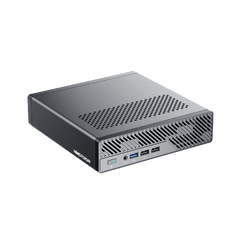
MINISFORUM MS-01 Barebone Mini Workstation
MINISFORUM
Buy — The entry CPU tier costs the least while keeping the identical socketed DDR5 and NVMe slots as the flagship i9 tier.
The subject of this comparison: every CPU tier shares the same two DDR5 SO-DIMM slots and three M.2 slots, so the cheapest i5 tier gets you full expansion room for the least money.Available at Amazon(paid link) — opens Amazon in a new tab. Price and availability shown there.
MINISFORUM MS-A1 Barebone Mini PC AM5
MINISFORUM
It depends — It ships with no CPU at all and drops to dual 2.5GbE instead of the MS-01's dual 10GbE SFP+.
A genuine alternative barebone that undercuts the MS-01 on price while keeping socketed DDR5 SO-DIMM, worth it only if you already have a spare AM5 chip and don’t need 10GbE.Available at Amazon(paid link) — opens Amazon in a new tab. Price and availability shown there.
Sources
Pages consulted while researching this article. None of these are affiliate links.
- Minisforum MS-01 Review: The 10GbE with PCIe Slot Mini PC (Specifications) — servethehome.com
- Minisforum MS-01 Review: The 10GbE with PCIe Slot Mini PC — servethehome.com
- MINISFORUM Mini PC MS-01: Core i9, Dual 10G & 3x M.2 NVMe SSDs — minisforum.com
- MINISFORUM Mini PC MS-A1: Socketed AM5 CPU, OCuLink & 4x M.2 — minisforum.com
- Minisforum MS-A1 mini PC launched with support for up to Ryzen 9000 series, OCuLink port, up to 96 GB of memory — notebookcheck.net
- Minisforum MS-A1 Mini-PC Review - Barebone with AM5 desktop socket and an AMD Ryzen 7 8700G — igorslab.de
- Beelink SER9 AMD Ryzen AI 9 HX 370 Mini PC Review — servethehome.com
- Beelink SER9 AMD Ryzen AI 9 HX 370 Mini PC Review - The Fastest iGPU On The Market Right Now — wccftech.com