Aurora R14 Stuck at 2133 MT/s? Use JEDEC 3200 RAM
The questionWhere do these come from?
My RAM is stuck on 2,133
My rams speed is just stuck at 2,133 mt/s. I have an alienware aurora r14 ryzen and i got new ram, and i remove the dell oem ram. The ram i got is corsair 2x16 at 3600 mt/s.
An Aurora R14 Ryzen that drops 3600 MT/s Corsair RAM to 2133 MT/s usually isn't broken; a JEDEC DDR4-3200 kit like Crucial's avoids XMP entirely.
A Corsair 3600 MT/s kit that runs at 2133 MT/s in an Alienware Aurora R14 Ryzen Edition is almost always behaving as designed, not failing: the kit’s 3600 figure lives in an XMP profile, and the Dell-built firmware on this board does not reliably apply XMP. The practical fix is to buy memory whose rated speed is a JEDEC profile, such as a Crucial DDR4-3200 kit, because JEDEC speeds are read from the module’s standard SPD table and need no overclocking menu at all.
Why a 3600 kit lands at 2133
Retail “gaming” DDR4 has two layers of data on the module’s SPD chip. The base layer is a JEDEC profile, which for most 3000-plus kits is a conservative 2133 or 2400 MT/s. The advertised speed (3600 here) is an Intel XMP profile stored on top. On a retail AMD board, the BIOS exposes that as XMP or DOCP/EXPO and you switch it on. On a Dell-engineered board, that switch is often hidden, greyed out or only partly working, so the board falls back to the JEDEC base layer: 2133 MT/s.
Owner reports on Dell’s community forums fit this pattern. Users with higher-rated aftermarket kits in the R14 describe them running well under rated speed (one thread describes a 3600 MT/s Kingston Fury Renegade kit running at 2400 MHz), another describes a greyed-out overclocking option in BIOS, and Dell moderators have pointed people toward resetting the BIOS and Alienware Command Center to OEM defaults. See the Dell thread on Kingston Fury memory in the Aurora R14. Kingston’s own compatibility listing for the Aurora Ryzen Edition R14 notes that faster memory will clock down to run at the optimal speed for the processor model. No independent lab has published measurements for this board’s memory behaviour; what is here is owner reports and vendor notes, not benchmarks.
If custom memory settings stop it booting
Some owners report that manual memory timings or frequency in the BIOS lead to a no-boot. This is a typical response of a locked-down OEM board to settings it was not validated for, not proof the motherboard is dead. In order:
- Power off, unplug, and clear CMOS (remove the coin cell for a minute, or use the board’s clear jumper if present).
- Boot with the original Dell memory if you still have it, and load BIOS defaults.
- Reinstall the aftermarket kit in the slots the manual specifies, and leave memory settings on Auto.
- If it still will not post with either kit, that is a support or RMA matter; stop experimenting.
Do not assume a failed board until the original memory boots cleanly after a CMOS reset.
Just want the recommendation?
Skip to the picksWhy JEDEC 3200 is the safer buy here
The Aurora R14 Ryzen’s Ryzen 5000 processors officially support DDR4-3200, so 3200 MT/s is the top of the supported range anyway. A kit whose headline speed is a JEDEC profile (DDR4-3200 at CL22, 1.2 V) presents that speed through the standard SPD table, which the board reads without XMP. The kit therefore has a chance to run at 3200 even if the BIOS never offers a profile switch. The cost is looser timings than an enthusiast 3600 CL16 kit; on a locked system that cannot run the 3600 profile anyway, 3200 working beats 3600 not working.
The Crucial DDR4-3200 UDIMM kits (for example the 2x8GB CT2K8G4DFRA32A) are sold on exactly this basis. Retailers list similar 3200 UDIMMs as compatible with Aurora R10 through R14, though the voltage figures differ between listings, so treat any third-party compatibility claim as a pointer, not a guarantee. Fit two matching modules in pairs.
| Verdict | What decides it | The catch | |
|---|---|---|---|
| Crucial DDR4-3200 JEDEC kit | Buy | 3200 is a JEDEC SPD profile, no XMP needed | Looser timings than 3600 CL16 enthusiast kits |
| Corsair Vengeance LPX DDR4-3600 | Skip (for this board) | 3600 exists only as an XMP profile | Falls back to the 2133 base profile when XMP is not applied |
When the Corsair kit is still worth keeping
If you already own the 3600 kit and your BIOS does expose an XMP or memory-profile option after a defaults reset, the kit can work, and Ryzen 5000 may not hold 3600 stably on this board anyway. Treat anything above 3200 as an experiment. Skip buying a 3600 XMP kit for an Aurora R14: it is the obvious default for gaming builds, but the rated speed is the one thing this firmware is unreliable about, and 3200 is the officially supported ceiling for the CPU. It is the right choice on a retail B550 board with a visible XMP/DOCP switch, which this is not.
What the answer cannot settle
Dell’s BIOS versions differ between R14 builds, and no source read here documents exactly which BIOS releases expose XMP. If the 3200 kit also runs at 2133, update the BIOS from Dell’s support page for your service tag and contact Dell support, since at that point it is a firmware or hardware question rather than a memory-choice one.
For a related RAM-choice case on a different brand, see Acer Nitro 32GB RAM Upgrade: Is DDR5-4800 Right?.
The bottom line
Two parts fix this, depending on which failed:
Top pick
Buy this
Crucial 16GB DDR4 RAM Kit (2x8GB), 3200MHz (PC4-25600) CL22 Desktop Memory, UDIMM 288-Pin, Downclockable to 2933/2666MHz, Compatible with Intel and AMD Ryzen - CT2K8G4DFRA32A
Crucial
DDR4-3200 is the Ryzen 5000 officially supported speed and is a JEDEC profile that needs no XMP switch.
The JEDEC DDR4-3200 kit this question centres on: its rated speed is a standard SPD profile, so it can run at 3200 on a board that will not apply XMP. Drawback: looser timings than a 3600 CL16 enthusiast kit.Available at Amazon(paid link) — opens Amazon in a new tab. Price and availability shown there.The alternative
Skip this
Corsair Vengeance LPX 16GB (2x 8GB) DDR4 3600(PC4-28800) C18 1.35V Desktop Memory -Black, Model Number: CMK16GX4M2Z3600C18
Corsair
3600 MT/s exists only as an XMP profile, and owners report Aurora R14 systems falling back to the JEDEC base speed (2133 MT/s in this case).
The rival the reader already has or considered: a 3600 XMP kit, fine on retail boards. On the Aurora R14 it is the wrong buy because the speed depends on a profile the Dell firmware may not apply.Available at Amazon(paid link) — opens Amazon in a new tab. Price and availability shown there.
Recommended products
Ordered by how well each one fits the situations above. Each link below is a paid link.

Crucial 16GB DDR4 RAM Kit (2x8GB), 3200MHz (PC4-25600) CL22 Desktop Memory, UDIMM 288-Pin, Downclockable to 2933/2666MHz, Compatible with Intel and AMD Ryzen - CT2K8G4DFRA32A
Crucial
Buy — DDR4-3200 is the Ryzen 5000 officially supported speed and is a JEDEC profile that needs no XMP switch.
The JEDEC DDR4-3200 kit this question centres on: its rated speed is a standard SPD profile, so it can run at 3200 on a board that will not apply XMP. Drawback: looser timings than a 3600 CL16 enthusiast kit.Available at Amazon(paid link) — opens Amazon in a new tab. Price and availability shown there.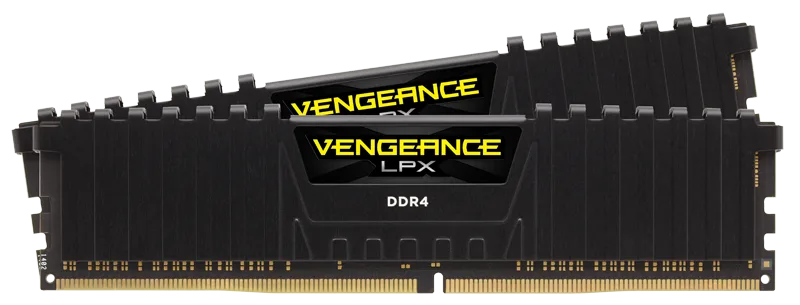
Corsair Vengeance LPX 16GB (2x 8GB) DDR4 3600(PC4-28800) C18 1.35V Desktop Memory -Black, Model Number: CMK16GX4M2Z3600C18
Corsair
Skip — 3600 MT/s exists only as an XMP profile, and owners report Aurora R14 systems falling back to the JEDEC base speed (2133 MT/s in this case).
The rival the reader already has or considered: a 3600 XMP kit, fine on retail boards. On the Aurora R14 it is the wrong buy because the speed depends on a profile the Dell firmware may not apply.Available at Amazon(paid link) — opens Amazon in a new tab. Price and availability shown there.
Sources
Pages consulted while researching this article. None of these are affiliate links.