Dell G15 RAM: Must Crucial Match the Micron Stick?
The questionWhere do these come from?
Dell G15 5510 RAM Upgrade Help – Matching Micron 8GB DDR4 3200 CL22 Stick?
Need some advice on RAM upgrade for my Dell G15 5510.
A Dell G15 5510 does not require matching RAM brands for dual channel; capacity, compatible timings and module specifications matter.
No, a Dell G15 5510 does not require an identical Micron module: a compatible Crucial 8GB DDR4 SODIMM can work alongside an existing Micron 8GB stick in dual channel. Match capacity and compatible operating specifications first; a different brand or rank does not automatically prevent dual-channel operation.
There is a separate speed limit to understand before buying: Dell specifies 2933 MT/s for the G15 5510, so a module advertised as “3200MHz” should not be purchased with the expectation that this laptop will run it at 3200. Dell lists two SODIMM slots and supports a 16GB configuration using two 8GB modules. Dell G15 5510 memory specifications
Adding 8GB does not require the same Micron label
If your G15 5510 currently contains one 8GB module, another compatible 8GB module is the straightforward route to 16GB with both memory channels populated. An exact replacement part number reduces uncertainty, but matching the manufacturer’s name is not what enables the second channel.
Intel explains that dual-channel operation uses two memory channels simultaneously and recommends matching capacity, speed and timings for ideal performance. Buying a matched kit is a convenient way to achieve that combination; it is not a prerequisite for adding memory to a working laptop. Intel’s explanation of dual-channel memory
Crucial is a Micron brand, but that relationship does not establish that a Crucial retail module has identical chips or timing profiles to an installed Micron OEM module. Check the complete module specification rather than treating the shared manufacturer as a compatibility guarantee. Crucial’s product specifications, preserved in a PDF copy
One detail in Dell’s table deserves correction: it describes the 1 × 8GB configuration as “Dual-Channel DDR4.” That wording identifies the memory platform, but one installed DDR4 SODIMM does not populate both channels. Check the installed configuration instead of taking that row as evidence that a second stick adds no benefit.
A 3200-rated stick can work below 3200
The advertised speed is the module’s rating, not an instruction that overrides the laptop’s memory controller. Kingston’s compatibility page for the G15 5510 explicitly lists DDR4-3200 modules and explains that faster memory clocks down according to the installed processor. That resolves the apparent contradiction between a 3200-rated upgrade and Dell’s 2933 specification. Kingston’s G15 5510 compatibility information
Look for standard 1.2V, unbuffered, non-ECC DDR4 laptop SODIMMs. The common operating profile matters more than matching the largest number printed on both labels. If one module supports only a lower common speed, the pair may operate below Dell’s listed maximum; different timings can also require a slower common setting. Intel documents this negotiation through the modules’ stored SPD information. Intel’s 10th-generation memory-controller documentation
Consequently, a lower speed reading does not prove dual channel failed. Capacity, channel mode and operating speed are separate things to verify. Advice for another Dell G15 generation should also not replace the 5510’s own documentation.
What 1Rx8 changes—and what it does not
The label 1Rx8 means one memory rank built from chips with an eight-bit data width. 2Rx8 means two ranks; 1Rx16 still means one rank, but with sixteen-bit chips. Neither “2R” nor “x16” means dual channel. Channel count describes the connection between the processor and installed memory, while rank and chip width describe organization within a module.
Just want the recommendation?
Skip to the picksMatching rank is sensible when you have a choice, but unequal ranks do not inherently disable dual channel. Intel’s controller documentation describes equal capacity across channels as the basis for fully symmetric operation and permits different DRAM device technology and width across channels. This is an architectural allowance, not a guarantee that every possible mixed pair will work with a particular BIOS. Intel’s memory organization documentation
Chip organization can nevertheless affect performance. ASUS explains that DDR4 x8 devices provide four bank groups, compared with two for x16 devices. More bank groups can help certain workloads even when both configurations already use dual channel. ASUS’s explanation of DDR4 x8 and x16 memory
For an independently measured example, RkBlog reported differences of up to around 15% in Final Fantasy XIV Endwalker benchmark testing while investigating laptop memory configurations on an HP 255 G8 with a Ryzen 7 5700U. That is evidence that organization can matter; it is not a forecast for a Dell G15 with dedicated graphics. No controlled measurement of the exact mixed Crucial/Micron G15 5510 pairing was located for this article. RkBlog’s laptop DDR4 testing
Check the Crucial part number before ordering
“Crucial 8GB DDR4-3200” does not, by itself, establish 1Rx8 construction. For CT8G4SFRA32A, the preserved Crucial specification lists multiple possible die densities rather than guaranteeing a single chip organization. If 1Rx8 is an explicit requirement, obtain confirmation for the actual module being supplied.
For a clearly documented alternative, Kingston KCP432SS8/8 is listed by Kingston for the G15 5510 and explicitly specified as 8GB, DDR4-3200, CL22, 1Rx8, 1.2V and 260-pin SODIMM. Its limitation remains the laptop’s operating speed: installing it does not unlock 3200 MT/s. Kingston’s supported modules and specifications
There is no evidence-based reason to blacklist a compatible Crucial or Micron module here. Both brands can be suitable; the meaningful distinction is whether the exact module meets your capacity, timing and organization requirements. You do not need to replace a stable pair simply because its labels differ.
Verify the upgrade before blaming mixed brands
Before installation, record the existing module’s complete part number and confirm whether one or both slots are occupied. CPU-Z can report module SPD information as well as current memory frequency and timings, helping distinguish the installed hardware from its advertised specification. Download it from its developer. CPU-Z documentation and download
Follow Dell’s service precautions before opening the laptop. Dell’s installation procedure requires aligning the notch, inserting the module firmly at an angle and pressing it down until the retaining clips click into place. Dell’s memory installation procedure
After installation, verify that the system detects 16GB, inspect the active channel mode and run Dell’s SupportAssist hardware diagnostics, including thorough memory testing where available. A successful boot alone does not establish stability. Dell’s SupportAssist diagnostics documentation
If errors appear, reseat the modules and test each individually in the same slot before testing the pair again. A module that fails alone may need replacement; two modules that pass separately but fail together need compatibility investigation. Give the memory supplier both complete part numbers and the diagnostic results. Brand matching alone cannot resolve that uncertainty.
The bottom line
The one that fits:
Top pick
Buy this
Kingston KCP432SS8/8 8GB DDR4 3200MT/s SODIMM
Kingston
Kingston explicitly lists KCP432SS8/8 as compatible with the G15 5510 and specifies 8GB, 1Rx8, DDR4-3200, CL22 and 1.2V.
Adds a documented 1Rx8 8GB module alongside an existing compatible 8GB stick. Its 3200 rating does not override the G15 5510’s lower operating speed.Available at Amazon(paid link) — opens Amazon in a new tab. Price and availability shown there.
Recommended products
Ordered by how well each one fits the situations above. Each link below is a paid link.
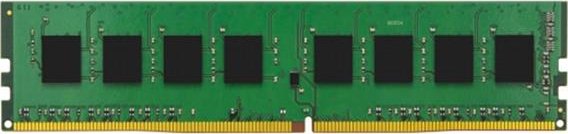
Kingston KCP432SS8/8 8GB DDR4 3200MT/s SODIMM
Kingston
Buy — Kingston explicitly lists KCP432SS8/8 as compatible with the G15 5510 and specifies 8GB, 1Rx8, DDR4-3200, CL22 and 1.2V.
Adds a documented 1Rx8 8GB module alongside an existing compatible 8GB stick. Its 3200 rating does not override the G15 5510’s lower operating speed.Available at Amazon(paid link) — opens Amazon in a new tab. Price and availability shown there.
Sources
Pages consulted while researching this article. None of these are affiliate links.
- Dell G15 5510 Setup and Specifications: Memory — dell.com
- Intel: How to Choose RAM for a Gaming PC — intel.com
- Crucial CT8G4SFRA32A manufacturer specifications, archived PDF — device.report
- Kingston Memory Compatibility: Dell/Alienware G15 5510 — kingston.com
- Intel 10th Generation Core Processor Families Datasheet — cdrdv2-public.intel.com
- ASUS: RAM Chips Are Changing—How 2021 ROG Laptops Are Affected — rog.asus.com
- RkBlog: Laptop DDR4 x8 Layout Versus x16, Single and Dual Channel — rkblog.dev
- CPUID: CPU-Z — cpuid.com