SK hynix 32GB DDR5-5600: Get the Right SO-DIMM
The question this answersWhere do these come from?
Which SK hynix 32GB DDR5-5600 SO-DIMM part number should I buy?
Look for HMCG88AGBSA092N or HMCG88AGBSA095N, then check your computer’s capacity limits and supported speed before buying.
The SK hynix HMCG88AGBSA092N and HMCG88AGBSA095N are documented 32GB DDR5-5600 SO-DIMM options; choose the full part number approved for your computer or matching its existing module. The important catch is that a compatible 5600-rated module can legitimately run at 5200 MT/s, depending on the computer and installed capacity. ASUS memory qualification list, Gigabyte AORUS 15X compatibility list.
Match the full part number before ordering
Start with the module label, particularly if you are replacing failed memory or adding a second stick. These similar SK hynix numbers do not all identify the same capacity:
| SK hynix part number | Capacity per module | Rated transfer rate |
|---|---|---|
| HMCG88AGBSA092N | 32GB | 5600 MT/s |
| HMCG88AGBSA095N | 32GB | 5600 MT/s |
| HMCG78AGBSA092N | 16GB | 5600 MT/s |
ASUS lists all three in its NUC 15 Pro qualification report. That makes the distinction checkable: the HMCG78 model above is a 16GB stick, even though two of them provide 32GB altogether. ASUS qualification report, memory section.
For a single 32GB upgrade, check that the selected purchase option says 1 × 32GB. A 32GB kit containing two 16GB modules cannot provide 32GB through one available socket. Likewise, ordering two individual 32GB modules means planning for 64GB total and checking support for that configuration.
Netlist’s manufacturer documentation identifies the HMCG88AGBSA family as 32GB, 2Rx8, DDR5-5600-46-45-45, non-ECC SO-DIMM. The 2Rx8 designation describes the module’s rank and chip organization; it does not mean the package contains two sticks. Netlist DDR5 product brief.
The 092N and 095N endings deserve more care than a seller’s claim that they are interchangeable. ASUS qualifies both for the listed platform, but its document does not explain their manufacturing differences or establish universal interchangeability. For an existing installation, matching the complete label is the conservative choice. For a new installation, use the computer manufacturer’s qualified part number where available.
Neither 32GB variant deserves a blanket warning based on the documentation reviewed. Both have documented compatibility; the deciding issue is which one your system supports. There is no evidence here that one suffix is inherently faster or more reliable.
Also distinguish a complete SK hynix module from another brand’s memory advertised as using SK hynix chips. If you need an exact replacement, a chip-brand description does not identify the finished module. Ask for the full module number and confirm whether the supplied item is new, refurbished, or removed from another computer. Check who handles a return before ordering.
Choose one 32GB stick or a pair for your slots
A single HMCG88AGBSA092N makes sense when you need 32GB in one socket, want to match an existing supported stick, or plan a later move to 64GB. Before buying, confirm the computer has a replaceable DDR5 SO-DIMM socket and supports 32GB per slot. A specification saying only “32GB maximum memory” does not establish that one 32GB module is supported.
Just want the recommendation?
Skip to the picksFor a computer with two accessible sockets, distinguish capacity planning from memory-channel operation. Kingston explains that mainstream laptops commonly use a dual-channel memory architecture and that identical pairs of modules optimize bandwidth. Its guidance also points readers to the motherboard documentation and qualified vendor list for supported configurations. Kingston memory population rules.
DDR5 adds a terminology trap: a module has two independently addressable 32-bit subchannels. Those internal subchannels do not make a single module equivalent to populating both memory channels of a typical two-slot laptop. You should not choose one stick solely because a description calls DDR5 “dual channel.” Kingston DDR5 technical overview.
If you already have a compatible 32GB SK hynix module and need 64GB, adding an identical supported module is a straightforward plan. Gigabyte explicitly recommends identical modules to reduce compatibility issues in its AORUS 15X documentation. That recommendation supports matching parts; it does not prove every mixed-brand installation will fail. Gigabyte compatibility guidance.
For a NAS or workstation that requires ECC memory, check the exact requirement before buying this family. Netlist classifies HMCG88AGBSA as non-ECC. DDR5’s on-die error correction operates within the memory chips and does not turn an ordinary non-ECC SO-DIMM into a system-level ECC module. Netlist module classifications, Kingston explanation of on-die ECC.
When 5600-rated memory runs at 5200
The strongest reason to read the computer’s support document is that it can approve this exact module while specifying a lower operating speed.
Gigabyte lists HMCG88AGBSA092N AA as compatible with the AORUS 15X ASF/AKF (2023), then states that double-sided 32GB DDR5-5600 modules operate at 5200 with the HX processor platform covered by that document. A 5200 reading in that configuration is therefore consistent with the manufacturer’s guidance. It is not, by itself, evidence of defective memory. Gigabyte’s exact-module compatibility note.
Dell documents a similar capacity distinction for the Alienware m18 R1 with Core i9-13900HX or i9-13980HX: 2 × 16GB at 5600 MT/s, but 2 × 32GB at 5200 MT/s. You cannot assume the speed supported at 32GB total remains supported at 64GB. Dell Alienware m18 R1 memory specifications.
Performance evidence also needs context. PassMark’s HMCG88AGBSA095N database page showed 597 samples and an average measured latency of 51 ns when checked on September 12, 2026. Those are submitted system benchmark results, rather than a controlled independent lab comparison of these two module variants. They should not be treated as the latency your laptop will achieve or evidence that 095N beats 092N. No controlled independent lab comparison of the two variants was found for this article. PassMark’s recorded results.
Before returning a module for running slowly, compare the installed capacity, processor, and reported speed with the exact system specification. If that configuration is explicitly supported at 5600 but operates below it, contact the computer manufacturer with the full RAM part numbers and BIOS version. If a supported module fails memory diagnostics, pursue troubleshooting and a replacement or RMA with the supplier; a different suffix alone is not an established fix.
The bottom line
What to get:
Top pick
Buy this
SK hynix HMCG88AGBSA092N 32GB DDR5-5600 SO-DIMM
hynix
ASUS and Gigabyte list HMCG88AGBSA092N as compatible 32GB DDR5-5600 memory, although Gigabyte specifies 5200 operation for the documented AORUS 15X HX configuration.
Buy this exact module when it matches your existing memory or your computer’s approved parts list. Its 5600 rating does not guarantee 5600 MT/s operation in every supported system.Available at Amazon(paid link) — opens Amazon in a new tab. Price and availability shown there.
Recommended products
Ordered by how well each one fits the situations above. Each link below is a paid link.
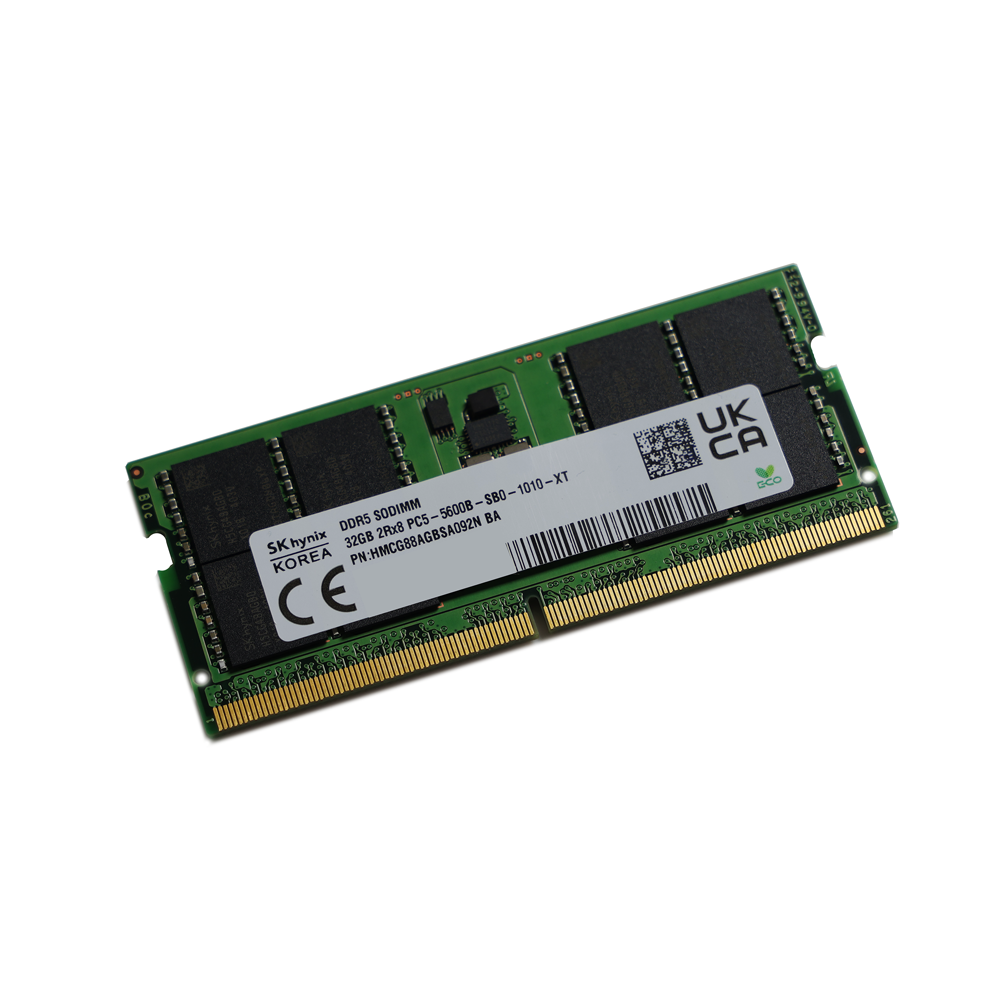
SK hynix HMCG88AGBSA092N 32GB DDR5-5600 SO-DIMM
hynix
Buy — ASUS and Gigabyte list HMCG88AGBSA092N as compatible 32GB DDR5-5600 memory, although Gigabyte specifies 5200 operation for the documented AORUS 15X HX configuration.
Buy this exact module when it matches your existing memory or your computer’s approved parts list. Its 5600 rating does not guarantee 5600 MT/s operation in every supported system.Available at Amazon(paid link) — opens Amazon in a new tab. Price and availability shown there.
Sources
Pages consulted while researching this article. None of these are affiliate links.
- ASUS NUC 15 Pro qualified vendor report — dlcdnets.asus.com
- Netlist DDR5 DIMM product brief and module classifications — netlist.com
- Kingston DDR4 and DDR5 memory population rules — kingston.com
- Kingston DDR5 memory standard technical overview — media.kingston.com
- Gigabyte AORUS 15X ASF/AKF memory compatibility list — faq.gigabyte.com
- Dell Alienware m18 R1 memory specifications — dell.com
- PassMark SK Hynix HMCG88AGBSA095N submitted benchmark results — memorybenchmark.net