Lenovo Tab P11 Plus for Drawing, Notes, and Splitscreen
The questionWhere do these come from?
Is there a PWM, temporal dithering free tablet that's 11"-11.5", good for drawing, light gaming and productivity multitasking?
I've been trying to find a tablet that's not too expensive (about 200-300 EUR, but the cheaper the better, ideally under 250 EUR) that'd be good for casual drawing, note-taking and productivity, esp.
The Tab P11 Plus handles drawing, notes, and splitscreen well, and its measured 2,500Hz PWM rate is high enough to spare sensitive eyes.
The Lenovo Tab P11 Plus covers all four of those requirements at once, but not automatically out of the box. The 11.5-inch 2K IPS panel has a PWM flicker rate that independent testing puts at 2,500Hz — high enough that most people sensitive to screen flicker won’t notice it — and the tablet supports a pressure-sensitive stylus, a resizable multi-window mode, and a chipset built for mid-range mobile gaming rather than flagship 3D. The part that trips people up is that the stylus, the RAM configuration that actually survives three open apps, and the software update ceiling all sit outside what the spec sheet advertises, so it’s worth knowing exactly what you’re buying before the order goes in.
The PWM number that actually matters for sensitive eyes
Pulse-width modulation is how a screen dims without a separate hardware control: instead of lowering the backlight’s voltage continuously, the panel switches it on and off rapidly, and the eye perceives the average as reduced brightness. When that switching frequency is low — anywhere under roughly 500Hz — some people register the flicker as eye strain, headaches, or a subtle shimmer even if they can’t consciously see it.
NotebookCheck’s lab measurement of the Tab P11 Plus found a PWM frequency of 2,500Hz, which the outlet’s own testing standard treats as high enough that flicker-sensitive users generally shouldn’t notice it. That’s a meaningfully better result than what shows up on some AMOLED tablets in this price range, where low-frequency PWM at low brightness is a known complaint. Lenovo also lists TÜV Rheinland Low Blue Light certification on the official Tab P11 Plus product page, which addresses a separate mechanism — blue-light spectrum output tied to eye fatigue and circadian effects, not flicker — so the tablet is covering both angles of “eye comfort” rather than just one.
None of that makes the panel exceptional. NotebookCheck measured 410 cd/m² at center brightness and a contrast ratio of 1,414:1, against Lenovo’s own claimed 1,500:1 — a normal gap between a manufacturer spec and an independent measurement, not a red flag. sRGB coverage came in at 96.9%, which is fine for note-taking and casual drawing but not something a color-critical illustrator would lean on.
Which storage and RAM configuration actually survives three open apps
The Tab P11 Plus ships in three configurations: 4GB RAM with 64GB storage, 4GB with 128GB, and 6GB with 128GB, all expandable further via a dedicated microSDXC slot. The RAM number matters more than it looks like it should for this exact use case, because Android’s split-screen and floating-window modes keep every visible app’s process resident in memory rather than suspending it. Running a note-taking app, a browser tab for reference material, and a drawing app in adjacent windows at once — the exact “splitscreen multitasking” scenario in the question — asks the OS to hold three full app states in RAM simultaneously, on top of whatever ZUI’s own interface layer needs.
With 4GB total, that combination is workable but tight enough that switching back to a fourth app can trigger a reload of one of the three you had open. The 6GB/128GB configuration has meaningfully more headroom for that pattern and is the one worth choosing if splitscreen use is a daily habit rather than an occasional check.
Whether the Helio G90T can handle “light” gaming, not just note apps
The MediaTek Helio G90T inside the Tab P11 Plus is a gaming-oriented chipset, but an older one — it first appeared in phones like the Redmi Note 8 Pro years before this tablet shipped. Its two Cortex-A76 performance cores run at 2.05GHz alongside six Cortex-A55 efficiency cores, paired with a Mali-G76 MC4 GPU. That combination handles casual titles, older 3D games, and anything closer to hyper-casual or puzzle genres without trouble, but it’s noticeably behind newer mid-range silicon on anything graphically demanding at high settings.
That gap matters less than it might seem, because the display is capped at a 60Hz refresh rate regardless of what the chipset could theoretically push. A tablet built around light gaming rather than competitive or high-frame-rate gaming doesn’t need a GPU that outruns a 60Hz panel, so the Helio G90T and the screen are reasonably matched to each other for this specific use case, even though both look dated next to gaming-first tablets.
Just want the recommendation?
Skip to the picksWhat actually needs to be in the cart beyond the tablet
The Tab P11 Plus doesn’t include a stylus in the box. Drawing and serious note-taking depend on the Lenovo Precision Pen 2, sold as a separate accessory, which NotebookCheck’s testing confirms supports 4,096 levels of pressure sensitivity, tilt detection, and roughly 200 hours of use per charge from its built-in rechargeable battery. Lenovo’s own product documentation also lists compatibility with the Active Pen 3, which uses a replaceable AAAA battery instead of an internal one — a reasonable backup option if you don’t want to track a charging cable for the stylus specifically.
Buy the Precision Pen 2 alongside the tablet if drawing or handwritten notes are the primary use case; without it, the “for drawing, note taking” half of the original question simply isn’t answered by the tablet alone. Worth factoring into the overall feel, too: the Tab P11 Plus weighs 490g and measures 7.5mm thick, which is comfortable to hold one-handed for reading but noticeably heavier than a paper notebook during long sketching sessions — expect to prop it on a stand or your lap rather than hold it aloft for an hour at a time.
If you’re deciding between this and the other 11-inch options
The Tab P11 Plus isn’t the only tablet in this size and price bracket that claims to handle drawing, notes, and light gaming. Two others come up constantly in the same searches, and independent display testing draws a sharper line between them than the marketing does.
| Tablet | Verdict | Display & PWM | The catch |
|---|---|---|---|
| Lenovo Tab P11 Plus | Buy | 2,000×1200 IPS, 60Hz, 2,500Hz PWM — high enough to avoid flicker for sensitive users | Stylus and higher RAM tier cost extra; chipset is dated for anything beyond light gaming |
| Samsung Galaxy Tab S9 FE | Skip | 10.9" TFT-LCD, 90Hz, but NotebookCheck recorded flickering below 13% screen brightness | Costs meaningfully more, and the Exynos 1380 chip is a step down from Samsung’s flagship tablets |
| Xiaomi Pad 6 | Consider | 11" 2.8K IPS, 144Hz, no PWM flicker detected by NotebookCheck at any brightness | Stylus sold separately and pricier than Lenovo’s, no bundled note-taking software ecosystem |
The Galaxy Tab S9 FE includes an S Pen in the box, which sounds like it solves the stylus problem the P11 Plus doesn’t — but NotebookCheck’s measurement found flicker appearing once brightness drops below 13%, which is precisely the range a lot of people dim to for comfortable reading in a dim room at night. For someone whose whole reason for researching this is PWM sensitivity, that’s a real disqualifier, not a minor footnote, and it comes bundled with a higher price for a chipset that’s a downgrade from Samsung’s own higher tiers.
The Xiaomi Pad 6 is the stronger pick specifically for the “light gaming” half of the question — its Snapdragon 870 and 144Hz panel have noticeably more headroom than the Helio G90T and 60Hz display in the P11 Plus, and NotebookCheck detected no PWM flicker at all on its panel, which is a cleaner result than the P11 Plus’s high-frequency-but-present flicker. It earns a “consider” rather than a “buy” here because it costs more, doesn’t include a pen, and its Smart Pen 2 accessory carries fewer bundled note-taking conveniences than Lenovo’s ecosystem — the right trade for someone whose budget has slightly more room and who weighs gaming performance above ecosystem software. If your setup already leans toward a bigger, more capable Android slate for work rather than a budget note-taker, it’s also worth reading Can the Galaxy Tab S10+ Replace Your Laptop? before committing to any tablet at this size.
Outdoor use is a separate weak spot shared by most tablets in this bracket: 400 nits isn’t enough to fight direct sunlight on any of these three, the Tab P11 Plus included, and if outdoor sketching or note-taking is part of the plan, Galaxy Tab A8 Outdoors? Skip It for Direct Sun covers why that brightness range struggles outside regardless of which brand made the panel.
What the update history means if you plan to keep it for years
The Tab P11 Plus shipped running Android 11 in mid-2021, per its GSMArena specification listing. Budget Android tablets in general — not this model specifically — have a well-documented pattern of receiving only one or two major OS version bumps before updates stop, well short of the five-plus years phones in higher price tiers now get. If you’re buying this expecting to hand it down or keep it running current software for several years, check Lenovo’s own Android upgrade matrix on its support site for the current status of your exact model number before ordering, since that page is the only place Lenovo commits to a specific upgrade ceiling and it can change independently of anything reported here.
That caveat aside, the core answer holds: for an 11 to 11.5-inch tablet that needs to draw, take notes, run two or three apps side by side, handle light gaming, stay within a tight budget, and not trigger PWM sensitivity, the Tab P11 Plus’s 2,500Hz flicker rate and TÜV Low Blue Light certification are the two facts that actually settle the eye-comfort question — provided you budget separately for the Precision Pen 2 and pick the 6GB RAM configuration if splitscreen multitasking is a daily habit rather than an occasional convenience.
The bottom line
Two readings, two answers:
Top pick
Buy this
Lenovo Tab P11 Plus tablet 6GB 128GB
Lenovo Tab
NotebookCheck's independent PWM measurement of 2,500Hz clears the threshold where flicker-sensitive users typically notice screen strobing.
An 11.5-inch IPS panel measured at 2,500Hz PWM (high enough to avoid flicker for sensitive users) plus TÜV Low Blue Light certification, split-screen multitasking, and a gaming-capable chipset within a tight budget.Available at Amazon(paid link) — opens Amazon in a new tab. Price and availability shown there.The alternative
It depends
Lenovo Precision Pen 2
Lenovo
It's a required purchase for the drawing and note-taking use case, not an optional upgrade, so it belongs in the same cart rather than as a rival product.
The 4,096-level pressure-sensitive stylus the Tab P11 Plus needs for drawing and handwritten notes, since none ships in the box.Available at Amazon(paid link) — opens Amazon in a new tab. Price and availability shown there.
Recommended products
Ordered by how well each one fits the situations above. Each link below is a paid link.
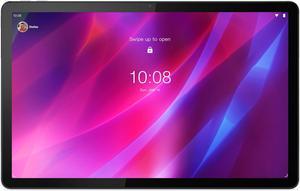
Lenovo Tab P11 Plus tablet 6GB 128GB
Lenovo Tab
Buy — NotebookCheck's independent PWM measurement of 2,500Hz clears the threshold where flicker-sensitive users typically notice screen strobing.
An 11.5-inch IPS panel measured at 2,500Hz PWM (high enough to avoid flicker for sensitive users) plus TÜV Low Blue Light certification, split-screen multitasking, and a gaming-capable chipset within a tight budget.Available at Amazon(paid link) — opens Amazon in a new tab. Price and availability shown there.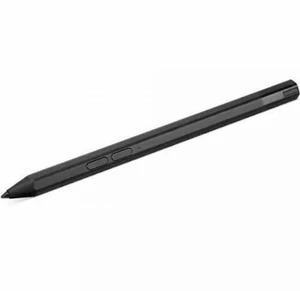
Lenovo Precision Pen 2
Lenovo
It depends — It's a required purchase for the drawing and note-taking use case, not an optional upgrade, so it belongs in the same cart rather than as a rival product.
The 4,096-level pressure-sensitive stylus the Tab P11 Plus needs for drawing and handwritten notes, since none ships in the box.Available at Amazon(paid link) — opens Amazon in a new tab. Price and availability shown there.
Sources
Pages consulted while researching this article. None of these are affiliate links.
- Lenovo Tab P11 Plus review: Budget Android tablet with stylus input and keyboard cover - Notebookcheck — notebookcheck.net
- Review of the Samsung Galaxy Tab S9 FE - Notebookcheck — notebookcheck.net
- Xiaomi Pad 6 review: Massively improved tablet with stylus support - Notebookcheck — notebookcheck.net
- Tab P11 Plus | 11" Family Tablet - Lenovo US — lenovo.com
- Tab P11 Plus Spec Sheet - Lenovo PSREF — psref.lenovo.com
- Lenovo Tab P11 Plus - Full tablet specifications - GSMArena — gsmarena.com