ESR Digital Pencil on an iPad 8th Gen: The Right SKU
The questionWhere do these come from?
SUGGEST STYLUS/PENCIL
The ESR Digital Pencil's standard USB-C model — not the magnetic Pro version — is the budget stylus that actually works on an iPad 8th generation.
For an iPad (8th generation), the ESR Digital Pencil is the stylus that actually fits a tight budget without giving up palm rejection — as long as you buy the standard, USB-C-charging version and not ESR’s magnetic “Pro” line, which this iPad’s rounded edge physically can’t use.
Why the iPad 8th generation narrows the field before you pick a brand
The iPad (8th generation, 2020) only pairs with Apple Pencil (1st generation). Apple’s own compatibility documentation lists the 1st-generation Pencil as the sole option for this model — the 2nd-generation Pencil, the newer Apple Pencil (USB-C), and Apple Pencil Pro all require a flat side edge for magnetic pairing or charging, and the 8th generation has rounded edges and a Lightning port instead. That single hardware fact rules out most of what shows up when you search “Apple Pencil” today, and it’s also why the 1st-generation Pencil on this iPad pairs and charges by plugging directly into the Lightning port rather than snapping to the side.
Third-party styluses inherit the same split. Any stylus that charges magnetically against a flat edge is built for the iPad Air (4th/5th generation), iPad Pro, or iPad mini (6th generation) — not this one. The ones worth considering for an 8th-generation iPad are the ones that charge over a cable.
ESR sells three pencil lines — only one is right for this iPad
ESR’s stylus range covers the same split under one brand name, which is where a lot of budget buyers pick the wrong SKU:
- ESR Digital Pencil Pro — magnetic wireless charging, built for iPads with a flat edge. Wrong for the 8th generation.
- ESR Geo Digital Pencil — adds Apple Find My tracking and shortcut buttons, charges over USB-C, no wireless charging.
- ESR Digital Pencil (the standard model) — no Find My, no magnetic charging, charges over an included USB-C cable.
ESR’s own help documentation for the standard Digital Pencil confirms it covers “iPad models released in 2018 or later,” which includes the 8th generation, and that it charges only over USB-C — there’s no magnetic charging path at all on this model, so there’s nothing to miss by not having a flat edge. Setup has no Bluetooth pairing step: you double-tap the top of the pencil to activate it, and a single tap or a slow double-tap won’t trigger it, which is a common reason people think a new unit is dead on arrival.
Just want the recommendation?
Skip to the picksWhat you give up next to Apple’s own pencil
| Stylus | Works on iPad (8th gen)? | Charging | Tilt sensitivity | Pressure sensitivity | Verdict |
|---|---|---|---|---|---|
| ESR Digital Pencil (standard) | Yes | USB-C cable, no pairing | Apple Notes only | No | Buy |
| Apple Pencil (1st generation) | Yes — Apple’s only supported pencil for this iPad | Plugs into the iPad’s Lightning port | Every app | Yes | Consider |
| Logitech Crayon (Lightning) | Yes, but only this specific SKU | Lightning cable | Every app | No | Skip |
ESR’s documentation is explicit that pressure sensitivity is “a patented feature of Apple Pencil” and isn’t on any ESR pencil. For note-taking — writing, highlighting, sketching quick diagrams — that mostly doesn’t matter; pressure sensitivity changes stroke weight for shading and illustration, not handwriting. What matters more for a notes app is tilt: ESR’s own help pages state tilt sensitivity works in Apple Notes but not in GoodNotes, Notability, or OneNote. Palm rejection isn’t limited the same way — it’s active across the apps ESR lists, including GoodNotes and Notability, so resting your hand while writing works regardless of which app you land in.
Worth knowing before you compare feature lists elsewhere: even the genuine Apple Pencil (1st generation) doesn’t get double-tap tool-switching on this iPad — that gesture is exclusive to the 2nd-generation Pencil and Apple Pencil Pro, neither of which pairs with the 8th generation at all. So an 8th-generation iPad caps what any pencil can do here, ESR included.
When the Apple Pencil upgrade is worth the extra cost
The 1st-generation Apple Pencil is the right buy if you’re doing enough shading or illustration work that pressure sensitivity earns its keep, or if you want Scribble-style handwriting recognition and tilt support in every app rather than just Apple Notes. It costs several times what the ESR line does, which is exactly the gap the ₹2,000-range budget in this question is trying to avoid — but if the extra spend is available, it’s the only pencil Apple makes that this iPad can use at all, and there’s no adapter that unlocks 2nd-generation or USB-C Pencil support on rounded-edge hardware. Can an Adapter Fix the Wrong Apple Pencil? covers why that workaround doesn’t exist for this class of pairing mismatch.
Why the Logitech Crayon isn’t the safer buy here
Logitech sells the Crayon in two current versions — a Lightning model and a USB-C-only model — and they look near-identical in listings. Only the Lightning version charges on an 8th-generation iPad; the USB-C version simply won’t charge on this device, because the iPad has no USB-C port to plug it into. Even once you find the correct SKU, the Crayon costs roughly double the ESR line, has no pressure sensitivity either, and its main edge — tilt sensitivity working across every app instead of only Apple Notes — comes at a price and a purchase-risk premium that a genuinely tight budget doesn’t need to take on. There’s nothing here the ESR doesn’t already cover for a notes-focused reader, so the Crayon is the one to skip.
Before you buy
Check the listing explicitly says the pencil charges “via USB-C cable” and does not mention magnetic or wireless charging — that one line is the fastest way to tell the standard ESR Digital Pencil apart from the Pro version that won’t work on this iPad. If you’re taking notes primarily in Apple’s own Notes app, tilt sensitivity works out of the box; if you live in GoodNotes or Notability, expect flat, non-tapered lines and plan around palm rejection instead, which does carry over.
The bottom line
Both work; your situation picks one:
Top pick
Buy this
ESR Digital Pencil for iPad
Apple
It's the only stylus here that fits both the iPad 8th generation's Lightning-port hardware and a tight budget, with palm rejection working across GoodNotes, Notability, and Apple Notes.
The USB-C charging model (not the magnetic Pro version) is on ESR’s own 2018-or-later compatibility list, which includes the iPad 8th generation, and needs no Bluetooth pairing step.Available at Amazon(paid link) — opens Amazon in a new tab. Price and availability shown there.The alternative
It depends
Apple Pencil 1st Generation
Apple Pencil
It costs several times what the ESR line does, which is the exact gap a tight budget is trying to avoid, but it's the only route to pressure sensitivity and full tilt support on this iPad.
The only Apple-made pencil the iPad 8th generation can pair with at all — a rival to the ESR for anyone who needs pressure sensitivity or app-wide tilt support rather than just Apple Notes.Available at Amazon(paid link) — opens Amazon in a new tab. Price and availability shown there.
Recommended products
Ordered by how well each one fits the situations above. Each link below is a paid link.
ESR Digital Pencil for iPad
Apple
Buy — It's the only stylus here that fits both the iPad 8th generation's Lightning-port hardware and a tight budget, with palm rejection working across GoodNotes, Notability, and Apple Notes.
The USB-C charging model (not the magnetic Pro version) is on ESR’s own 2018-or-later compatibility list, which includes the iPad 8th generation, and needs no Bluetooth pairing step.Available at Amazon(paid link) — opens Amazon in a new tab. Price and availability shown there.Apple Pencil 1st Generation
Apple Pencil
It depends — It costs several times what the ESR line does, which is the exact gap a tight budget is trying to avoid, but it's the only route to pressure sensitivity and full tilt support on this iPad.
The only Apple-made pencil the iPad 8th generation can pair with at all — a rival to the ESR for anyone who needs pressure sensitivity or app-wide tilt support rather than just Apple Notes.Available at Amazon(paid link) — opens Amazon in a new tab. Price and availability shown there.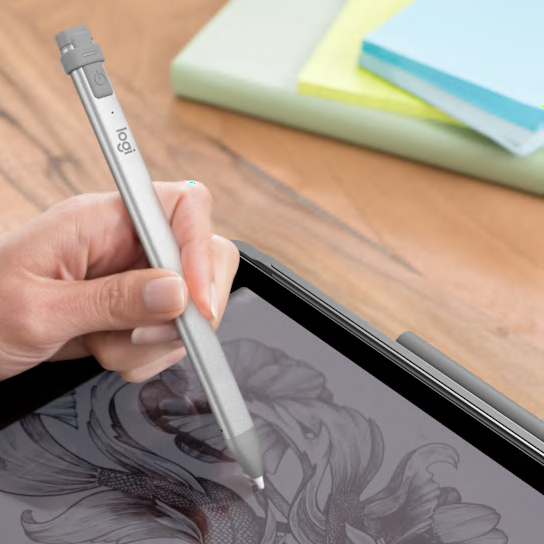
Logitech Crayon Lightning
Logitech Crayon
Skip — It costs roughly double the ESR line, carries real risk of buying the wrong (USB-C) SKU for a Lightning-port iPad, and still lacks pressure sensitivity — no real edge for note-taking on this device.
A rival third-party pencil with app-wide tilt sensitivity, but Logitech sells a near-identical USB-C-only SKU that will not charge on this iPad’s Lightning port at all.Available at Amazon(paid link) — opens Amazon in a new tab. Price and availability shown there.

Sources
Pages consulted while researching this article. None of these are affiliate links.
- Apple Pencil compatibility - Apple Support — support.apple.com
- Digital Pencil with Synthetic Resin Nib | ESR Help Center (India) — in.esrtech.com
- Stylus Pens for Tablets, Best iPad Pro/Air/mini Digital Pencils - ESR — esrtech.com
- ESR Stylus Pen review: specs, performance, price - AppleInsider — appleinsider.com
- Logitech Crayon for iPad - Apple Digital Pencil Technology — logitech.com