iPad Air M2 128GB for Procreate: Enough Storage?
The questionWhere do these come from?
IPad for Procreate
I’ve never had an iPad before but wanting to start using procreate to make illustrations and posters as stuff like that. I don’t want to spend too much and have been looking to the best options.
Yes: 128GB is enough for Procreate on an iPad Air M2, but pair it with the Apple Pencil Pro, since the cheaper USB-C Pencil has no pressure.
Yes: an iPad Air M2 with 128GB is enough for a first Procreate iPad, and the Apple Pencil is the part that needs care. The M2 Air works with the Apple Pencil Pro and the Apple Pencil (USB-C) only. Only the Pencil Pro gives you pressure sensitivity. Buy the iPad, plan to buy the Pencil Pro with it, and do not treat the cheaper Pencil as an equal.
No independent lab has published Procreate storage measurements for this model. The reasoning below rests on Apple’s compatibility pages, Procreate’s own help documentation and reported owner experience.
What the Apple Pencil compatibility actually is
Apple’s compatibility guide lists the iPad Air with M2 (11-inch and 13-inch) as working with two Pencils:
| Pencil | Works with M2 Air | Pressure sensitivity | What it adds or lacks |
|---|---|---|---|
| Apple Pencil Pro | Yes (iPadOS 17.5 or later) | Yes | Squeeze, barrel roll, haptic feedback, Find My |
| Apple Pencil (USB-C) | Yes (iPadOS 17.1.1 or later) | No | Tilt and low latency, charges and pairs by cable |
| Apple Pencil (2nd generation) | No | Yes | Not on the M2 Air’s list |
The Apple Pencil (2nd generation) is the trap for anyone shopping used. Many second-hand listings bundle one with an older Air or iPad Pro, and it will not work with the M2 Air. The first-generation Pencil is also not on the list.
The Apple Pencil Pro sits in the position where the 2nd generation used to: it attaches magnetically to the long edge of the iPad and charges there. The USB-C Pencil has no wireless charging dock on the iPad and draws without pressure, which is the single biggest limit for drawing apps. In Procreate pressure controls stroke width and opacity, so without it every line has a fixed weight unless you adjust the brush by hand.
Is 128GB enough for Procreate?
For most first-time users, yes. Procreate files are not large the way video is. Their size depends on canvas size and layer count, not on the app, and Procreate limits the layer count for you based on RAM and canvas size.
Procreate’s help page states the M2 and M3 Air canvas ceiling as 134 megapixels in total, with a longest edge of 16,384px. A square canvas at that limit is 11,585px by 11,585px. Nobody drawing a first illustration, sticker sheet or comic page needs that ceiling. The more demanding the canvas, the fewer layers Procreate allows, and the layer count is set by RAM and canvas dimensions together. Procreate links a layer calculator on its help page; use it with your intended canvas size rather than guessing.
Just want the recommendation?
Skip to the picksWhere 128GB starts to pinch:
- You keep every finished file, timelapse and PSD export on the iPad. Export and archive to iCloud, or to an external drive over the Air’s USB-C port.
- You shoot or edit video on the same iPad.
- You plan to use Procreate Dreams, which handles animation and generates larger project files.
- You install a lot of large apps or offline media.
The practical workflow is simple: draw in Procreate, export finished work, and keep the iPad as a working surface rather than a library. If you cannot commit to that, the 256GB model removes the question, at a higher price.
The older-Air question: M2 against newer Air models
The M2 Air is not a stripped-down iPad. Procreate lists the same 134-megapixel limit for the M2 and the M3 Air, and the M3 Air takes the same two Pencils. For drawing, a newer Air buys longer software support more than a visible difference in the canvas. If the gap in price between M2 and M3 is small where you shop, take the newer one with the same 128GB. If it is large, the M2 is the better value.
If you are weighing the Air against the cheaper A16 iPad for note-taking rather than drawing, the same Pencil question decides it: see iPad Air 11 vs iPad A16 for Notes: The Real Decider.
11-inch or 13-inch
Both sizes take the same Pencils and share the M2. The 11-inch is easier to carry and sketch on in a lap. The 13-inch gives a larger canvas on screen, which matters when you zoom out to check a whole page. Neither changes the storage answer.
What to skip
Skip the Apple Pencil (USB-C) if drawing is the reason you are buying. It is the Pencil most likely to appear as the cheap option, and it has no pressure sensitivity. Skip a used Apple Pencil (2nd generation) as well: it is the wrong generation for this iPad.
Buying checklist
- Confirm the listing says iPad Air (M2), not an earlier Air, because the earlier Air models take the 2nd generation Pencil and not the Pencil Pro.
- Decide on the Pencil before the storage: the Pencil Pro for drawing, the USB-C Pencil only for handwriting.
- Budget for external or cloud storage if you will keep many large files.
- If the iPad is used, check Apple’s compatibility page for the exact Pencil bundled with it.
What this page cannot settle is how fast your own files will grow, since that depends on canvas size, layer count and how often you export. If you start filling storage, the fix is to move files off the iPad, not to replace it.
The bottom line
Two answers, depending on what you meant:
Top pick
Buy this
Apple 2024 iPad Air 11-inch, Wi-Fi, 128GB - Space Gray (Renewed)
Apple
Procreate's help page gives the M2 Air a 134-megapixel canvas ceiling, the same as the M3, and the 128GB base model holds a large working library of Procreate files.
The iPad the question is about. It is the sensible first iPad for Procreate if you buy it new or as a clean refurbished unit and accept 128GB. The drawbacks are no Apple Pencil 2 support and no cloud-free room for huge video exports.Available at Amazon(paid link) — opens Amazon in a new tab. Price and availability shown there.The alternative
It depends
Apple Pencil Pro: Latest Model - Device Compatibility Check Required
Apple
It is the only Pencil that gives the M2 Air pressure sensitivity plus squeeze and barrel roll, but it costs more than the USB-C Pencil, so it is only worth it if you draw rather than just take notes.
A complement the iPad Air M2 needs for drawing: it attaches magnetically to the side and charges there. Buy it with the iPad if Procreate is the main use.Available at Amazon(paid link) — opens Amazon in a new tab. Price and availability shown there.
Recommended products
Ordered by how well each one fits the situations above. Each link below is a paid link.
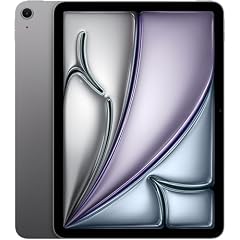
Apple 2024 iPad Air 11-inch, Wi-Fi, 128GB - Space Gray (Renewed)
Apple
Buy — Procreate's help page gives the M2 Air a 134-megapixel canvas ceiling, the same as the M3, and the 128GB base model holds a large working library of Procreate files.
The iPad the question is about. It is the sensible first iPad for Procreate if you buy it new or as a clean refurbished unit and accept 128GB. The drawbacks are no Apple Pencil 2 support and no cloud-free room for huge video exports.Available at Amazon(paid link) — opens Amazon in a new tab. Price and availability shown there.
Apple Pencil Pro: Latest Model - Device Compatibility Check Required
Apple
It depends — It is the only Pencil that gives the M2 Air pressure sensitivity plus squeeze and barrel roll, but it costs more than the USB-C Pencil, so it is only worth it if you draw rather than just take notes.
A complement the iPad Air M2 needs for drawing: it attaches magnetically to the side and charges there. Buy it with the iPad if Procreate is the main use.Available at Amazon(paid link) — opens Amazon in a new tab. Price and availability shown there.
Apple Pencil (USB-C): Device Compatibility Check Required
Apple
Skip — Apple's own comparison lists no pressure sensitivity for the USB-C Pencil, so brush size and opacity cannot vary with pressure in Procreate.
The cheaper Pencil the M2 Air also accepts, and the one a shopper is most likely to grab. Fine for handwriting and annotation; the wrong choice for illustration. Skip it if Procreate is the point.Available at Amazon(paid link) — opens Amazon in a new tab. Price and availability shown there.
Sources
Pages consulted while researching this article. None of these are affiliate links.
- Apple: Apple Pencil compatibility with iPad models — support.apple.com
- Apple: Apple Pencil compatibility — support.apple.com
- Procreate Help: How large can I make a canvas? — help.procreate.com
- Procreate Help: What's my iPad's maximum layer limit? — help.procreate.com
- PhoneArena: Apple Pencil models explained — phonearena.com