Samsung Tab Active5 Pro for AlfaOBD and Garage Work
The questionWhere do these come from?
Help me choose: Samsung Active5 Pro or Samsung Tab S11
I know this is kind of a weird set of tablets to be going back and forth over, but my use-case is also weird.
The Tab Active5 Pro's IP68/MIL-STD build and 8-year update runway through 2033 beat generic tablets for AlfaOBD, garage manuals, and durability.
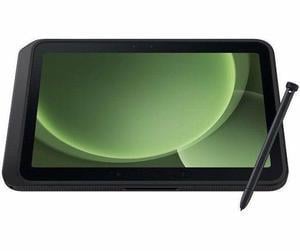
The Samsung Galaxy Tab Active5 Pro is the right call for AlfaOBD diagnostic work: it pairs over Bluetooth 5.3 with standard ELM327 interfaces the way any modern Android tablet does, but it adds the two things a generic Android tablet doesn’t — an IP68/MIL-STD-810H rugged shell rated for a garage environment, and an eight-year OS-plus-security update commitment that runs through 2033. That combination is what separates it from both cheaper consumer tablets and its own rugged predecessors.
Does it actually work with AlfaOBD and ELM327 adapters?
AlfaOBD doesn’t certify specific tablets. Its own Android documentation only specifies that the connected interface needs to be ELM327-based, version 1.3 or above, over Bluetooth, USB, or Wi-Fi, and it warns plainly that “the quality of ELM327 clones is not stable” — the adapter matters more than the tablet. On the FIAT Forum’s long-running thread on which Bluetooth dongle to use with AlfaOBD, posters consistently trace connection dropouts back to cheap clone interfaces rather than to the phone or tablet running the app.
Where the tablet does matter is in how consistently its Bluetooth stack behaves over months of daily pairing and unpairing in a shop with metal lifts, other Bluetooth tools, and Wi-Fi noise. The Tab Active5 Pro runs a clean, Samsung-certified Bluetooth 5.3 implementation under Android 15 with One UI 7 — the same Google-approved Play Store build as any consumer Galaxy tablet, so AlfaOBD installs and updates normally. It is not running a stripped-down or forked Android build the way some ultra-budget tablets do, which is the more common source of dropped connections and background-service kills that interrupt a live OBD session mid-scan.
How rugged does it need to be for garage use?
The Tab Active5 Pro is IP68-certified against dust and water and meets MIL-STD-810H for drops, vibration, and temperature extremes, with a Corning Gorilla Glass Victus+ panel on top. Notebookcheck’s review, which put the device through its standard test suite, describes it as built to handle “drops, puddles, and frequent disinfection” and calls the design “functional rather than stylish” — a fair trade in a bay where a tablet gets set down on a fender covered in brake dust or handled with gloved hands still damp from a coolant flush.
That durability isn’t unique to the Pro — the smaller Tab Active5 and the older Tab Active4 Pro carry the same IP68 and MIL-STD-810H certification. What the Pro adds on top is a dual hot-swappable battery: two 5,050 mAh cells that can be pulled and replaced individually without powering the tablet down, which matters if you’re running AlfaOBD continuously across a full shift and don’t want to plan a charging break around it.
What’s the actual update runway compared to the alternatives?
This is the category where the Tab Active5 Pro pulls furthest ahead, and it’s the reason to pick it over what most people default to. Samsung and Notebookcheck both list an eight-year OS and security update commitment for the Active5 Pro, running through 2033 — an unusually long window even by Samsung’s own enterprise standards, and one built specifically around the Knox Suite management stack that shops running fleets of diagnostic tablets rely on.
Compare that to what’s actually available on the alternatives:
Just want the recommendation?
Skip to the picks- The Galaxy Tab Active4 Pro, the Pro’s direct predecessor from 2022, launched with three major OS upgrades and five years of security patches. That five-year clock started in 2022, which means it’s now down to roughly a year of coverage left against the Active5 Pro’s fresh eight-year runway — a real consideration if you’re eyeing a discounted or refurbished Active4 Pro instead of the current model.
- The Galaxy Tab A9+, the tablet most people land on when they search generically for “cheap Android tablet,” gets three OS upgrades and four years of security patches, according to Samsung’s own update tracking cited by rmupdate.com. It also carries no IP rating and no MIL-STD certification at all — nothing to stop it from failing the first time it takes a splash of brake cleaner or a drop off a creeper.
For a tool you’re expecting to run AlfaOBD sessions and pull up garage manuals on for years, not months, the update runway is as much a durability spec as the IP rating is. An Android tablet that stops getting security patches in three or four years is a tablet you’ll be shopping to replace right around the time you’ve built a library of saved diagnostic sessions and PDF manuals on it.
Is the smaller Tab Active5 better for flights and one-handed use?
If the AlfaOBD work is occasional and the tablet spends more time in a bag between flights than mounted in a bay, the base Tab Active5 is worth considering instead of the Pro. It carries the identical IP68/MIL-STD-810H rating and Bluetooth 5.3 radio, so nothing changes on the AlfaOBD or durability side — the difference is entirely in size and stamina.
| Tablet | Verdict | Weight / screen | Battery | Update commitment |
|---|---|---|---|---|
| Galaxy Tab Active5 Pro | Buy | 683 g, 10.1" 120Hz | Two swappable 5,050 mAh cells | 8 years OS + security (through 2033) |
| Galaxy Tab Active5 | Consider | 433 g, 8.0" 120Hz | One removable 5,050 mAh cell | 4 major updates + 5 years security |
| Galaxy Tab Active4 Pro | Skip | 674 g, 10.1" 60Hz | 7,600 mAh (not swappable) | 3 major updates + 5 years security (from 2022) |
| Galaxy Tab A9+ | Skip | 480 g, 11.0" 90Hz | 7,040 mAh, no IP/MIL rating | 3 OS upgrades + 4 years security |
At 433 g against the Pro’s 683 g, the base Active5 is close to half the weight and small enough to hold in one hand while probing a connector with the other — a real advantage for anyone reading garage manuals or running quick diagnostic checks standing up rather than at a bench. Each of its removable batteries, and each of the Pro’s two cells, sits well under the 100 Wh threshold that airlines use to gate spare lithium-ion batteries in carry-on luggage, so neither tablet creates a problem at security regardless of which one you fly with.
The tradeoff is the 8-inch screen and the single, smaller battery pool. Garage manuals and wiring diagrams are easier to read at 10.1 inches, and if you’re running the tablet mounted near a vehicle for an extended session rather than carrying it between cars, the Pro’s dual-battery capacity is the more practical fit. Pick the base Active5 if portability and one-handed use matter more than screen real estate; pick the Pro if the tablet lives in the shop and needs to outlast a full workday without a charging break.
What about garage manuals, PDFs, and note-taking?
Both Active5 models ship with a built-in S Pen, and the Tab Active5 Pro’s 10.1-inch, 1920×1200 panel with a 120Hz refresh rate makes scrolling through PDF service manuals and wiring diagrams noticeably smoother than the Active4 Pro’s 60Hz display — a difference Android Police’s side-by-side comparison called out specifically when weighing the two generations against each other. Storage is expandable to 2TB via microSD on the Pro, which matters if your manual library runs to gigabytes of scanned factory documentation per vehicle platform rather than a handful of PDFs.
For note-taking, the S Pen works the same way it does on any Samsung tablet with Samsung Notes or a third-party notes app — there’s nothing AlfaOBD-specific about it, and nothing here that the smaller Active5 doesn’t also offer.
Where the Snapdragon 7s Gen 3 might feel underpowered
The Tab Active5 Pro’s Qualcomm Snapdragon 7s Gen 3 is a mid-range chipset — Notebookcheck’s benchmarks put it at 3,322 in Geekbench 6.7 multi-core and 676,593 in AnTuTu v10, describing the resulting performance as adequate for “everyday tasks” rather than fast. AlfaOBD itself is a lightweight app that doesn’t stress a chipset meaningfully, so this ceiling shows up in general use — switching between a PDF manual, a browser tab, and the AlfaOBD session, or running Knox device management in the background — rather than in the diagnostic work itself. If the tablet’s job is narrowly AlfaOBD plus PDFs, the chipset is not a limiting factor; if you’re also expecting it to double as a fast general-purpose tablet, temper expectations accordingly.
The one real weakness worth knowing before you buy
Notebookcheck’s review flags two things worth weighing against the update and durability advantages: the Tab Active5 Pro is heavy at 683 g for a device that isn’t laptop-sized, and its fingerprint sensor is unreliable when operated with gloves on — a real limitation in a garage setting where bare-hand unlocking isn’t always practical. Neither is disqualifying given the alternative is a shorter-lived tablet, but if one-handed carry or glove-friendly unlocking matters more than the extra battery capacity and 2-inch larger screen, that’s the case for stepping down to the base Active5 rather than the Pro.
The bottom line
Two good answers to different versions of the question:
Top pick
Buy this
Samsung Galaxy Tab Active5 Pro
Samsung
Notebookcheck documents 8 years of guaranteed updates and IP68/MIL-STD-810H certification, well beyond any consumer Android tablet's software lifespan.
Rugged IP68/MIL-STD-810H build with dual hot-swappable batteries and an eight-year OS-plus-security update commitment through 2033 — the longest runway in this class, and the reason to pick it over a generic tablet for AlfaOBD and garage manuals.Available at Amazon(paid link) — opens Amazon in a new tab. Price and availability shown there.The alternative
Skip this
Samsung Galaxy Tab Active4 Pro
Samsung
Its 5-year security window started in 2022 and has roughly a year left, against 8 fresh years on the Active5 Pro, and its display is capped at 60Hz versus 120Hz.
The Active5 Pro’s rugged predecessor and a direct rival for anyone considering a discounted or refurbished unit instead of the current model.Available at Amazon(paid link) — opens Amazon in a new tab. Price and availability shown there.
Recommended products
Ordered by how well each one fits the situations above. Each link below is a paid link.
Samsung Galaxy Tab Active5 Pro
Samsung
Buy — Notebookcheck documents 8 years of guaranteed updates and IP68/MIL-STD-810H certification, well beyond any consumer Android tablet's software lifespan.
Rugged IP68/MIL-STD-810H build with dual hot-swappable batteries and an eight-year OS-plus-security update commitment through 2033 — the longest runway in this class, and the reason to pick it over a generic tablet for AlfaOBD and garage manuals.Available at Amazon(paid link) — opens Amazon in a new tab. Price and availability shown there.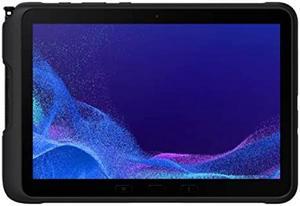
Samsung Galaxy Tab Active4 Pro
Samsung
Skip — Its 5-year security window started in 2022 and has roughly a year left, against 8 fresh years on the Active5 Pro, and its display is capped at 60Hz versus 120Hz.
The Active5 Pro’s rugged predecessor and a direct rival for anyone considering a discounted or refurbished unit instead of the current model.Available at Amazon(paid link) — opens Amazon in a new tab. Price and availability shown there.Samsung Galaxy Tab A9+
Samsung
Skip — It carries no IP rating and no MIL-STD certification at all, and Samsung's own update tracking caps it at 3 OS upgrades and 4 years of security patches.
The budget Android tablet most people default to for a general-purpose device; it runs AlfaOBD’s app fine but was never built for a garage.Available at Amazon(paid link) — opens Amazon in a new tab. Price and availability shown there.
Sources
Pages consulted while researching this article. None of these are affiliate links.
- Galaxy Tab Active5 Pro Enterprise Edition - Samsung Business — samsung.com
- Samsung Galaxy Tab Active5 Pro - Full tablet specifications - GSMArena — gsmarena.com
- Samsung Galaxy Tab Active5 Pro review - Notebookcheck — notebookcheck.net
- AlfaOBD Android Help — alfaobd.com
- AlfaOBD Android Help (PDF) — alfaobd.com
- Which bluetooth dongle for AlfaOBD - The FIAT Forum — fiatforum.com
- Galaxy Tab Active 5 vs. Tab Active 4 Pro - Android Police — androidpolice.com
- Samsung Galaxy Tab Active5 - Specifications — devicespecifications.com