Can the Galaxy Tab S10+ Replace Your Laptop?
The question this answersWhere do these come from?
Can the Galaxy Tab S10+ replace my laptop?
The Galaxy Tab S10+ can replace a laptop for browser work, documents and notes, but desktop software and complex Excel remain blockers.
The Galaxy Tab S10+ can replace a laptop for browsing, email, straightforward documents and handwritten notes, provided your essential tools work in Android apps or a tablet browser. Keep a Windows or Mac laptop if you need desktop-only software, Excel VBA macros or a work or college system that does not support Android.
The deciding question is whether you can finish your work on it. Opening a document, displaying several windows and connecting a keyboard are useful capabilities, but none proves that the tablet can complete your particular workflow.
For writing, studying and everyday browser work
The Tab S10+ makes the strongest case when your day consists of reading PDFs, taking notes, answering messages, attending online classes and writing documents. Samsung specifies a 12.4-inch, 2800 × 1752 AMOLED display and S Pen support. That gives you a substantial writing surface while retaining the option to detach the keyboard and use the device as a tablet. Samsung’s Galaxy Tab S10+ specifications
For students, the distinction is between replacing a notebook and replacing the computer required by a course. Reading lecture slides and annotating them can suit a tablet well. A required statistics package, engineering application or exam browser needs a separate compatibility check. Ask the institution about the exact software and assessment requirements before making the Tab S10+ your only computer.
For browser work, test the whole transaction: sign in, upload a file, edit it, download the result and submit it. A site displaying correctly does not establish that its file picker, editor or export controls work correctly in your tablet browser. Requesting the desktop version of a website is worth trying, but it does not install a desktop operating system.
There is also a less obvious Office limitation. Microsoft says free basic editing in its Android apps applies to screens measuring 10.1 inches or less. The Tab S10+ exceeds that threshold, so check that your Microsoft 365 plan qualifies for editing on this larger tablet; do not assume installing Word and Excel includes editing access. Browser versions are a separate route whose features you should test. Microsoft’s mobile Office requirements
Desktop Excel and specialist software are the stopping point
Do not buy the Galaxy Tab S10+ as your only computer if your work depends on running Excel VBA macros. Microsoft explicitly says Excel for Android can open and edit .xlsm workbooks, but VBA functions will not run. A workbook opening successfully is therefore an inadequate compatibility test. Microsoft’s Excel file-format support
The same documentation lists CSV files as read-only in Excel for Android. That is a specific reason to test data-import and export routines instead of assuming that ordinary spreadsheet work transfers without changes. Other applications may provide an alternative, but that requires validating the actual task.
Samsung DeX changes how Android applications are presented. It does not turn Android into Windows or macOS. If your required application has no suitable Android or browser version, a keyboard cover cannot solve that limitation. The related explanation of what Windows access on a Galaxy Tab actually means separates remote access from running Windows locally.
Remote access can let the Tab S10+ replace the laptop you carry while another computer does the processing. That is a useful arrangement when you already have an accessible desktop, but it retains another computer and a network connection as dependencies. It is not a complete replacement for the underlying workstation.
DeX works, but check the One UI version
Older demonstrations can misrepresent the interface you will receive after updates. Samsung’s current support instructions distinguish Classic DeX on tablets running One UI 7.1 and earlier from New DeX on One UI 8 and later, where applications use a different pop-up-window workflow. Samsung still documents multitasking on the tablet without an external display. Samsung’s DeX support instructions
Just want the recommendation?
Skip to the picksCheck the installed version under Settings → About tablet → Software information before following a setup video. Use instructions matching that version rather than assuming the launch-era desktop appearance is permanent.
An external monitor is also supported: Samsung specifically documents connecting the Tab S10+ through an HDMI adapter for DeX. A larger display can make documents and several windows easier to arrange, but it leaves the same Android application limits in place. Samsung’s Tab S10 DeX guide
For a desk setup, check the adapter’s video-output support and whether it provides charging passthrough. Samsung lists the tablet’s USB connection as USB 3.2 Gen 1. That specification alone does not guarantee every dock’s display modes or peripheral compatibility; verify the exact monitor and accessories you intend to use.
Choose the keyboard by how you control the pointer
Samsung’s similarly named keyboard covers serve different purposes. The full Book Cover Keyboard EF-DX825 includes a touchpad; the Slim EF-DX820 is intended for typing without an integrated touchpad.
| Feature | Book Cover Keyboard EF-DX825 | Book Cover Keyboard Slim EF-DX820 |
|---|---|---|
| Integrated touchpad | Yes | No |
| Keyboard connection | POGO pins | POGO pins |
| Samsung-listed cover weight | 512 g | 345 g |
| Cover plus 571 g Wi-Fi tablet | 1,083 g | 916 g |
The combined weights are calculated from Samsung’s specifications and exclude the charger and other accessories. Check the regional keyboard layout before ordering. Samsung EF-DX825 specifications, Samsung EF-DX820 specifications
Choose the EF-DX825 for a portable setup that needs typing and pointer control together. The EF-DX820 Slim falls short for readers expecting a laptop-style touchpad, because it does not include one; it makes sense if you already use a mouse or prefer touch and S Pen input. Neither keyboard deserves a blanket warning—the difference is integrated pointer control and carrying weight.
The arithmetic also changes the portability argument. With the full keyboard cover, the Wi-Fi Tab S10+ becomes a 1.083 kg package, rather than the 571 g tablet advertised on its own. Its advantage is that you can detach the keyboard when reading or writing by hand. Do not assume the complete setup is dramatically lighter than the laptop it will replace.
Battery life does not guarantee a full working day
Notebookcheck measured 8 hours 22 minutes of Wi-Fi browsing using Chrome 130 on its Galaxy Tab S10+ review unit. That is a useful measured reference, not a promise of equivalent runtime during video meetings, high-brightness use or multitasking with peripherals. The result also describes the review’s software and test conditions, rather than every subsequent update. Notebookcheck’s Galaxy Tab S10+ measurements
If replacing your laptop means leaving the charger at home, validate that with your actual workload. A web-browsing benchmark cannot establish whether the tablet will cover a day of classes followed by an evening meeting.
Prove the replacement before retiring your laptop
Use a demonstration unit or your existing Tab S10+ to complete these checks with representative files:
- Finish a document: edit formatting, add comments, export a PDF and send it through the required system.
- Exercise the difficult spreadsheet: check macros, imports and any feature beyond basic formulas.
- Run a real meeting workflow: use the required conferencing app and test screen sharing if you need it.
- Work offline: confirm the documents and applications you need remain usable without connectivity.
- Try the complete physical setup: type where you normally work and connect the monitor, storage or printer you actually need.
Employer access policies, course software and individual website behavior cannot be settled by the tablet’s specification sheet. Confirm those with the relevant provider or IT department. Choose the Tab S10+ as your sole computer when these essential tasks pass; otherwise, it is better suited to replacing the laptop in your bag while you retain access to a full computer.
The bottom line
Worth it either way — the difference is your budget:
Top pick
It depends
Samsung Galaxy Tab S10+ 256GB Wi-Fi Moonstone Gray
Samsung
The 12.4-inch Android tablet supports DeX, but Excel for Android cannot run VBA functions required by some desktop workflows.
Consider it for documents, browser work and S Pen notes when your essential tasks already work on Android. DeX does not remove mobile-app limitations or provide desktop Windows software.Available at Amazon(paid link) — opens Amazon in a new tab. Price and availability shown there.The alternative
Buy this
Samsung Galaxy Tab S10+ Book Cover Keyboard AI Key EF-DX825UBEGUJ Black
Samsung
The EF-DX825 provides an integrated touchpad and POGO connection for the Galaxy Tab S10+.
Choose this cover when your portable setup needs both a keyboard and an integrated touchpad. Its 512 g weight brings the Wi-Fi tablet and cover to 1,083 g before other accessories.Available at Amazon(paid link) — opens Amazon in a new tab. Price and availability shown there.
Recommended products
Ordered by how well each one fits the situations above. Each link below is a paid link.
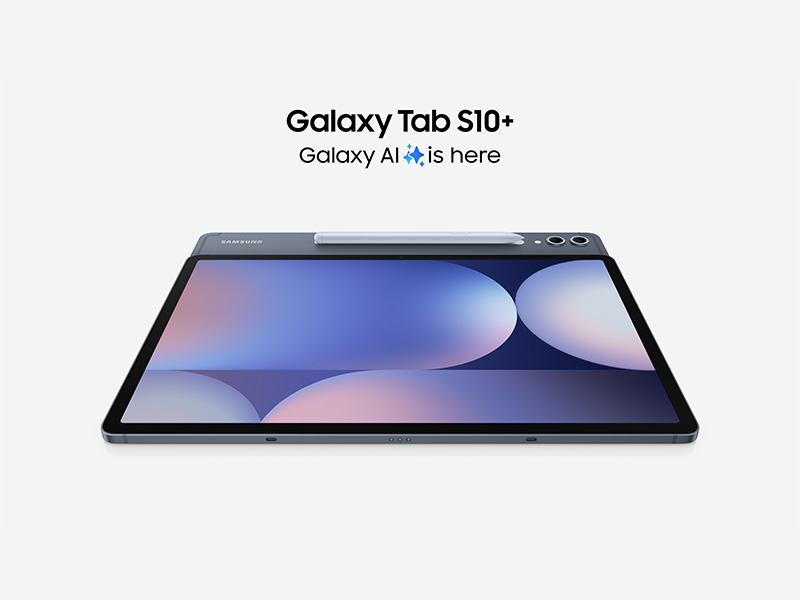
Samsung Galaxy Tab S10+ 256GB Wi-Fi Moonstone Gray
Samsung
It depends — The 12.4-inch Android tablet supports DeX, but Excel for Android cannot run VBA functions required by some desktop workflows.
Consider it for documents, browser work and S Pen notes when your essential tasks already work on Android. DeX does not remove mobile-app limitations or provide desktop Windows software.Available at Amazon(paid link) — opens Amazon in a new tab. Price and availability shown there.Samsung Galaxy Tab S10+ Book Cover Keyboard AI Key EF-DX825UBEGUJ Black
Samsung
Buy — The EF-DX825 provides an integrated touchpad and POGO connection for the Galaxy Tab S10+.
Choose this cover when your portable setup needs both a keyboard and an integrated touchpad. Its 512 g weight brings the Wi-Fi tablet and cover to 1,083 g before other accessories.Available at Amazon(paid link) — opens Amazon in a new tab. Price and availability shown there.Samsung Galaxy Tab S10+ Book Cover Keyboard Slim AI Key EF-DX820 Black
Samsung
It depends — The EF-DX820 weighs 345 g but has no integrated touchpad, making it suitable for readers with another preferred pointing method.
Consider the Slim if you already use a mouse or prefer touch input while typing. It is lighter than the full cover but omits the integrated touchpad.Available at Amazon(paid link) — opens Amazon in a new tab. Price and availability shown there.


Sources
Pages consulted while researching this article. None of these are affiliate links.
- Samsung Galaxy Tab S10+ specifications — samsung.com
- Microsoft 365 system requirements — support.microsoft.com
- Microsoft Excel mobile file-format support — support.microsoft.com
- Use the Samsung DeX screen on your Galaxy phone or tablet — samsung.com
- How to get the most out of Samsung DeX on Galaxy tablets — insights.samsung.com
- Samsung Book Cover Keyboard EF-DX825 specifications — samsung.com
- Samsung Book Cover Keyboard Slim EF-DX820 specifications — samsung.com
- Notebookcheck Samsung Galaxy Tab S10 Plus review — notebookcheck.net