Is the Redmi Pad 2 Enough for School?
The questionWhere do these come from?
Best tablet under ₱10k for an incoming SHS student?
I'm an incoming SHS student and some people told me na baka kailangan ko ng tablet or laptop for school. For now, tablet muna sana, and my budget is around ₱10k (the cheaper, the better 😭).
Yes, the Redmi Pad 2 makes sense for school notes, documents, streaming, and light gaming if you choose the right version.
Yes, the Redmi Pad 2 is a sensible school tablet for notes, documents, video classes, entertainment, and light gaming, as long as you buy it for tablet work rather than laptop work. The better student choice is the 11-inch Redmi Pad 2 with at least 6GB RAM if handwritten notes and split-screen study matter; the Redmi Pad 2 9.7 4G makes more sense only if mobile data is more important than screen space.
The main limit is performance headroom. This is not the tablet to buy for heavy video editing, large layered art files, desktop-style multitasking, or demanding games at high graphics settings. It is a class-notes, PDF, Google Docs, Canva-light, YouTube, ebook, and casual-game device.
The 11-inch model is the schoolwork pick
Choose the 11-inch Redmi Pad 2 over the 9.7-inch Redmi Pad 2 4G if schoolwork is the priority. Xiaomi lists the 11-inch model with a 2560 x 1600 display, 16:10 aspect ratio, up to 90Hz refresh rate, MediaTek Helio G100-Ultra, LPDDR4X memory, UFS 2.2 storage, and storage expansion up to 2TB on the official Redmi Pad 2 specs page. Those are the specs that matter for reading PDFs, keeping two apps open, and writing notes beside a lecture slide.
For school, the minimum comfortable configuration is 6GB + 128GB. The 4GB + 128GB version can still handle basic classroom use, but it is easier to run into reloads when switching between Chrome tabs, Google Docs, a PDF reader, Messenger, and a note app. The 8GB + 256GB version is the safer choice if the tablet is expected to last several school years, store downloaded lectures, and run creative apps with fewer slowdowns.
Use a microSD card for media, scans, exported PDFs, and offline videos, not as a substitute for internal storage. Apps and active projects still benefit from the tablet’s built-in UFS 2.2 storage.
Handwritten notes require the optional pen
The Redmi Pad 2 can work for handwritten notes, but budget for the pen from the start. Xiaomi lists the Redmi Smart Pen as compatible with the Redmi Pad 2 Series, with 4096 pressure levels, 240Hz touch sampling, Bluetooth 5.1, and two buttons on the official Redmi Smart Pen specs page. That makes it appropriate for lecture notes, PDF markup, diagrams, and basic sketching.
Do not treat it like an iPad Pro or Galaxy Tab S flagship for art. The Redmi Pad 2 is fine for school diagrams, visual notes, rough layouts, and light creative work. It is not the right purchase if the actual workload is serious illustration, animation, or multi-layer design files every day.
For note apps, the practical setup is simple: use Microsoft OneNote, Google Keep, Nebo, Noteshelf, or a PDF annotation app, then sync to Google Drive or OneDrive. Before the semester starts, test palm rejection, export format, and cloud sync in the exact app you plan to use. If the pen disconnects often, check Bluetooth pairing first, then update HyperOS under Settings > About tablet > OS version if an update is available. If the pen still drops connection after re-pairing and updating, that becomes a support or replacement issue, not a setting you can reliably fix.
The two Redmi Pad 2 sizes are not equivalents
There are two very different devices that may appear under the same Redmi Pad 2 name in stores. The 11-inch Redmi Pad 2 is the stronger school-tablet pick. The Redmi Pad 2 9.7 4G is smaller and includes cellular connectivity, which can matter if Wi-Fi at school or during commuting is unreliable.
Just want the recommendation?
Skip to the picks| Model | Best school use | Display | Battery |
|---|---|---|---|
| Redmi Pad 2 11-inch | Notes, PDFs, split-screen study | 11-inch, 2560 x 1600, up to 90Hz | 9000mAh |
| Redmi Pad 2 9.7 4G | Mobile data, reading, lighter carry | 9.7-inch, 2048 x 1280, up to 120Hz | 7600mAh |
| Redmi Pad 2 11-inch 8GB + 256GB | Longer-term multitasking and storage | 11-inch, 2560 x 1600, up to 90Hz | 9000mAh |
The 9.7 4G model has real advantages: Xiaomi Philippines lists 4G support, a 9.7-inch 2048 x 1280 display, 600-nit outdoor mode, 120Hz refresh rate, Snapdragon 6s 4G Gen 2, up to 128GB internal storage, and microSD expansion up to 2TB on the official Redmi Pad 2 9.7 4G page. It is the more portable option and the built-in 4G can be useful for students without dependable Wi-Fi.
But for actual schoolwork, screen size wins more often. An 11-inch screen gives more room for a PDF and notes side by side. It is also easier to type in a document while keeping source material visible. The 9.7-inch model is better if the tablet is mostly for reading, videos, messaging, and online classes away from Wi-Fi.
Gaming is fine with modest graphics settings
The Redmi Pad 2 is fine for light and midrange Android games, but it should be bought with realistic graphics expectations. On the 11-inch model, the MediaTek Helio G100-Ultra and Mali-G57 MC2 are enough for casual games, Roblox-style play, Minecraft, emulators within reason, and popular competitive games at conservative settings. The target should be stable gameplay, not maximum graphics.
If gaming matters, avoid the lowest RAM version. Background apps, screen recording, Discord, and game updates all eat memory. Also leave plenty of internal storage free; Android tablets slow down when they are constantly full. A microSD card helps store media, but internal storage is still where game data and app caches often matter.
The display is a strength for entertainment. The 11-inch model has 2560 x 1600 resolution and a 16:10 shape, while the 9.7 4G model has a 2048 x 1280 panel. Both are suitable for streaming and reading. The 11-inch model’s larger 9000mAh battery is better for long school days, but Xiaomi also notes that the included adapter may differ by region and lists 18W fast charging support with a 15W inbox adapter for the 11-inch model. That means charging is usable, not fast by modern phone standards.
What to check before buying for school
Check the exact model name, RAM, storage, and whether it is Wi-Fi-only or 4G before buying. Do not assume every listing called Redmi Pad 2 is the same device. If the listing says 9.7 4G, it is the smaller cellular model. If it says 11-inch, 2560 x 1600, Helio G100-Ultra, and 9000mAh, it is the larger school-friendlier version.
For school, the practical checklist is: at least 6GB RAM if possible, 128GB internal storage minimum, Redmi Smart Pen compatibility if handwriting matters, a Bluetooth keyboard if typing essays, a case that can stand the tablet up, and a cloud backup plan for notes. A tablet used for school should never be the only copy of assignments or handwritten notebooks.
If you are also considering imported Android tablets, especially Lenovo Xiaoxin models, the decision changes because software region and ROM quality become part of the purchase. In that case, check the guide to getting the right Xiaoxin Pad ROM before comparing specs alone.
The actual school verdict
Buy the Redmi Pad 2 for school if the job is notes, PDFs, Google Docs, slides, online classes, reading, streaming, and light games. Choose the 11-inch model for most students, especially with 6GB or 8GB RAM. Choose the 9.7 4G model only when cellular data and portability are more important than writing space.
Skip it if you need a true laptop replacement, heavy multitasking, serious digital art, demanding games, or desktop software. In those cases, the honest answer is not a setting or accessory; it is a more powerful tablet, Chromebook, or laptop.
The bottom line
Both justify the spend at different budgets:
Top pick
Buy this
Stylus Pen for Android Tablet/Phones, Tablet Pencil for iOS/Android,Black
Luntak
The article recommends a compatible pen for handwritten notes, PDF markup, diagrams, and basic sketching.
Needed if the school workflow includes handwritten notes, PDF markup, diagrams, or sketching. The drawback is that it is an extra accessory and should be checked for compatibility with the exact Redmi Pad 2 model being bought.Available at Amazon(paid link) — opens Amazon in a new tab. Price and availability shown there.The alternative
Buy this
Logitech Pebble Keys 2 K380s Wireless Bluetooth Keyboard - Tonal Graphite
Logitech
The article recommends a Bluetooth keyboard for typing essays and longer documents.
Useful for essays, emails, and longer Google Docs work where an on-screen keyboard wastes too much display space. The drawback is that it is separate from the tablet, so it is less convenient than a keyboard case.Available at Amazon(paid link) — opens Amazon in a new tab. Price and availability shown there.
Recommended products
Ordered by how well each one fits the situations above. Each link below is a paid link.

Stylus Pen for Android Tablet/Phones, Tablet Pencil for iOS/Android,Black
Luntak
Buy — The article recommends a compatible pen for handwritten notes, PDF markup, diagrams, and basic sketching.
Needed if the school workflow includes handwritten notes, PDF markup, diagrams, or sketching. The drawback is that it is an extra accessory and should be checked for compatibility with the exact Redmi Pad 2 model being bought.Available at Amazon(paid link) — opens Amazon in a new tab. Price and availability shown there.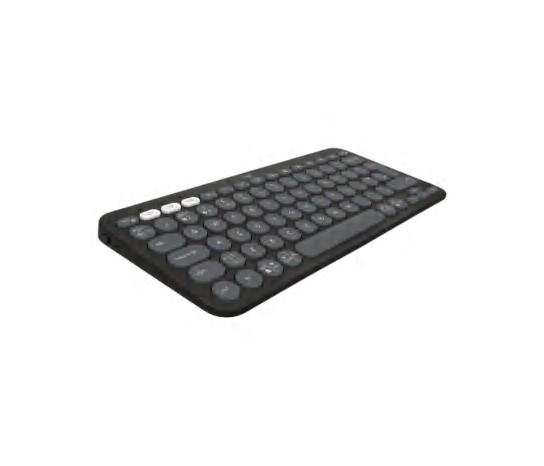
Logitech Pebble Keys 2 K380s Wireless Bluetooth Keyboard - Tonal Graphite
Logitech
Buy — The article recommends a Bluetooth keyboard for typing essays and longer documents.
Useful for essays, emails, and longer Google Docs work where an on-screen keyboard wastes too much display space. The drawback is that it is separate from the tablet, so it is less convenient than a keyboard case.Available at Amazon(paid link) — opens Amazon in a new tab. Price and availability shown there.
SAMSUNG EVO Select Micro SD-Memory-Card + Adapter, 256GB microSDXC 130MB/s Full HD & 4K UHD, UHS-I, U3, A2, V30, Expanded Storage for Android Smartphones, Tablets, Nintendo-Switch (MB-ME256KA/AM)
Samsung
Buy — The article recommends microSD storage for media, scans, exported PDFs, and offline videos while keeping apps and active projects on internal storage.
Good for storing downloaded lectures, PDFs, scans, and offline videos without filling internal storage. The drawback is that apps and active project files may still perform better from internal storage.Available at Amazon(paid link) — opens Amazon in a new tab. Price and availability shown there.Gylint Case for Xiaomi Redmi Pad 2 11 Inch 2025 Case, Folding Folio Ultra-Thin PU Leather Stand Case Cover Wth Auto Wake/Sleep for Xiaomi Redmi Pad 2 Black
Gylint
Buy — The article's school checklist recommends a case that can stand the tablet up.
A stand case matters for video classes, typing, and desk use because it keeps the tablet at a stable viewing angle. The drawback is added weight, especially on the larger 11-inch model.Available at Amazon(paid link) — opens Amazon in a new tab. Price and availability shown there.
Sources
Pages consulted while researching this article. None of these are affiliate links.
- Redmi Pad 2 review: Move aside Samsung — techadvisor.com
- Affordable tablet with stylus input and LTE — Xiaomi Redmi Pad 2 4G review — notebookcheck.net
- Redmi Pad 2 9.7 Review — yugatech.com
- Redmi Pad 2 9.7-inch 4G hands-on review — unwire.hk
- Xiaomi Redmi Pad 2 Review — UL Benchmarks — benchmarks.ul.com
- REDMI Pad 2 Specs - Xiaomi Global — mi.com
- REDMI Pad 2 9.7 4G - Xiaomi Philippines — mi.com
- Redmi Smart Pen Specs - Xiaomi UK — mi.com