HP EliteBook X G1a: Fine for CAD, Weak for LLMs
The questionWhere do these come from?
Laptop with reasonable LLM capabilities
Hello, I am looking for a new laptop that has decent LLM capabilities. (Mostly using Qwen3.6-35b-a3b at the highest end).
The EliteBook X G1a handles school, coding and light CAD well, but it is not the Strix Halo 128GB machine, so medium local LLMs are its weak spot.
The HP EliteBook X G1a is a good fit for school, coding and light-to-moderate CAD, but it is the wrong laptop for medium local LLMs. The reason is that the 14-inch EliteBook X G1a is not the Strix Halo machine its “G1a” name and AI branding suggest. Spec listings and reviews show it on Strix Point chips (Ryzen AI 7 Pro 360 with Radeon 880M, or Ryzen AI 9 class parts with the 890M), with 32 to 64 GB of soldered LPDDR5X. If you need 128 GB of shared memory, you want HP’s sibling, the ZBook Ultra G1a. Confirm the exact SKU in HP’s QuickSpecs before ordering, because HP sells several configurations under similar names.
What “medium” LLMs actually need
Local model size is set by memory first and bandwidth second. A rough rule for 4-bit quantised weights is about 0.6 GB per billion parameters, plus a few GB for context.
- 7B to 14B models need about 5 to 10 GB. Any 16 GB machine handles them, and the EliteBook is comfortable here.
- 27B to 32B models need roughly 18 to 24 GB. A 64 GB EliteBook can hold them, but you give up RAM for the OS, IDE, CAD and a game engine at the same time.
- 70B models need roughly 40 to 45 GB. This is where a 64 GB laptop with an integrated GPU runs out of room once everything else is open.
Speed is the second limit. Token generation is bound by memory bandwidth, and a 128-bit LPDDR5X bus like the Strix Point’s gives well under half the bandwidth of the 256-bit bus on Strix Halo. Expect slow output from anything over about 14B on the EliteBook. No independent lab has published local-LLM tokens-per-second figures for this model that this page could verify, so treat that as an inference from bus width, not a measurement.
Where the EliteBook is the right call
Reviewers describe it as a polished, light business machine. TechRadar’s review says it lasts a working day on one charge, and the 2.8K OLED panel is a highlight. StorageReview covers the same OLED model, with the 74.5 Wh battery and 100 W USB-C adapter. Itdaily’s verdict, “solid, but better on paper”, is the caution worth keeping: its real-world performance does not match what the AI-PC branding implies. Those are reviewers’ reports; this site has not handled the laptop.
Just want the recommendation?
Skip to the picksFor the other items on a student’s list:
- School and coding: more than enough. Eight Zen 5 cores, 32 GB or more of RAM and fast NVMe storage compile and run IDEs, Docker and WSL2 without trouble.
- Game development: fine for 2D, small 3D projects and Godot or Unity work. Unreal Engine 5 with large levels will stress an 880M or 890M, and shader compiles will be slow.
- CAD: fine for Fusion 360, Onshape, and small-to-medium SolidWorks or Inventor parts. Large assemblies, heavy rendering and viewport-intensive work favour a discrete GPU with certified drivers. Check your school’s software list; some programs only certify specific GPUs. For a related look at the same question, see HP Omen 16 Slim: Enough for CAD Work and Gaming?.
Comparison
| Verdict | What decides it | The catch | |
|---|---|---|---|
| HP EliteBook X G1a | Consider | Light, long battery, OLED, up to 64 GB | Integrated Radeon 880M/890M, and the memory is soldered |
| HP ZBook Ultra G1a | Buy | Up to 128 GB shared memory, Radeon 8060S, 256-bit bus | Heavier, hotter and priced as a workstation |
| Lenovo ThinkPad P1 Gen 7 | Consider | Discrete NVIDIA GPU, ISV drivers, CUDA | Dedicated VRAM caps model size; shorter battery life |
Who should buy which
Buy the ZBook Ultra G1a if running 30B-plus models locally is something you will do regularly, not occasionally. Its design is what makes that possible: memory the GPU can address in bulk. It is the pick for this combination of CAD, coding, game development and LLMs in a single 14-inch machine.
Choose the EliteBook X G1a if local AI means 7B to 14B models for coding assistance and the rest of the day is classes, code and light CAD. In that case the lighter build and battery life matter more than a memory pool you would rarely use. The EliteBook does not deserve a skip, because it is a capable laptop; it simply isn’t what the “medium LLM” requirement needs.
Choose a discrete-GPU workstation like the ThinkPad P1 if CAD is the main workload and you want CUDA for AI work. Its limit is VRAM: small models run quickly, but anything past mid-teens of billions of parameters spills into system RAM and slows sharply. Because the memory is soldered on all of these machines, buy the capacity you will need in three years; it cannot be upgraded later. Pairing a smaller laptop with a desktop or cloud GPU for occasional large-model work is also reasonable. For smaller models on modest hardware, see Phi-3 Mini on a Low-End Laptop: Use Q4.
The bottom line
Two readings, two answers:
Top pick
It depends
HP EliteBook X G1a 14 Inch Notebook Next Gen AI PC Wolf Pro Security Edition - AMD Chip - 2880 x 1800 - Windows 11 Pro - AMD Radeon 880M Graphics - BrightView, In-plane Switching (IPS) Technology - Fr
HP
Listings show Ryzen AI 7 Pro 360 / Radeon 880M-class configurations with 32 to 64 GB LPDDR5X, so it suits everything on the list except medium LLMs and heavy CAD assemblies.
The laptop in question. Right for school, coding, Unity or Unreal-lite game development and entry-level CAD; the drawback is that memory tops out far below what 30B-plus local models want, and the integrated graphics are mid-range.Available at Amazon(paid link) — opens Amazon in a new tab. Price and availability shown there.The alternative
Buy this
HP ZBook Ultra G1a 14" Touchscreen Mobile Workstation - 2.8K - AMD Ryzen AI Max+ PRO 395-128 GB - English Keyboard - Meteor Silver - Smart Buy - AMD Chip - 2880 x 1800 - Windows 11 Pro - Radeon 8060
HP
Its 256-bit memory bus and up to 128 GB of unified memory allow 30B to 70B quantised models, which the Strix Point EliteBook X cannot hold.
The alternative to buy if medium local LLMs are a real requirement: HP’s other 14-inch G1a, built on the Strix Halo chip with Radeon 8060S graphics and up to 128 GB of shared memory. It costs more and runs heavier and hotter than the EliteBook.Available at Amazon(paid link) — opens Amazon in a new tab. Price and availability shown there.
Recommended products
Ordered by how well each one fits the situations above. Each link below is a paid link.

HP EliteBook X G1a 14 Inch Notebook Next Gen AI PC Wolf Pro Security Edition - AMD Chip - 2880 x 1800 - Windows 11 Pro - AMD Radeon 880M Graphics - BrightView, In-plane Switching (IPS) Technology - Fr
HP
It depends — Listings show Ryzen AI 7 Pro 360 / Radeon 880M-class configurations with 32 to 64 GB LPDDR5X, so it suits everything on the list except medium LLMs and heavy CAD assemblies.
The laptop in question. Right for school, coding, Unity or Unreal-lite game development and entry-level CAD; the drawback is that memory tops out far below what 30B-plus local models want, and the integrated graphics are mid-range.Available at Amazon(paid link) — opens Amazon in a new tab. Price and availability shown there.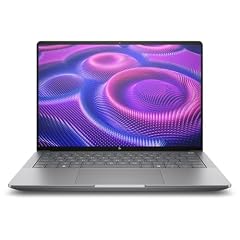
HP ZBook Ultra G1a 14" Touchscreen Mobile Workstation - 2.8K - AMD Ryzen AI Max+ PRO 395-128 GB - English Keyboard - Meteor Silver - Smart Buy - AMD Chip - 2880 x 1800 - Windows 11 Pro - Radeon 8060
HP
Buy — Its 256-bit memory bus and up to 128 GB of unified memory allow 30B to 70B quantised models, which the Strix Point EliteBook X cannot hold.
The alternative to buy if medium local LLMs are a real requirement: HP’s other 14-inch G1a, built on the Strix Halo chip with Radeon 8060S graphics and up to 128 GB of shared memory. It costs more and runs heavier and hotter than the EliteBook.Available at Amazon(paid link) — opens Amazon in a new tab. Price and availability shown there.
Lenovo ThinkPad P1 Gen 7, w/Ultra 7, NVIDIA RTX 3000, 16" 2.8K, 32GB RAM
Lenovo
It depends — A discrete GPU with dedicated VRAM is faster for CAD viewports and CUDA tooling, but VRAM limits model size to roughly 8 to 16 GB of weights.
A rival for readers whose CAD is the priority: a mobile workstation with a discrete NVIDIA GPU, ISV-certified drivers and CUDA for local AI. Gives up battery life and the large unified memory pool.Available at Amazon(paid link) — opens Amazon in a new tab. Price and availability shown there.
Sources
Pages consulted while researching this article. None of these are affiliate links.
- TechRadar: HP EliteBook X G1a 14 business laptop review — techradar.com
- StorageReview: HP EliteBook X G1a review — storagereview.com
- Itdaily: HP EliteBook X G1a review, solid but better on paper — itdaily.com
- TechRadar: 128GB Ryzen AI laptop preview — techradar.com