HP Omen 16 Slim: Enough for CAD Work and Gaming?
The questionWhere do these come from?
Input on HP Omen 16 Slim or Laptop Recommendations for an Architecture Student
Hey guys, I'm an architecture student who was given the listed minimum specs for a laptop. I'm not too familiar with laptops, but I bought the HP Omen 16 Slim based off of the specs given.
The HP Omen 16 Slim runs Revit, AutoCAD, and modern games well, but its thin chassis power-limits the GPU more than the bulkier Legion 5.
The HP Omen 16 Slim handles Revit, AutoCAD, SketchUp, and current games at 1440p without trouble, provided you configure it with the RTX 5070 and 32GB of RAM. Where it actually falls short of a thicker 16-inch rival like Lenovo’s Legion Pro 5i is sustained power delivery: HP’s own spec sheet lists the RTX 5070 in the Omen 16 Slim at up to 110W TGP in “Unleashed Mode,” and NotebookCheck’s coverage of the launch puts the figure closer to 105W. That’s a real number to check against any thicker competitor before you decide the extra cost of one is worth it.
Whether the RTX 5070 is enough for Revit, AutoCAD, and SketchUp
Architecture software splits into two very different hardware appetites, and it matters which one you’re running most.
AutoCAD is the light one. Autodesk’s own AutoCAD requirements list a recommended graphics card at 8GB of VRAM with 106 GB/s of bandwidth and DirectX 12 support. The Omen 16 Slim’s RTX 5070 carries 8GB of GDDR7 with far more bandwidth than that spec calls for, so 2D drafting, 3D modeling, and even Shaded/Wireframe (Fast) visual styles in AutoCAD are not where this laptop will struggle.
Revit is the demanding one, and the constraint is RAM more than GPU. Autodesk’s Revit system requirements page sets a 16GB minimum and 32GB as the recommended configuration for a typical single-model editing session. The Omen 16 Slim’s 32GB DDR5-5600, split across two SO-DIMM slots, lands exactly on Autodesk’s recommended line — not above it. If your Revit files stay in the range of a single building or a modest multi-family project, that’s sufficient. Puget Systems’ hardware guidance for Revit recommends 64GB for medium-to-large projects and multi-discipline coordination models, which neither the Omen 16 Slim nor the Legion Pro 5i can reach — both top out at 32GB across two slots. If your work regularly involves large linked models with structural, MEP, and architectural files combined, no 16-inch gaming laptop in this class gets you there; that’s a mobile workstation question, not a choice between these two.
SketchUp sits closer to AutoCAD in its baseline demands, but its rendering extensions change the picture entirely — which is the next question.
What changes when you add Enscape or Lumion rendering
Real-time rendering plugins are where GPU VRAM, not just GPU speed, becomes the limiting factor. Enscape’s own system requirements list a 4GB VRAM floor but note that scenes exceeding available VRAM cause stuttering, slow navigation, and failed renders rather than graceful slowdowns. Puget Systems’ Enscape hardware recommendations put the practical target at 8GB or more for detailed environments, and 12GB+ if you render for VR walkthroughs.
The Omen 16 Slim’s RTX 5070 has exactly 8GB — it clears Enscape’s recommended minimum but with no headroom. That’s fine for a single-building interior/exterior scene with moderate furniture and material density. It becomes the limiting factor once you’re rendering a full city block, a densely furnished multi-room interior, or exporting 4K panoramas with high-poly vegetation and RTX-accelerated lighting all at once. Lumion carries the same math: it’s GPU-bound, and an 8GB card is the point where you start turning down effects and texture quality on large scenes rather than the point where nothing runs.
This is the one spec where “spend more” has a specific, checkable answer rather than a vague one: a 12GB card gives real headroom for scenes that an 8GB card renders at reduced settings. That’s exactly what separates the two laptops in this comparison.
Just want the recommendation?
Skip to the picksHP Omen 16 Slim vs Lenovo Legion Pro 5i: the numbers that decide it
Both machines are sold in the RTX 50-series generation at a 16-inch size, and the difference isn’t chassis size so much as how much power each design lets the GPU draw.
| Buy / Skip | GPU & VRAM | Chassis | |
|---|---|---|---|
| HP Omen 16 Slim | Buy | RTX 5070, 8GB GDDR7, up to 105-110W TGP | 22.6mm thick, 2.43kg |
| Lenovo Legion Pro 5i (16-inch) | Consider | RTX 5070 Ti, 12GB GDDR7, 140W TGP | 26mm thick, 2.41kg |
The chassis numbers are closer than the “Slim” branding implies — HP’s Omen 16 Slim is about 3.4mm thinner than the Legion Pro 5i 16IAX10H that NotebookCheck reviewed, and the two laptops weigh within 20 grams of each other. What actually separates them is the GPU tier Lenovo makes available at this size: a 140W RTX 5070 Ti with 12GB of VRAM, against HP’s 105-110W RTX 5070 with 8GB. That NotebookCheck review also measured the Legion’s own limits — Cinebench R15 looped runs showed about an 8 percent performance drop over five to six cycles, so “thicker” doesn’t mean “immune to throttling,” just that it has more thermal and power budget to spend before it shows up.
If you configure the Legion Pro 5i with the same RTX 5070 rather than the Ti, the gap narrows to roughly 115W versus the Omen’s 105-110W — a difference small enough that it won’t change which architecture or gaming workloads either machine can run. The Ti configuration is where the real capability gap opens, because it’s a different card with 50 percent more VRAM, not just a wattage bump on the same chip.
Where the thin chassis actually costs you
For gaming, independent testing of the Omen 16 Slim’s RTX 5070 recorded around 85 FPS in Cyberpunk 2077 on High with RT Ultra and DLSS Quality, and 210-260 FPS in Call of Duty: Black Ops 6 on Extreme settings — figures that put it solidly in the 1440p-high-refresh bracket its 240Hz panel is built for. That review also credited HP’s Tempest Cooling system with holding those numbers steady across longer sessions rather than dropping over time.
Where the power ceiling shows up is in workloads that hold the GPU at 100 percent for extended periods: ray-traced gaming marathons, and — more relevant to the actual question here — long Enscape or Lumion render exports, or repeated real-time walkthrough sessions during a client presentation. A 105-110W card finishes those jobs; it just has less margin than a 140W card before clocks step down to stay within thermal limits. If your rendering sessions are short (checking a view, adjusting materials, quick client walkthroughs), this never becomes visible. If you’re exporting long animated flythroughs or running Enscape continuously for hours during a studio crit, the extra power budget on the Legion Pro 5i’s Ti configuration is the more comfortable choice.
Display: WQXGA IPS versus WQXGA OLED
Both laptops offer a 16-inch WQXGA (2560×1600) panel at up to 240Hz, but the panel technology differs: the Omen 16 Slim’s is IPS rated at 500 nits and 100% sRGB, while the Legion Pro 5i’s OLED option adds 100% DCI-P3 coverage and HDR peak brightness up to 1,100 nits. For line-drawing, model navigation, and most BIM work, sRGB coverage on the IPS panel is entirely sufficient — Revit and AutoCAD aren’t color-managed the way photo or video work is. Where OLED’s wider gamut and deeper blacks matter more is in rendered visualization output — reviewing a Lumion or Enscape render for client presentation benefits from the extra contrast and color range, though it’s a marginal factor next to the GPU and RAM decisions above.
Which one to buy
Configure the HP Omen 16 Slim with the RTX 5070 and 32GB of RAM and it comfortably runs AutoCAD, Revit (up to Autodesk’s own recommended project scale), and SketchUp, plus Enscape or Lumion rendering on single-building or moderate-density scenes, in a chassis that’s genuinely one of the thinnest 16-inch gaming laptops available. It’s the pick if your projects fit inside an 8GB VRAM budget and a 32GB RAM ceiling, and if your rendering sessions are measured in minutes rather than hours.
Skip the base RTX 5070 configuration and look at the Legion Pro 5i’s RTX 5070 Ti option specifically if you regularly render scenes that push past 8GB of VRAM — dense interiors, large exteriors, or animated walkthroughs — or if your work involves long, sustained GPU sessions where the extra 30-35W of power budget keeps clocks higher for longer. That configuration costs more for a reason that’s checkable rather than assumed: 50 percent more VRAM and a higher power ceiling on the same generation of silicon. For projects large enough to need more than 32GB of system RAM, neither machine is the right tool — that’s a mobile workstation-class laptop, a separate purchase from either of these.
If you’re deciding between other slim gaming chassis and how much performance they give up for portability, see Lenovo Yoga Slim 7 14IMH9 Gaming: Know Its Limits for how far that tradeoff goes on a smaller 14-inch design.
The bottom line
Two of these work — the difference is which situation you are in:
Top pick
Buy this
HP Omen 16 Slim RTX 5070 gaming laptop
HP
The 8GB RTX 5070 and 32GB RAM ceiling meet Autodesk's and Enscape's own recommended specs for single-building projects, with no VRAM headroom left over for larger scenes.
Its RTX 5070 clears Enscape’s 8GB VRAM recommendation and its 32GB of RAM matches Autodesk’s recommended tier for Revit, in one of the thinnest 16-inch gaming chassis available.Available at Amazon(paid link) — opens Amazon in a new tab. Price and availability shown there.The alternative
It depends
Lenovo Legion Pro 5i Gen 10 16 inch RTX 5070 Ti laptop
Lenovo
NotebookCheck measured this chassis at 140W TGP with 12GB VRAM, which only pays off for scenes or render sessions that actually exceed an 8GB card's headroom.
The rival worth the extra cost if you render dense Enscape or Lumion scenes past 8GB of VRAM: its RTX 5070 Ti option adds 12GB of VRAM and a 140W TGP versus the Omen’s 105-110W.Available at Amazon(paid link) — opens Amazon in a new tab. Price and availability shown there.
Recommended products
Ordered by how well each one fits the situations above. Each link below is a paid link.

HP Omen 16 Slim RTX 5070 gaming laptop
HP
Buy — The 8GB RTX 5070 and 32GB RAM ceiling meet Autodesk's and Enscape's own recommended specs for single-building projects, with no VRAM headroom left over for larger scenes.
Its RTX 5070 clears Enscape’s 8GB VRAM recommendation and its 32GB of RAM matches Autodesk’s recommended tier for Revit, in one of the thinnest 16-inch gaming chassis available.Available at Amazon(paid link) — opens Amazon in a new tab. Price and availability shown there.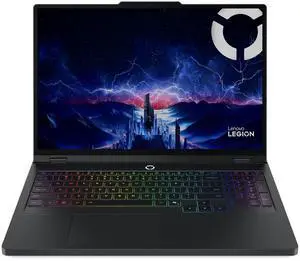
Lenovo Legion Pro 5i Gen 10 16 inch RTX 5070 Ti laptop
Lenovo
It depends — NotebookCheck measured this chassis at 140W TGP with 12GB VRAM, which only pays off for scenes or render sessions that actually exceed an 8GB card's headroom.
The rival worth the extra cost if you render dense Enscape or Lumion scenes past 8GB of VRAM: its RTX 5070 Ti option adds 12GB of VRAM and a 140W TGP versus the Omen’s 105-110W.Available at Amazon(paid link) — opens Amazon in a new tab. Price and availability shown there.
Sources
Pages consulted while researching this article. None of these are affiliate links.
- HP Omen 16 Slim (2025) official specifications — hp.com
- NotebookCheck: HP Omen 16 Slim debuts with RTX 5070 — notebookcheck.net
- LapZen Lab: HP Omen 16 Slim RTX 5070 review — lapzenlab.com
- NotebookCheck: Lenovo Legion Pro 5 16IAX10H OLED review — notebookcheck.net
- Lenovo Legion Pro 5i Gen 10 (16-inch) official product page — lenovo.com
- Autodesk: System requirements for Revit products — autodesk.com
- Autodesk: System requirements for AutoCAD 2027 — autodesk.com
- Autodesk: Hardware requirements for large Revit projects — autodesk.com