Acer Nitro V17 RTX 5060 + Ryzen 5 240: Worth Buying?
The questionWhere do these come from?
Nitro V17 AI
Yo. I'm rocking Acer Aspire 7 with 1650 and I believe it's time to upgrade. I found Nitro V17 RTX 5060 R5 240 for pretty cheap price (4000 pln, 1000 usd).
The Ryzen 5 240 won't bottleneck the RTX 5060 in this Nitro V17, but Acer caps the GPU at 85W and ships the cheaper 230-nit panel with it.
The Acer Nitro V17 AI (model ANV17-41-R8ML) pairing a Ryzen 5 240 with an RTX 5060 is a reasonable buy for mixed office-and-gaming use, on one condition: you’re buying it for 1080p gaming and everyday work, not for a bright, color-accurate screen or maximum CPU headroom. The CPU won’t hold the GPU back. The panel is where Acer actually cut the corner, and that’s the part worth checking before you order it.
What’s actually in this configuration
Acer’s own spec sheet for the ANV17-41-R8ML lists a 6-core/12-thread Ryzen 5 240, an RTX 5060 with 8GB of GDDR7 capped at up to 85W, 16GB of DDR5 (expandable to 32GB across two slots), a 512GB PCIe Gen4 SSD, a 17.3-inch 1920x1080 IPS panel at 180Hz, and a 76Wh battery rated for 10.5 hours. It weighs 5.97 lb (2.71 kg) with a plastic chassis.
Does the Ryzen 5 240 bottleneck the RTX 5060?
No. AMD’s own listing puts the Ryzen 5 240 at 6 cores/12 threads, a 4.3GHz base clock, boost up to 5GHz, 16MB of L3 cache, and a 35-54W configurable TDP — the same Zen 4 “Hawk Point” silicon used in AMD’s higher mobile tiers, just with two fewer cores than the Ryzen 7 260 that ships in this chassis’s pricier configuration. At 1080p, which is the resolution this exact panel runs, six modern Zen 4 cores are not the limiting factor for an RTX 5060; the GPU’s own power ceiling is.
Why Acer capped this GPU at 85W
Nvidia’s spec for the RTX 5060 laptop GPU allows a configurable TGP of 45-100W, confirmed by NotebookCheck’s coverage of the launch specs. Acer’s own listing for this exact SKU caps it at “up to 85W” — inside Nvidia’s range, but short of the 100W ceiling some competing chassis use. LaptopMedia’s review of this same chassis (tested with the higher RTX 5070 configuration) found Acer deliberately under-powering the GPU across the line, measuring 93W of sustained draw on a card Nvidia allows to run considerably higher — and titled the review “They Detuned It on Purpose… And it’s Great,” because the tradeoff bought quieter fan noise and stable thermals rather than peak frame rates. Expect the same philosophy on the RTX 5060 variant: fewer benchmark-chasing frames, more consistent performance under sustained load.
Just want the recommendation?
Skip to the picksThe panel is where the corners were cut
This is the tradeoff most reviews of the pricier QHD configuration don’t surface, because they aren’t testing this panel. NotebookCheck’s head-to-head against the Lenovo LOQ 17 found the Acer’s Full HD panel running around 230 cd/m² with sluggish response times — the same FHD 180Hz panel Acer’s spec sheet confirms ships on the RTX 5060 SKU. If you plan to use this laptop somewhere bright — a dorm room with a window, an office desk — that brightness ceiling is worth knowing about before the laptop arrives, not after.
For mixed use: office work and gaming on one charge
This is where the configuration earns its keep. A 76Wh battery is unusually large for a 17-inch gaming laptop at this tier — NotebookCheck’s comparison found it giving the Nitro V17 over 1.5 hours more runtime than the Lenovo LOQ 17’s 60Wh pack in the same class. For someone splitting time between browser tabs, office documents, and evening gaming sessions, that’s the difference between charging once a day and carrying the brick everywhere. LaptopMedia’s testing of the same chassis also found “no discernible flex” in the plastic shell and a comfortable full-size keyboard with a numpad — reasonable durability for a laptop it’s actually possible to carry between classes or a desk and a couch.
How the three real options compare
| CPU / GPU | Display | Battery | Verdict | |
|---|---|---|---|---|
| Nitro V17 (this config) | Ryzen 5 240 / RTX 5060 @ 85W | 1080p IPS, 180Hz, ~230 cd/m² | 76Wh, ~10.5h rated | Buy for mixed use on a budget |
| Nitro V17, RTX 5070 config | Ryzen 7 260 / RTX 5070 | QHD IPS, 165Hz, 285 cd/m², 96% DCI-P3 | 76Wh | Consider if the screen matters more than price |
| Lenovo LOQ 17 | Core i7-14700HX / RTX 5060 | 1080p IPS, 165Hz | 60Wh | Consider only for CPU-heavy work |
When the RTX 5070 configuration is worth the extra cost
Acer sells a higher SKU of this same ANV17-41 chassis with a Ryzen 7 260 and RTX 5070 alongside a QHD 165Hz panel. LaptopMedia measured that panel at 285 cd/m² with 96% DCI-P3 coverage — a real step up from the roughly 230 cd/m² FHD panel that ships with the RTX 5060. NotebookCheck clocked the RTX 5070 at roughly 11% faster than the 5060 in the same chassis. If color accuracy or resolution matters more to your mixed-use case than keeping cost down, that configuration is the one to look at instead — you’re paying for the screen as much as the GPU. If you’re already weighing a similar 5060-versus-higher-tier tradeoff on a different chassis, see G14 RTX 5060 vs 5070 Ti for Engineering for how that calculus plays out on a 14-inch workstation-style laptop.
When the Lenovo LOQ 17 is the better buy instead
NotebookCheck’s direct comparison found the Lenovo LOQ 17’s Intel Core i7-14700HX beating the Nitro V17’s AMD chip by roughly a third in CPU-bound work, with gaming performance about 16% ahead as well — a bigger gap than the two extra cores on the Ryzen 7 260 configuration alone would suggest, and one that widens further against the six-core Ryzen 5 240 in this specific build. If your mixed use leans toward video encoding, compilation, or anything else that’s genuinely CPU-bound rather than GPU-bound, the LOQ 17 does more work per session. The cost is real: NotebookCheck measured it running about 19% louder under sustained gaming load and losing more than 1.5 hours of runtime versus the Nitro’s 76Wh battery. For anyone who gates on quiet operation or battery life over raw CPU throughput, that trade goes the other way.
The long-term value question
Both the RTX 5060 and RTX 5070 configurations of this chassis carry 8GB of VRAM — a ceiling, not a tier difference, and the same limit Nvidia set across most of this GPU generation’s mid-range mobile cards. At the 1080p resolution this exact panel runs, 8GB is enough for the foreseeable run of current and next couple of years’ titles at high settings. It becomes the limiting factor only if you later pair this GPU with a higher-resolution external monitor, or if you’re chasing settings above “high” in newer AAA titles — decisions worth planning around now rather than after the VRAM ceiling shows up as stutter two years in.
The bottom line
Two answers, priced differently:
Top pick
Buy this
Acer Nitro V 17 AI ANV17-41-R8ML RTX 5060 Ryzen 5 240
Acer
Acer's spec sheet lists a 76Wh battery rated for 10.5 hours and a 6-core/12-thread CPU that doesn't bottleneck the RTX 5060 at the 1080p resolution this panel actually runs.
The exact configuration this question is about: a 6-core Ryzen 5 240, an 85W-capped RTX 5060, and a 76Wh battery in a 17.3-inch chassis. It handles mixed office-and-gaming use well; the 1080p panel is its weakest part.Available at Amazon(paid link) — opens Amazon in a new tab. Price and availability shown there.The alternative
It depends
Acer Nitro V 17 AI RTX 5070 Ryzen 7 260
Acer
LaptopMedia measured its QHD panel at 285 cd/m2 with 96% DCI-P3, well above the roughly 230 cd/m2 NotebookCheck recorded on the FHD panel that ships with the RTX 5060 configuration.
The step-up configuration in the same chassis, with a Ryzen 7 260 and a QHD 165Hz panel instead of the 1080p one. Worth the extra cost only if screen quality matters more to your mixed use than keeping the price down.Available at Amazon(paid link) — opens Amazon in a new tab. Price and availability shown there.
Recommended products
Ordered by how well each one fits the situations above. Each link below is a paid link.
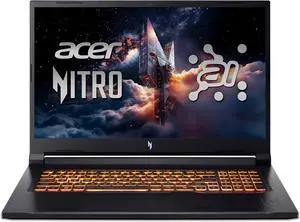
Acer Nitro V 17 AI ANV17-41-R8ML RTX 5060 Ryzen 5 240
Acer
Buy — Acer's spec sheet lists a 76Wh battery rated for 10.5 hours and a 6-core/12-thread CPU that doesn't bottleneck the RTX 5060 at the 1080p resolution this panel actually runs.
The exact configuration this question is about: a 6-core Ryzen 5 240, an 85W-capped RTX 5060, and a 76Wh battery in a 17.3-inch chassis. It handles mixed office-and-gaming use well; the 1080p panel is its weakest part.Available at Amazon(paid link) — opens Amazon in a new tab. Price and availability shown there.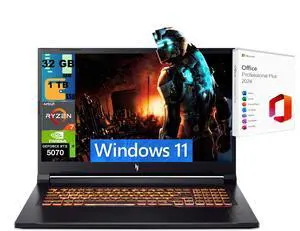
Acer Nitro V 17 AI RTX 5070 Ryzen 7 260
Acer
It depends — LaptopMedia measured its QHD panel at 285 cd/m2 with 96% DCI-P3, well above the roughly 230 cd/m2 NotebookCheck recorded on the FHD panel that ships with the RTX 5060 configuration.
The step-up configuration in the same chassis, with a Ryzen 7 260 and a QHD 165Hz panel instead of the 1080p one. Worth the extra cost only if screen quality matters more to your mixed use than keeping the price down.Available at Amazon(paid link) — opens Amazon in a new tab. Price and availability shown there.
Lenovo LOQ 17 RTX 5060 Core i7-14700HX
Lenovo LOQ
It depends — NotebookCheck measured the i7-14700HX beating the Nitro's Ryzen chip by roughly a third in CPU-bound tasks, but recorded the Lenovo running about 19% louder under load and losing over 1.5 hours of runtime from its smaller 60Wh battery.
The rival 17-inch RTX 5060 laptop most buyers cross-shop against this one. Its Core i7-14700HX does more CPU-bound work per session, but you trade away battery life and quiet running to get it.Available at Amazon(paid link) — opens Amazon in a new tab. Price and availability shown there.
Sources
Pages consulted while researching this article. None of these are affiliate links.
- Nitro V 17 AI AMD - ANV17-41-R8ML Tech Specs | Acer United States — acer.com
- AMD Ryzen 5 240 Official Specifications — amd.com
- GeForce RTX 5060 laptops GPU unveiled with 8 GB GDDR7 VRAM and 100 Watts max power - NotebookCheck — notebookcheck.net
- Acer Nitro V 17 AI (ANV17-41) Review - They Detuned It on Purpose... And it's Great? - LaptopMedia — laptopmedia.com
- RTX 5070 gaming under $1,400: Acer Nitro V 17 is affordable and better than expected - NotebookCheck — notebookcheck.net
- Acer Nitro V 17 vs. Lenovo LOQ 17: Which RTX 5070 gaming laptop is the better budget choice? - NotebookCheck — notebookcheck.net
- Lenovo LOQ 17" Gen 10 Specifications - LaptopMedia — laptopmedia.com