MSI GF63 Thin Battery Dead? Replace It or Retire It
The questionWhere do these come from?
Battery died almost completely after a few years - Is it normal or something else is going on
The genuine BTY-M6K battery is worth replacing in a degraded GF63 Thin if the rest of the laptop still runs well after several years.
A GF63 Thin whose battery has faded to almost nothing after several years is usually worth fixing, not retiring — the part MSI put in it, BTY-M6K, is still sold new, drops in without modification, and costs a fraction of what the rest of the laptop is worth. The one thing worth doing before you order one is ruling out a false alarm: a miscalibrated battery gauge can mimic a dead cell almost exactly, and it costs nothing to check.
Confirm it’s the cell, not the gauge
Open an administrator Command Prompt and run powercfg /batteryreport. Windows writes an HTML file and prints its path; open it and look at the “Installed batteries” section, which lists a DESIGN CAPACITY figure next to a FULL CHARGE CAPACITY figure. Divide the second by the first — Microsoft’s own battery-care guidance walks through generating this same report as the standard way to check wear over time. If full charge capacity is a small fraction of design capacity, the cell itself has degraded and no driver update or calibration will bring the missing capacity back.
If the two numbers are close but the laptop still won’t hold a charge, run a calibration pass through MSI Center’s Battery Master first — a full drain to shutdown followed by an uninterrupted charge to 100% resets a gauge that’s drifted out of sync with the cell. That fixes bad reporting. It does not fix a genuinely worn-out pack, and Battery University’s research on lithium-ion aging explains why: capacity fade comes from cell oxidation that “cannot be reversed,” and most lithium-ion packs drop below 80% of original capacity somewhere between 300 and 500 full charge cycles. A GF63 Thin used daily for several years has almost certainly passed that mark. Near-zero capacity at this age is normal wear, not a defect MSI needs to answer for.
The part number that fits nearly every GF63 Thin
MSI has used one battery, BTY-M6K, across essentially the entire GF63 Thin line — the 9SC, 9SCX, 9SCXR, 10SC, 10SCXR, 10SCSR, 11SC, 11UC, 11UCX, and 12VE all take the same pack, rated 11.4V at roughly 52.4Wh (MSI’s own spec sheet for the 9SC lists it as 51Wh, 3-cell lithium-polymer, which is the same cell rounded differently). The same part also turns up in the GF65 Thin, GF75 Thin, GS63VR, GS73VR, and several WS and WF workstation models, because MSI reuses chassis and battery bays across its thin-bezel lineup rather than tooling a new pack for every SKU.
That overlap is good news for supply and bad news for assuming: check the part number printed on your own battery before ordering, rather than trusting the model name on the lid. Regional SKUs and chassis revisions occasionally diverge, and a five-minute label check avoids a return.
Just want the recommendation?
Skip to the picksGenuine cell vs. compatible replacement
| Buy / Skip | The thing that decides it | The catch | |
|---|---|---|---|
| Genuine MSI BTY-M6K | Buy | Matches the factory 11.4V/52.4Wh rating and the BMS firmware the embedded controller already expects | Sold through parts resellers, not MSI’s own storefront, so confirm the seller stocks the genuine part rather than a relabeled clone |
| Compatible third-party BTY-M6K (e.g. CELLONIC) | Consider | Physically interchangeable, typically rated around 4300mAh against the genuine cell’s 4500-4600mAh | Slightly lower real capacity and a shorter seller warranty than the OEM part carries |
The genuine cell is the sensible default because the laptop’s embedded controller was tuned against it — capacity readings, thermal throttling curves tied to battery temperature, and shutdown thresholds all assume that specific chemistry and firmware. A compatible replacement is worth considering only if the swap is about avoiding a dead machine on a tight budget rather than matching the original spec exactly; the tradeoff is the same one that shows up on the Dell Latitude 7310 Battery: Why a Generic One Won’t Fit, where a mismatched controller causes real problems rather than a minor shortfall. Neither option ships in a higher-than-stock capacity — for the reasons a bigger pack usually isn’t offered, see HP BN03XL Battery: Why There’s No Bigger Version.
What opening the case involves
Getting to the battery means removing the entire bottom panel: twelve Phillips-head screws (iFixit’s teardown notes them at 4.8mm), one of which may sit under a white “Factory Seal” sticker. MSI has told reviewers that breaking that seal to reach screws underneath for a RAM or storage upgrade doesn’t itself void the warranty — the same panel gates the battery bay, though a pack that’s been fading for several years is almost certainly outside its own coverage window regardless of the seal.
Once the panel is off, the pack itself isn’t held down with screws — it’s secured to the chassis and needs to be pried loose starting from one corner, and the connector linking it to the motherboard is fragile: iFixit’s replacement guide specifically warns to handle only the outer white housing of that connector, since excess force on the wires themselves can snap them. A proper #00 Phillips driver and a plastic (not metal) spudger matter here — a kit built for exactly this kind of work, like the iFixit Pro Tech Toolkit, is the difference between screws that back out cleanly and heads that strip on the first pass.
Is the swap worth it, or is it time to retire the laptop
For most GF63 Thin owners past the several-year mark, yes — a battery is one of the least expensive individual components in the machine, and swapping it buys the rest of the laptop’s still-functional CPU, GPU, and display several more years of useful life. That calculus changes if the battery isn’t the only thing showing its age: a heatsink caked with enough dust to cause sustained thermal throttling, a GPU generation that’s become the actual bottleneck for what you want to run, or a hinge or keyboard that’s failing alongside the battery all shift the decision toward replacing the laptop instead of one part of it. A battery swap is worth doing when it’s the only thing wrong; it’s a poor use of time when it’s the first of several things wrong.
When to stop and call MSI instead
If the chassis has visibly bulged, the trackpad has lifted, or the keyboard deck no longer sits flat, that’s a swollen cell — stop before removing anything. A swollen lithium-polymer pack can rupture or ignite under the physical stress of prying it loose, and this is the one scenario where the right move is contacting MSI support for a repair or RMA rather than attempting the swap yourself, regardless of how far out of warranty the laptop is.
After the replacement
Let the new pack complete one full charge-to-100%-and-run-down cycle before treating the reported percentage as accurate; this doesn’t “break in” the cell chemically, but it does let the gauge relearn the new pack’s actual capacity instead of carrying over stale numbers from the old one. From there, MSI Center’s charge-limit modes — Basic Protection stopping at 100% and resuming under 89%, or Balanced holding the range between 70-80% — are worth setting if the laptop spends most of its life plugged in at a desk, since that’s the single biggest lever for delaying the next replacement by years rather than months.
The bottom line
Two answers, priced differently:
Top pick
Buy this
MSI BTY-M6K Original Battery for GF63 Thin
msi
It's rated at the same 11.4V/52.4Wh as the factory pack, so the embedded controller reports capacity accurately instead of guessing.
The genuine cell MSI’s own embedded controller was tuned against, with matched voltage and BMS firmware, so it restores the laptop’s original runtime rather than an approximation of it.Available at Amazon(paid link) — opens Amazon in a new tab. Price and availability shown there.The alternative
It depends
CELLONIC BTY-M6K Compatible Battery MSI GF63 Thin
CELLONIC
It's commonly rated around 4300mAh against the genuine cell's 4500-4600mAh, and the seller warranty on these packs typically runs shorter than the OEM part's.
A third-party rival to the genuine cell, physically interchangeable and worth considering only if the goal is avoiding a dead machine on a tight budget rather than matching the original spec exactly.Available at Amazon(paid link) — opens Amazon in a new tab. Price and availability shown there.
Recommended products
Ordered by how well each one fits the situations above. Each link below is a paid link.

MSI BTY-M6K Original Battery for GF63 Thin
msi
Buy — It's rated at the same 11.4V/52.4Wh as the factory pack, so the embedded controller reports capacity accurately instead of guessing.
The genuine cell MSI’s own embedded controller was tuned against, with matched voltage and BMS firmware, so it restores the laptop’s original runtime rather than an approximation of it.Available at Amazon(paid link) — opens Amazon in a new tab. Price and availability shown there.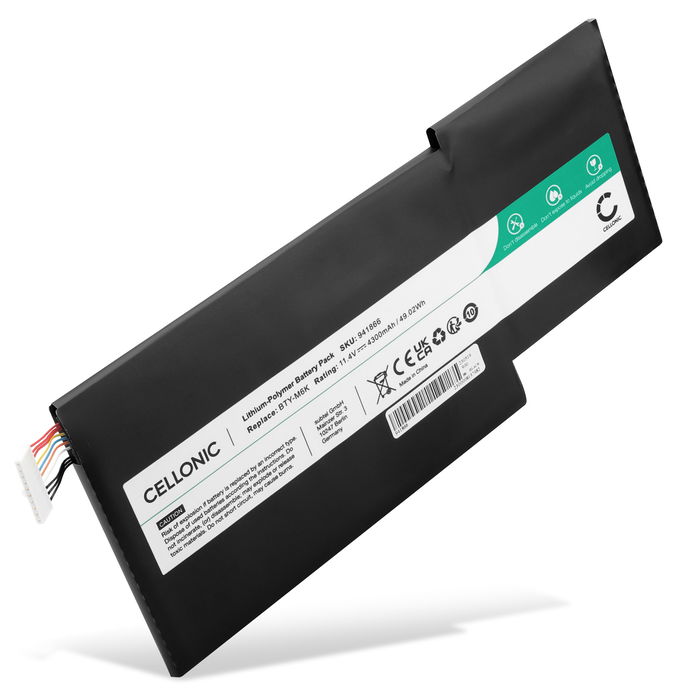
CELLONIC BTY-M6K Compatible Battery MSI GF63 Thin
CELLONIC
It depends — It's commonly rated around 4300mAh against the genuine cell's 4500-4600mAh, and the seller warranty on these packs typically runs shorter than the OEM part's.
A third-party rival to the genuine cell, physically interchangeable and worth considering only if the goal is avoiding a dead machine on a tight budget rather than matching the original spec exactly.Available at Amazon(paid link) — opens Amazon in a new tab. Price and availability shown there.
iFixit Pro Tech Toolkit
iFixit
It depends — A wrong-sized Phillips bit strips the panel's small screw heads, and a metal pry tool risks cracking the battery connector's housing.
The complement the repair actually requires: the bottom panel’s twelve small Phillips screws and the battery connector’s fragile outer housing call for a properly sized driver and a plastic spudger, not a generic hardware-store kit.Available at Amazon(paid link) — opens Amazon in a new tab. Price and availability shown there.
Sources
Pages consulted while researching this article. None of these are affiliate links.
- MSI Thin GF63 12VE Battery Replacement - iFixit — ifixit.com
- Disassembling MSI GF63 - iFixit Repair Guide — ifixit.com
- MSI GF63 Thin 9SC Laptop Review - NotebookCheck — notebookcheck.net
- MSI should really remove the Factory Seal sticker from some of its laptops - NotebookCheck — notebookcheck.net
- Caring for your battery in Windows - Microsoft Support — support.microsoft.com
- BU-802: What Causes Capacity Loss? - Battery University — batteryuniversity.com