Nobara GA402 Kernel Panics: The AMD Phoenix Fix
The questionWhere do these come from?
Kernel panics/freezes on ASUS ROG Strix G14 GA402 (Ryzen 7940HS) during low-power states - Looking for a stable Linux distro/config.
Hi everyone, I'm running into persistent stability issues with my ASUS ROG Strix G14 GA402 (Ryzen 9 7940HS / RTX 4060). I’ve tried both Fedora and Pop!
GA402 kernel panics come from AMD Phoenix's amd_pstate and ASPM power states, not from Nobara — fix them with boot parameters, kernel choice, and a BIOS update.
Nobara does not cause the kernel panics on the ROG Zephyrus G14 GA402, and switching to it will not cure them either. If you’re on a 2023-refresh GA402XV, GA402XY or GA402XZ — the models built around the Ryzen 9 7940HS “Phoenix” APU rather than the 2022 GA402RJ/GA402RK’s Ryzen 9 6900HS “Rembrandt” — the panics trace to how the amd_pstate CPU-frequency driver’s CPPC calls interact with PCIe ASPM and NVMe autonomous power-state transitions on this specific chassis. That is a kernel-and-firmware conflict, not a distro bug, and the fix is the same whether you run Nobara, plain Fedora, or Arch.
Confirm which GA402 you actually have
The GA402 chassis code covers two different generations of ASUS’s Zephyrus G14, and the fix that matters here only applies to one of them. The 2022 GA402RJ and GA402RK use the Ryzen 9 6900HS “Rembrandt” APU; the 2023 refresh — GA402XV, GA402XY and GA402XZ — moved to the Ryzen 9 7940HS “Phoenix” APU with Radeon 780M graphics. The amd_pstate/CPPC behavior described below changed substantially between those two chip generations, so a fix pulled from a Rembrandt thread will not necessarily apply to a Phoenix one, and vice versa. Check your exact model number on the bottom panel or with sudo dmidecode -s system-product-name before applying anything below.
What amd_pstate is doing when it panics
Since kernel 6.5, amd_pstate defaults to “active” mode with Energy Performance Preference (EPP) enabled on any CPU that exposes CPPC — which includes every Phoenix-generation Ryzen mobile chip. In active mode, the kernel hands frequency control almost entirely to the CPU’s own firmware, biasing it toward performance or efficiency through the EPP register rather than requesting specific clock speeds itself. Passive mode, by contrast, has the OS calculate and request an exact performance percentage on every scaling decision, and guided mode sits between the two. kernel.org’s own amd-pstate documentation lays out all three modes and confirms amd_pstate=active, amd_pstate=passive and amd_pstate=guided as the boot parameters that select between them.
This driver has shipped panic-causing bugs before on exactly this class of hardware. Phoronix reported that Linux 6.6 included a fix to the amd-pstate self-test code specifically “to avoid a possible kernel panic when loading the driver” — evidence that CPPC-related crashes in this code path are a real, recurring category of bug rather than a one-off. The 7940HS itself has also shipped a documented amd_pstate regression: Manjaro Forum moderators tracked a bug where kernel 6.9.0 and 6.9.1 misreported the chip’s maximum boost frequency (4.45GHz instead of its rated 5.2GHz) specifically with amd_pstate=passive set, a bug that was fixed in 6.9.2. Kernel version matters a lot on this chip, and jumping straight to “latest” without checking is how people end up debugging a regression that upstream already fixed.
As of mid-2026, upstream kernel developers are still actively hardening this exact area. A patch series titled “ACPI: CPPC: Fix register…” working through review as of August 2026 addresses missing validation of firmware-provided CPPC register descriptors and unsafe read-modify-write races when multiple CPU cores share the same physical performance-control register — precisely the kind of firmware/kernel handshake that Phoenix’s CPPC v4 implementation relies on. A companion series reworking how the driver honors a BIOS-configured minimum performance floor was also in review the same summer. Neither had landed in a stable kernel release at the time of writing, which is one reason this fault keeps resurfacing across kernel versions instead of getting fixed once.
Where ASPM and the NVMe drive make it worse
The CPU’s power-state driver isn’t the only thing changing state under load. PCIe Active State Power Management (ASPM) puts the bus feeding the NVMe drive into a low-power link state between transfers, and the drive itself can drop into an autonomous power state (APST) or full D3cold. On this laptop family, community documentation on a related GA402 variant notes that ASPM’s “powersave” policy combined with the NVMe drive entering D3cold can cause outright resume failures, and the accepted workaround is adding nvme_core.default_ps_max_latency_us=0 to the kernel command line to stop the drive from dropping into its deepest, slowest-to-wake power state. Separately, ArchWiki maintainers for this chassis list amd_pstate=passive among the boot parameters added specifically for APU stability — a sign that active mode’s firmware-driven frequency changes are implicated in more than one reported crash on this hardware.
Just want the recommendation?
Skip to the picksIf the panic isn’t limited to resume — if it happens mid-session, under mixed load, or when the laptop switches between AC and battery — the more aggressive workaround is disabling ASPM transitions outright with pcie_aspm=off, or the narrower pcie_port_pm=off if you want to keep ASPM elsewhere and only stop the port-level power management implicated in the crash. Both cost battery life; pcie_aspm=off more so, since it stops the entire PCIe subsystem from power-gating rather than just the port. A broader, older pattern documented across many Ryzen mobile platforms is that certain CPU C-states aren’t handled cleanly by some BIOS/kernel combinations at all, with processor.max_cstate=1 cited as a last-resort fix — at the cost of breaking suspend and hibernate, since deep sleep depends on those same C-states.
Does Nobara fix any of this by default
Nobara is a Fedora-based distribution maintained by Thomas “GloriousEggroll” Crider, and it ships gaming-oriented kernel tweaks, Mesa/Vulkan driver patches, and hardware compatibility fixes (Wi-Fi, Bluetooth, graphics) out of the box, on top of Proton-GE, Steam and Lutris preinstalled. Being Fedora-based, it inherits compatibility with the ASUS Linux project’s asusctl/asusd/supergfxctl tooling for keyboard RGB, fan curves and GPU switching — but it’s worth being precise about what “supported” means here. asus-linux.org’s own FAQ states official support extends to “Fedora (current version) and openSUSE Tumbleweed” only, not to Nobara by name, and specifies a minimum kernel of 5.11 with 5.13 or newer strongly recommended, with custom fan-curve support on Ryzen ROG laptops merged since kernel 5.17.
None of that touches the fault described above. Nobara’s own patch set is aimed at gaming compatibility and desktop polish, not at CPPC register validation or ASPM policy — those live in the upstream kernel and in ASUS’s own firmware, which is why a fresh Nobara install on a GA402XV can panic in exactly the same way a fresh Fedora or Arch install does, until the same boot parameters are applied. Nobara is worth considering for this laptop because it removes a lot of the day-one setup work — codecs, Proton-GE, driver tooling — that a bare Fedora or openSUSE install leaves you to do by hand. It is not, on its own, a fix for this bug.
The fix, in order
- Update the BIOS first. Several reports of this class of panic on ASUS laptops trace back to firmware-side ACPI
_CPCobjects that get corrected in BIOS updates rather than kernel patches — a firmware fix addresses the root cause, where kernel parameters only work around it. Flash from ASUS’s EZ Flash utility using a FAT32-formatted USB drive. - Pick a kernel deliberately, not just the latest one. Avoid 6.9.0 and 6.9.1 specifically on the 7940HS if you can choose; use 6.6 or later, or 6.9.2 and up, per the frequency-reporting fix referenced above.
- Test
amd_pstate=activeagainstamd_pstate=passive. Active is the current kernel default for CPPC-capable CPUs; passive is what community documentation for this chassis lists as the change made specifically for APU stability. Boot with one, confirm stability under load for a day, then compare against the other if problems persist. - Add
nvme_core.default_ps_max_latency_us=0if panics cluster around suspend, resume, or heavy drive access. - Add
pcie_aspm=off(or the narrowerpcie_port_pm=off) if the panic happens during any power-state transition rather than specifically around the NVMe drive — accepting the battery-life cost. - Fall back to
processor.max_cstate=1only if the above doesn’t resolve it, and only if you don’t rely on suspend, since it disables the C-states that suspend depends on.
When to stop tuning boot parameters
If panics continue after a BIOS update, a kernel version change, and testing both amd_pstate modes with the ASPM/NVMe parameters above, this has moved past what a boot flag can fix. That combination points at a firmware/ACPI defect that needs either an ASUS support ticket citing Linux instability, or waiting for the CPPC register-validation work referenced above to land in a stable kernel release. That’s a genuine stopping point, not a dead end you’ve talked yourself into — none of the sources describing this bug class report a boot-parameter combination that resolves it 100% of the time on every affected unit.
Nobara or Bazzite for this laptop
| Verdict | How it’s built | The catch | |
|---|---|---|---|
| Nobara Linux | Consider | Fedora-based, standard package manager and GRUB, so amd_pstate=, nvme_core.* and pcie_aspm= are added the ordinary way |
Ships gaming patches, not ACPI/CPPC fixes — the firmware conflict is still present |
| Bazzite | Skip | Fedora Atomic (rpm-ostree image), asusctl and supergfxctl preinstalled | The identical “fatal exception in interrupt” boot panic is open and unresolved on a GA402-chassis Zephyrus G14 in Bazzite’s own issue tracker, and kernel arguments need rpm-ostree kargs rather than a direct GRUB edit |
Bazzite is the other Fedora-based, gaming-oriented distribution ROG owners commonly weigh against Nobara, and it’s a reasonable pick on hardware that isn’t hitting this specific fault. On this chassis specifically, though, its own GitHub tracker (issue #3277) shows an owner hitting the same panic signature at boot with no confirmed fix by the issue’s last update, and its immutable rpm-ostree design makes iterating on kernel boot parameters slower than on a traditional package-based distro like Nobara or Fedora Workstation — every kargs change requires a new ostree deployment and reboot rather than a text-file edit and grub2-mkconfig.
Whichever distro you land on, get a FAT32-capable USB drive before starting. A SanDisk Ultra Fit 128GB USB 3.1 flash drive works for both jobs you’ll need it for: writing the Nobara or Fedora installer image, and running ASUS’s EZ Flash BIOS utility — which, per the fixes described above, is the step most likely to address the actual firmware tables behind this panic rather than just working around them at the kernel level.
The bottom line
Which part you need depends on what broke:
Top pick
It depends
Nobara Linux
Nobara Linux
Its kernel and patch set come from GloriousEggroll's gaming-focused tree, not from asus-linux.org (which officially supports only Fedora and openSUSE Tumbleweed), and neither addresses the CPPC register handling or ASPM policy that causes this specific panic.
A Fedora-based gaming spin with Proton-GE, Mesa/Vulkan patches and ASUS keyboard/RGB tooling preinstalled, which saves the setup work vanilla Fedora requires on ROG hardware — but its patches target gaming performance, not the amd_pstate/ASPM firmware conflict, so the panic still needs manual boot parameters.Available at Amazon(paid link) — opens Amazon in a new tab. Price and availability shown there.The alternative
Skip this
Bazzite Linux
Bazzite Linux
Bazzite issue #3277 documents the same 'fatal exception in interrupt' boot panic on a GA402-chassis Zephyrus G14 with no confirmed fix as of its last update, and its rpm-ostree base requires rpm-ostree kargs rather than a direct GRUB edit to apply the amd_pstate/ASPM workarounds.
The other Fedora-based gaming distro ROG owners weigh against Nobara, built as an immutable rpm-ostree image with asusctl and supergfxctl already wired in — its own issue tracker has an open, unresolved report of the identical boot-time panic on this chassis, and its atomic design makes adding kernel arguments slower than on a package-based distro.Available at Amazon(paid link) — opens Amazon in a new tab. Price and availability shown there.
Recommended products
Ordered by how well each one fits the situations above. Each link below is a paid link.
Nobara Linux
Nobara Linux
It depends — Its kernel and patch set come from GloriousEggroll's gaming-focused tree, not from asus-linux.org (which officially supports only Fedora and openSUSE Tumbleweed), and neither addresses the CPPC register handling or ASPM policy that causes this specific panic.
A Fedora-based gaming spin with Proton-GE, Mesa/Vulkan patches and ASUS keyboard/RGB tooling preinstalled, which saves the setup work vanilla Fedora requires on ROG hardware — but its patches target gaming performance, not the amd_pstate/ASPM firmware conflict, so the panic still needs manual boot parameters.Available at Amazon(paid link) — opens Amazon in a new tab. Price and availability shown there.Bazzite Linux
Bazzite Linux
Skip — Bazzite issue #3277 documents the same 'fatal exception in interrupt' boot panic on a GA402-chassis Zephyrus G14 with no confirmed fix as of its last update, and its rpm-ostree base requires rpm-ostree kargs rather than a direct GRUB edit to apply the amd_pstate/ASPM workarounds.
The other Fedora-based gaming distro ROG owners weigh against Nobara, built as an immutable rpm-ostree image with asusctl and supergfxctl already wired in — its own issue tracker has an open, unresolved report of the identical boot-time panic on this chassis, and its atomic design makes adding kernel arguments slower than on a package-based distro.Available at Amazon(paid link) — opens Amazon in a new tab. Price and availability shown there.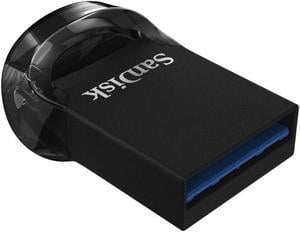
SanDisk Ultra Fit 128GB USB 3.1 Flash Drive
Sandisk
Buy — ASUS's EZ Flash utility and Fedora Media Writer both require a FAT32-formatted USB drive, and a BIOS update is the one fix here that corrects firmware ACPI tables rather than just working around them at the kernel level.
Needed twice over: once to write the Nobara or Fedora installer image, and once for ASUS’s EZ Flash BIOS utility, which corrects the ACPI power-management tables behind several of these panics — the only drawback is that EZ Flash wants it formatted FAT32, so back up anything already on the drive first.Available at Amazon(paid link) — opens Amazon in a new tab. Price and availability shown there.
Sources
Pages consulted while researching this article. None of these are affiliate links.
- ASUS ROG Zephyrus G14 (2022) GA402 - ArchWiki — wiki.archlinux.org
- ROG Zephyrus G14 (2022) GA402 - Gentoo Wiki — wiki.gentoo.org
- ASUS Zephyrus 2022 G14 GA402RJ Crashes / Kernel Panics - Arch Linux Forums — bbs.archlinux.org
- Random kernel panic on boot: fatal exception in interrupt · Issue #3277 · ublue-os/bazzite — github.com
- amd-pstate CPU Performance Scaling Driver — The Linux Kernel documentation — docs.kernel.org
- AMD P-State Fixes & Other Power Management Changes For Linux 6.6 - Phoronix — phoronix.com
- Kernel 6.9 - wrong Max CPU Frequency, AMD Ryzen 9 7940HS - Manjaro Linux Forum — forum.manjaro.org
- AMD Ryzen "Freezing" Bug on GNU/Linux Systems — gist.github.com