2019 Spectre x360 13 Battery: What It Fixes, What It Won't
The questionWhere do these come from?
2019 HP Spectre x360 Convertible 13 battery issues (main charging port not working + only really works when plugged in.
As title says, the main little charging port that diagonal on the top right of the keyboard has stopped working. For a little while, if I held the charger a certain way inside of it, it would work, but now it doesn't work at all.
A new SP04XL or RR04XL battery fixes short runtime and battery alerts on a 2019 Spectre x360 13 — but a failing USB-C port needs a motherboard, not a battery.
A new battery fixes the short runtime and low-battery warnings on a 2019 HP Spectre x360 13. It does not fix a failing USB-C charging port — on this chassis the port is soldered to the system board, so a dead port is a motherboard-level repair, not a battery job. Those are two separate faults with two separate price tags, and the overheating you’re seeing is worth checking against both before you spend on either.
Which 2019 Spectre x360 13 you actually have
HP sold two different “2019” Spectre x360 13 models, and they take different batteries, so the first step is reading the exact model number off the bottom label or under Settings > System > About.
- 13-ap0xxx / 13t-ap000 — the CES 2019 redesign with the gem-cut chassis and 8th-generation “Whiskey Lake” Core i7-8565U. This is the version most 2019 reviews are actually about. PCWorld measured just over 16 hours of looped 4K video playback on this chassis at 250-260 nits brightness, crediting Intel’s low-power display panel for most of the gain over the prior generation.
- 13-aw0xxx — the October 2019 refresh with a 10th-generation “Ice Lake” Core i7-1065G7 in the same body. NotebookCheck’s spec sheet for the 13-aw0013dx lists a 60Wh, 4-cell lithium-ion pack and cites a Laptop Mag runtime of more than 13 hours.
The two share a case design but not a battery. The ap0xxx line uses the SP04XL cell (part number L28764-005); the aw0xxx line uses RR04XL (L60213-AC1, HSTNN-DB9K). Buying the wrong one means a battery that either won’t fit the connector or won’t be recognized by the embedded controller — HP’s firmware checks the battery’s ID chip, and iFixit’s own install notes for the aw0xxx battery guide record at least one case of a replacement getting flagged as a “non-HP battery” and shutting the system down within an hour. Match the part number to your exact model suffix, not just “Spectre x360 13.”
What the battery replacement actually fixes
If your symptoms are short runtime unplugged, a “Consider replacing your battery” or “Plugged in, not charging” message, or a battery icon with a warning triangle, that’s a battery capacity problem, and a new cell resolves it directly. Confirm it first rather than guessing:
- Run
powercfg /batteryreportfrom an elevated command prompt. Windows writes an HTML report comparing Design Capacity to Full Charge Capacity — a pack running well under design capacity has genuinely degraded, per Microsoft’s own battery-care guidance. - Run HP Battery Check inside HP Support Assistant (or HP PC Hardware Diagnostics from the F2 boot menu if the machine won’t start normally). HP’s own support page describes the tool as identifying battery problems and issuing a failure ID you can use to pursue a repair.
If both point to a degraded cell and your unplugged runtime is nowhere near the 13-16 hour range these machines shipped with, the battery is doing exactly what old lithium cells do after six-plus years, and replacing it with the correct part number (SP04XL for ap0xxx, RR04XL for aw0xxx) restores that number. That’s a real, worthwhile fix for that specific symptom.
Why it won’t touch the charging port
A “failing main charging port” is a different failure mode from a tired battery, and it sits in a different part of the machine. iFixit’s own charging-port replacement guide for the 13-aw0xxx chassis is explicit about this: the guide’s introduction states it “recommends replacing the motherboard in its entirety to replace the charging port,” because the USB-C receptacle is soldered directly to the system board rather than living on a separate, swappable daughtercard. There’s no battery, cable, or port-only part that resolves a genuinely dead connector — the fix is a full system-board swap, which iFixit lists as its own separate, harder repair guide alongside the battery, fan, and lower-case guides for this model.
Before concluding the port itself is dead, rule out the cheaper explanations, since HP’s own troubleshooting steps for this chassis are worth running in order:
Just want the recommendation?
Skip to the picks- Try the other USB-C port. The Spectre x360 13 has two Thunderbolt 3 ports, both on the right edge, and both accept charging power — if the second port charges normally, the fault is isolated to the first port’s connector or the trace feeding it, not the whole charging subsystem.
- Swap the cable and the wall adapter for a known-good 65W USB-C PD charger. A worn cable or a failing brick produces the exact same symptoms as a bad port — intermittent charging, charging that stops when the laptop is moved, or charging that only works at certain cable angles.
- Reset the embedded controller: shut down, unplug everything, hold the power button 15 seconds, then power back on. This clears a stuck charging-negotiation state without touching hardware.
If the second port also fails, or the fault follows the laptop across multiple known-good cables and chargers, you’re looking at the soldered-port failure iFixit describes, and no battery purchase changes that outcome.
Is the overheating connected to the port fault?
Not necessarily the same failure, but worth separating rather than assuming. A charging port with a degrading solder joint or connector can cause the system to see unstable input power, which forces the platform to cycle between AC and battery draw more than it should — that shows up as heat during charging specifically. A battery with high internal resistance from age generates its own heat under load, independent of the port. And HP Spectre x360 13 owners have separately reported normal charger warmth being mistaken for a fault, versus real spikes to the high 80s and 90s Celsius within minutes of plugging in, which HP support treats as a thermal or charging-circuit issue rather than a battery one.
Run HP PC Hardware Diagnostics’ Power and thermal component tests before you spend on parts. If temperatures spike specifically when the charger is connected through the suspect port but stay normal on battery power or through the second port, that heat is following the port fault, not the battery — another data point against a battery-only fix.
Repair or retire: the actual decision
A replacement battery is a genuinely worthwhile, low-cost fix for capacity loss and short runtime, and it’s a reasonable DIY job on this chassis — iFixit’s guide lists six Phillips #00 screws holding the battery in, with the bottom case removed first, no glue to fight. It does nothing for a confirmed hardware port failure.
A confirmed dead port means a full system-board replacement, which is one of the most expensive single repairs a laptop this size can need, because you’re effectively replacing the CPU, RAM, and I/O board as one assembly rather than a single connector. On a machine that’s now six-plus years past release, with processors (8th-gen Whiskey Lake or 10th-gen Ice Lake) that are well behind current efficiency and performance, that repair bill routinely lands close to what a comparable new machine costs. That math is the actual answer to “is it worth it”: worth it for the battery alone, almost never worth it for the board.
If your battery report and HP Battery Check both come back clean and the fault really is limited to one USB-C port with the second port working fine, you can keep using the laptop indefinitely by charging exclusively through the good port — that’s a legitimate long-term workaround, not just a stopgap. If both ports are affected, or diagnostics show the board itself is failing, the honest move is to replace the battery only if you’re planning to sell or hand down the laptop as-is, and otherwise put that money toward its replacement instead. HP’s own messaging on this generation is relevant here too: the Spectre x360 line has been folded into the OmniBook Ultra series, so the direct successor to shop for is the OmniBook Ultra Flip 14, not a Spectre-branded model.
For related repair-vs-replace calls on other machines, see MSI GF63 Thin Battery Dead? Replace It or Retire It and HP BN03XL Battery: Why There’s No Bigger Version for how HP’s part-matching and battery-ID checks play out on other Spectre and EliteBook generations.
The bottom line
Two answers, priced differently:
Top pick
Buy this
HP SP04XL Spectre x360 13 Replacement Battery
SP04XL Spectre
It restores the 13-16 hour unplugged runtime this chassis shipped with once diagnostics confirm the fault is capacity loss, not the charging port — but it does not address a port fault at all.
The correct cell for the 13-ap0xxx / 13t-ap000 chassis (the CES 2019 redesign) if HP’s Battery Check or a powercfg report shows genuine capacity loss and your model label reads ap0xxx.Available at Amazon(paid link) — opens Amazon in a new tab. Price and availability shown there.The alternative
It depends
HP RR04XL Spectre x360 13-aw0xxx Replacement Battery
RR04XL Spectre
Right only for the aw0xxx model suffix; installing it in the wrong chassis, or from a listing with the wrong ID chip, has been reported to get flagged as a non-HP battery and shut the system down.
The alternative pack for the October 2019 Ice Lake refresh (13-aw0xxx) — a different cell and controller than SP04XL, so it only fits if your model suffix reads aw0xxx.Available at Amazon(paid link) — opens Amazon in a new tab. Price and availability shown there.
Recommended products
Ordered by how well each one fits the situations above. Each link below is a paid link.
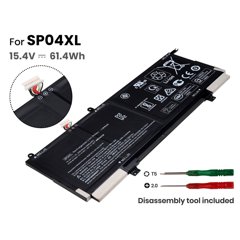
HP SP04XL Spectre x360 13 Replacement Battery
SP04XL Spectre
Buy — It restores the 13-16 hour unplugged runtime this chassis shipped with once diagnostics confirm the fault is capacity loss, not the charging port — but it does not address a port fault at all.
The correct cell for the 13-ap0xxx / 13t-ap000 chassis (the CES 2019 redesign) if HP’s Battery Check or a powercfg report shows genuine capacity loss and your model label reads ap0xxx.Available at Amazon(paid link) — opens Amazon in a new tab. Price and availability shown there.
HP RR04XL Spectre x360 13-aw0xxx Replacement Battery
RR04XL Spectre
It depends — Right only for the aw0xxx model suffix; installing it in the wrong chassis, or from a listing with the wrong ID chip, has been reported to get flagged as a non-HP battery and shut the system down.
The alternative pack for the October 2019 Ice Lake refresh (13-aw0xxx) — a different cell and controller than SP04XL, so it only fits if your model suffix reads aw0xxx.Available at Amazon(paid link) — opens Amazon in a new tab. Price and availability shown there.
Anker Nano II 65W USB-C GaN Charger
Anker Nano
It depends — Useful only as a diagnostic and workaround step before spending on parts — it doesn't fix a confirmed dead port or a degraded battery, it just tells you which one you actually have.
A complement, not a fix: a known-good 65W USB-C PD charger isolates whether the fault is a dying adapter/cable or the port itself, and lets you keep charging through the laptop’s second Thunderbolt 3 port while you decide on a repair.Available at Amazon(paid link) — opens Amazon in a new tab. Price and availability shown there.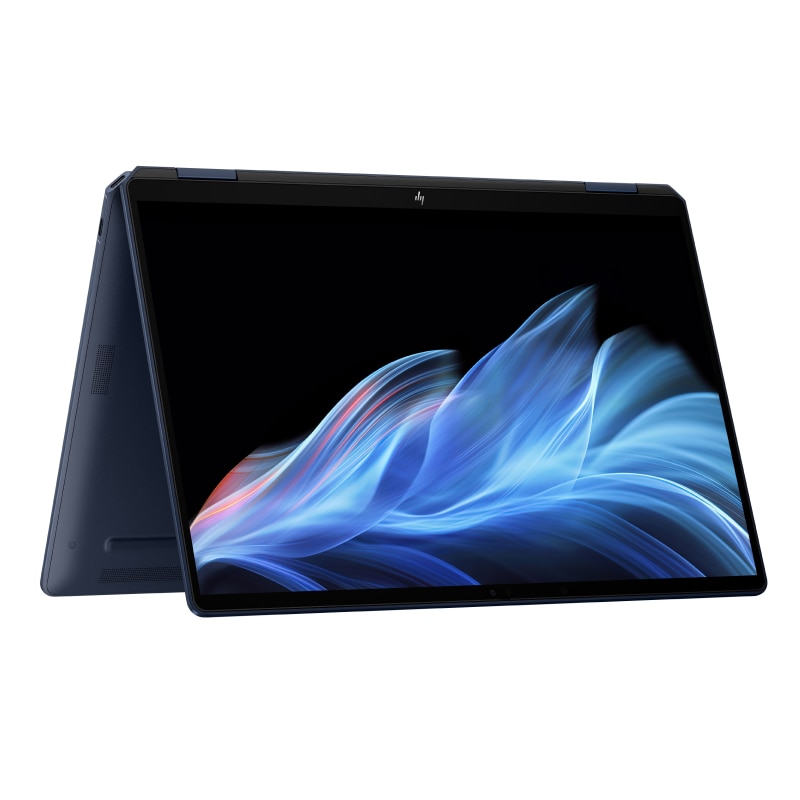
HP OmniBook Ultra Flip 14 2-in-1 Laptop
OmniBook
It depends — Only the right call once a full system-board swap is the actual repair needed, since that single repair on a 2019 chassis routinely costs close to what a comparable new machine does.
The direct successor line once Spectre x360 branding retired — the alternative to a motherboard repair if diagnostics confirm the port itself, not the battery, has failed on a six-year-old chassis.Available at Amazon(paid link) — opens Amazon in a new tab. Price and availability shown there.
Sources
Pages consulted while researching this article. None of these are affiliate links.
- HP Spectre x360 13-aw0xxx Charging Port Replacement - iFixit — ifixit.com
- HP Spectre x360 13-aw0xxx Battery Replacement - iFixit — ifixit.com
- HP Spectre x360 13-aw0xxx Troubleshooting - iFixit — ifixit.com
- HP Spectre x360 13-aw0xxx Repair Help - iFixit — ifixit.com
- HP Spectre x360 13-aw0013dx - NotebookCheck — notebookcheck.net
- HP Spectre x360 13 (2019) review - PCWorld — pcworld.com
- Caring for your battery in Windows - Microsoft Support — support.microsoft.com
- HP Battery Check: Fix laptop battery not charging - HP Support — support.hp.com