Dell U3223QE for Mixed Work and Gaming: The Catch
The questionWhere do these come from?
Dell U3223QE — User needs a 32 inch monitor for mixed work and gaming, with USB-C power delivery and a budget around $1000.
The U3223QE's 90W USB-C and rich contrast suit work well, but its 60Hz panel with no VRR is a real limit once gaming gets competitive.
The Dell U3223QE covers the USB-C and color-accuracy half of this request well — its primary USB-C port delivers a genuine 90W, enough to run and charge most laptops off a single cable — but it caps out at 60Hz with no FreeSync, G-Sync, or any adaptive sync support. The gaming half only works if the games in question don’t need a fast panel. For anything competitive or fast-paced, the monitor that would normally answer “32-inch 4K gaming” fails the USB-C requirement outright, which is the trap this specific combination of specs sets.
What the 60Hz cap actually costs you
TFTCentral’s bench tests put the U3223QE’s response time at 10.7ms gray-to-gray in normal mode and 6.8ms in fast mode, with visible overshoot artifacts once fast mode is enabled. Total input lag measured 16.25ms. None of that is unusual for a 60Hz office panel, and it’s not a defect — it’s what an IPS Black panel tuned for contrast and color, not motion, looks like on a bench. It’s also well behind what a 120Hz+ panel with adaptive sync delivers, where input lag routinely comes in under 10ms and there’s no frame tearing to manage.
Without variable refresh rate, any frame rate above 60fps either gets capped in-game or tears, because the panel has no mechanism to sync to the GPU’s output. That’s the practical cost: not “this monitor can’t game,” but “this monitor can’t game fast.”
Why the obvious 32-inch gaming alternative fails the USB-C requirement
Dell’s own 32-inch 4K gaming monitor, the G3223Q, runs 144Hz with AMD FreeSync Premium Pro and dual HDMI 2.1 ports — exactly what the gaming half of this question wants. It has no USB-C power delivery at all. Its only charging option is USB-A with BC1.2, capped at 2A, which is not enough to run a laptop docking setup off one cable. Tom’s Hardware measured it as carrying the lowest control lag of any 144Hz panel they’d tested at the time, so the gaming performance is real — it’s the USB-C PD requirement that disqualifies it, not the panel.
That matters because it’s the model most searches for “32 inch 4K gaming monitor” will surface first. If USB-C power delivery is a hard requirement — because the point is a single-cable dock for a laptop — the G3223Q doesn’t meet it regardless of refresh rate.
The USB-C power-delivery number that actually matters
Not all “USB-C with power delivery” claims mean the same thing. Most thin-and-light work laptops draw 45–65W under sustained load; 15-inch and creator-class laptops can pull 90–100W. Against that:
- The U3223QE’s primary USB-C port delivers 90W with DisplayPort Alt Mode and data — enough for nearly every ultrabook and most 15-inch laptops running normal workloads. A secondary USB-C port on the bottom edge adds only 15W and skips DP Alt Mode, so it’s for phones and accessories, not a laptop.
- The Gigabyte M32U’s USB-C port is limited to 18W, which TechPowerUp found insufficient to keep up with a laptop under load — it works as a display and USB hub, but the laptop still needs its own charger plugged in.
- The G3223Q, again, has none.
If the single-cable dock is the actual point of “USB-C power delivery,” 90W is the number to check for, not just the presence of a USB-C port.
Just want the recommendation?
Skip to the picksMatching the panel to the kind of gaming you actually do
If gaming means turn-based, story-driven, or strategy titles, the 60Hz cap doesn’t cost much — those genres rarely benefit from refresh rates above 60Hz, and the U3223QE’s IPS Black panel measures 1,983:1 contrast against TFTCentral’s bench, roughly double a standard IPS panel’s ~1,000:1. Dark scenes hold more shadow detail than a typical productivity monitor manages, which is a real gain for anything visually atmospheric.
If gaming means competitive shooters, fast-camera racing games, or anything where frame pacing matters, the missing VRR is the bigger problem than the raw Hz number. Screen tearing above 60fps, plus the fast-mode overshoot TFTCentral documented, will be visible in exactly the situations where it matters most. That’s the case for accepting the G3223Q’s missing USB-C PD, or the M32U’s weak 18W port, and solving laptop power a different way — a separate charger, or a desktop instead of a laptop feeding the monitor.
If the 32-inch size itself, rather than the refresh rate, is the open question, 27 vs 32-Inch 4K Gaming: Let Distance Decide covers how viewing distance settles that independently of any of this.
If 60Hz is the real dealbreaker
Dell’s direct successor, the U3225QE, replaces the 60Hz panel with a 120Hz one that supports VRR, bumps contrast to a rated 3,000:1, and upgrades the USB-C connection to Thunderbolt 4 with up to 140W of delivery — enough headroom for even power-hungry 16-inch laptops. It corrects the U3223QE’s exact weakness for this question.
It doesn’t fully solve motion clarity, though. RTINGS still rates the U3225QE’s response time as bad for fast-moving objects, despite the higher refresh rate and VRR support — the panel technology prioritizes color and contrast over pixel response, and that trade-off carries over from the U3223QE. Going to 120Hz buys smoother frame pacing and no tearing; it doesn’t buy an esports-grade panel.
What the HDR badge doesn’t tell you
The U3223QE carries a VESA DisplayHDR 400 rating, and TFTCentral measured peak SDR brightness at 447.4 cd/m². On paper that looks like a gaming-relevant HDR spec. In practice, RTINGS found the local dimming implementation ineffective, producing muted highlights and weak dark-scene performance in HDR content. Don’t buy this monitor for HDR gaming — buy it for accurate SDR color work, where TFTCentral measured 98.8% DCI-P3 coverage, and treat HDR support as a checkbox rather than a feature you’ll use.
Where the U3223QE pulls ahead for mixed use
The features that make it worth choosing over a faster panel are all on the work side: a built-in auto-switching KVM, RJ45 Ethernet passthrough over the same USB-C cable, four USB-A 3.2 ports at 10Gbps, and factory color accuracy suited to photo or video work. None of that shows up in a gaming spec sheet, but it’s what “mixed work and gaming” is actually asking for when the work half is the daily driver and gaming is the evening use case.
Comparison
| Monitor | Max refresh / VRR | USB-C power delivery | Measured motion / contrast | Verdict |
|---|---|---|---|---|
| Dell U3223QE | 60Hz, no VRR | 90W primary + 15W secondary | 1,983:1 contrast; 16.25ms input lag (TFTCentral) | Buy — work-first, casual gaming |
| Dell G3223Q | 144Hz, FreeSync Premium Pro | None (USB-A BC1.2 only) | Lowest control lag of any 144Hz panel Tom’s Hardware had tested | Skip — no USB-C PD |
| Gigabyte M32U | 144Hz, FreeSync Premium Pro | 18W only | Fast response; PD too weak for laptop load (TechPowerUp) | Consider — bring your own charger |
| Dell U3225QE | 120Hz, VRR | Up to 140W (Thunderbolt 4) | 3,000:1 contrast; RTINGS rates response time “bad” for fast motion | Consider — if 60Hz is the dealbreaker |
Which one to actually buy
If the daily use is a laptop dock first and gaming is an occasional, slower-paced activity, the U3223QE’s combination of 90W charging, KVM, and measured contrast makes it the right fit, with the 60Hz cap as a known and acceptable trade. If competitive or fast-paced gaming is the priority and the laptop can be charged another way, the missing or weak USB-C power delivery on the G3223Q or M32U stops mattering and their refresh rate wins. If neither trade-off is acceptable, the U3225QE is the one model here that doesn’t force the choice — provided the still-weak HDR local dimming and merely “bad, not great” response time are acceptable limits in exchange for VRR and real wattage.
The bottom line
Two of these work — the difference is which situation you are in:
Top pick
Buy this
Dell UltraSharp U3223QE 32 4K USB-C Hub Monitor
Dell
Its 90W USB-C port and TFTCentral-measured 1,983:1 contrast genuinely cover the work and casual-gaming case, but 60Hz with no VRR is a real ceiling.
The right pick if gaming means strategy, story-driven, or turn-based titles and a laptop dock is the daily job; the 60Hz cap and missing VRR mean fast shooters will show tearing or motion blur.Available at Amazon(paid link) — opens Amazon in a new tab. Price and availability shown there.The alternative
Skip this
Dell G3223Q 32 inch 4K Gaming Monitor
Dell
It carries no USB-C power delivery at all, only USB-A BC1.2 charging, so it fails the single-cable docking requirement regardless of its gaming performance.
Delivers the 144Hz and FreeSync Premium Pro this question’s gaming half wants, but there is no way to charge a laptop from it over the same cable.Available at Amazon(paid link) — opens Amazon in a new tab. Price and availability shown there.
Recommended products
Ordered by how well each one fits the situations above. Each link below is a paid link.
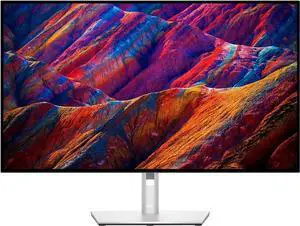
Dell UltraSharp U3223QE 32 4K USB-C Hub Monitor
Dell
Buy — Its 90W USB-C port and TFTCentral-measured 1,983:1 contrast genuinely cover the work and casual-gaming case, but 60Hz with no VRR is a real ceiling.
The right pick if gaming means strategy, story-driven, or turn-based titles and a laptop dock is the daily job; the 60Hz cap and missing VRR mean fast shooters will show tearing or motion blur.Available at Amazon(paid link) — opens Amazon in a new tab. Price and availability shown there.
Dell G3223Q 32 inch 4K Gaming Monitor
Dell
Skip — It carries no USB-C power delivery at all, only USB-A BC1.2 charging, so it fails the single-cable docking requirement regardless of its gaming performance.
Delivers the 144Hz and FreeSync Premium Pro this question’s gaming half wants, but there is no way to charge a laptop from it over the same cable.Available at Amazon(paid link) — opens Amazon in a new tab. Price and availability shown there.
Gigabyte M32U 32 inch 4K 144Hz Monitor
Gigabyte
It depends — TechPowerUp measured its USB-C port at only 18W, too weak to keep a laptop charged under sustained load.
Worth considering if a separate charger for the laptop is already part of the setup and the goal is just a fast 4K panel with USB-C data and KVM.Available at Amazon(paid link) — opens Amazon in a new tab. Price and availability shown there.
Dell UltraSharp U3225QE 32 4K Thunderbolt Hub Monitor
Dell
It depends — It fixes the refresh rate and power delivery gap, but RTINGS still rates its response time as bad for fast motion, so it trades tearing for lingering motion blur rather than eliminating it.
The model to consider if 60Hz is the actual dealbreaker; it adds 120Hz, VRR, and up to 140W of Thunderbolt 4 charging on top of the same contrast-focused panel design.Available at Amazon(paid link) — opens Amazon in a new tab. Price and availability shown there.
Sources
Pages consulted while researching this article. None of these are affiliate links.
- Dell UltraSharp U3223QE Review - TFTCentral — tftcentral.co.uk
- Dell U3223QE Review - RTINGS.com — rtings.com
- Dell G3223Q Review - RTINGS.com — rtings.com
- Dell G3223Q 32-inch 4K Gaming Monitor Review - Tom's Hardware — tomshardware.com
- Gigabyte M32U Review - RTINGS.com — rtings.com
- Gigabyte M32U Review: Connectivity & Power Consumption - TechPowerUp — techpowerup.com
- Dell U3225QE Review - RTINGS.com — rtings.com
- Dell U3223QE review: A winning debut for an IPS Black monitor - PCWorld — pcworld.com