AOC Q27G3XMN for Coding: Good Text, Real Trade-offs
The question this answersWhere do these come from?
Is the AOC Q27G3XMN good for coding?
The AOC Q27G3XMN works well for coding and HDR gaming, but dark scrolling, viewing angles and missing USB-C limit its appeal.
The AOC Q27G3XMN is good for coding if you also want HDR gaming; its text clarity is good, but dark scrolling and narrow viewing angles are real compromises. For a monitor used almost entirely for programming, prioritize text density and laptop connectivity before its Mini LED backlight. RTINGS’ independent review supports that distinction: it finds good office performance but notes black smearing and limited productivity features.
The Q27G3XMN does not deserve a blanket skip. It earns a conditional recommendation for a desk that handles both development and entertainment, rather than an automatic recommendation for every programmer.
Reading code all day: sharp enough, with a workspace limit
AOC specifies a flat, 27-inch VA panel with 2560 × 1440 resolution and 108.8 pixels per inch. Those are the specifications that determine the basic size and density of your editor; the backlight’s 336 dimming zones do not add text detail. AOC’s specifications
RTINGS rates its text clarity as good. That makes the Q27G3XMN a reasonable choice for ordinary editor fonts, terminals and documentation, without suggesting that it matches a higher-resolution screen for fine lettering. RTINGS’ text and office assessment
The practical question is how much you expect to keep visible. Dividing 2560 pixels into two equal columns leaves 1280 pixels per column before window borders, editor sidebars and padding. That can accommodate an editor beside documentation, but a file tree, two code panes and a browser preview will compete for space.
Scaling changes that calculation. At 125% scaling, the nominal logical workspace is approximately 2048 × 1152, calculated by dividing each native dimension by 1.25. That is not a monitor defect: larger interface elements use more of the available screen. Keep the display at its native resolution and enlarge your editor font or interface rather than lowering the output resolution to make text bigger.
If tiny text sharpness is the main reason you are replacing a monitor, compare a higher-density screen before buying this one. If your current problem is simply fitting an editor and documentation side by side, the Q27G3XMN’s resolution is a more plausible fit. The broader guide to 1440p monitors for coding and gaming covers that shared workload.
Dark themes: separate deep blacks from scrolling clarity
The strongest evidence for using this monitor with a dark editor is a measurement that does not require its headline feature: TFTCentral measured approximately 3,500:1 contrast with local dimming disabled. Its updated default-mode testing recorded 3,565:1. Turning local dimming off therefore preserves substantial native contrast. TFTCentral’s contrast measurements
That matters because AOC explicitly documents slight halos around window edges and moving objects when local dimming is enabled. The manual describes this as a characteristic of the backlight, rather than a panel failure. For coding, start with Luminance → Local Dimming → Off and judge whether the desktop looks more consistent. AOC’s user manual
Local dimming and pixel response are separate issues. Disabling dimming can remove its contribution to halos, but it cannot eliminate the VA panel’s slower dark transitions. TFTCentral measured a 5.2 ms average gray-to-gray response at 180Hz with Medium overdrive, while still observing dark smearing on particular transitions. That average is not a guarantee that every dark character transition completes equally quickly. TFTCentral’s response-time testing
Just want the recommendation?
Skip to the picksFor programming, the implication is straightforward: stationary text can look clear while text in motion trails during scrolling. Judge the monitor with your actual syntax colors, background and scrolling speed. A pale theme and a near-black theme exercise different transitions, so neither alone represents every editor setup.
Viewing position matters too. RTINGS reports that the image washes out from the sides. If you frequently show code to someone sitting beside you, or place this screen well off-center, that limitation deserves more weight than its HDR capability. RTINGS’ viewing-angle assessment
Coding by day, HDR gaming afterward
This is the strongest reason to choose the Q27G3XMN. Its Mini LED backlight can improve contrast for entertainment after you finish working, even if you leave local dimming disabled in your editor. AOC specifies a maximum 180Hz refresh rate and DisplayHDR 1000 certification. AOC’s product documentation
Use different settings for those two jobs. A sensible coding baseline is:
- Run the desktop at 2560 × 1440.
- Turn operating-system HDR off for ordinary desktop work and leave the monitor’s simulated HDR Mode off.
- Set Luminance → Local Dimming → Off initially.
- Adjust Luminance → Brightness with a normal document open, rather than using an HDR highlight as your reference.
These are starting recommendations, not a claimed calibration. AOC’s manual distinguishes actual HDR input from its simulated HDR Mode and documents that HDR can lock brightness and other controls. AOC’s menu documentation
DisplayPort supports the monitor’s maximum 180Hz; HDMI tops out at 144Hz. AOC also identifies 180Hz as overclocking and instructs owners to drop to 165Hz if display errors occur. A stable 165Hz desktop is preferable to chasing the advertised maximum through intermittent errors. AOC’s timing specifications
Laptop coding: account for the connections before buying
The Q27G3XMN lacks USB-C and a USB hub, so it cannot provide a single cable for laptop video, charging and peripherals. Plan the video connection, power supply and keyboard connection separately. That is a meaningful inconvenience if you dock and undock throughout the day. RTINGS’ connectivity review
If your laptop has only USB-C outputs, check its documentation for video-output support before choosing an adapter. The adapter must also support your intended resolution and refresh rate; the connector shape alone does not establish either capability.
The supplied stand is more accommodating than the connectivity: AOC lists 130 mm of height adjustment, swivel and portrait rotation, plus a 100 × 100 mm VESA mounting pattern. Try those adjustments before adding a monitor arm. AOC’s ergonomic specifications
Choose the Q27G3XMN when readable QHD text and HDR gaming both matter. For coding alone, its compromises become harder to justify if you need sharper small fonts, consistent off-axis viewing or a tidy single-cable laptop desk.
The bottom line
The verdict:
Top pick
It depends
AOC Q27G3XMN
AOC
Its 27-inch 2560 × 1440 panel combines good tested text clarity with 336-zone local dimming, but independent testing identifies dark smearing and it lacks USB-C connectivity.
Consider it for coding alongside HDR gaming: its QHD screen provides readable text, and Mini LED improves entertainment contrast. Dark-transition smearing and the absence of USB-C make it less compelling for coding alone.Available at Amazon(paid link) — opens Amazon in a new tab. Price and availability shown there.
Recommended products
Ordered by how well each one fits the situations above. Each link below is a paid link.
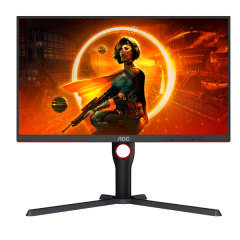
AOC Q27G3XMN
AOC
It depends — Its 27-inch 2560 × 1440 panel combines good tested text clarity with 336-zone local dimming, but independent testing identifies dark smearing and it lacks USB-C connectivity.
Consider it for coding alongside HDR gaming: its QHD screen provides readable text, and Mini LED improves entertainment contrast. Dark-transition smearing and the absence of USB-C make it less compelling for coding alone.Available at Amazon(paid link) — opens Amazon in a new tab. Price and availability shown there.
Sources
Pages consulted while researching this article. None of these are affiliate links.
- RTINGS: AOC Q27G3XMN Review — rtings.com
- AOC Q27G3XMN Official Specifications — aoc.com
- TFTCentral: AOC Gaming Q27G3XMN Review — tftcentral.co.uk
- AOC Q27G3XMN User Manual — aoc.com