4070 Ti Super 16GB vs 5070 12GB: The Full Breakdown
The questionWhere do these come from?
RTX5070 12GB or RTX4070ti S 16GB
Hello everyone, I am planning to build a pc for 1440p gaming and I cant decide between a used 4070ti Super an new 5070. Second hand 4070ti Super costs around $700 and brand new 5070 around $750 at where I live.
Choose the RTX 4070 Ti Super for 1440p gaming and local AI if the used card passes testing; choose the 5070 for warranty and MFG.
Choose the used RTX 4070 Ti Super 16GB if it passes inspection and stress testing — it is the stronger choice for 1440p gaming and local AI work combined. Choose the new RTX 5070 instead when warranty coverage, lower power draw, or Multi Frame Generation matter more than VRAM.
The answer, by condition
Community threads on this pairing argue past each other because each reply optimizes for something different:
| If this is true for you | Pick |
|---|---|
| 1440p gaming with ray tracing and high-res textures pushed hard | RTX 4070 Ti Super |
| High-refresh esports titles | Either — CPU and settings decide first |
| AI training or fine-tuning with model size not yet fixed | RTX 4070 Ti Super (16GB headroom) |
| AI workloads already measured under 12GB, Blackwell-supported framework | RTX 5070 |
| Multi Frame Generation, lower power draw, or a kept 650W-class PSU | RTX 5070 |
| Used card with no return window, or warranty matters most | RTX 5070 |
Specifications
| Specification | RTX 4070 Ti Super 16GB | RTX 5070 12GB |
|---|---|---|
| Memory | 16GB GDDR6X, 256-bit | 12GB GDDR7, 192-bit |
| CUDA cores | 8,448 | 6,144 |
| Architecture | Ada Lovelace | Blackwell |
| Frame generation | DLSS Frame Generation | DLSS Multi Frame Generation |
| TGP / required system power | 285W / 700W | 250W / 650W |
Those are NVIDIA’s reference specifications for the RTX 4070 Ti Super and RTX 5070. Cooler size, factory clocks, connectors, and recommended power can differ on partner cards, so check the page for the exact model being offered.
CUDA-core totals are not directly comparable across Ada and Blackwell. They still illustrate that the 5070 is not a straightforward replacement for the higher-tier 4070 Ti Super; the newer model number alone does not make it faster.
If 1440p gaming is the priority
The RTX 4070 Ti Super is the better conventional gaming card. An independent 16-game review found the RTX 5070 performing approximately like the RTX 4070 Super at 1440p, placing it below the 4070 Ti Super in that test set. The same review found a severe 12GB memory limit in Indiana Jones and the Great Circle with full ray tracing and DLSS Quality at 1440p, while the 16GB card remained operational at those settings. That is an extreme case, not evidence that every game needs more than 12GB, but it demonstrates why memory capacity matters once textures and ray tracing are pushed together. See the TechSpot RTX 5070 benchmarks for the complete test configuration and results.
The RTX 5070 remains capable at 1440p when settings stay within its 12GB frame buffer. It may require reducing texture quality, ray-tracing quality, or both in the heaviest games. Faster GDDR7 cannot substitute for missing capacity once a workload exceeds the available VRAM.
For high-refresh competitive games, both GPUs will usually be limited by the game, CPU, and chosen settings before VRAM becomes the main issue. For demanding single-player games using high-resolution textures and ray tracing, the 4070 Ti Super’s extra memory and stronger conventional performance make it the safer choice.
If coding and AI model training matter
Ordinary coding, compiling, browser work, and running an IDE do not justify one GPU over the other. Local CUDA training, fine-tuning, image generation, and large-model inference do.
The 4070 Ti Super provides 16GB instead of 12GB: 33% more physical VRAM. That can accommodate a larger batch, longer context, higher image resolution, or a model that otherwise produces a CUDA out-of-memory error. Not all advertised memory will be available to a framework, because the desktop, driver, loaded libraries, and other applications consume part of it — no fixed model size can be promised from the capacity number alone.
The RTX 5070 has fifth-generation Tensor Cores and CUDA capability 12.0, versus fourth-generation Tensor Cores and CUDA capability 8.9 on the 4070 Ti Super. Supported Blackwell workloads using newer low-precision paths can benefit, but only if the framework supports them and the workload fits in 12GB. Do not compare NVIDIA’s headline AI TOPS figures as though they were a universal training benchmark; different precision modes and software paths can produce very different results.
Just want the recommendation?
Skip to the picksFor experimental local AI where model fit is uncertain, capacity is the more dependable advantage: choose the 4070 Ti Super. If every planned workload has already been measured below 12GB and explicitly benefits from Blackwell, the 5070 becomes defensible.
If frame-generation latency worries you
The RTX 5070’s exclusive advantage is Multi Frame Generation. The 4070 Ti Super can generate one intermediate frame, while Blackwell can generate multiple. NVIDIA’s technical explanation confirms these are interpolated from traditionally rendered frames rather than additional game-simulation updates — a higher displayed FPS counter does not mean mouse input is being processed at that same rate. NVIDIA’s DLSS 4 technical report also describes Reflex as a separate latency-reduction stage.
For a competitive game, use these settings:
- Set Frame Generation or Multi Frame Generation to Off in the game.
- Set NVIDIA Reflex Low Latency to On. Try On + Boost only when the game offers it and the additional power consumption is acceptable.
- Use DLSS Super Resolution: Quality first, then Balanced if more conventionally rendered frames are needed.
- Reduce ray tracing until the base frame rate feels responsive before considering any generated frames.
In Fortnite, NVIDIA documents the exact Reflex path as Settings > Video > Advanced Graphics > NVIDIA Reflex Low Latency in its Reflex and DLSS guidance. Other games place the same option under Graphics or Display.
For slower single-player games, enable Super Resolution first and judge responsiveness before enabling Frame Generation. Multi Frame Generation is useful for motion smoothness and monitor utilization; it is not a remedy for an already sluggish base frame rate.
The 4070 Ti Super is not excluded from all newer DLSS improvements. NVIDIA supports the updated Frame Generation model and transformer Super Resolution on RTX 40-series cards, but reserves Multi Frame Generation for RTX 50-series hardware. In compatible games, the override is under NVIDIA app > Graphics > Program Settings > Driver Settings. NVIDIA provides the supported modes and exact procedure in its DLSS override instructions.
If the 4070 Ti Super is used
The used card is the recommendation only if its condition can be verified. Before accepting it:
- Match the serial number on the card, box, and receipt. Check the exact board manufacturer’s warranty policy; transferability cannot be assumed.
- Inspect the PCB, fan blades, screws, and 16-pin power socket. Reject melted plastic, darkened contacts, corrosion, a warped board, or evidence of liquid.
- Open GPU-Z and confirm GeForce RTX 4070 Ti SUPER, 16,384MB GDDR6X, and a 256-bit bus. A 12GB RTX 4070 Ti is a different card.
- Run OCCT’s VRAM test at 80% allocation for 20 minutes, followed by 3D Adaptive for 20 minutes. Stop if there are artifacts, memory errors, driver resets, crashes, burning smells, or abnormal fan noise.
- Log the run through GPU-Z’s Sensors > Log to file option. A screenshot taken at idle does not prove stability under load.
- Confirm that the exact card fits the case. RTX 4070 Ti Super partner models vary substantially in length and slot thickness.
- Use the card maker’s supplied adapter or a PSU cable explicitly approved for that PSU model. Fully seat the 16-pin connector and use the two separate PCIe 8-pin cables specified by NVIDIA when an adapter is required.
If the seller refuses testing, cannot provide a return window, or cannot establish the card’s identity, choose the new RTX 5070 instead. The warranty and known history outweigh the performance difference in that situation.
What this comparison can’t resolve for you
A few points depend on a specific card or workload, not on anything a review settles in advance:
- Fan life and intermittent faults. A 20-minute stress test catches artifacts and throttling, not a fault that appears after an hour.
- Usable VRAM. The OS, driver, and background apps take a share first — no exact usable figure exists for either card.
- Whether a framework uses Blackwell’s low-precision paths. That depends on software support, not the architecture name alone.
The verdict
Choose the RTX 5070 when all four are true: the AI workloads fit within 12GB, Multi Frame Generation is genuinely wanted, a 650W-class system is being retained, and the used 4070 Ti Super carries meaningful condition or warranty risk.
Otherwise, the RTX 4070 Ti Super is the better fit. It offers the stronger 1440p foundation and the more useful memory capacity for local model work without relying on generated frames. If a new card with 16GB is mandatory, move up a class and compare the options in 5070 Ti, 5080 or 9070 XT: Which Wins? rather than accepting 12GB solely to obtain a new warranty.
The bottom line
Neither is wrong; the use case separates them:
Top pick
Buy this
PNY GeForce RTX™ 4070 Ti Super 16GB XLR8 Gaming Verto™ Epic-X RGB™ OC Triple Fan Graphics Card DLSS 3 (ARGB, 256-bit, GDDR6X, PCIe 4.0, HDMI/DisplayPort, incl. Adapter & Support Bracket, 3.3 Slot)
PNY
The article recommends the 16GB RTX 4070 Ti Super for combined 1440p gaming and local AI work because of its stronger conventional performance and greater VRAM capacity, provided the used card passes inspection and stress testing.
This is a specific 16GB, triple-fan 4070 Ti Super that is useful when checking used listings against a real model number. Its drawback is a three-slot, roughly 305mm design, and a used unit still requires condition and warranty checks.Available at Amazon(paid link) — opens Amazon in a new tab. Price and availability shown there.The alternative
It depends
ASUS TUF Gaming GeForce RTX 5070 12GB GDDR7 OC EditionGaming Graphics Card
ASUS
The RTX 5070 is recommended when warranty coverage, 250W power draw, or Multi Frame Generation matters more than VRAM, with AI workloads requiring a measured fit below 12GB and Blackwell software support.
This is the compact two-slot alternative when a new card, lower system-power requirement, and Multi Frame Generation take priority. Its clear drawback for this workload is the 12GB frame buffer.Available at Amazon(paid link) — opens Amazon in a new tab. Price and availability shown there.
Recommended products
Ordered by how well each one fits the situations above. Each link below is a paid link.
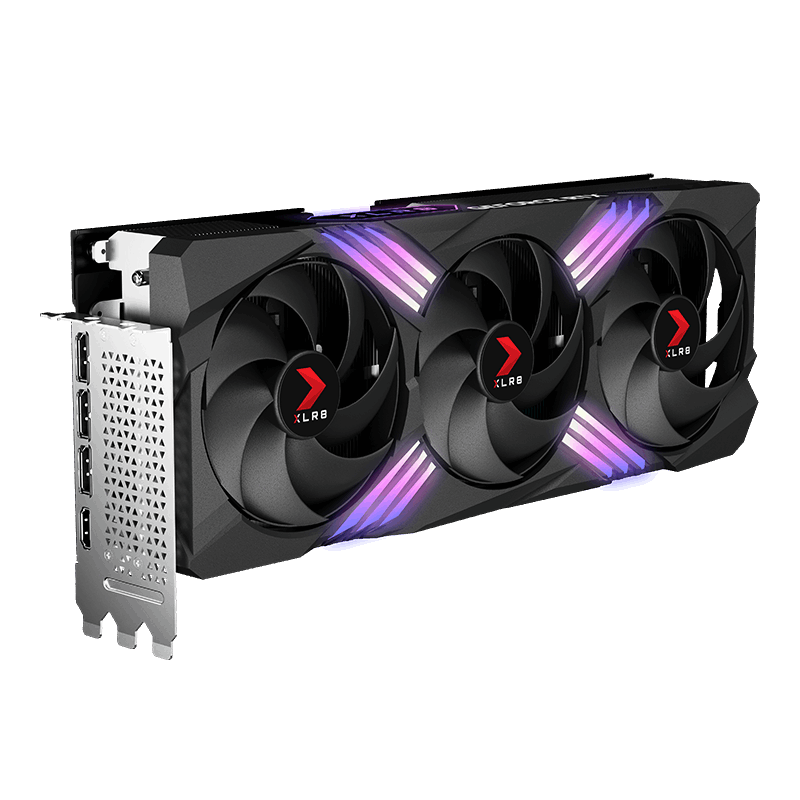
PNY GeForce RTX™ 4070 Ti Super 16GB XLR8 Gaming Verto™ Epic-X RGB™ OC Triple Fan Graphics Card DLSS 3 (ARGB, 256-bit, GDDR6X, PCIe 4.0, HDMI/DisplayPort, incl. Adapter & Support Bracket, 3.3 Slot)
PNY
Buy — The article recommends the 16GB RTX 4070 Ti Super for combined 1440p gaming and local AI work because of its stronger conventional performance and greater VRAM capacity, provided the used card passes inspection and stress testing.
This is a specific 16GB, triple-fan 4070 Ti Super that is useful when checking used listings against a real model number. Its drawback is a three-slot, roughly 305mm design, and a used unit still requires condition and warranty checks.Available at Amazon(paid link) — opens Amazon in a new tab. Price and availability shown there.ASUS TUF Gaming GeForce RTX 5070 12GB GDDR7 OC EditionGaming Graphics Card
ASUS
It depends — The RTX 5070 is recommended when warranty coverage, 250W power draw, or Multi Frame Generation matters more than VRAM, with AI workloads requiring a measured fit below 12GB and Blackwell software support.
This is the compact two-slot alternative when a new card, lower system-power requirement, and Multi Frame Generation take priority. Its clear drawback for this workload is the 12GB frame buffer.Available at Amazon(paid link) — opens Amazon in a new tab. Price and availability shown there.
Sources
Pages consulted while researching this article. None of these are affiliate links.
- GeForce RTX 4070 Family Graphics Cards | NVIDIA — nvidia.com
- GeForce RTX 5070 Family Graphics Cards | NVIDIA — nvidia.com
- Nvidia GeForce RTX 5070 Review | TechSpot — techspot.com
- DLSS 4: Transforming Real-Time Graphics with AI | NVIDIA Research — research.nvidia.com
- Battlefield 6 Available Now With DLSS 4 Multi Frame Generation | NVIDIA — nvidia.com
- NVIDIA App Update Adds DLSS 4 Overrides — nvidia.com