PNY RTX 5080 Slim: Keep It, or Return It?
The questionWhere do these come from?
PNY 5080 Slim - Is it a keeper? (Not looking for tech support)
Hey everyone, looking for some advice on my current GPU situation and potential upcoming build upgrade.
Keep the PNY RTX 5080 Slim only if your case truly needs two slots; otherwise a triple-fan RTX 5080 runs cooler for the same silicon.
The PNY GeForce RTX 5080 Slim is only worth keeping if the reason you bought it — a case that won’t clear a triple-fan card, or a build that needs two GPUs sitting in adjacent PCIe slots — is still true today. If it isn’t, a standard triple-fan RTX 5080 gives you the same GB203 silicon, the same 16GB of GDDR7, and more thermal and acoustic headroom for no performance cost, and that makes the Slim the wrong card to keep once the space constraint that justified it goes away.
That’s the actual decision, and it’s worth being precise about what you’re trading, because the Slim isn’t a cut-down or budget RTX 5080 — it runs the same GB203 die at a factory boost clock of 2730 MHz, 113 MHz above NVIDIA’s reference 5080 clock, across a 256-bit bus with 16GB of 30 Gbps GDDR7, per PNY’s own spec sheet. The difference between this card and every other RTX 5080 on the shelf is entirely in the cooler.
What “Slim” actually means on this card
PNY built the Slim around a shortened version of NVIDIA’s own Founders Edition PCB — TechPowerUp’s teardown confirms it’s the only dual-slot, dual-fan custom RTX 5080 on the market outside NVIDIA’s own FE card. The whole card measures 300 x 150 x 40mm and stays inside a two-slot bracket, cooled by two 120mm fans over six heatpipes and a vapor-chamber baseplate that also draws heat off the memory and VRM. It draws power through a single 16-pin (12V-2x6) connector, PNY rates it at 360W, and the company’s own minimum PSU recommendation is 850W. It carries a 3-year limited warranty.
None of that is a compromise on paper. The compromise is physical: a 360W card squeezed into a 40mm-thick, two-fan cooler has less fin area and less airflow to dissipate the same heat than a 60mm-plus triple-fan cooler carrying the identical GPU. TweakTown’s review still measured it running “cool and quiet” at stock settings, and HotHardware found it stayed relatively cool even overclocked, without touching the stock fan curve — so the vapor chamber and six heatpipes are doing real work. But HotHardware’s own conclusion draws the line plainly: for anyone with standard case clearance, a triple-fan RTX 5080 “will deliver the same performance with more thermal and acoustic comfort.” The Slim isn’t a worse card. It’s a card that spends its cooling budget on width instead of quiet.
The test that actually decides it: measure your case, not your intent
Before you touch the return window, put a tape measure on the case, not on your plans. PNY lists the card at 300 x 150 x 40mm. A two-slot bracket means it needs roughly 41-42mm of clearance including the bracket lip, plus room behind it for the 16-pin cable’s bend radius — PCWorld’s hands-on notes the connector is recessed specifically to make that cable routing easier in tight cases, which matters if your case has a shrouded PSU shelf or a narrow gap between the GPU and a side-panel fan.
If your case is a standard mid-tower or full-tower with a normal three-slot PCIe bracket and nothing else occupying the slot below the GPU, the clearance the Slim buys you is clearance you’re not using. That’s the condition under which HotHardware’s verdict applies directly: return it, and put the money into a triple-fan RTX 5080 that will run cooler and quieter under the same 360W load.
If your case is a genuine SFF or Mini-ITX build — PCWorld tested the Slim in a Corsair 2000D and found it gave “much needed breathing room” next to a Radeon RX 7900 XT that only just scraped in — the two-slot width is the entire reason this card exists, and there is no substitute at this performance tier. TechPowerUp’s teardown is blunt about this too: outside NVIDIA’s own Founders Edition, this is the only dual-slot RTX 5080 you can buy. Keep it.
Just want the recommendation?
Skip to the picksThere’s a third case worth naming: multi-GPU workstation builds for local AI or rendering, where you’re populating two physical x16 slots on a workstation or HEDT board rather than running one card. RTX 50-series has no NVLink, so this isn’t about bridging GPUs — it’s purely about whether two cards’ coolers physically fit in adjacent slots without one choking the other’s intake. A 40mm two-slot card is the only way to do that with full-power RTX 5080 silicon on both cards. If that’s the build you’re planning, the Slim is the correct card, and a triple-fan alternative won’t fit at all.
Why “planning broader build changes” cuts both ways
This is the detail that actually decides the return, and it depends entirely on which direction the build is moving:
If the change is toward a smaller case — downsizing to an ITX or SFF build, or adding a second GPU for local inference or rendering — the Slim gets more useful, not less. Keep it and let the rest of the build change around it.
If the change is toward a bigger case, more radiators, or more case fans because the current build feels cramped or loud, that’s a signal the clearance problem the Slim solves isn’t actually your problem. In a case with normal three-slot clearance, the same 360W GB203 die is available in a triple-fan cooler with more surface area for the same acoustic result reviewers already measured as “cool and quiet” on the two-fan card — meaning a triple-fan card should run cooler still, or just as cool at a lower fan speed.
Either way, decide the case first and the GPU second. Returning the Slim now and rebuying a triple-fan card later, after the case is settled, is cheaper than keeping a card sized for a build you’re about to abandon.
What to verify before the window closes
A few checks take less time than the return itself and tell you whether the card is actually working as reviewed, not just whether you feel like keeping it:
- Boost clock under load. PNY rates this card at 2730 MHz boost. Run a demanding, sustained load — TechPowerUp used path-traced titles like Cyberpunk 2077 for its thermal testing — and confirm the reported clock is in that range, not throttling well below it.
- Sustained temperature. If the card is running noticeably hotter than “cool and quiet” under a load reviewers rated that way, check that the cooler’s mounting screws are torqued evenly and that a case exhaust fan isn’t dumping hot air back across the intake — a two-fan cooler has less margin for a bad thermal contact than a triple-fan one does.
- Coil whine at variable, uncapped frame rates — menus, loading screens, anywhere the GPU isn’t power-limited — which is where it’s most audible and least masked by fan noise.
- Physical clearance, measured with a ruler against the card’s stated 300 x 150 x 40mm and the connector’s bend radius, not against how the last card fit.
- PSU headroom. PNY’s own minimum is 850W; confirm the connector is either a native 12V-2x6 output or a full-seated adapter, since a partially seated high-power connector is a stability and safety issue independent of which RTX 5080 you own.
PNY Slim vs. the triple-fan alternative vs. the Founders Edition
| Verdict | Cooler | The catch | |
|---|---|---|---|
| PNY GeForce RTX 5080 Slim OC | Consider | 2-slot, 40mm, dual 120mm fans, vapor chamber | Same 360W budget through less fin area — right only if the case or slot spacing genuinely needs two slots |
| PNY GeForce RTX 5080 OC (Triple Fan) | Buy | 3-slot, triple fan | Won’t fit SFF/ITX cases or 2-slot multi-GPU spacing |
| NVIDIA GeForce RTX 5080 Founders Edition | Consider | 2-slot flow-through, dual fan, reference clocks | Ships at reference clocks, no factory OC, sold through NVIDIA’s own channel rather than a partner |
The triple-fan card is the default answer for anyone without an actual clearance constraint, because it’s the same GPU with more cooler to spend the same power budget on. The Founders Edition is the other real two-slot option if you want NVIDIA’s own build quality and reference pricing without PNY’s factory overclock — worth considering if you’re set on two slots but don’t need PNY’s specific card. The Slim earns keeping only when the two-slot width is doing real work in your build: an SFF case that won’t take anything wider, or a multi-GPU slot layout that has no room for a third fan row. Outside those two cases, return it while the window is open and buy the cooler that matches the case you actually have.
The bottom line
Worth it either way — the difference is your budget:
Top pick
It depends
PNY GeForce RTX 5080 Slim OC 16GB Dual-Fan Dual-Slot Graphics Card
PNY
HotHardware's own review notes anyone with standard case clearance gets the same performance with more thermal and acoustic comfort from a triple-fan card instead.
The subject of the decision: a full-power RTX 5080 squeezed into a two-slot, 40mm cooler. Right to keep only if your case or slot layout genuinely can’t clear a wider card.Available at Amazon(paid link) — opens Amazon in a new tab. Price and availability shown there.The alternative
Buy this
PNY GeForce RTX 5080 OC Triple Fan Graphics Card
PNY
Delivers the same reviewed performance as the Slim with more thermal and acoustic headroom, at the cost of needing a case with standard three-slot clearance.
The rival to return for: same GB203 die and clocks as the Slim, but a 3-slot triple-fan cooler with more surface area to dissipate the identical 360W load.Available at Amazon(paid link) — opens Amazon in a new tab. Price and availability shown there.
Recommended products
Ordered by how well each one fits the situations above. Each link below is a paid link.

PNY GeForce RTX 5080 Slim OC 16GB Dual-Fan Dual-Slot Graphics Card
PNY
It depends — HotHardware's own review notes anyone with standard case clearance gets the same performance with more thermal and acoustic comfort from a triple-fan card instead.
The subject of the decision: a full-power RTX 5080 squeezed into a two-slot, 40mm cooler. Right to keep only if your case or slot layout genuinely can’t clear a wider card.Available at Amazon(paid link) — opens Amazon in a new tab. Price and availability shown there.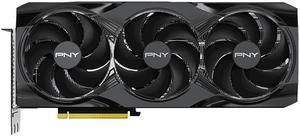
PNY GeForce RTX 5080 OC Triple Fan Graphics Card
PNY
Buy — Delivers the same reviewed performance as the Slim with more thermal and acoustic headroom, at the cost of needing a case with standard three-slot clearance.
The rival to return for: same GB203 die and clocks as the Slim, but a 3-slot triple-fan cooler with more surface area to dissipate the identical 360W load.Available at Amazon(paid link) — opens Amazon in a new tab. Price and availability shown there.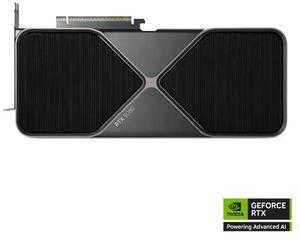
NVIDIA GeForce RTX 5080 Founders Edition Graphics Card
NVIDIA
It depends — Matches the Slim's two-slot form factor but ships at reference boost clocks with no factory OC, and comes through NVIDIA's own stock channel rather than a partner AIB.
The other genuine two-slot RTX 5080 alternative, sold directly by NVIDIA at reference clocks rather than through a partner’s factory overclock.Available at Amazon(paid link) — opens Amazon in a new tab. Price and availability shown there.
Sources
Pages consulted while researching this article. None of these are affiliate links.
- PNY GeForce RTX 5080 Slim Models GPUs — pny.com
- PNY RTX 5080 Slim OC Review - Pictures & Teardown | TechPowerUp — techpowerup.com
- PNY RTX 5080 Slim OC Review - Ray Tracing | TechPowerUp — techpowerup.com
- PNY RTX 5080 Slim OC Review - Temperatures & Fan Noise | TechPowerUp — techpowerup.com
- PNY RTX 5080 Slim OC Review - Cooler Performance Comparison | TechPowerUp — techpowerup.com
- PNY RTX 5080 Slim OC Review - Power Consumption | TechPowerUp — techpowerup.com
- PNY RTX 5080 Slim OC Review - Overclocking & Power Limits | TechPowerUp — techpowerup.com
- PNY RTX 5080 Slim OC Review - Average FPS | TechPowerUp — techpowerup.com