Portable Laptop Stand for Neck Pain
The questionWhere do these come from?
Which portable laptop stands are most practical?
Choose the Roost V3 for cafe work with neck pain only if you also use a separate keyboard and mouse.
The most practical choice for you is a Roost V3, paired with a compact external keyboard and mouse or trackpad. A stand by itself will not fix your neck and back pain if you keep typing on the laptop keyboard, because raising the screen also raises the keyboard into a bad shoulder and wrist position.
The Non-Negotiable Part
For cafe work, the laptop has to stop being one single device. It needs to become a screen on a riser, with input devices on the table in front of you.
That is the whole ergonomic trade. Your screen should come up so you are not folding your neck down. Your keyboard and pointer should stay low and close enough that your elbows can hang near your sides, shoulders relaxed, wrists roughly straight. OSHA’s workstation guidance says laptop users doing prolonged typing should use an external keyboard and input device, and its keyboard guidance is very clear about relaxed shoulders, elbows close to the body, and straight wrists. Cornell’s older but still useful laptop guidance says the same basic thing: when the laptop screen is in a comfortable position, the attached keyboard usually is not.
So if you are imagining a stand that lets you keep typing on the built-in keyboard for hours, skip the purchase. You will just move the pain around. You might save your neck and annoy your shoulders, wrists, or upper back.
For a freelancer in cafes, your working kit should be three pieces: laptop stand, slim keyboard, and small mouse or trackpad. The stand should be tall enough to put the top third of the screen around eye height on a typical cafe table, stable enough that a bump does not feel scary, and compact enough that you actually bring it.
Why Cafe Tables Change the Choice
A home-office stand can be heavy, wide, and beautiful. That is not your problem. Your problem is a small round table, a drink, a bag at your feet, uneven flooring, and maybe one power outlet you had to claim like territory.
This makes several popular laptop stands the wrong answer. Big aluminum Z-hinge stands can be sturdy, but they are often too bulky for daily cafe carry. Adhesive kickstands and tiny folding strips are easy to pack, but they usually do not raise the screen enough for neck pain. Flat folding stands are clean in a bag, but if they give only one height, you are gambling on the table height, chair height, and your torso length.
For you, height range matters more than looking minimal. A useful travel stand should get a 13- to 16-inch laptop several inches off the table, not just tilt the keyboard. The Roost lists a 6- to 11-inch screen lift and a 6-ounce folded package about 13 inches long. Nexstand’s K2 lists 8 height settings, a 5.5- to 11.8-inch height range, 234 g weight, and support for laptops from 10 to 17 inches, with the caveat that the front edge needs to fit its grips. Those numbers are the right category for your problem.
Sturdy Does Not Mean Heavy
With portable stands, “sturdy” is not the same as “metal.” The Roost and Nexstand style uses a plastic truss frame and front hooks. It looks less substantial than aluminum, but the structure is doing the work. The laptop weight loads into the frame, and the front lip stops the machine from sliding forward.
Just want the recommendation?
Skip to the picksThe weak point is not normal use. It is setup quality. If one side is not fully locked, or the front hooks do not catch the laptop edge properly, a cafe bump becomes more exciting than it should be. Before you trust any of these stands with a work laptop, set it up at home ten times, at the lowest, middle, and highest settings. Push lightly on the laptop lid from the sides. Tap the table. Learn what “locked” feels like.
Also check your laptop shape. Some very thin front lips, thick protective cases, rounded edges, or bottom vents can make a stand fit worse. Nexstand explicitly gives a front-edge limit. MOFT warns that its adhesive laptop stand is not recommended for laptops with bottom vents where the stand would block airflow; that warning is about a different MOFT product, but the lesson carries over: do not cover cooling vents just to get a cleaner-looking setup.
What to Pack
The most balanced cafe setup is the Roost V3, a compact keyboard, and a small mouse or trackpad. Roost comes first not because it is magically ergonomic, but because it is tall, light, quick to deploy, and less likely to be left at home. Packability is a pain-control feature. The stand you do not carry helps you zero days per week.
Its downside is real: it is a premium travel stand, and it is not the best choice if you are rough with gear or hate little mechanical setup steps. It also does not remove the need for peripherals. If you try to type on the laptop while it is raised, you will feel wobble and poor arm position.
The Nexstand K2 is the sensible second choice. It is still tall enough to matter, has more height positions on paper, and is light enough for a work bag. Its tradeoff is confidence and finish. Some users and reviewers describe it as less premium or a bit more flexy than Roost-style premium stands. It is still worth buying if you want the ergonomic shape without paying for the Roost.
MOFT Z is the odd one. It folds flat and gives sitting angles plus a standing mode. If your cafe sessions include switching between sitting and standing at a counter, it may fit your life better than a stick-style stand. The bad part is weight and footprint. MOFT’s FAQ lists it around 30 oz, folded at 9.4 by 11 by 0.6 inches. That is portable in a tote, not invisible in a small sling bag. It also takes more table area, which matters in cafes.
Rain Design mBar pro+ is the pick if you value stiffness and simplicity over height adjustment. It is not the correct first recommendation for your stated adjustable-height need, because it has a fixed 5.5-inch lift. But it is thin, light, aluminum, and much less fussy than the truss-style stands. If you are shorter, use a taller cafe chair, or already know that a 5.5-inch lift works for your body, it is a calm fallback.
Before You Buy
Measure your current pain setup once. Sit at a cafe-style table, stack books or a box under the laptop until your neck stops dropping forward, then measure the lift from table to laptop base or screen center. If you need more than about 6 inches of lift, skip tiny tilt stands. If you need close to 10 inches, prioritize Roost or Nexstand. If 5.5 inches is enough and you hate adjustment mechanisms, Rain Design becomes more attractive.
Also decide what pointer you can use in cramped space. A mouse needs side room. A trackpad can sit centered below the keyboard. If your back pain gets worse when you twist or reach, the trackpad may be better for cafe tables even if you prefer a mouse at home.
The recommendations below are ordered for your actual situation: neck and back pain, freelancer mobility, cafe tables, adjustable height, and enough stability to trust with a real work laptop.
The bottom line
Both work; your situation picks one:
Top pick
Buy this
Roost V3 Laptop Stand – Adjustable and Extremely Portable Laptop Stand – PC and MacBook Stand
Roost
The Roost V3 is the article’s first choice for cafe work because it provides a 6- to 11-inch screen lift in a 6-ounce package, paired with an external keyboard and pointer.
Best first choice for a freelancer who will actually carry the setup. It gives meaningful screen lift in a very light, compact form, but you should budget bag space for a separate keyboard and mouse or trackpad.Available at Amazon(paid link) — opens Amazon in a new tab. Price and availability shown there.The alternative
It depends
MOFT Folding Laptop Stand Lap Desk, Portable & Mini Computer Stand Laptop Desk for Travel and Home Office, Ergonomic Design with Adjustable Viewing Angles, Lightweight Computer Cooling Riser, Gray
MOFT
The MOFT Z suits switching between sitting and standing at counters, but its roughly 30-ounce weight and larger table footprint make it less suitable for small bags and tiny cafe tables.
Best if you sometimes work at standing-height counters or want a flat-folding stand rather than a stick-shaped one. It is heavier and takes more table space, so it is less ideal for tiny cafe tables.Available at Amazon(paid link) — opens Amazon in a new tab. Price and availability shown there.
Recommended products
Ordered by how well each one fits the situations above. Each link below is a paid link.
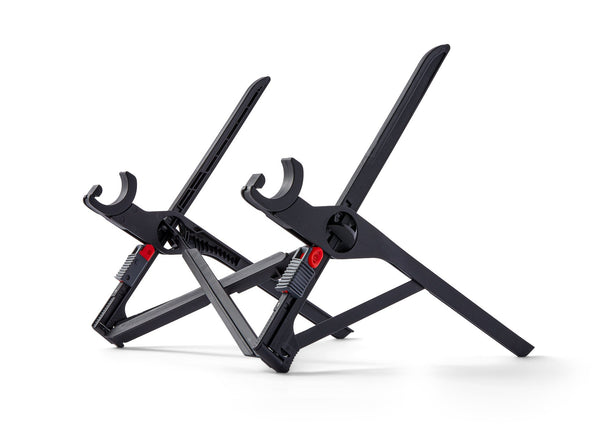
Roost V3 Laptop Stand – Adjustable and Extremely Portable Laptop Stand – PC and MacBook Stand
Roost
Buy — The Roost V3 is the article’s first choice for cafe work because it provides a 6- to 11-inch screen lift in a 6-ounce package, paired with an external keyboard and pointer.
Best first choice for a freelancer who will actually carry the setup. It gives meaningful screen lift in a very light, compact form, but you should budget bag space for a separate keyboard and mouse or trackpad.Available at Amazon(paid link) — opens Amazon in a new tab. Price and availability shown there.
MOFT Folding Laptop Stand Lap Desk, Portable & Mini Computer Stand Laptop Desk for Travel and Home Office, Ergonomic Design with Adjustable Viewing Angles, Lightweight Computer Cooling Riser, Gray
MOFT
It depends — The MOFT Z suits switching between sitting and standing at counters, but its roughly 30-ounce weight and larger table footprint make it less suitable for small bags and tiny cafe tables.
Best if you sometimes work at standing-height counters or want a flat-folding stand rather than a stick-shaped one. It is heavier and takes more table space, so it is less ideal for tiny cafe tables.Available at Amazon(paid link) — opens Amazon in a new tab. Price and availability shown there.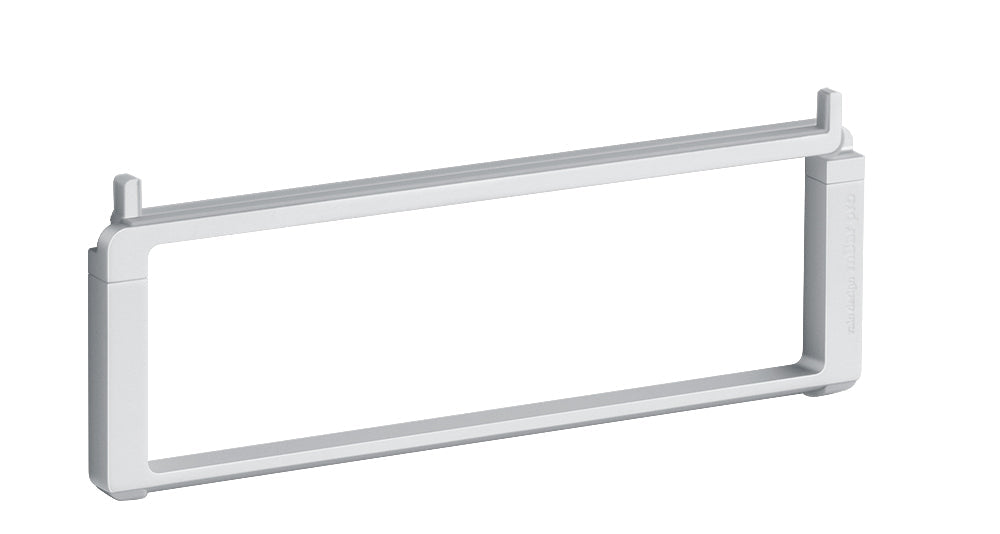
Rain Design mBar Pro Foldable Laptop Stand - Silver (10082)
Rain Design
It depends — The Rain Design is recommended only if a fixed 5.5-inch lift already works for your body and you prefer simplicity over height adjustment.
A sturdy fixed-height fallback, not the main adjustable-height answer. Choose it only if you know a 5.5-inch lift works for your body and you prefer a simple aluminum stand with fewer moving parts.Available at Amazon(paid link) — opens Amazon in a new tab. Price and availability shown there.
Sources
Pages consulted while researching this article. None of these are affiliate links.
- The Best Laptop Stands — wired.com (accessed 2026-08-10)
- Roost Laptop Stand — therooststand.com (accessed 2026-08-10)
- Nexstand K2 Portable and Adjustable Laptop Stand — nexstand.io (accessed 2026-08-10)
- MOFT FAQs — moft.com (accessed 2026-08-10)
- mBar pro+ - Foldable Lightweight Laptop Stand by Rain Design — raindesigninc.com (accessed 2026-08-10)
- OSHA Computer Workstations Purchasing Guide — osha.gov (accessed 2026-08-10)
- OSHA Computer Workstations - Keyboards — osha.gov (accessed 2026-08-10)
- Cornell CUErgo School Ergonomics Guide — ergo.human.cornell.edu (accessed 2026-08-10)