Dell Inspiron 3535 Charger: It's 65W, Not 60W
The questionWhere do these come from?
Hi, I'm looking for a new official 60-watt charger for my Dell Inspiron 153535, as the old cable is broken. (Which website?) Thanks to everyone who read and/or replied to my post. Goodbye (I live in Europe).
Welcome to /r/Dell. Feel free to ask questions that are support related or otherwise on anything related to Dell Technologies & we'll do our best to help you.
Dell's manual lists a 65W adapter for the Inspiron 15 3535, not 60W — here's the exact part, and why the Dell 60W USB-C adapter won't work.
Dell’s own documentation for this laptop specifies a 65W adapter, not 60W — a 19.5V/3.34A power brick with a 4.50mm x 2.90mm barrel connector. If you’ve been searching for an “official 60W charger” for the Inspiron 15 3535 and coming up with mismatched results, that’s why: the number itself is off, and it’s an easy mix-up given how many wattages Dell uses across its lineup (45W, 60W, 65W, 90W, 130W). The good news is the fix is simple once you’re looking for the right part.
The exact spec, from Dell’s manual
The Inspiron 15 3535 owner’s manual lists the power adapter as:
- Output: 19.50 VDC, 3.34A (65W)
- Input: 100 VAC–240 VAC, 50 Hz–60 Hz
- Connector: 4.50mm external diameter, 2.90mm internal diameter, barrel-type with a center pin
That input range is the detail that answers the “in Europe” part of the question on its own. It’s a universal-input adapter — the electronics inside already handle both North American 120V/60Hz and European 230V/50Hz without a step-down transformer or voltage converter. What differs by country is only the plug that goes into the wall, not the brick.
Why “60W” doesn’t match anything for this laptop
There’s a real, current Dell product called the Dell 60W USB-C GaN Ultra Slim AC Adapter, and it’s easy to land on it when searching for an “official 60W Dell charger.” It just isn’t for this laptop. Two things rule it out:
- Dell’s own compatibility list for that adapter covers specific Inspiron 13, 14, and 16 configurations — the Inspiron 15 3535 isn’t on it.
- The 3535’s USB-C port is documented in its external-ports spec as a USB 3.2 Gen 1 Type-C port with no charging or Power Delivery capability listed. The laptop charges exclusively through the barrel-type port. Even if you tracked down the 60W USB-C adapter, there’s nowhere on this laptop to plug it in for charging.
So the “60W” trail is a dead end twice over: wrong wattage for the model, and wrong connector even if the wattage matched.
What to actually buy
| Adapter | Connector | Rated output | Fits the Inspiron 15 3535 | Verdict |
|---|---|---|---|---|
| Dell 65W 4.5mm AC Adapter | 4.5mm x 2.9mm barrel | 19.5V / 3.34A | Matches Dell’s own spec exactly | Buy |
| Dell 60W USB-C GaN Ultra Slim AC Adapter | USB-C, 24-pin | 20V / 3A (60W) | No — port is data-only on this model, and Dell’s own compatibility list excludes it | Skip |
| Generic 45W 4.5mm replacement adapter | 4.5mm x 2.9mm barrel | 19.5V / 2.31A | Physically fits, but under Dell’s rated 3.34A | Consider, light use only |
The 65W 4.5mm adapter is sold directly through Dell’s own accessories store — in the US it’s listed as the “Dell 65W 4.5mm AC Adapter,” and the same product name is used on Dell’s UK store, each carrying a country-specific stock number tied to that storefront. Searching your own country’s Dell site (dell.de, dell.fr, dell.it, dell.es, dell.co.uk, and so on) for that exact product name is the most reliable way to get one shipped with the correct local mains cord already attached, rather than importing a North American-corded unit and adapting the plug afterward.
Just want the recommendation?
Skip to the picksIf you do end up with an adapter that has a different regional cord, that’s not a dealbreaker — the mains cord on this class of Dell adapter is a separate, detachable two-pin lead (not the grounded three-prong “cloverleaf” style used on Dell’s higher-wattage 90W and 130W bricks), so a basic two-pin plug adapter for whichever European socket type you have — Type C or F across most of the continent, Type G in the UK and Ireland — is enough to use it safely. You’re not working around a voltage mismatch, just a pin shape.
A 45W adapter of the same 4.5mm family will physically connect and can run the laptop, but it supplies 2.31A against the 3.34A Dell specifies. Treat one as a spare for light browsing, not a daily driver — under sustained CPU load it can fall behind what the laptop is drawing, which shows up as slower charging or the battery holding steady rather than climbing while the machine is in use.
Watch the tip size, not just the wattage
Several third-party listings advertise “universal” replacement chargers for the Inspiron 3000 series bundling two interchangeable tips: 4.5mm and the older, larger 7.4mm x 5.0mm barrel. The 3535 only accepts the 4.5mm tip — the 7.4mm tip belongs to older Dell Inspiron and Latitude generations and won’t fit this laptop’s port at all, regardless of what wattage is printed on the brick. If a listing’s compatibility list spans a decade of Inspiron models with both tip sizes, confirm which tip is actually included before ordering.
If you want to confirm against your specific unit
Configurations sold under the same “Inspiron 15 3535” name can still vary by processor and region. Dell’s support site can look up the exact adapter shipped with your unit if you enter its Service Tag (found on the bottom of the laptop or in the BIOS) under Dell’s product support page rather than relying on the general model page. That’s worth doing if your unit is a configuration you’re unsure about, since it removes any guesswork about the wattage entirely.
One independent hands-on review of this laptop reports charge times “from flat to full” of around two hours using the bundled adapter — consistent with what a 3.34A, 65W supply should deliver into a 41Wh battery, and a useful sanity check if a replacement adapter you’ve bought is taking noticeably longer than that to fill the battery from empty.
If you’re also chasing down whether a specific replacement part actually matches a Dell laptop’s original spec rather than just the model number, the same question comes up with memory: Dell G15 RAM: Must Crucial Match the Micron Stick? covers what actually has to match and what doesn’t.
The bottom line
Two options, and the revision you own picks one:
Top pick
Buy this
Dell 65W AC Power Adapter 4.5mm Barrel Connector HA65NM130
Dell
Dell's owner's manual for this exact model specifies 65W at 19.5V/3.34A with a 4.50mm x 2.90mm barrel connector.
Matches the Inspiron 15 3535’s own spec exactly: 19.5V/3.34A output through the 4.5mm barrel port, with universal 100-240V input that works on European mains without a converter.Available at Amazon(paid link) — opens Amazon in a new tab. Price and availability shown there.The alternative
Skip this
Dell 60W USB-C GaN Ultra Slim AC Adapter
Dell
The Inspiron 15 3535's USB-C port is documented as data-only with no Power Delivery, and Dell's own compatibility list for this adapter does not include this model.
A genuine, current Dell charger, but not for this laptop — it has nowhere to plug in on the Inspiron 15 3535 and Dell excludes this model from its own compatibility list.Available at Amazon(paid link) — opens Amazon in a new tab. Price and availability shown there.
Recommended products
Ordered by how well each one fits the situations above. Each link below is a paid link.

Dell 65W AC Power Adapter 4.5mm Barrel Connector HA65NM130
Dell
Buy — Dell's owner's manual for this exact model specifies 65W at 19.5V/3.34A with a 4.50mm x 2.90mm barrel connector.
Matches the Inspiron 15 3535’s own spec exactly: 19.5V/3.34A output through the 4.5mm barrel port, with universal 100-240V input that works on European mains without a converter.Available at Amazon(paid link) — opens Amazon in a new tab. Price and availability shown there.
Dell 60W USB-C GaN Ultra Slim AC Adapter
Dell
Skip — The Inspiron 15 3535's USB-C port is documented as data-only with no Power Delivery, and Dell's own compatibility list for this adapter does not include this model.
A genuine, current Dell charger, but not for this laptop — it has nowhere to plug in on the Inspiron 15 3535 and Dell excludes this model from its own compatibility list.Available at Amazon(paid link) — opens Amazon in a new tab. Price and availability shown there.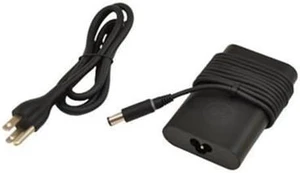
Dell 45W AC Power Adapter 4.5mm Barrel Connector
Dell
It depends — Its 2.31A output is below the 3.34A Dell's manual specifies for this model, which can mean slower charging under sustained CPU load.
Fits the same 4.5mm port and will charge the laptop, but delivers less current than Dell specifies, so it’s better kept as a spare than used as the everyday charger.Available at Amazon(paid link) — opens Amazon in a new tab. Price and availability shown there.
Sources
Pages consulted while researching this article. None of these are affiliate links.
- Inspiron 15 3535 Owner's Manual: Power adapter — dell.com
- Inspiron 15 3535 Owner's Manual: External ports — dell.com
- Dell 65W 4.5mm AC Adapter | Dell USA — dell.com
- Dell 65W 4.5mm AC Adapter | Dell UK — dell.com
- Dell 60W USB-C GaN Ultra Slim AC Adapter | Dell USA — dell.com
- Dell Inspiron 15 3535 Review (Ryzen 5 7520U) | Honest Mid-Range Verdict — vividrepairs.co.uk