MacBook Air to TV Stuck at 30Hz? Fix It
The questionWhere do these come from?
Mac Mini vs Macbook Air connect to TV
Are the experience/resolution the same between connecting mac mini M1 to TV via HDMI cable compared to connecting a macbook air m2 to TV via usb c to HDMI cable?
A 30Hz TV output is usually caused by the adapter or TV input mode, not the MacBook Air, so test the signal chain before replacing the computer.
The MacBook Air is usually not why a 4K TV is stuck at 30Hz; the usual bottleneck is a 4K30 USB-C adapter, an inadequate HDMI cable, or a TV input that has not been switched to its full-bandwidth mode. Do not buy an M1 Mac mini just to fix this: its built-in HDMI output is officially limited to 4K at 60Hz, which a correctly connected MacBook Air can already deliver.
Apple specifies one external display up to 6K at 60Hz for the 2022 M2 MacBook Air, with DisplayPort output carried over USB-C. Notebookcheck also connected the M2 Air to a 4K display over USB-C successfully. Those facts do not guarantee that every HDMI converter will work, but they rule out the idea that the laptop is inherently limited to 4K30. Apple’s M2 MacBook Air specifications confirm the 6K60 display capability.
The products that change the result
| Product | Relationship | Relevant documented capability | Verdict and catch |
|---|---|---|---|
| Cable Matters 48Gbps USB-C to HDMI Adapter for macOS (201488) | The HDMI 2.1 adapter in question | 4K120 on M1, M2 and M3 Macs | Buy; no VRR support |
| Apple USB-C Digital AV Multiport Adapter (A2119) | 4K60 alternative | 3840 × 2160 at 60Hz on a 2020-or-newer MacBook Air | Consider; not a 4K120 solution |
| Anker 341 USB-C Hub (7-in-1, 4K HDMI) | Multiport-hub alternative | 3840 × 2160 at 30Hz | Skip; it preserves the exact limitation being fixed |
| Anker HDMI Cable 8K, 6 ft (A8742) | Certified cable complement | Ultra High Speed, 48Gbps, 4K120 | Consider when the existing cable is unknown or fails testing |
Skip the Anker 341 USB-C Hub for this job: Anker documents its HDMI output as 4K at 30Hz, so it is wrong for anyone trying to escape a 30Hz ceiling. That limitation is checkable in Anker’s specifications for the 341 hub.
The Apple A2119 gets nothing wrong at 4K60, but it is the wrong alternative for a 120Hz-TV owner expecting 4K120. Apple explicitly lists 3840 × 2160 at 60Hz for that adapter when paired with a MacBook Air introduced in 2020 or later. Its older A1621 version tops out at 4K30, so check the tiny model number printed beside the ports before assuming an Apple-branded adapter is fast enough. Apple documents both model numbers and their different limits.
Run this isolation test before buying anything
Start with the MacBook connected directly to the adapter—not through a dock, receiver, switch or soundbar—and follow this order:
- Open Apple menu → System Settings → Displays, select the TV, enable Show all resolutions, and choose 3840 × 2160. Check whether 60Hz or 59.94Hz appears in the Refresh Rate menu. If only 30Hz appears, the Mac and TV have negotiated a low-bandwidth mode; changing playback software will not fix that link.
- Try 1920 × 1080 at 60Hz. If 1080p60 works but 4K60 does not, the connection is functioning but one component cannot carry the required 4K bandwidth.
- Keep the same TV input and HDMI cable, but connect a different source known to output 4K60. If the TV reports 4K60, attention shifts to the USB-C adapter or its connection to the Mac.
- Keep the Mac and adapter, then substitute a certified HDMI cable and test again. A successful result identifies the old cable; no change shifts attention to the adapter or TV configuration.
- Test another HDMI input on the TV and enable that input’s enhanced-bandwidth setting. Some televisions provide their highest bandwidth on only one or two ports.
| Test result | Most likely fault | Next action |
|---|---|---|
| 1080p60 works; 4K60 is absent | Adapter, cable or restricted TV input | Enable full bandwidth, then swap cable and adapter separately |
| Another source gets 4K60 through the same port and cable | USB-C adapter or Mac negotiation | Connect directly and test a documented 4K60 adapter |
| 4K60 appears but desktop text remains fuzzy | TV processing or chroma mode | Select native 4K and label the input as PC |
| No resolution produces a stable picture | Connection, handshake or hardware fault | Reconnect directly, update software and cross-test each component |
Apple similarly recommends bypassing hubs, checking that the adapter supports the requested resolution and refresh rate, and reconnecting or detecting the display when output is missing. Apple’s external-display troubleshooting guide lays out those checks.
When the TV—not the adapter—is enforcing 30Hz
A TV can advertise a restricted HDMI mode until enhanced input bandwidth is enabled. The name is manufacturer-specific: recent Samsung sets commonly call it Input Signal Plus, LG uses HDMI Deep Color, and Sony uses HDMI Signal Format or an Enhanced format option. Enable it for the exact HDMI input carrying the Mac signal, then disconnect and reconnect the adapter so macOS reads the TV’s capabilities again.
RTINGS’ display testing enables the television’s full-bandwidth input setting before checking 4K60 and 4K120. Its published procedure also notes that the menu name changes across manufacturers and model years. RTINGS explains the settings and its resolution-testing method here.
A USB-C to HDMI 2.1 adapter cannot create modes the television does not accept. A 60Hz panel will remain a 60Hz panel, while a 120Hz television may accept 4K120 only through particular HDMI ports. Check the TV’s manual for the supported port and signal format rather than relying on an “HDMI 2.1” label alone.
Just want the recommendation?
Skip to the picksFuzzy text and poor video are different faults
Thirty-hertz output makes pointer movement, scrolling and motion look less fluid; it does not by itself reduce a still image’s pixel count. If macOS reports 3840 × 2160 at 60Hz but text remains smeared, set the TV input label to PC and disable overscan or unnecessary picture processing. Also confirm that macOS is using the TV’s native 3840 × 2160 timing rather than a low-resolution mode.
The deciding signal for desktop text is often 4:4:4 chroma. RTINGS’ measurements show that chroma subsampling can blur colored text, while the same reduction is normally difficult to see in films and television programmes. Its tests switch televisions into PC mode specifically to verify 4:4:4 text reproduction. The RTINGS chroma comparison shows what the resulting blur looks like.
If the desktop is sharp and the TV reports 4K60 but one streaming service still looks soft, the adapter has passed its basic test. Investigate that service’s selected resolution, browser or application restrictions, network throughput and copy-protection requirements instead. Replacing the computer is unlikely to improve a compressed or resolution-limited stream.
Washed-out highlights or strange color call for a separate HDR check. Temporarily switch HDR off in the Mac’s display settings and compare the same material. If SDR looks normal, the physical link is working and the remaining problem is the TV’s HDR mode, tone mapping or the content itself—not a 30Hz hardware ceiling.
What HDMI 2.1 does—and does not—fix
The Cable Matters 201488 is the appropriate purchase when the TV accepts 4K120 and the goal is to remove a 4K30 or 4K60 adapter bottleneck. Cable Matters documents custom macOS firmware, 4K120 support for M1, M2 and M3 chips, and no VRR, FreeSync or G-Sync. Those capabilities and the VRR limitation are stated on the 201488 product documentation.
No independent lab measurement of the 201488’s complete Mac-to-TV mode set was located; its 4K120 figures therefore remain manufacturer-documented rather than independently verified. The narrower 4K60 diagnosis is better supported: Apple officially allows a 6K60 external display on the M2 Air, and an independent Notebookcheck review successfully used a 4K USB-C display.
For a 60Hz television, HDMI 2.1 is not required merely to obtain 4K60. The Apple A2119 is a sensible alternative when its USB-A and pass-through charging ports are useful. The dedicated Cable Matters adapter is the stronger answer when 120Hz matters or when a multiport hub’s shared video path is the suspected bottleneck.
The HDMI cable must match the target too. HDMI Licensing Administrator says a certified Premium High Speed cable covers 4K60 up to 18Gbps, while an Ultra High Speed cable is the certified class for 48Gbps and 4K120. Its cable guide explains both certification levels. Anker model A8742 is a genuine complement rather than another adapter: HDMI’s certification database identifies the six-foot model as an Ultra High Speed cable tested for up to 48Gbps and 4K120. The A8742 certification can be verified directly.
Why an M1 Mac mini is not the repair
Apple specifies the M1 Mac mini’s built-in HDMI port for one display up to 4K at 60Hz. It can simultaneously drive another display up to 6K60 through Thunderbolt, but its HDMI socket does not turn a 30Hz television path into a 120Hz one. Apple’s M1 Mac mini specifications state the 4K60 HDMI ceiling.
That makes the purchase decision straightforward: buy the Cable Matters 201488 when a 4K120 television and the diagnostic tests justify an HDMI 2.1 adapter; choose the Apple A2119 when 4K60 plus charging and USB-A are enough. Do not replace a functioning MacBook Air with an M1 Mac mini solely because the current adapter negotiates 30Hz—the new computer would conceal the faulty link component rather than explain or exceed it.
The bottom line
Two candidates — the symptom tells you which:
Top pick
Buy this
Cable Matters 48Gbps USB-C to HDMI 2.1 Adapter for macOS 201488
Matters
Cable Matters documents model 201488 for 4K120 on M1, M2 and M3 Macs, while explicitly stating that VRR, FreeSync and G-Sync are unsupported.
This is the USB-C-to-HDMI 2.1 adapter the diagnosis is about and the top pick for a 4K120 television. Its drawback is that it does not support VRR, and the model’s high-refresh Mac results are manufacturer-documented rather than independently lab-tested.Available at Amazon(paid link) — opens Amazon in a new tab. Price and availability shown there.The alternative
It depends
Apple USB-C Digital AV Multiport Adapter A2119
Apple USB-C
Apple documents A2119 for 3840 × 2160 at 60Hz on MacBook Air models introduced in 2020 or later.
This is the 4K60 alternative when you also need USB-A and USB-C pass-through charging. Its documented ceiling is 3840 × 2160 at 60Hz, so it is not the choice for a 120Hz TV.Available at Amazon(paid link) — opens Amazon in a new tab. Price and availability shown there.
Recommended products
Ordered by how well each one fits the situations above. Each link below is a paid link.
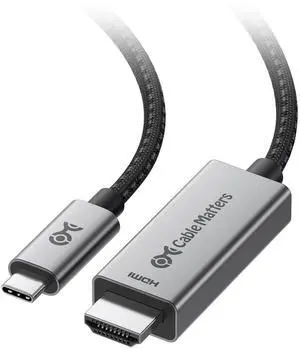
Cable Matters 48Gbps USB-C to HDMI 2.1 Adapter for macOS 201488
Matters
Buy — Cable Matters documents model 201488 for 4K120 on M1, M2 and M3 Macs, while explicitly stating that VRR, FreeSync and G-Sync are unsupported.
This is the USB-C-to-HDMI 2.1 adapter the diagnosis is about and the top pick for a 4K120 television. Its drawback is that it does not support VRR, and the model’s high-refresh Mac results are manufacturer-documented rather than independently lab-tested.Available at Amazon(paid link) — opens Amazon in a new tab. Price and availability shown there.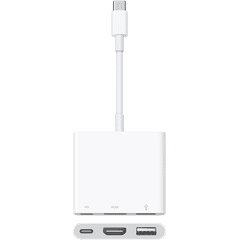
Apple USB-C Digital AV Multiport Adapter A2119
Apple USB-C
It depends — Apple documents A2119 for 3840 × 2160 at 60Hz on MacBook Air models introduced in 2020 or later.
This is the 4K60 alternative when you also need USB-A and USB-C pass-through charging. Its documented ceiling is 3840 × 2160 at 60Hz, so it is not the choice for a 120Hz TV.Available at Amazon(paid link) — opens Amazon in a new tab. Price and availability shown there.
Anker 341 USB-C Hub 7-in-1 4K HDMI A8346
Anker
Skip — Anker’s specification limits the hub’s HDMI port to 4K at 30Hz.
This popular multiport hub is an alternative to a dedicated video adapter, but it preserves the 30Hz fault the reader is trying to fix. Its benefit is additional data, card and Ethernet ports, not faster 4K video.Available at Amazon(paid link) — opens Amazon in a new tab. Price and availability shown there.
Anker HDMI Cable 8K 6 ft A8742
Anker HDMI
It depends — HDMI Licensing Administrator verifies the six-foot A8742 as an Ultra High Speed cable certified for up to 48Gbps and 4K120.
This is a certified cable complement for the Cable Matters adapter when the existing HDMI lead is unknown or fails the swap test. It is an extra purchase that will not improve a link already running reliably at its target mode.Available at Amazon(paid link) — opens Amazon in a new tab. Price and availability shown there.
Sources
Pages consulted while researching this article. None of these are affiliate links.
- MacBook Air (M2, 2022) - Tech Specs — support.apple.com
- Apple MacBook Air M2 Entry Review — notebookcheck.net
- Mac mini (M1, 2020) - Tech Specs — support.apple.com
- If your external display is dark or low resolution — support.apple.com
- About the Apple USB-C Digital AV Multiport Adapter — support.apple.com
- Cable Matters 48Gbps USB-C to HDMI Adapter for macOS — cablematters.com
- Anker 341 USB-C Hub (7-in-1, 4K HDMI) — service.anker.com
- RTINGS Supported Resolutions of TVs — rtings.com