Boox Pen Nib Wearing Down Fast? The Official Fix
The questionWhere do these come from?
Replacement nibs
Hi, do you find any tips, for basic Onyx Boox 5c pen, better than original. I’m dysgraphic so I use one nib for one month, because I press it pretty hard.
Match your exact Boox pen model first, then order Boox's own nib pack — felt and ceramic third-party tips wear faster or risk scratching the screen.
Buy the BOOX Stylus Tips for Pen Plus / Pen2 Pro / Pen3 / Triangular Pen straight from Boox’s own store. It is the nib made for the pen that actually ships in the box with most current Boox tablets, and matching the OEM part to the OEM tip holder is the only way to guarantee the replacement clicks in cleanly instead of fitting loose, scratching, or wobbling. If your device is older — a first-generation Note Air, Nova2, Note2, or the original Max Lumi — the pen it shipped with takes a different, non-interchangeable nib sold separately as Boox’s Standard Stylus Nibs. The two nib families are not the same part, and Boox’s own support documentation is explicit that forcing the wrong one into a tip holder can scratch the barrel or loosen the socket.
Identify your exact pen before ordering
Boox currently builds its passive EMR pen line around four models that share one nib: Pen Plus, Pen2 Pro, Pen3, and the Triangular Pen. According to Boox’s compatibility guide, all four take an identical 1.6mm nib, so one replacement pack covers whichever of the four you own. Pen Plus is the baseline model that ships standard with most current Note Air and Note Max tablets; Pen2 Pro and Pen3 are cosmetic and ergonomic revisions of the same writing mechanism, not a different nib size.
There is one easy way to tell your pen apart from the one style it’s commonly confused with. Boox’s own help documentation gives a simple visual test: if the tip is sharp and glossy like chrome, the pen is the Magnetic Stylus, a different family with its own nib. If the tip is matte and semi-elliptic with a flat end, it’s a Pen Plus-family pen, and the nib pack above is the correct one to order. Checking this before buying avoids the exact mismatch Boox warns will scratch the tip holder or feel scratchy against the screen.
Why “tougher” third-party nibs usually make it worse
Heavy writing pressure wears a nib down through friction — the harder the tip presses against the textured glass, the faster the material at the point wears away. That’s true of any EMR pen, not just Boox’s, and it’s why a search for “tougher” nibs tends to surface felt or ceramic tips marketed as wear-resistant. For a heavy-handed writer, most of those options work against the goal.
Independent testing of Wacom’s own EMR nib lineup — the same underlying technology Boox pens use — found that the plain plastic nib lasts the longest of Wacom’s own options, while felt and flex tips actually increase friction against the surface and wear out faster, not slower, despite being marketed as a premium alternative. The same physics applies on a Boox screen: a softer felt tip drags more, and heavier pressure accelerates that drag.
Just want the recommendation?
Skip to the picksCeramic tips sold as “wear-resistant” replacements carry a separate problem. Independent Boox stylus guides note that ceramic-nibbed pens built for other e-ink tablets — Supernote’s line, in particular — are not validated against the screen coating Boox tablets use, and using one risks scratching the digitizer glass rather than protecting it. A scratched screen is a worse outcome than a worn nib, and it isn’t reversible the way swapping a nib is. The plastic nib Boox already ships is, materially, close to the most wear-resistant option in this category — the fix for fast wear is buying more of the right one and reducing how hard you have to press, not switching material.
Cutting how hard you actually have to press
Nib wear scales with three things: how much pressure you apply, how textured the writing surface is, and how often you write. You can’t change the second one — the etched-glass texture is what gives an e-ink screen its paper-like drag — but the first one is partly adjustable. Boox’s firmware V4.2 update added an adjustable pen brush pressure sensitivity setting inside the handwriting app, letting you tune how much physical force is needed to register full line weight. Turning that sensitivity up means a lighter touch produces the same stroke a harder press used to, which reduces the friction driving nib wear even if your writing habits and grip stay exactly the same. It’s worth checking that your device is updated to at least that firmware version and that the setting is turned up before assuming the nib itself is the whole problem — for someone with dysgraphia whose grip pressure is unlikely to change on demand, this setting does more for nib life than any tip material swap will.
When wear this fast means something else is wrong
Nib life on any EMR pen varies enormously by user — some people go years on one tip, others burn through one in weeks under heavy pressure — so there’s no fixed lifespan to measure against. But there is a point past normal: if a nib is visibly flattened, split, or rattling loose in the barrel within days rather than weeks of moderate use, that’s outside the range explained by pressure alone, and it’s worth raising with Boox support rather than continuing to cycle through tips. A warped or oversized tip holder will chew through replacement nibs regardless of how careful the material choice is, and that’s a hardware fault, not a writing-pressure problem — Boox’s support channel is the right place to get it checked or replaced under warranty.
If matching the exact pen and nib doesn’t solve the wear problem at all, the base pen’s plastic body — not just the tip — may be the wrong shape for a heavy grip. A wood-cased alternative built around a different form factor is worth a look; see Staedtler Noris Digital Jumbo on BOOX: Will It Work? for how that pairing fits Boox devices.
Comparing the nib options
| Verdict | Fits | The catch | |
|---|---|---|---|
| BOOX Stylus Tips (Pen Plus / Pen2 Pro / Pen3 / Triangular) | Buy | Current-gen EMR pens bundled with most Note Air, Note Max, Go, and Tab Ultra tablets | Only fits the matte, flat, semi-elliptic tip style — not the glossy Magnetic Stylus or older pens |
| BOOX Standard Stylus Nibs (5-pack) | Consider | The earlier EMR pen shipped with first-gen Note Air, Nova2, Note2, and original Max Lumi | A different, non-interchangeable nib size from the current Pen Plus family |
| Ceramic/felt “wear-resistant” third-party nibs | Skip | Marketed as universal EMR replacements | Felt increases surface friction and wears faster under pressure; ceramic tips are built for other brands’ screen coatings and risk scratching Boox’s digitizer glass |
The lowest-risk path for someone burning through nibs from heavy writing pressure is still the plain answer: identify which of the two official nib families your pen actually takes, order that one, and pair it with the firmware’s pressure sensitivity setting so less force is needed to write the same line. That combination addresses the actual cause of the wear — friction under pressure — instead of chasing a tip material that promises toughness but, on the evidence, either wears faster or risks the screen it’s supposed to protect.
The bottom line
Two of these work — the difference is which situation you are in:
Top pick
Buy this
Boox Stylus Tips for Pen Plus Pen2 Pro Pen3 Triangular Pen replacement nibs
Boox Stylus
Boox's own compatibility guide confirms all four current-generation EMR pens share an identical 1.6mm nib, making the official pack a guaranteed fit rather than a guess.
The nib Boox makes for its own Pen Plus, Pen2 Pro, Pen3, and Triangular Pen — the pen that ships standard with most current Note Air and Note Max tablets — so it clicks into the stock tip holder without the fit gamble a third-party tip carries.Available at Amazon(paid link) — opens Amazon in a new tab. Price and availability shown there.The alternative
It depends
Boox Standard Stylus Nibs 5-pack replacement
Boox Standard
It fits only the older nib socket size; mismatching it with a current Pen Plus-family holder is exactly the fit problem Boox's own support guide warns can scratch or loosen the tip holder.
Boox’s separate nib pack sized for the earlier generation of EMR pens bundled with older tablets like the first Note Air, Nova2, Note2, and the original Max Lumi — the pack to buy instead if your pen predates the Pen Plus family.Available at Amazon(paid link) — opens Amazon in a new tab. Price and availability shown there.
Recommended products
Ordered by how well each one fits the situations above. Each link below is a paid link.

Boox Stylus Tips for Pen Plus Pen2 Pro Pen3 Triangular Pen replacement nibs
Boox Stylus
Buy — Boox's own compatibility guide confirms all four current-generation EMR pens share an identical 1.6mm nib, making the official pack a guaranteed fit rather than a guess.
The nib Boox makes for its own Pen Plus, Pen2 Pro, Pen3, and Triangular Pen — the pen that ships standard with most current Note Air and Note Max tablets — so it clicks into the stock tip holder without the fit gamble a third-party tip carries.Available at Amazon(paid link) — opens Amazon in a new tab. Price and availability shown there.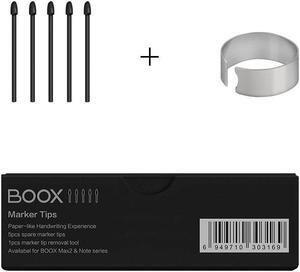
Boox Standard Stylus Nibs 5-pack replacement
Boox Standard
It depends — It fits only the older nib socket size; mismatching it with a current Pen Plus-family holder is exactly the fit problem Boox's own support guide warns can scratch or loosen the tip holder.
Boox’s separate nib pack sized for the earlier generation of EMR pens bundled with older tablets like the first Note Air, Nova2, Note2, and the original Max Lumi — the pack to buy instead if your pen predates the Pen Plus family.Available at Amazon(paid link) — opens Amazon in a new tab. Price and availability shown there.
Sources
Pages consulted while researching this article. None of these are affiliate links.
- Which nib or tip is compatible with my BOOX stylus? – BOOX Help Center — help.boox.com
- BOOX Stylus Tips for Pen Plus / Pen2 Pro / Triangular Pen – The Official BOOX Store — shop.boox.com
- BOOX E Ink Accessories – The Official BOOX Store — shop.boox.com
- Which Stylus Pen Works with BOOX Tablets in Canada? (2026 Compatibility Guide) — e-reader.ca
- 5 Best Stylus for Onyx Boox - What Works & What Doesn't — borednbookless.com
- How Long Do Wacom Nibs Last? (And How You Can Make Them Last Longer!) — drawingbyte.com
- BOOX Releases Firmware V4.2 with EinkWise, Calendar Sync and Better Handwriting — kingnewswire.com
- Pen Plus vs InkSense vs InkSpire: Which BOOX Stylus Do You Need in 2026? — ereaders.co.nz