OLED Text Eye Strain? The 27-Inch 4K IPS Fix: 27G810A-B
The questionWhere do these come from?
OLED is amazing for gaming, but terrible for coding/text?
Hi everyone, I recently bought the ASUS PG27UCDM OLED. Gaming is mind-blowing, but text clarity during coding and browsing is causing severe eye strain.
If OLED text fringing is straining your eyes, the LG UltraGear 27G810A-B is a 27-inch 4K IPS with a normal RGB stripe and 180Hz gaming.
The LG UltraGear 27G810A-B is a sensible replacement if an OLED monitor is giving you eye strain from text: it is a 27-inch 4K IPS panel with a conventional RGB stripe subpixel layout, so Windows text renders as it was designed to, and it still runs 4K at 180Hz. Before you swap, check whether a fix on the OLED is enough, because the cause is the panel’s subpixel structure, not “OLED being harsh”.
Why text looks wrong on many OLED monitors
Text rendering in Windows (ClearType) assumes red, green and blue subpixels side by side in a stripe. Many OLED monitors do not use that. RTINGS explains that older WOLED panels use an RWBG layout, newer third-generation WOLEDs use RGWB, and QD-OLEDs use a triangular layout. PC Monitors describes the result on QD-OLED as thin green lines at the top edge and purple lines at the bottom edge of text and windows. Owners on forums such as Blur Busters report that this fringing and softness tires their eyes during long desktop sessions.
The effect is worst at lower pixel density. A 27-inch 1440p OLED has roughly 109 pixels per inch, while a 27-inch 4K panel has about 163. If your strain comes from a 1440p OLED, 4K density alone helps a lot, whatever the panel type.
What to try before replacing it
- Run Windows’ ClearType Text Tuner (search “Adjust ClearType text”) and pick the sharpest samples. Some owners find this reduces fringing, and others find it makes little difference.
- Raise Windows scaling to 125% or 150% and increase font weight in your browser or editor, so strokes cover more subpixels.
- Lower brightness in a dim room. OLED text on a white page at high brightness is a separate cause of strain from fringing.
- Check whether the strain is flicker. If it persists on a dark theme with fringing visible only on close inspection, the culprit may be brightness or viewing distance rather than the layout.
If none of that helps, the layout is the problem and no setting changes it.
Why the 27G810A-B fits this particular complaint
According to LG’s retail listings, it is a 27-inch 3840x2160 IPS panel, 10-bit, covering about 95% of DCI-P3, with 180Hz at 4K and a dual mode that drops to Full HD at 360Hz. It has DisplayPort and two HDMI inputs, supports G-Sync Compatible and FreeSync Premium, and carries VESA DisplayHDR 400.
Just want the recommendation?
Skip to the picksFor your eyes, the useful part is the combination: a standard stripe layout and 163 ppi. Text is sharp and free of colour fringing at 100% to 150% scaling. For gaming, 4K at 180Hz needs a strong GPU, and the 360Hz Full HD mode is there for esports titles when frames matter more than detail.
What you give up leaving OLED
Be realistic about the trade. IPS has visible backlight limits: no true black, and contrast is far lower than OLED, with dark scenes looking grey in a dark room. DisplayHDR 400 is a baseline tier and will not deliver the highlight impact of an OLED. Pixel response is quick for IPS but will not match OLED motion clarity. If you play mostly dark, cinematic games, you will notice the downgrade. If you spend most hours on documents, code and browsing, the text gain usually outweighs it, which is the reason people make this swap.
No independent lab measurement of this specific model was found while preparing this page, so the figures above are from LG’s listings, not measured data. Check RTINGS or a similar lab for a review before relying on the HDR or response-time claims.
Cheaper or narrower alternatives
| Verdict | What decides it | The catch | |
|---|---|---|---|
| LG UltraGear 27G810A-B | Buy | 27-inch 4K IPS, 180Hz, 360Hz Full HD mode | IPS contrast, HDR 400 only |
| LG UltraGear 27GP950-B | Consider | Older 27-inch 4K Nano IPS at 144Hz | Previous generation, lower refresh |
| Dell S2725QC | Consider | 27-inch 4K IPS at 120Hz, office-first design | Not a gaming-first panel |
Nothing here is worth a skip warning: all three share the same text-friendly stripe layout, and the difference is how much gaming capability you want next to it. The one thing to avoid is another OLED with a non-stripe layout if text is your problem. Newer V-stripe OLED panels are expected to improve this, but check the layout before buying.
Related reading: Dell U3223QE for mixed work and gaming covers the larger 32-inch 4K IPS route.
Who should keep the OLED
If fringing is mild and a tuned ClearType plus 150% scaling removes the strain, keep it and avoid giving up contrast. If you only code or write in a dark theme, the strain is often smaller. The IPS swap is for people whose eyes tire even after tuning, or who use the screen eight hours a day for text.
The bottom line
Two of these work — the difference is which situation you are in:
Top pick
Buy this
LG 27G810A-B 27-inch Ultragear 4K UHD (3840 x 2160) IPS Gaming Monitor, Dual Mode UHD 180Hz or FHD 360Hz, 1ms, NVIDIA G-Sync, AMD FreeSync Premium, VESA DisplayHDR 400, HDMI 2.1, Black
LG
3840x2160 on 27 inches is about 163 ppi with an RGB stripe layout, avoiding the OLED fringing that causes the strain.
The pick: a 27-inch 4K IPS with standard RGB stripe subpixels, 180Hz at 4K and a 360Hz Full HD mode. Drawback: IPS contrast and DisplayHDR 400 are a clear step down from OLED.Available at Amazon(paid link) — opens Amazon in a new tab. Price and availability shown there.The alternative
It depends
Dell 27 Monitor S2725QC, 4K UHD IPS, 120Hz, 99% sRGB, 4ms, FreeSync Premium
Dell
Right when text comfort matters most and gaming is occasional, since its refresh rate tops out at 120Hz.
An alternative for people who mostly work with text: 27-inch 4K IPS at 120Hz. Drawback: office-focused, so gaming features are thinner than on the LG.Available at Amazon(paid link) — opens Amazon in a new tab. Price and availability shown there.
Recommended products
Ordered by how well each one fits the situations above. Each link below is a paid link.
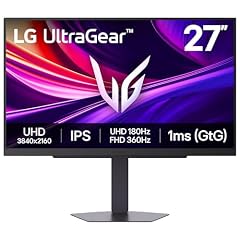
LG 27G810A-B 27-inch Ultragear 4K UHD (3840 x 2160) IPS Gaming Monitor, Dual Mode UHD 180Hz or FHD 360Hz, 1ms, NVIDIA G-Sync, AMD FreeSync Premium, VESA DisplayHDR 400, HDMI 2.1, Black
LG
Buy — 3840x2160 on 27 inches is about 163 ppi with an RGB stripe layout, avoiding the OLED fringing that causes the strain.
The pick: a 27-inch 4K IPS with standard RGB stripe subpixels, 180Hz at 4K and a 360Hz Full HD mode. Drawback: IPS contrast and DisplayHDR 400 are a clear step down from OLED.Available at Amazon(paid link) — opens Amazon in a new tab. Price and availability shown there.
Dell 27 Monitor S2725QC, 4K UHD IPS, 120Hz, 99% sRGB, 4ms, FreeSync Premium
Dell
It depends — Right when text comfort matters most and gaming is occasional, since its refresh rate tops out at 120Hz.
An alternative for people who mostly work with text: 27-inch 4K IPS at 120Hz. Drawback: office-focused, so gaming features are thinner than on the LG.Available at Amazon(paid link) — opens Amazon in a new tab. Price and availability shown there.
Sources
Pages consulted while researching this article. None of these are affiliate links.
- RTINGS: WOLED vs. QD-OLED — rtings.com
- PC Monitors: QD-OLED and WOLED Fringing Issues — pcmonitors.info
- Blur Busters Forums: OLED Issues With Text — forums.blurbusters.com