The Affordable Alternative to Apple's Studio Display
The questionWhere do these come from?
Monitor Recommendations
Hi everyone, I’m looking for a monitor that can match the quality of the Studio Display. My old monitor would display text slightly fuzzy and it would mess with my eyes and cause nausea and headaches.
The Samsung ViewFinity S8's 163 PPI panel still renders Retina-sharp text on a Mac, for far less than Apple's Studio Display — with one real tradeoff.
The Samsung ViewFinity S8 27-inch (sold as the S80PB, S80UA, or S27C804 depending on region) is the monitor to buy when the Apple Studio Display’s panel quality is what you want and its price is the part you can’t get past. It drops from the Studio Display’s 5120×2880, 218-PPI panel to a 3840×2160, 163-PPI one — a real cut in pixel density — but at 27 inches that resolution still lands on an exact 2x scaling multiple on macOS, which is the setting that actually produces Retina-sharp text. The pixel count isn’t what makes the Studio Display look the way it does; the scaling math is, and the ViewFinity S8 does the same math.
Why 163 PPI still looks sharp next to 218 PPI
macOS doesn’t render text at a panel’s native resolution. It renders at a multiple of it and scales down, and the only multiple that produces zero softening is 2x. Set a Studio Display to “looks like 2560×1440” and macOS is drawing at 5120×2880 and mapping it one-to-one onto the panel’s actual pixels — true Retina. Set a ViewFinity S8 to “looks like 1920×1080” and macOS is drawing at 3840×2160 and doing the identical one-to-one mapping. Both are exact pixel-doubled output; neither is interpolated. The explainer at Byte Cellar walks through why this integer-scaling behavior, not raw PPI, is what modern macOS actually depends on for sharp external-display text.
What you lose isn’t sharpness — it’s desktop space at that sharpness. The Studio Display’s 2x mode gives you the equivalent of a 2560×1440 desktop; the ViewFinity S8’s 2x mode gives you the equivalent of 1920×1080. If you push the S8 to “looks like 2560×1440” to match the Studio Display’s usable area, macOS has to use non-integer scaling, and that’s where the softness people associate with cheap 4K monitors actually comes from. For code, documents, and browser windows, 1920×1080-equivalent at 27 inches is still a normal, comfortable working size — it’s just less than what the pricier panel gives you at the same sharpness.
Where the Studio Display’s price is actually going
The gap between the two isn’t padding — it buys specific things the ViewFinity S8 doesn’t have. The Studio Display includes a 12MP Center Stage camera with autoframing and a six-speaker array with force-cancelling woofers and spatial audio, neither of which has an equivalent on the Samsung. It also ships, as standard, with a stand that only tilts roughly 30 degrees and sits lower than many desks need — the height-adjustable, VESA-compatible stand is a separate configuration you select instead of the default, a point reviewers including Rene Ritchie have flagged as the display’s most contested design choice. The ViewFinity S8, by contrast, ships with height, tilt, swivel, and pivot adjustment as standard on most of its SKUs.
So the honest accounting is: you’re paying extra for a camera and an audio system most Mac users already own somewhere else (a laptop camera, a speaker set, headphones), while also paying extra again if you want the ergonomics the Samsung includes by default. If neither the camera nor the spatial audio is why you wanted “Studio Display quality” in the first place, that premium isn’t buying you sharper text — the ViewFinity S8 already gets you that.
Just want the recommendation?
Skip to the picks| Monitor | Panel / PPI | Peak brightness | Stand, standard | Camera / audio |
|---|---|---|---|---|
| Apple Studio Display | 5120×2880 / 218 PPI | 600 nits | Tilt-only; height adjustment is a separate configuration | 12MP Center Stage / 6-speaker spatial audio |
| Samsung ViewFinity S8 27" | 3840×2160 / 163 PPI | 400 nits (350 typical, DisplayHDR 400) | Height, tilt, swivel, pivot | Varies by SKU — some include 5W speakers, others none |
| Dell UltraSharp U2723QE | 3840×2160 / 163 PPI | 400 nits (DisplayNinja measured 2,300:1 contrast) | Height, tilt, swivel, pivot | None built in |
| Samsung ViewFinity S9 27" | 5120×2880 / 218 PPI | 600 nits | Height, tilt, swivel, pivot | Detachable 4K SlimFit camera / 5W×2 speakers |
The Dell UltraSharp U2723QE: the color-accuracy rival
If the reason the Studio Display’s “quality” appealed to you is color accuracy rather than text sharpness, the Dell UltraSharp U2723QE is the closer comparison to the ViewFinity S8, not a complement to it — it’s the other affordable 4K USB-C hub monitor competing for the same slot. DisplayNinja’s testing measured a Delta E average under 2 straight out of the factory calibration, 100% sRGB, 100% Rec.709, and 98% DCI-P3 coverage, along with a 2,300:1 contrast ratio against Dell’s own 2,000:1 spec — independently verified numbers that beat the Samsung’s advertised figures in the same categories. It matches the ViewFinity S8’s 90W USB-C power delivery and height-adjustable stand.
The tradeoff is the parts Samsung bundles that Dell doesn’t: no built-in speakers at all, and no camera. For a MacBook already providing its own camera and running external speakers or headphones, that’s not a real loss. For someone who wanted the ViewFinity S8 partly because a SKU with built-in audio meant fewer cables, it is.
Samsung ViewFinity S9: it matches the spec, not the affordability
The ViewFinity S9 27-inch (LS27C902) is worth naming because it’s the model that actually spec-matches the Studio Display — 5120×2880 at 218 PPI, 600 nits, with a detachable 4K SlimFit camera and dual 5W speakers thrown in, plus the height-adjustable stand as standard rather than a paid add-on. 9to5Mac’s side-by-side found the two displays essentially tied on panel specs, with Samsung’s advantage being that the ergonomic stand isn’t a separate purchase.
What it doesn’t do is fix the problem this search is actually about. Both displays start at close to the same price before Apple’s extra-cost options are added, so the S9 only wins once the comparison includes the stand upgrade Apple charges separately for — it isn’t a budget option in the way the 4K S8 is. If the blocker is the Studio Display’s price full stop, the S9 doesn’t clear that bar; it only solves the narrower problem of Apple pricing ergonomics as an accessory.
Check the exact model code before buying
“ViewFinity S8” isn’t one product — Samsung sells it under different regional model numbers (S27B800, S80UA, S80PB, S80D, S27C804, among others), and features that matter here aren’t consistent across all of them. Samsung’s own spec pages show the S80UA configuration with built-in 5W speakers, while the S80PB configuration sold in the US lists no integrated audio and a tilt-only stand rather than the full height/tilt/swivel/pivot mechanism. The 163-PPI 4K panel and 90W USB-C charging carry across the lineup; built-in speakers, HDR tier, and stand type do not. Match the exact SKU listing against what you actually need before assuming “ViewFinity S8” guarantees a specific feature set.
Which one actually answers the question
If sharp text and a lower cost than the Studio Display are the two things that matter, the 27-inch Samsung ViewFinity S8 is the pick — confirm the SKU includes the full-motion stand if ergonomics matter, since not all of them do. If out-of-box color accuracy matters more than matching the Studio Display’s industrial design, the Dell UltraSharp U2723QE’s measured calibration numbers make it the stronger rival at a comparable cost. If what you actually want is the Studio Display’s exact pixel density and you’re prepared to spend close to Studio Display money to get a bundled stand with it, the ViewFinity S9 is that option — but it isn’t the affordable answer, it’s the spec-matched one. Only keep the Studio Display itself if the Center Stage camera and spatial-audio array are the actual draw, not the screen.
The bottom line
Both work; your situation picks one:
Top pick
Buy this
Samsung 27" ViewFinity S8 (S80UH) High-Resolution Monitor
Samsung
163 PPI at 27 inches still lands on an exact integer HiDPI scale on macOS, so text renders as sharp as the Studio Display's — it just shows a smaller logical desktop at that sharpness.
The subject of this question: a 27-inch 4K panel that hits macOS’s exact 2x HiDPI multiple for Retina-sharp text, ships with a full-motion stand on most SKUs, and costs far less than the Studio Display it’s being weighed against.Available at Amazon(paid link) — opens Amazon in a new tab. Price and availability shown there.The alternative
Skip this
Apple Studio Display: Standard Glass, Tilt-Adjustable Stand
Apple
The height-adjustable, VESA-compatible stand most desks need isn't the default configuration — it's a separate option on top of an already higher starting cost than any 4K alternative.
The rival this question explicitly can’t justify paying for. Its 218 PPI panel, Center Stage camera, and six-speaker array are real upgrades, but the standard stand only tilts and the adjustable one is a separate configuration.Available at Amazon(paid link) — opens Amazon in a new tab. Price and availability shown there.
Recommended products
Ordered by how well each one fits the situations above. Each link below is a paid link.

Samsung 27" ViewFinity S8 (S80UH) High-Resolution Monitor
Samsung
Buy — 163 PPI at 27 inches still lands on an exact integer HiDPI scale on macOS, so text renders as sharp as the Studio Display's — it just shows a smaller logical desktop at that sharpness.
The subject of this question: a 27-inch 4K panel that hits macOS’s exact 2x HiDPI multiple for Retina-sharp text, ships with a full-motion stand on most SKUs, and costs far less than the Studio Display it’s being weighed against.Available at Amazon(paid link) — opens Amazon in a new tab. Price and availability shown there.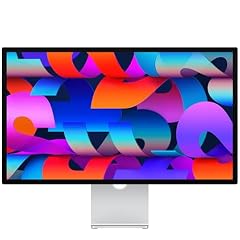
Apple Studio Display: Standard Glass, Tilt-Adjustable Stand
Apple
Skip — The height-adjustable, VESA-compatible stand most desks need isn't the default configuration — it's a separate option on top of an already higher starting cost than any 4K alternative.
The rival this question explicitly can’t justify paying for. Its 218 PPI panel, Center Stage camera, and six-speaker array are real upgrades, but the standard stand only tilts and the adjustable one is a separate configuration.Available at Amazon(paid link) — opens Amazon in a new tab. Price and availability shown there.
Dell UltraSharp U2723QE 27" 4K UHD WLED LCD Monitor - 16:9 - Black, Silver
Dell
It depends — Independently measured out-of-box color accuracy beats the ViewFinity S8's, which matters if color-critical work is the actual reason you wanted Studio Display quality — but it drops built-in audio entirely.
A direct rival to the ViewFinity S8 for the same affordable-4K-USB-C-hub slot. DisplayNinja measured a Delta E under 2 and a 2,300:1 contrast ratio out of the box, beating Samsung’s figures, but it has no built-in speakers or camera at all.Available at Amazon(paid link) — opens Amazon in a new tab. Price and availability shown there.
Samsung 27" ViewFinity S8 (S80HF) Series High-Resolution Monitor
Samsung
It depends — It spec-matches the Studio Display closely enough that the two start near the same price before Apple's stand upgrade, so it solves the ergonomics gap rather than the price problem this question is actually about.
The alternative that matches the Studio Display’s panel almost exactly — same 218 PPI, same 600 nits — and bundles the height-adjustable stand Apple sells separately, plus a detachable 4K camera and built-in speakers.Available at Amazon(paid link) — opens Amazon in a new tab. Price and availability shown there.
Sources
Pages consulted while researching this article. None of these are affiliate links.
- 4K Scaling Is Not a Problem on Modern Macs — Byte Cellar — bytecellar.com
- Studio Display - Technical Specifications - Apple — apple.com
- Apple Studio Display Review — But Why?! - Rene Ritchie — reneritchie.net
- Apple's Studio Display doesn't shine in the light of competition - AppleInsider — appleinsider.com
- Dell U2723QE Review: 4K Monitor With IPS Black Panel - DisplayNinja — displayninja.com
- 27-inch ViewFinity S8 (S80PB) 4K UHD IPS Monitor - Samsung — samsung.com
- 27" ViewFinity S8 (S80UA), UHD, with Speaker - Samsung — samsung.com
- Samsung ViewFinity S8 is a budget 4K display packed with extra features - 9to5Mac — 9to5mac.com