GW2790QT Tops Out at 75Hz: 100Hz 2K Picks for India
The questionWhere do these come from?
Looking for Monitor Recommendations
Hi everyone, I’m looking for some good monitor recommendations. Requirements: 1. A 27-inch 2K screen with at least a 100Hz refresh rate 2. Good brightness and colours 3.
BenQ's own spec sheet caps the GW2790QT at 75Hz; the Dell S2725DC and Samsung ViewFinity S6 hit 100Hz with the same 65W USB-C hub in India.
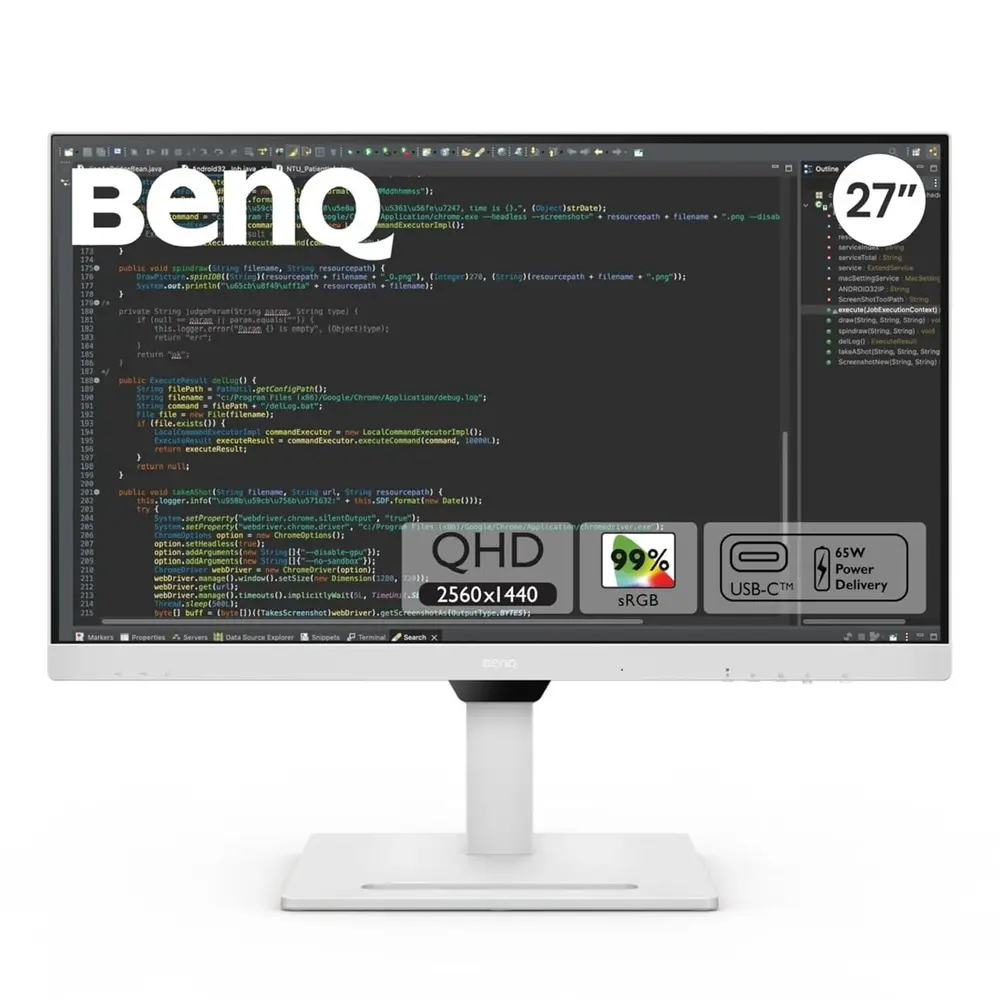
The BenQ GW2790QT checks nearly every box on this list: 27 inches, QHD, USB-C with 65W power delivery, a built-in hub, and it’s sold in India both directly through BenQ’s own store and through major retailers. It misses exactly one requirement — BenQ’s own spec sheet caps the panel’s refresh rate at 75Hz, not 100Hz. If 100Hz is a genuine floor rather than a nice-to-have, two other 27-inch QHD monitors sold in India clear it while keeping the same USB-C docking setup: the Dell 27 Plus QHD USB-C Monitor (S2725DC) at 144Hz, and the Samsung ViewFinity S6 (S60UD) at exactly 100Hz.
Where the GW2790QT actually falls short
Both BenQ’s India spec page and its US equivalent list the GW2790QT’s maximum refresh rate as 75Hz. That’s real and it’s not a typo carried over from a different region’s listing — it’s consistent across BenQ’s own documentation. PCWorld’s Matthew S. Smith tested the panel and described the 75Hz ceiling as “a slight bump over 60Hz, but not enough to make a difference for most people” for anything beyond office work, and MonitorNerds’ review noted the panel is “prone to blurring” during fast motion at that refresh rate.
There’s a naming trap worth flagging directly, because it’s exactly the kind of thing that causes someone to buy the wrong SKU. BenQ also sells a GW2790Q — no “T” — that does hit 100Hz. But to get there, BenQ dropped USB-C entirely: the GW2790Q’s spec sheet lists two HDMI 2.0 ports and one DisplayPort 1.2 port as the only inputs, with no USB-C, no power delivery, and no hub of any kind. It also has a fixed tilt-only stand rather than the GW2790QT’s height/swivel/pivot stand. The GW2790Q is listed on BenQ’s India store too, so it’s an easy monitor to land on by mistake while comparing “GW2790” model numbers without reading past the resolution and screen size.
In other words, between BenQ’s own two 27-inch QHD models, you can have 100Hz or you can have the USB-C hub — not both.
The brightness and color figures, independently measured
The part of the question this article can answer with confidence is brightness and color, because three separate outlets tested the same panel with colorimeters rather than repeating BenQ’s marketing number.
- PCWorld measured a maximum of 370 nits, 100% sRGB coverage, 81% DCI-P3, 79% AdobeRGB, and a 1170:1 contrast ratio.
- IT Pro’s Alun Taylor measured 347 nits, 102.6% sRGB, 72.7% DCI-P3, and a factory Delta E of 1.08 against the sRGB target — accuracy the review called “close to perfect.”
- MonitorNerds measured 364 nits at full brightness, 100% sRGB, 94% DCI-P3, and a factory Delta E of 1.12, improving to 0.45 after a full colorimeter calibration.
Those three numbers cluster tightly around BenQ’s own 350-nit claim, and every outlet found sRGB coverage at or above 100%. On brightness and color specifically, the GW2790QT is doing exactly what the question is asking for — it’s the refresh rate, not the panel quality, that disqualifies it from a strict 100Hz requirement.
Two 27-inch QHD monitors sold in India that clear 100Hz with the same hub
| Monitor | Refresh rate | USB-C PD | Hub extras | Verdict |
|---|---|---|---|---|
| BenQ GW2790QT | 75Hz | 65W | 3× USB-A + 1× USB-C downstream, DP daisy-chain, no Ethernet | Skip if 100Hz is required |
| BenQ GW2790Q | 100Hz | None | No USB-C, no hub at all | Skip — no USB-C |
| Dell 27 Plus QHD USB-C (S2725DC) | 144Hz | 65W | 2× USB-A 5Gbps + 1× USB-C (15W) downstream | Buy |
| Samsung ViewFinity S6 (S60UD) | 100Hz | 90W | 3× USB 3.0 downstream + Ethernet + DP daisy-chain | Consider |
Dell’s India store page lists the S2725DC at 2560×1440, 144Hz, IPS, 350 cd/m², 99% sRGB, with a 65W USB-C upstream port feeding a two-port USB-A hub plus a USB-C downstream port carrying its own 15W of power for a phone or accessory. The stand adjusts for height, tilt, swivel, and pivot, matching the GW2790QT’s ergonomic range. It clears the 100Hz floor by a wide margin without giving up anything on the USB-C or brightness side of the original requirement.
Just want the recommendation?
Skip to the picksSamsung’s India product page puts the ViewFinity S6 S60UD at 2560×1440, 100Hz, 350 cd/㎡, 99% sRGB, with 90W of USB-C power delivery — more headroom than the 65W the original question asks for, useful if the laptop in question is a 16-inch workstation rather than an ultrabook. It also adds two things neither BenQ model has: a built-in Ethernet/LAN port for a wired connection independent of the laptop’s Wi-Fi, and DisplayPort daisy-chain support for feeding a second monitor from one cable.
Whether the built-in USB-C hub is worth paying extra for
This is the second half of the original question, and the honest answer depends on what the hub is replacing.
It earns its keep if you dock one laptop daily and want a single cable for video, power, and two or three peripherals. Plug in one USB-C cable, and the keyboard, mouse, and webcam connected to the monitor’s downstream ports stay attached even after the laptop is unplugged and carried away — that’s the entire point of a hub-equipped monitor over a plain display.
It doesn’t replace a real KVM switch or dock. IT Pro’s review of the GW2790QT found it “can’t be used in KVM mode” because the single USB-C upstream port carries video, data, and power together — there’s no separate upstream data connector to add a second host computer. If the goal is switching one keyboard and mouse between two PCs, none of the monitors here do that; that needs a dedicated KVM switch or dock regardless of which display sits on top of it.
Ethernet is the one feature that splits these three hubs. BenQ’s and Dell’s hubs are USB-only. If a wired connection matters more than the laptop’s own Wi-Fi — for video calls or large file transfers — the ViewFinity S6 is the only one of the three with a LAN port built into the monitor itself.
Daisy-chaining is a genuine hub-only feature worth paying for if a second monitor is already part of the setup. Both the GW2790QT and the ViewFinity S6 support DisplayPort MST daisy-chaining, which feeds a second monitor from one output rather than running two separate cables back to the laptop. The GW2790Q and, per Dell’s spec sheet, the S2725DC do not list this capability.
MonitorNerds’ one complaint about the GW2790QT’s hub was wanting “a higher charging output” than 65W — worth noting if the laptop being docked draws more power under load, which is where the ViewFinity S6’s 90W ceiling has a real advantage.
Which one actually matches every item on the list
If 100Hz is non-negotiable, the GW2790QT is the wrong buy despite getting brightness, color, and the USB-C hub right — its own spec sheet rules it out. The Dell S2725DC is the closer match on paper: it clears 100Hz with the most headroom, keeps the same 65W hub convenience, and its brightness and color specs land in the same range BenQ’s panel measured. The ViewFinity S6 is worth choosing over the Dell specifically for the Ethernet port and the extra 25W of charging capacity, at the cost of sitting right at the 100Hz floor instead of above it. If 100Hz turns out to be a “would be nice” rather than a hard requirement, the GW2790QT’s independently measured color accuracy and brightness make it the strongest eye-care monitor of the group at whatever refresh rate its panel actually runs.
The bottom line
Two good answers to different versions of the question:
Top pick
Skip this
BenQ GW2790QT 27 inch QHD Monitor
BenQ
BenQ's own spec sheet caps its refresh rate at 75Hz, which fails the 100Hz floor this question sets, even though its measured 347-370 nit brightness and 100%+ sRGB color are genuinely excellent.
The monitor this question is actually about: 27-inch QHD, 99% sRGB measured, and a 65W USB-C hub, sold in India via BenQ’s own store.Available at Amazon(paid link) — opens Amazon in a new tab. Price and availability shown there.The alternative
Skip this
BenQ GW2790Q 27 inch 100Hz Monitor
BenQ
To hit 100Hz, BenQ shipped it with two HDMI 2.0 ports and one DisplayPort only — no USB-C, no power delivery, and no hub at all, per its own spec sheet.
BenQ’s other 27-inch QHD model — same resolution, same 100% sRGB claim, and it actually reaches 100Hz, which makes it an easy mix-up with the GW2790QT.Available at Amazon(paid link) — opens Amazon in a new tab. Price and availability shown there.
Recommended products
Ordered by how well each one fits the situations above. Each link below is a paid link.
BenQ GW2790QT 27 inch QHD Monitor
BenQ
Skip — BenQ's own spec sheet caps its refresh rate at 75Hz, which fails the 100Hz floor this question sets, even though its measured 347-370 nit brightness and 100%+ sRGB color are genuinely excellent.
The monitor this question is actually about: 27-inch QHD, 99% sRGB measured, and a 65W USB-C hub, sold in India via BenQ’s own store.Available at Amazon(paid link) — opens Amazon in a new tab. Price and availability shown there.BenQ GW2790Q 27 inch 100Hz Monitor
BenQ
Skip — To hit 100Hz, BenQ shipped it with two HDMI 2.0 ports and one DisplayPort only — no USB-C, no power delivery, and no hub at all, per its own spec sheet.
BenQ’s other 27-inch QHD model — same resolution, same 100% sRGB claim, and it actually reaches 100Hz, which makes it an easy mix-up with the GW2790QT.Available at Amazon(paid link) — opens Amazon in a new tab. Price and availability shown there.Dell 27 Plus QHD USB-C Monitor S2725DC
Dell
Buy — 144Hz clears the 100Hz floor with room to spare, and its 65W USB-C upstream plus USB-A/USB-C downstream hub matches the same single-cable docking, per Dell's India spec page.
An alternative to the GW2790QT that keeps the 65W USB-C hub and adjustable stand but adds real refresh-rate headroom.Available at Amazon(paid link) — opens Amazon in a new tab. Price and availability shown there.Samsung ViewFinity S6 S60UD 27 inch QHD Monitor
Samsung
It depends — Worth it specifically if a wired LAN port or 90W of charging matters more than extra refresh rate, since it sits at exactly 100Hz rather than the Dell's 144Hz.
A rival to both the GW2790QT and the Dell that adds Ethernet and higher charging headroom the BenQ hub doesn’t have.Available at Amazon(paid link) — opens Amazon in a new tab. Price and availability shown there.


Sources
Pages consulted while researching this article. None of these are affiliate links.
- GW2790QT Specifications | BenQ India — benq.com
- GW2790QT Specifications | BenQ US — benq.com
- GW2790Q Specifications | BenQ US — benq.com
- GW2790Q Product Info | BenQ India — benq.com
- BenQ GW2790QT review: A budget upgrade for your home office setup | PCWorld — pcworld.com
- BenQ GW2790QT monitor review: A stylish Type-C monitor for the office | IT Pro — itpro.com
- BenQ GW2790QT Review – Premium 1440p USB-C Monitor for Productivity | MonitorNerds — monitornerds.com
- BenQ GW2790QT review: A Mac office monitor with good looks and a great price | Macworld — macworld.com