Mova V50 Dust Bags Won't Seal to the Dock? The Fix
The questionWhere do these come from?
Mova V50 bag not sealing.
I just got the V50 and I'm seeing that the dust bags are not sealing properly to the dock. I have tried all included bags and non of them is sealing properly.
When every included bag fails to seal the same way, the fault is almost always the dock's seating or a defect, not the bags themselves.
If every dust bag you’ve tried behaves the same way — none of them seating flush against the dock — the bags are almost certainly not the problem. A single bad bag is a manufacturing defect in one piece of plastic and foam; three or four bad bags from the same box, all failing identically, point at the dock side of the interface: the bag isn’t landing where the mechanism expects it, or the dock’s own molded seal has a fit problem that shipped with the unit. Clear any obstruction, reseat an existing genuine bag on the guide rails and latch the lid firmly; if it still won’t seal, request a replacement dock or return the unit rather than buying more bags.
This applies to the MOVA V50 Ultra Complete specifically — the self-emptying variant with the OmniDry mop system and a base station MOVA lists at 458 x 420 x 470 mm, according to NotebookCheck’s coverage of the model. Those are MOVA’s own figures relayed by the outlet rather than an independent lab measurement, which matters later when you’re deciding whether a spec claim is worth trusting on its own.
Why the same fault on every bag changes the diagnosis
MOVA’s own maintenance documentation identifies one specific weak point on this dock design: “the connection point where the bag meets the dock attracts hair clumps, making it the top troubleshooting issue for pet owners,” according to MOVA’s robot vacuum maintenance guide. That’s a real and common cause, but it’s a cause that would eventually clear once you swap bags and clean the port — it wouldn’t explain a brand-new unit where every bag from the box fails the same way from the start. On a unit that’s never had a chance to accumulate hair or debris at that junction, the more likely explanations are a chute obstruction, an installation step that isn’t fully seating, or a dock molding defect.
Rule out an obstruction before you touch the bag again
On a unit fresh out of the box, check the chute the bag sits against for anything left over from packaging — foam inserts, tape, or a protective film are common in auto-empty docks of this type and can hold the bag away from the seal without being obviously visible once the bag is in place. Pull the bag back out and look straight down the port with a flashlight rather than just feeling for resistance.
It’s also worth ruling out moisture at that same surface. MOVA’s own support team has explained why the dock runs a drying cycle after every clean, not just mopping runs: “the airflow generated during cleaning will bring moisture from the air into the dust bag,” which is why the OmniDry cycle fires after vacuum-only runs too, according to a MOVA support reply on a Questions & Feedback thread. If the drying cycle was interrupted or skipped early on this unit, a damp edge at the collar is a plausible reason a bag that looks correctly placed won’t sit flush.
Seat the bag exactly the way the dock expects it
MOVA’s maintenance guide gives an exact sequence for this, and it’s worth following to the letter rather than approximating it: “Lift the lid of the canister. Pull up on the plastic card to remove the old bag… Slide a new bag into place along the guide rails. Press down firmly to close the lid,” per the same maintenance guide. Two details in that sequence are where a seal typically fails without looking wrong at a glance:
Just want the recommendation?
Skip to the picks- The bag has to travel along the guide rails, not just drop into the canister opening. If it’s angled or catches partway, it can look seated while sitting a few millimeters off true.
- The lid needs a firm, deliberate press, not a light close. A lid that’s resting shut rather than latched won’t apply the pressure the seal depends on, and that’s indistinguishable from a “bad bag” until you specifically re-press it.
Do this with each of the bags you’ve already tried before writing any of them off — a bag that failed because the lid wasn’t fully pressed will fail the same way every time until the lid itself is closed correctly, which produces exactly the “all the bags behave the same” pattern.
Genuine bag vs. a generic “compatible” multi-pack
If the bags currently in rotation aren’t MOVA’s own — many V50 households restock from third-party multi-packs that bundle a dust bag in with brushes, filters, and mop pads — that’s worth isolating as its own variable. MOVA’s compatibility listing for its 3.2L bag names the V50 Ultra line specifically among the models it fits, according to the MOVA 3.2L Dust Collection Bag product page; confirm your exact model against the listing in your app before assuming a generic bag is dimensionally identical. MOVA’s own maintenance guide is blunt about the risk of substituting: “third-party bags didn’t perform well during tests and can release fine dust particles back into your home,” per the same maintenance guide.
| Buy / Skip | The thing that decides it | The catch | |
|---|---|---|---|
| MOVA 3.2L Dust Collection Bag (genuine) | Don’t buy more | The existing genuine bags are already sized to the V50 Ultra line’s dock port and rails, so reseat one and press the lid correctly before blaming the bag | A genuine bag mis-seated the same way will fail identically; if correctly seated bags still fail, replace or return the dock |
| Third-party “V50 Ultra Complete compatible” multi-pack bags | Skip | MOVA’s own guide states these bags underperformed in its testing and can leak fine dust back into the room | Cheaper per bag, but a seal that’s already failing is the wrong place to introduce a second unverified variable |
Skip the generic multi-pack while you’re still diagnosing the fault, even if it’s already in the cupboard. Once the dock is confirmed to seal properly with a genuine bag, whether a cheaper compatible bag also seals is a separate question you can test in isolation — testing it now just makes it harder to tell which variable caused which failure.
When it’s a defect in the dock, not anything you can fix at home
If you’ve confirmed there’s no packaging obstruction, pressed the lid firmly with a genuine bag properly aligned on the guide rails, and it still won’t seal — on a unit this new, that’s a molding or assembly defect in the dock’s canister housing, not a maintenance issue. No amount of reseating a correctly sized bag compensates for a port that doesn’t mate flush out of the box. This is the same class of fault covered in Qrevo Edge Dock Failure: Fix It or Return It — a dock-side seating fault on a different brand’s auto-empty base that also isn’t something bag-swapping resolves.
What to have ready before you contact support
MOVA’s support process for a suspected hardware fault follows a consistent pattern. In one documented case on the MOVA support forum, a user with a dock fault that survived sensor cleaning, a software update, and a full reset was asked by support to share the device to a support account, provide the unit’s serial number, upload system logs, and — if possible — send a video of the fault occurring along with the time it happened. Gather all four before you open a ticket rather than after; it’s the same information MOVA will ask for regardless of which specific dock component is at fault, and having it ready up front skips at least one round-trip.
MOVA’s general support line is +1 (888) 308-6159, Monday through Sunday, 9:00–18:00 EDT, with email support at support@mova-tech.com, per MOVA’s common problems guide. On a unit still within its return window, a seal that fails identically across every bag in the box — after you’ve confirmed there’s no obstruction and the lid is latching fully — is grounds to request a replacement dock or return the unit rather than continuing to troubleshoot a hardware tolerance problem at home. One forum user’s Base Station Overview post on a working V50 setup describes the bag as normally “easy to swap,” which is a useful baseline: if swapping yours is anything harder than that, or the lid never gives you a firm, level close, you’re outside normal operation, not just needing to get used to the mechanism.
If you’re also comparing whether to stay on the V50 platform for future bag and dock compatibility, MOVA’s newer self-emptying lineup uses the same general bag-and-rail design; see Mova E50 Pro Ultra or Xiaomi H50 Pro? for how that carries across models if a straight swap or upgrade ends up being the faster fix than an extended RMA process.
The bottom line
Two parts fix this, depending on which failed:
Top pick
Skip this
MOVA V50 Ultra Complete 3.2L Dust Collection Bags
MOVA
MOVA's compatibility list names the V50 Ultra line specifically, and the lid only latches flush when a correctly sized bag sits along its molded guide rails.
Skip this purchase: reseat one of the existing genuine bags on the V50 Ultra line’s dock guide rails; if it still won’t seal, replace or return the dock.Available at Amazon(paid link) — opens Amazon in a new tab. Price and availability shown there.The alternative
Skip this
V50 Ultra Complete Compatible Replacement Parts Kit with Dust Bags
V50
MOVA's own maintenance guide states third-party bags underperformed in its testing and can release fine dust back into the room, which is the wrong variable to add while you're still diagnosing a seal that's already failing.
Bundled multi-packs cost less per bag but mix in brushes, filters, and mop pads from a third-party mold, not MOVA’s own tooling.Available at Amazon(paid link) — opens Amazon in a new tab. Price and availability shown there.
Recommended products
Ordered by how well each one fits the situations above. Each link below is a paid link.
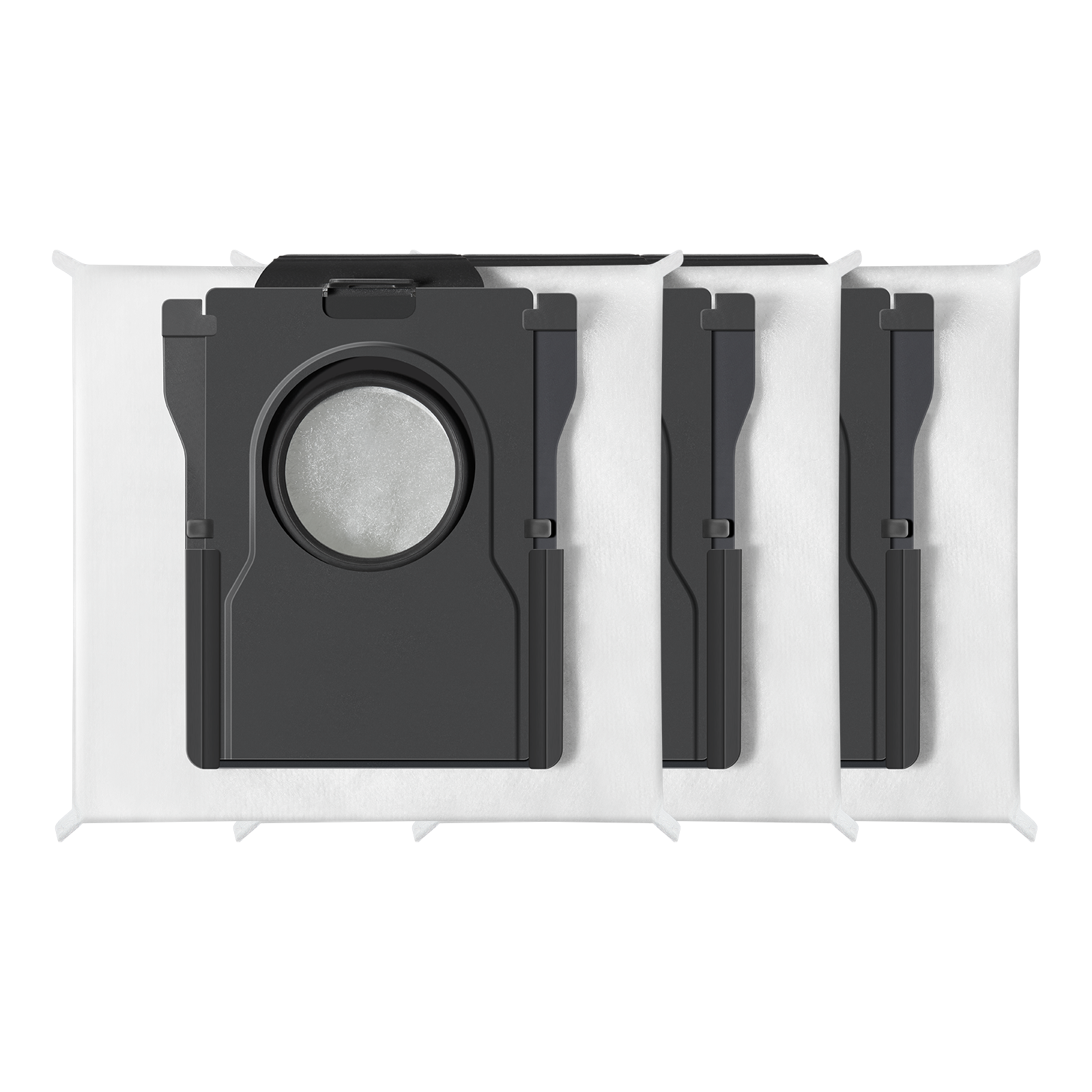
MOVA V50 Ultra Complete 3.2L Dust Collection Bags
MOVA
Skip — MOVA's compatibility list names the V50 Ultra line specifically, and the lid only latches flush when a correctly sized bag sits along its molded guide rails.
Skip this purchase: reseat one of the existing genuine bags on the V50 Ultra line’s dock guide rails; if it still won’t seal, replace or return the dock.Available at Amazon(paid link) — opens Amazon in a new tab. Price and availability shown there.
V50 Ultra Complete Compatible Replacement Parts Kit with Dust Bags
V50
Skip — MOVA's own maintenance guide states third-party bags underperformed in its testing and can release fine dust back into the room, which is the wrong variable to add while you're still diagnosing a seal that's already failing.
Bundled multi-packs cost less per bag but mix in brushes, filters, and mop pads from a third-party mold, not MOVA’s own tooling.Available at Amazon(paid link) — opens Amazon in a new tab. Price and availability shown there.
Sources
Pages consulted while researching this article. None of these are affiliate links.
- How to Clean a Robot Vacuum: The Complete MOVA Maintenance Guide — us.mova.tech
- How to Fix Common Robot Vacuum Problems & MOVA Guide — ca.mova.tech
- MOVA 3.2L Dust Collection Bag — us.mova.tech
- Bag and dust box drying - Questions&Feedback MOVA — forum.mova-tech.com
- V50 won't stay in dock to charge... - Robot Vacuum MOVA — forum.mova-tech.com
- Robot Vacuum Not Charging? Causes, Fixes & Battery Troubleshooting Guide — us.mova.tech
- How to Empty Your Robot Vacuum (And How Often) — us.mova.tech
- Powerful Mova V50 Ultra robot vacuum can climb obstacles and retract its laser tower to mop under your bed — notebookcheck.net