Mac Mini vs MacBook Pro for Developers
The questionWhere do these come from?
My MacBook M2 Pro is dying under the weight of my projects — Mac Mini M4 Pro vs upgrading to M5 Pro MacBook?
Keep the M2 Pro MacBook as your mobile machine and move heavy builds, Docker, simulators, and dev services onto a Mac mini.
The better fix is a dedicated desktop Mac, not replacing the laptop first. Keep the M2 Pro MacBook as the machine you carry, then move the loud, hot, RAM-hungry work onto a Mac mini M4 Pro that you remote into from the couch, desk, or office.
Your laptop is probably not failing because the M2 Pro chip is suddenly weak. It is being asked to be your IDE, browser, Docker host, database box, simulator runner, local AI toy, build server, Slack machine, and portable computer at the same time. A newer M5 Pro MacBook Pro would be faster, but it would still be one machine doing every job, with the same thermal and battery tradeoffs that made this painful in the first place.
The Real Choice Is One Mac Or Two Jobs
For development, the split matters more than the chip generation. A MacBook is excellent at being your keyboard, screen, camera, travel computer, and client machine. A Mac mini is better at sitting on Ethernet, staying plugged in, keeping Docker containers warm, running background services, holding external drives, and doing long builds without turning your lap into the cooling system.
Here is the practical comparison:
| Choice | Best use | Memory ceiling to care about | Main compromise |
|---|---|---|---|
| Keep M2 Pro MacBook + Mac mini M4 Pro | Heavy local dev with remote desktop | Mac mini M4 Pro supports up to 64GB unified memory | Two-machine workflow |
| Replace with 14-inch MacBook Pro M5 Pro | One portable main Mac | M5 Pro supports up to 64GB unified memory | Still all workload on laptop |
| Mac Studio M4 Max | Long creative/AI/dev loads at desk | M4 Max Studio supports up to 128GB unified memory | Less portable than everything |
Apple’s Mac mini M4 Pro spec is the key reason it fits this problem: the M4 Pro model has a 12-core CPU, 16-core GPU, 273GB/s memory bandwidth, Thunderbolt 5, and configurable unified memory up to 64GB. The 14-inch M5 Pro MacBook Pro is stronger on paper, with M5 Pro options up to an 18-core CPU, 20-core GPU, 307GB/s memory bandwidth, and the same 64GB upper memory option. But the MacBook’s strength is portability, not being a permanent dev appliance.
Why The Mac Mini Fixes More Than Speed
If your projects are crushing the M2 Pro, the pain is probably coming from memory pressure and background load, not just compile time. Docker Desktop itself only lists a low minimum memory requirement, but real projects are not Docker Desktop alone. They are Docker plus Postgres, Redis, Elasticsearch or OpenSearch, queues, test runners, browser tabs, an IDE indexer, Xcode, iOS Simulator, Android tooling, and whatever agent or local LLM experiment you forgot was still running.
A Mac mini lets those things stay up without poisoning the laptop experience. Your MacBook can SSH in, use Screen Sharing, use VS Code Remote SSH, or just connect to services running on the mini. If you work with large monitors, the desktop can also become the machine physically attached to them; if you are still deciding how big that display should be, the related monitor problem is covered in The Large Monitor You Want for a MacBook Pro Is Probably Not a TV.
The bad part is real: remote development adds friction. You have to care about networking, file locations, SSH keys, sleep settings, backups, and which machine owns each repo. If you constantly work offline, travel for weeks, or need your full build environment on airplanes and trains, this split will annoy you. In that case, buy the MacBook Pro and configure it with more memory than feels reasonable today.
The Memory Decision Is The Buying Decision
Do not buy this as a CPU upgrade. Buy it as a memory and workload isolation upgrade.
If a MacBook is already buckling under multiple projects, containers, and dev services, treat the Mac mini M4 Pro as a 48GB or 64GB machine, not the base configuration. The base 24GB M4 Pro mini is fast, but for that kind of workload, 24GB is a half-step. It may benchmark well and still feel cramped on a real workday.
Just want the recommendation?
Skip to the picksStorage is different. Internal Apple storage is convenient, but dev storage can be split. Put the OS, apps, active repos, and Docker images on internal storage, then use a fast external SSD for archives, media, old checkouts, VM images, and project dumps. You cannot add memory later. You can add storage later.
If the choice is 64GB memory with smaller internal storage or 24GB memory with larger internal storage, choose memory. The only exception is if your work depends on huge local datasets that must live on the internal SSD for speed.
How To Set Up The Two-Mac Workflow
The clean setup is simple. Put the Mac mini on Ethernet. Keep it awake for network access. Turn on remote login for SSH. Use Screen Sharing only over a trusted network or through a private overlay network. Do not expose VNC or SSH directly to the open internet.
Security matters here because a remote desktop Mac usually has source code, tokens, databases, browser sessions, and signing credentials. Tailscale is a sensible option for private access, but its SSH feature has specific platform and policy requirements, so check the docs before assuming it behaves like plain OpenSSH everywhere. If you use Apple Screen Sharing, keep macOS updated; remote access bugs are exactly the kind of thing you do not want lingering on a machine that stays online all day.
For code, keep repos on the mini when the mini is doing the builds. Do not edit a repo on the MacBook while Docker volumes and watchers are running on the mini against a synced copy. That creates weird file-state bugs. Use git as the handoff, or remote into the mini and work there.
A good default split looks like this:
- MacBook: email, browser, meetings, notes, light edits, travel work, PR review.
- Mac mini: Docker, local databases, Xcode builds, simulators, test suites, local AI, indexing, scheduled jobs.
- External SSD: old project folders, datasets, media, backups, exported build artifacts.
When The M5 Pro MacBook Is The Right Move
Buy the M5 Pro MacBook Pro instead if portability is the job. If you need to run the whole stack away from your desk several days a week, a desktop Mac will feel like a machine you own but cannot use at the moment you need it.
The M5 Pro MacBook Pro also makes sense if your M2 Pro has a bad battery, broken screen, failing keyboard, too little RAM, and poor resale value all at once. Then you are not only solving build pain; you are replacing a worn main computer. In that case, do not buy the lowest-memory M5 Pro just because the chip is new. For Docker, Xcode, simulator-heavy work, and local agents, the safer configuration is 48GB or 64GB.
The tradeoff is heat concentration. A powerful laptop can finish big jobs quickly, but it is still your lap machine, travel battery, webcam machine, and desktop docked machine. If you keep it plugged into monitors and hammer it with containers all day, you are paying for portability while using it like a desktop.
Where The Recommendations Land
The first recommendation is the Mac mini M4 Pro with more memory because it solves the actual shape of the problem: your laptop is overloaded by background services and sustained dev work. The second is the M5 Pro MacBook Pro, but only for the version of this decision where you truly need one portable machine. The Mac Studio is the overkill-but-clean answer if you also do serious video, 3D, local AI, or long-running creative exports and want more ports and cooling headroom. A fast external SSD belongs in the list because it prevents you from wasting the desktop budget on internal storage before memory is handled.
The bottom line
The choice turns on one thing:
Top pick
Skip this
Apple 2024 MacBook Pro with Apple M4 Pro Chip (16-inch, 24GB RAM, 512GB SSD Storage) (QWERTY English) Space Black (Renewed)
Apple
The article argues against replacing the laptop first and calls 24GB a half-step for heavy projects, containers, and development services, recommending a 48GB or 64GB desktop instead.
Best fit if your M2 Pro MacBook is still usable but your projects, Docker containers, simulators, and dev services need a permanent home. Prioritize the higher-memory configuration over extra internal storage.Available at Amazon(paid link) — opens Amazon in a new tab. Price and availability shown there.The alternative
It depends
Apple 14-inch MacBook Pro CTO Laptop with M5 Pro Chip, 15-Core CPU, 16-Core GPU, 48GB Unified Memory, 1TB SSD Storage, Standard Display, 70W USB-C Power Adapter, 2026
Apple
The M5 Pro MacBook Pro is recommended only when the full build environment must travel with you, with 48GB or 64GB advised for demanding development workloads.
Choose this only if you need your full build environment with you away from the desk. It is the cleaner one-machine answer, but it does not separate heavy services from your daily laptop.Available at Amazon(paid link) — opens Amazon in a new tab. Price and availability shown there.
Recommended products
Ordered by how well each one fits the situations above. Each link below is a paid link.
Apple 2024 MacBook Pro with Apple M4 Pro Chip (16-inch, 24GB RAM, 512GB SSD Storage) (QWERTY English) Space Black (Renewed)
Apple
Skip — The article argues against replacing the laptop first and calls 24GB a half-step for heavy projects, containers, and development services, recommending a 48GB or 64GB desktop instead.
Best fit if your M2 Pro MacBook is still usable but your projects, Docker containers, simulators, and dev services need a permanent home. Prioritize the higher-memory configuration over extra internal storage.Available at Amazon(paid link) — opens Amazon in a new tab. Price and availability shown there.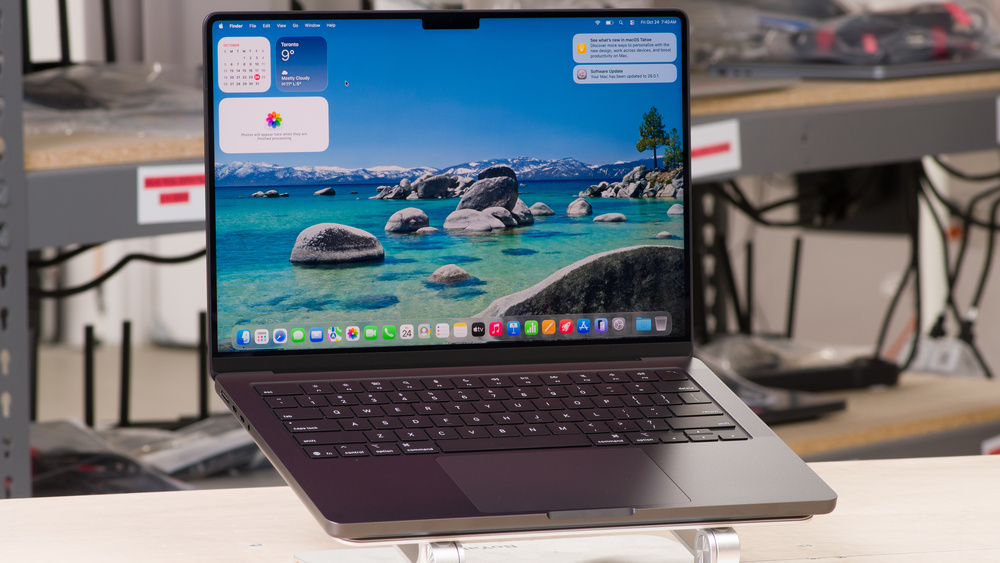
Apple 14-inch MacBook Pro CTO Laptop with M5 Pro Chip, 15-Core CPU, 16-Core GPU, 48GB Unified Memory, 1TB SSD Storage, Standard Display, 70W USB-C Power Adapter, 2026
Apple
It depends — The M5 Pro MacBook Pro is recommended only when the full build environment must travel with you, with 48GB or 64GB advised for demanding development workloads.
Choose this only if you need your full build environment with you away from the desk. It is the cleaner one-machine answer, but it does not separate heavy services from your daily laptop.Available at Amazon(paid link) — opens Amazon in a new tab. Price and availability shown there.2024 Apple MacBook Pro with M4 Max Chip (16-inch, 64GB RAM, 1TB SSD) (QWERTY English) Silver (Renewed)
Apple
It depends — A 64GB replacement laptop fits the narrower case of needing the full development stack away from the desk, while the article otherwise recommends separating sustained workloads onto a desktop.
The stronger desktop option if your work also includes long creative exports, heavier local AI, many displays, or constant sustained loads. It is more machine than most app development setups need.Available at Amazon(paid link) — opens Amazon in a new tab. Price and availability shown there.Samsung T9 Portable SSD 2TB, USB 3.2 Gen 2x2 External SSD, Up to 2,000 MB/s
Samsung
Buy — The article recommends a fast external SSD for archives, datasets, old repositories, and build artifacts so the Mac budget can prioritize memory that cannot be upgraded later.
Use external storage for archives, datasets, old repos, media, and build artifacts so the Mac budget goes toward unified memory first.Available at Amazon(paid link) — opens Amazon in a new tab. Price and availability shown there.


Sources
Pages consulted while researching this article. None of these are affiliate links.
- Mac mini (2024) - Tech Specs — support.apple.com (accessed 2026-08-10)
- MacBook Pro (14-inch, M5 Pro or M5 Max) - Tech Specs — support.apple.com (accessed 2026-08-10)
- Mac Studio - Technical Specifications — apple.com (accessed 2026-08-10)
- Review: M4 and M4 Pro Mac minis are probably Apple’s best Mac minis ever — arstechnica.com (accessed 2026-08-10)
- M4 Pro Mac mini review: Remarkably small and incredibly powerful — macworld.com (accessed 2026-08-10)
- Install Docker Desktop on Mac — docs.docker.com (accessed 2026-08-10)
- Tailscale SSH — tailscale.com (accessed 2026-08-10)