Is the Lenovo Idea Tab Good for Taking Notes?
The questionWhere do these come from?
Tablet for Note Taking
Hey guys i am a uni student looking for a tablet for note taking ie; Most of it will be used with the pencil- to draw graphs write etc. I am indifferent between the OS (Android, IOS, Linux, Windows).
Yes—the Lenovo Idea Tab is capable of handwritten notes and graphs, provided you get a compatible Lenovo active pen.
Yes. The standard 11-inch Lenovo Idea Tab is a sensible tablet for handwritten university notes, diagrams, graphs, and PDF annotation, provided your configuration includes a Lenovo Tab Pen or you add the compatible Tab Pen Plus.
The hardware is appropriate for this job: Lenovo specifies a 2560 × 1600 IPS display with a 90Hz refresh rate, plus 4,096 pressure levels, tilt detection, and palm rejection with either supported pen. Some configurations have a normal anti-fingerprint screen, while the Matte Edition adds a paper-like anti-glare surface. These are physical display variants, not a setting you can enable later. Lenovo’s Idea Tab specifications list both finishes and warn that the bundled pen differs by configuration.
The important limitation is pen quality. This is a capable note-taking system, but not the closest alternative to a premium Samsung S Pen or Apple Pencil setup. An independent review found the Idea Tab usable in Lenovo Notepad, Nebo, and Noteshelf 3, while describing its writing feel and precision as a step below those premium pens. That makes it suitable for lectures and ordinary diagrams, but less convincing for detailed illustration or anyone particularly sensitive to pen latency and tip accuracy. MyNextTablet’s Idea Tab review documents that comparison.
Either Lenovo pen covers the handwriting basics
Both compatible pens provide the core features needed for handwriting. The meaningful difference is how they are powered and whether you need Bluetooth functions.
| Feature | Lenovo Tab Pen | Lenovo Tab Pen Plus |
|---|---|---|
| Pressure sensitivity | 4,096 levels | 4,096 levels |
| Palm rejection | Yes | Yes |
| Tilt detection | Yes | Yes |
| Power | Replaceable 1.5V AAAA battery | 80mAh rechargeable battery; USB-C |
| Lenovo-rated use | More than 180 hours of continuous writing | Up to 35 hours per charge |
Choose the regular Lenovo Tab Pen when it is included in the box. It delivers the same published pressure sensitivity and avoids another device that needs regular charging. Keep a spare AAAA battery in your bag, because the pen becomes unusable when that battery expires.
Choose the Lenovo Tab Pen Plus when the tablet comes without a pen, or when USB-C charging, its hardware button, Bluetooth pairing, and remote-control functions are useful. Lenovo’s Tab Pen Plus datasheet confirms the rechargeable battery, button, Bluetooth connection, pressure support, and rated runtime.
Do not substitute a generic capacitive stylus if palm rejection matters. A simple rubber- or disc-tip stylus behaves like a finger and cannot reproduce the Idea Tab’s active-pen pressure, tilt, and palm-rejection features.
Start with the preinstalled note-taking apps
Start with the preinstalled apps before buying another note-taking application. Lenovo’s software list includes Notepad, Nebo, Squid, and MyScript Calculator, although availability can differ by region.
-
Use Lenovo Notepad for quick handwritten pages and notes launched from the stylus toolbox.
-
Use Nebo for organized course notebooks, handwriting conversion, diagrams, and annotated lecture PDFs. Nebo was renamed MyScript Notes on Android in September 2025, so the name and icon may change after an update. Current versions support grid, lined, dotted, and blank backgrounds; they can also regularize a hand-drawn line or shape when the pen is held briefly at the end of the stroke. Those features make it the strongest preinstalled choice for graphs and geometry. MyScript’s Android release history documents the rename and features.
Just want the recommendation?
Skip to the picks -
Use Squid when you prefer unrestricted freeform pages rather than handwriting-to-text conversion.
-
Use MyScript Calculator for handwritten equations. It complements a notebook but is not a replacement for keeping the derivation in your course notes.
A preinstalled Nebo build may not contain the newest features or the same entitlement as the current Play Store release. MyScript explicitly warns that Lenovo’s preinstalled versions can be older or feature-limited. Check the app’s About screen before assuming a missing tool is unsupported by the tablet. MyScript’s Lenovo installation guidance explains the update and backup differences.
For a practical workflow, create one notebook per course, use a grid background for graphs, and export important pages after each class. MyScript Notes can export notebooks as PDF, PNG, SVG, or its native .nebo format. Its export instructions provide the exact menu path: open the note, tap the three-dot menu, choose Export, and select the format.
The pen settings to check first
Open Settings > Pen & keyboard > Pen. Enable Accidental touch protection for the note-taking app, then enable the stylus toolbox if you want quick access to notes, screenshots, and pen tools. Lenovo cautions that some apps do not support its accidental-touch protection, so palm marks occurring in only one application are usually an app-compatibility problem rather than defective tablet hardware. The Idea Tab user guide for TB336FU and TB336ZU documents these controls.
If you use MyScript Notes, also open its side panel and select three-dot menu > Settings > Pen, then confirm that active-pen input is enabled. This prevents finger input from being treated like the Lenovo pen inside the application.
When the problem occurs in every application, use this order:
- For the regular Tab Pen, install a fresh standard 1.5V AAAA alkaline battery.
- For the Tab Pen Plus, charge it, enable Bluetooth, then hold its button for eight seconds to enter pairing mode. Tap Connect > Complete when the tablet finds it.
- Restart the tablet and test a slow diagonal line in Lenovo Notepad and MyScript Notes.
- Repeat the test with your palm resting on the display and Accidental touch protection enabled.
If the pen still produces lines while hovering, repeatedly drops strokes, or remains consistently offset in both applications, there is no trustworthy universal firmware fix to apply. Lenovo distributes updates by model and region, so naming one supposed corrective firmware version would be misleading. Contact Lenovo support or return the tablet and pen while that option remains available.
What to check before buying or returning it
Confirm the exact contents of the individual SKU. Lenovo lists the Idea Tab with a regular Tab Pen, Tab Pen Plus, or no bundled pen at all. A product photograph showing a stylus does not establish what is in the box.
Also confirm whether the display is the standard anti-fingerprint version or the paper-like anti-glare Matte Edition. The matte version is the more relevant configuration when reducing glare and creating a less glassy writing surface are priorities.
Finally, complete one real note-taking test immediately: write a full page, draw several slow diagonal lines and graph axes, rest your palm on the display, import a lecture PDF, and export the annotated result. Open the exported file on another device. If either supported Lenovo pen fails those checks in two known-compatible apps after fresh power or pairing, support or replacement is the honest next step—not another generic stylus or an unverified firmware workaround.
The bottom line
Both justify the spend at different budgets:
Top pick
It depends
TabPen Plus for Lenovo Tab Pen Plus (AP500U/AP501U) Compatible with Lenovo Tab M11/P12/M10 5G/K11 /Y700 / Legin Tab Gen 3 Pen-Palm Rejection
TabPen
The article recommends the Tab Pen Plus option for penless configurations or USB-C and Bluetooth needs, with up to 35 hours of runtime versus over 180 hours for the regular Tab Pen.
Buy this if the Idea Tab configuration has no pen or you want USB-C charging, a hardware button, and Bluetooth functions. Its drawback is the shorter rated runtime between charges compared with the AAAA-powered Tab Pen.Available at Amazon(paid link) — opens Amazon in a new tab. Price and availability shown there.The alternative
Buy this
Lenovo Folio Case for Idea Tab, Protective Tablet Cover with Built in Pen Holder, Sleep/Wake Function & Convertible Stand, PU Leather Case, Luna Grey
Lenovo
The article’s body does not discuss the folio case or provide any case-specific limitation supporting a consider or skip verdict.
The model-specific folio protects the screen, provides a writing stand, and keeps the pen in its built-in holder. It adds bulk and does not improve pen accuracy or palm rejection.Available at Amazon(paid link) — opens Amazon in a new tab. Price and availability shown there.
Recommended products
Ordered by how well each one fits the situations above. Each link below is a paid link.
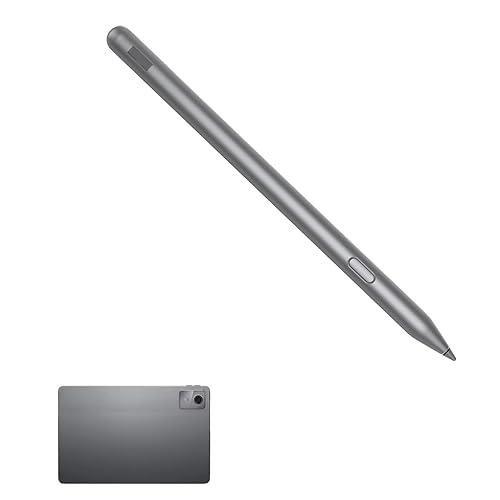
TabPen Plus for Lenovo Tab Pen Plus (AP500U/AP501U) Compatible with Lenovo Tab M11/P12/M10 5G/K11 /Y700 / Legin Tab Gen 3 Pen-Palm Rejection
TabPen
It depends — The article recommends the Tab Pen Plus option for penless configurations or USB-C and Bluetooth needs, with up to 35 hours of runtime versus over 180 hours for the regular Tab Pen.
Buy this if the Idea Tab configuration has no pen or you want USB-C charging, a hardware button, and Bluetooth functions. Its drawback is the shorter rated runtime between charges compared with the AAAA-powered Tab Pen.Available at Amazon(paid link) — opens Amazon in a new tab. Price and availability shown there.Lenovo Folio Case for Idea Tab, Protective Tablet Cover with Built in Pen Holder, Sleep/Wake Function & Convertible Stand, PU Leather Case, Luna Grey
Lenovo
Buy — The article’s body does not discuss the folio case or provide any case-specific limitation supporting a consider or skip verdict.
The model-specific folio protects the screen, provides a writing stand, and keeps the pen in its built-in holder. It adds bulk and does not improve pen accuracy or palm rejection.Available at Amazon(paid link) — opens Amazon in a new tab. Price and availability shown there.
Energizer AAAA Batteries, 1.5 Volt Battery AAAA Alkaline, 2 Count
Energizer
It depends — Spare 1.5V AAAA alkaline batteries support the regular Tab Pen, while the Tab Pen Plus uses a rechargeable USB-C battery.
A spare keeps the standard Lenovo Tab Pen working during a lecture when its replaceable battery expires. These batteries are unnecessary for the rechargeable Tab Pen Plus.Available at Amazon(paid link) — opens Amazon in a new tab. Price and availability shown there.
Sources
Pages consulted while researching this article. None of these are affiliate links.
- Lenovo Idea Tab Product Specifications Reference — psref.lenovo.com
- Lenovo Idea Tab User Guide — TB336FU and TB336ZU — gzhls.at
- Lenovo Tab Pen Plus Datasheet — psrefstuff.lenovo.com
- Lenovo Idea Tab Product Page — lenovo.com
- MyScript Notes Android Release History — help.myscript.com
- MyScript Notes Pre-installed Versions — help.myscript.com
- Exporting and Sharing MyScript Notes — help.myscript.com
- Lenovo Idea Tab Review — MyNextTablet — mynexttablet.com