HP 14-fa0023dx Keyboard: The Right Replacement
The questionWhere do these come from?
Some keys on HP 14-fa0023dx laptop keyboard occasionally not working
Some of the keys on my HP 14-fa0023dx laptop keyboard (Esc, 1, q, a and z) occasionally don't work. If I hold one down for several seconds, I sometimes reactivate it, but not always.
If the key cluster also fails in HP’s UEFI test, use the N91050-001 top-cover/keyboard assembly—not a bare keyboard.
If the same cluster of keys fails in HP PC Hardware Diagnostics UEFI, stop reinstalling drivers: the fault is inside the laptop. For the U.S. glacier-silver HP Envy x360 14-fa0023dx, the supported replacement is HP N91050-001, a backlit keyboard integrated into the top cover—not a loose keyboard.
Before ordering it, check the warranty and perform the outside-Windows test below. A loose ribbon cable can mimic a failed keyboard, while a damaged system-board connector would not be fixed by replacing the keyboard assembly.
Run the test that bypasses Windows
A Windows keyboard test is useful, but UEFI is the deciding test because it runs outside Windows. HP says its UEFI diagnostics isolate hardware failures from operating-system and software problems. To open them:
- Shut down the laptop completely.
- Turn it on and press Esc repeatedly, about once per second.
- When the Startup Menu appears, press F2.
- Open the component or input-device tests and run Keyboard Test.
- Press every suspect key several times, including after the keyboard has behaved normally for a few minutes.
HP describes its keyboard test as an interactive three-minute test. Record the result and any 24-digit failure ID because HP uses that identifier when arranging support or repair. The exact menu wording can change with the installed diagnostics version. HP’s hardware-test instructions explain the startup sequence and failure ID.
If Esc is one of the failed keys and will not open the Startup Menu, first run the Windows version: HP PC Hardware Diagnostics > Device check > Input Devices > Keyboard Test. HP documents that path in its notebook keyboard troubleshooting guide. A repair shop or HP support can then repeat the test in UEFI before fitting a part.
Replace or internally inspect the keyboard when the same keys fail in UEFI. If they fail only in Windows, continue with software diagnosis instead: test another user account, remove remapping utilities, check accessibility settings, and install the model-specific drivers from HP. The 14-fa0023dx support page identifies this configuration as product 9S1R4UA and provides its diagnostics and drivers.
Why a vertical cluster points to hardware
When a group such as Esc, 1, Q, A and Z fails together, five worn switches are less plausible than one shared electrical problem. Keyboards scan switches through row and column circuits; one damaged trace, ribbon contact or connector pin can therefore affect several keys. QMK’s matrix documentation explains how a controller activates columns and reads rows to identify each keypress.
That pattern is evidence, not proof of one specific failed scan line. HP does not publish the 14-fa0023dx matrix map, and the electrically shared keys do not have to follow a perfectly straight physical column. The defensible diagnosis is therefore keyboard matrix, keyboard ribbon connection, or the system-board keyboard interface—in that order of practical inspection—not a guaranteed membrane failure.
Holding a key until the cluster starts responding again also points toward an unstable contact, but it is not a repair. Cleaning around the keycaps cannot reach a cracked membrane trace or oxidized ribbon contact.
No independent laboratory has published keyboard failure-rate or matrix measurements for the exact 14-fa0023dx. Notebookcheck tested the Intel-based 14-fc0078TU sibling and reported that its strokes registered without misses, but that observation neither maps the AMD model’s matrix nor rules out an individual hardware fault. It does show why a normal review cannot substitute for testing the failing machine. Notebookcheck’s test identifies the precise sibling configuration.
The exact assembly for the 14-fa0023dx
HP’s service manual lists two top-cover families for the 14-fa0000 series:
Just want the recommendation?
Skip to the picks- N91050-xxx: glacier-silver top cover, soft-gray backlit keyboard
- N91051-xxx: meteor-silver top cover, soft-gray backlit keyboard
The same manual assigns -001 to the United States layout. Combining the glacier-silver base number with the U.S. suffix gives N91050-001. The assembly includes the keyboard cable and backlight cable. HP’s 14-fa0000 Maintenance and Service Guide provides both the assembly number and country-code table.
Do not assume the touchpad comes with every N91050-001 listing. HP catalogs the glacier-silver touchpad separately as N91049-001, so compare listing photographs and included-parts text rather than treating a seller’s picture as the service specification.
Before ordering, verify the bottom label shows 14-fa0023dx and product number 9S1R4UA. Then enter the serial or product number into HP PartSurfer; HP recommends PartSurfer for finding model-specific certified parts. HP’s certified-parts instructions accept a serial number, product number or product name.
Replacement choices at a glance
| Product | Connection or fit | What it actually solves | Verdict |
|---|---|---|---|
| HP N91050-001 top cover with keyboard | Internal; U.S. backlit layout; glacier silver | Restores the built-in keyboard after a confirmed assembly fault | Consider after UEFI testing |
| Logitech K120, part 920-002495 | External USB-A; full-size layout | Restores reliable typing without opening the laptop | Consider as a desk workaround |
| “N91050-001 keyboard only, without frame” | Bare internal keyboard from a third party | Requires an unofficial keyboard-only rebuild | Skip |
The N91050-001 assembly is the appropriate repair part only after hardware failure is confirmed. Its drawback is the labor: this is effectively a chassis transplant, not a five-minute keyboard swap.
The Logitech K120 is a sensible temporary or desk-bound answer. The 14-fa0023dx has USB-A ports, and Logitech specifies the K120 as a plug-and-play USB keyboard for Windows 10 and 11. It is 450 mm wide and has a 1.5 m cable, so it is not a portable replacement for the laptop keyboard. Logitech publishes the K120’s dimensions and USB requirements.
Skip the “HP N91050-001 keyboard only, without frame” replacement: HP assigns N91050-001 to the complete glacier-silver top-cover-and-keyboard assembly and supplies no keyboard-only service procedure for this chassis. A skilled specialist may rebuild a heat-staked keyboard deck, but that is not the supported N91050-001 repair and is the wrong purchase for a normal parts swap.
A cable reseat is the last inexpensive internal check
After a UEFI failure, a single keyboard-ribbon reseat is reasonable if the laptop is out of warranty and you are experienced with laptop ZIF connectors. Check warranty coverage first; opening the machine or damaging a connector can turn a keyboard repair into a system-board repair.
Back up important files, shut down, unplug the USB-C charger, remove the bottom cover according to HP’s manual, and disconnect the internal battery before touching a ribbon cable. The service guide identifies separate ZIF connections for the main keyboard cable and keyboard-backlight cable. Release the latch rather than pulling against it, inspect the main ribbon for contamination or a crooked insertion, and reseat it squarely. Do not work on the connector with the battery attached.
If reseating changes nothing, the N91050-001 assembly is the next part to replace. If a known-good assembly still shows the same failed cluster, stop replacing parts: the remaining suspect is the system-board connector or keyboard controller, which requires board-level diagnosis.
What the replacement job really involves
HP states that the top cover and keyboard remain only after all other spare parts have been removed from the computer. That means the display assembly, battery, fan, system board, touchpad and other components must be removed or transferred before the old keyboard deck is finally bare. HP’s official repair video does not reach the display/top-cover stage until 23:08, after chapters covering the battery, speakers, storage, boards, touchpad, fan and system board. HP’s model-specific replacement video shows the complete sequence.
Use a repair shop or HP service if you have not previously handled ZIF latches, antenna leads, display cables and laptop screw maps. Also stop immediately if there is evidence of liquid ingress, corrosion, a swollen battery or a damaged system-board socket. In those cases, installing a new top cover without cleaning or board inspection can leave the underlying fault unresolved.
The practical order is therefore: UEFI test, warranty check, careful ribbon inspection, then N91050-001 replacement. That sequence avoids buying an integrated top-cover assembly for a Windows-only problem while still treating a repeatable cluster failure as the hardware fault it probably is.
The bottom line
Which part you need depends on what broke:
Top pick
It depends
HP N91050-001 Top Cover with Backlit US Keyboard
HP
HP’s service guide identifies N91050-xxx as the glacier-silver backlit top-cover assembly and -001 as the United States layout.
This is the supported glacier-silver U.S. keyboard assembly for the 14-fa0023dx after a UEFI-confirmed hardware fault. The drawback is that installation requires transferring nearly every internal component.Available at Amazon(paid link) — opens Amazon in a new tab. Price and availability shown there.The alternative
It depends
Logitech K120 Corded Keyboard 920-002495
Logitech
It connects through USB-A without opening the laptop, but it does not restore portable use of the built-in keyboard.
Use this USB-A keyboard while waiting for repair or as a permanent desk workaround. Its full-size 450 mm body is inconvenient to carry with a 14-inch laptop.Available at Amazon(paid link) — opens Amazon in a new tab. Price and availability shown there.
Recommended products
Ordered by how well each one fits the situations above. Each link below is a paid link.
__43352.1764555914.jpg?c=2)
HP N91050-001 Top Cover with Backlit US Keyboard
HP
It depends — HP’s service guide identifies N91050-xxx as the glacier-silver backlit top-cover assembly and -001 as the United States layout.
This is the supported glacier-silver U.S. keyboard assembly for the 14-fa0023dx after a UEFI-confirmed hardware fault. The drawback is that installation requires transferring nearly every internal component.Available at Amazon(paid link) — opens Amazon in a new tab. Price and availability shown there.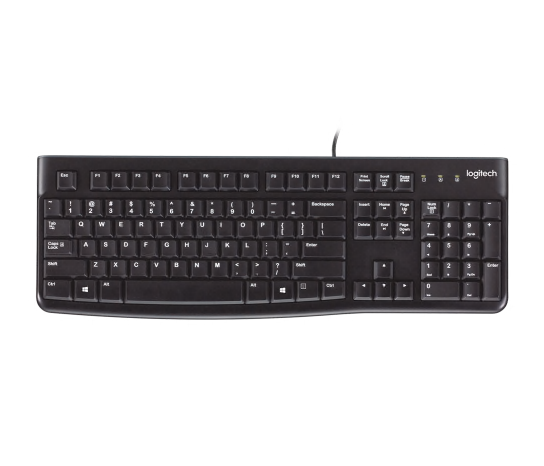
Logitech K120 Corded Keyboard 920-002495
Logitech
It depends — It connects through USB-A without opening the laptop, but it does not restore portable use of the built-in keyboard.
Use this USB-A keyboard while waiting for repair or as a permanent desk workaround. Its full-size 450 mm body is inconvenient to carry with a 14-inch laptop.Available at Amazon(paid link) — opens Amazon in a new tab. Price and availability shown there.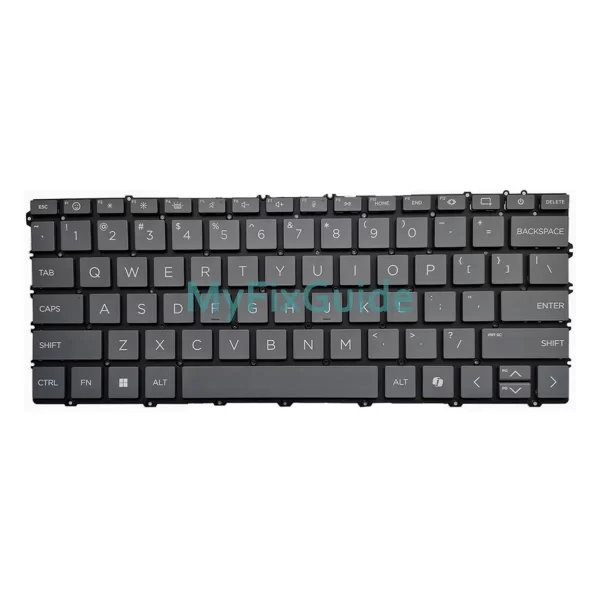
HP N91050-001 Replacement Keyboard Without Frame
HP
Skip — HP defines N91050-001 as a top-cover-and-keyboard assembly and publishes no keyboard-only replacement procedure for the 14-fa0000 chassis.
Do not confuse a bare third-party keyboard with HP’s N91050-001 service assembly. Fitting one requires an unsupported rebuild of the integrated keyboard deck.Available at Amazon(paid link) — opens Amazon in a new tab. Price and availability shown there.
Sources
Pages consulted while researching this article. None of these are affiliate links.
- HP ENVY x360 14-fa0000 Maintenance and Service Guide — kaas.hpcloud.hp.com
- HP Envy x360 Laptop 14-fa0023dx (9S1R4UA) Support — support.hp.com
- HP Notebook PCs — Keyboard Troubleshooting — support.hp.com
- HP PCs — Testing for Hardware Failures — support.hp.com
- QMK Firmware — How a Keyboard Matrix Works — docs.qmk.fm
- Notebookcheck HP Envy x360 2-in-1 14 Review — notebookcheck.net
- HP Consumer Notebook PCs — Ordering HP Certified Replacement Parts — support.hp.com
- Logitech K120 Corded Keyboard Specifications — logitech.com