Akko TAC75 HE Glare: Reliable or Risky?
The questionWhere do these come from?
What's a budget 75% HE keyboard that will last for years?
I'm looking for a budget 75% Hall Effect (magnetic switch) keyboard, but my biggest priority is durability and reliability. I don't really care about having the absolute fastest rapid trigger or the most RGB.
The TAC75 HE Glare is a sensible budget buy, but its 12-month warranty and calibration-dependent firmware leave long-term durability unproven.
The Akko TAC75 HE Glare is reliable enough to buy as a budget 75% Hall-effect keyboard, but there is not enough evidence to call it a proven years-long keyboard. Its replaceable switches and documented calibration procedure are reassuring; its short warranty, firmware dependence and scattered fault reports are the reasons to buy only with a good return route.
There is no honest categorical skip in this shortlist. Neither the TAC75 HE nor the Keychron K2 HE has published multi-year failure-rate data; the difference is that the Akko prioritizes wired performance and value, while the Keychron has stronger independent build-quality evidence, wireless connectivity and open-source QMK firmware.
| Product | Verdict | Reliability or repair signal | Main catch |
|---|---|---|---|
| Akko TAC75 HE Glare | Buy for a strict budget | Replaceable compatible magnetic switches, model-specific driver and official recalibration procedure | Only 12 months of warranty coverage; no published endurance rating |
| Keychron K2 HE | Consider when support and wireless features matter more | RTINGS bought and tested it, reporting great build quality and true 1000Hz wired/2.4GHz operation | Same default 12-month warranty; accepts only Gateron double-rail magnetic switches |
What the available evidence actually proves
The TAC75 HE Glare has an 8,000Hz wired polling mode, adjustable actuation from 0.1 to 3.3mm and rapid-trigger adjustment down to 0.005mm. Its Glare switch has a 25gf initial force, 48gf bottom-out force and 3.4mm total travel. Akko also fits PBT keycaps and permits downward-facing N-pole magnetic switches, although it warns that third-party switches may reduce actuation precision. It cannot use ordinary mechanical switches. Those are useful specifications, but none establishes how many boards will still work after several years. Akko’s TAC75 HE specifications contain no keyboard failure rate or switch-cycle endurance claim.
That missing number is significant. An independent Japanese review listed durability as unspecified, while confirming the wired connection, removable USB-C cable and hot-swap support for several named magnetic switches. The reviewer also pressed as many keys simultaneously as possible and found that the sample registered them all. FPS Sakaba’s TAC75 HE review therefore supplies useful short-term functional testing, not a multi-year durability test.
Vortex Gaming measured an 8,000Hz polling rate and 0.694ms latency with its test tool, although the reviewed keyboard was supplied by Akko. That result supports the performance claim for one sample; it says nothing about the percentage that later develop dead keys or controller faults. Vortex Gaming’s measured TAC75 HE review is evidence that the board can be fast, not evidence that every unit will last.
Dead-key reports need careful interpretation
There are genuine TAC75 HE fault reports, but forum posts provide no denominator. Ten complaints among ten keyboards would be disastrous; ten among hundreds of thousands would not be. No public source establishes which situation applies, so claims that the model has an epidemic of dead keys are not supportable.
Some apparent dead-key cases are configuration failures rather than failed hardware. Akko’s own HE troubleshooting page says outdated firmware can cause typing problems and instructs owners of unresponsive or inconsistent keys to open Main → Custom Actuation, select Start Calibration, press and release every key fully with moderate force, and then confirm. Akko says incomplete calibration should be repeated. Akko’s magnetic-key troubleshooting procedure is unusually specific and gives an owner a realistic recovery path.
One TAC75 HE owner described a board that appeared bricked after the configuration application froze. A later commenter with similar symptoms reported restoring their board by completing calibration instead of abandoning it partway through. That is anecdotal evidence, but it demonstrates why “the keys stopped working” does not automatically mean the PCB is dead. The reported TAC75 HE recovery also shows that interrupted configuration can be alarming and difficult to diagnose.
A dead key that remains in the same physical position after calibration and after swapping in a known-good compatible switch is more concerning. That pattern points away from the removable switch and toward the Hall sensor, PCB or firmware. If it persists on a second computer with a direct USB connection, use the return window or request an RMA rather than repeatedly flashing unofficial firmware.
Firmware is the larger durability caveat
Akko currently divides TAC75 HE software support by serial number: boards whose last five digits are 32000 or lower use the V4 driver, while later units use the newer TAC75 HE web driver. The web tool requires Chrome and does not support Safari or Firefox. Akko’s download page documents that split, which is important because using the wrong tool complicates recovery and support.
Just want the recommendation?
Skip to the picksFirmware updates should be performed through the correct official driver with the keyboard connected directly to a stable USB port—not through a KVM or a hub that may cut power. Akko’s standard warranty lasts 12 months, provides direct RMA service only for products bought through its direct channels, and specifically excludes firmware-upgrade failures caused by power or connection interruptions. Distributor policies can differ. Akko’s warranty statement makes retaining the invoice and choosing an authorized seller especially important.
There is also a performance behavior worth separating from reliability. One Glare-switch owner reported that rapid-trigger behavior changed while multiple keys were held; after trying firmware V503 and recalibration, the owner published a support response describing an intentional 0.3mm multi-key dead zone intended to suppress accidental inputs. That TAC75 HE multi-key report is not an official public specification or proof that every firmware revision behaves identically. It is nevertheless a reason for serious rhythm and counter-strafing players to test their exact key combinations during the return period.
Hall effect prevents one failure mode, not every failure
A Hall-effect switch does not rely on metal contacts closing for each keystroke, so traditional contact bounce and contact wear are removed from the sensing mechanism. The keyboard still has a USB connector, cable, controller, sensors, solder joints, LEDs and firmware. Any of those can fail.
The Glare switch’s light 25gf starting force also makes aggressive sensitivity settings easier to trigger accidentally. A repeated input at 0.005mm rapid-trigger sensitivity may be a calibration or setup problem rather than mechanical “double clicking.” Akko explicitly provides RT Stabilizer because tiny hand movements can create unintended inputs at the most sensitive setting. Enable it, increase the trigger distance incrementally and recalibrate before assuming the switch has failed.
For random disconnects, first distinguish a lost keyboard from a lost configuration session. Connect directly to the computer, try another known-good data cable and port, and check whether the operating system actually removes the USB device. A TAC75 HE owner has reported unwanted inputs after switching a monitor-integrated KVM, but one report cannot establish universal KVM incompatibility. The reported TAC75 HE KVM behavior is enough to justify testing a frequently switched setup early.
What the Keychron K2 HE changes
The Keychron K2 HE is the more defensible alternative when independently assessed construction, wireless operation and firmware openness matter. RTINGS bought its test unit and found great build quality, PBT keycaps, an aluminum frame around the plastic chassis and a true 1000Hz effective update rate over both USB and 2.4GHz. Its measured strengths do not constitute a lifetime test, and RTINGS also noted switch wobble and restricted hot-swap compatibility. RTINGS’ Keychron K2 HE testing is still a broader independent evidence base than is currently available for the TAC75 HE.
Keychron specifies 0.2–3.8mm actuation adjustment, QMK firmware, a browser-based Launcher and Gateron double-rail magnetic switches. Those switches are replaceable, but no other magnetic-switch family is officially supported. Keychron’s K2 HE documentation therefore trades Akko’s wider stated switch compatibility for a more established software and hardware package.
The K2 HE gets the value equation wrong for a strict-budget buyer who only needs a wired board: its additional wireless hardware does not extend the default warranty beyond 12 months. Keychron also states that manufacturing defects in K HE models may be handled by replacing the defective part rather than the complete keyboard. Keychron’s warranty terms do not turn it into a guaranteed multi-year purchase.
The buying verdict
Buy the Akko TAC75 HE Glare if you need the 75% layout, wired Hall-effect features and replaceable magnetic switches, and you are willing to verify every key, test multi-key rapid trigger and complete a calibration while the keyboard is still returnable. Purchase through a channel that clearly identifies who handles the warranty, then save the invoice and the correct driver link for the board’s serial number.
Choose the Keychron K2 HE instead if wireless operation, QMK and independently verified build quality justify leaving the strictest budget tier. If “must work untouched for several years” is absolute, neither model has the published failure-rate or endurance evidence required to promise that outcome. The TAC75 HE remains the budget pick, but its honest verdict is a conditional buy—not proof that contactless switches make the whole keyboard failure-proof.
The bottom line
Two good answers to different versions of the question:
Top pick
Buy this
Akko TAC75 HE Glare Magnetic Switch Keyboard
Akko
It combines a 75% wired layout, PBT keycaps and replaceable downward-facing N-pole magnetic switches, while Akko provides a model-specific driver and calibration procedure.
Buy this when you need a wired budget 75% Hall-effect board and are prepared to calibrate and test it during the return period. Its replaceable compatible magnetic switches help, but its firmware dependence and 12-month warranty are real drawbacks.Available at Amazon(paid link) — opens Amazon in a new tab. Price and availability shown there.The alternative
It depends
Keychron K2 HE Wireless Magnetic Switch Keyboard
Keychron
RTINGS found great build quality and true 1000Hz wired and 2.4GHz operation, but Keychron specifies only a 12-month default warranty and one compatible magnetic-switch family.
Consider this when wireless connectivity, QMK and independently assessed build quality matter more than staying in the strictest budget tier. The drawback is that its default warranty is also 12 months and hot-swap support is limited to Gateron double-rail magnetic switches.Available at Amazon(paid link) — opens Amazon in a new tab. Price and availability shown there.
Recommended products
Ordered by how well each one fits the situations above. Each link below is a paid link.
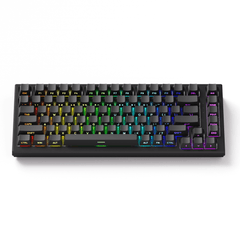
Akko TAC75 HE Glare Magnetic Switch Keyboard
Akko
Buy — It combines a 75% wired layout, PBT keycaps and replaceable downward-facing N-pole magnetic switches, while Akko provides a model-specific driver and calibration procedure.
Buy this when you need a wired budget 75% Hall-effect board and are prepared to calibrate and test it during the return period. Its replaceable compatible magnetic switches help, but its firmware dependence and 12-month warranty are real drawbacks.Available at Amazon(paid link) — opens Amazon in a new tab. Price and availability shown there.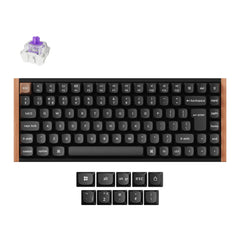
Keychron K2 HE Wireless Magnetic Switch Keyboard
Keychron
It depends — RTINGS found great build quality and true 1000Hz wired and 2.4GHz operation, but Keychron specifies only a 12-month default warranty and one compatible magnetic-switch family.
Consider this when wireless connectivity, QMK and independently assessed build quality matter more than staying in the strictest budget tier. The drawback is that its default warranty is also 12 months and hot-swap support is limited to Gateron double-rail magnetic switches.Available at Amazon(paid link) — opens Amazon in a new tab. Price and availability shown there.
Sources
Pages consulted while researching this article. None of these are affiliate links.
- TAC75 HE White Magnetic Switch Keyboard — Akko — en.akkogear.com
- Troubleshooting Unresponsive HE Keyboard Switches — Akko — en.akkogear.com
- Akko Downloads Hub — en.akkogear.com
- Akko Warranty and Service Statement — en.akkogear.com
- Akko TAC75 HE Review — FPS Sakaba — vanillaice-fps.com
- Akko TAC75 HE Measured Review — Vortex Gaming — vortexgaming.io
- TAC75 HE Calibration Recovery Report — reddit.com
- TAC75 HE Multi-Key Rapid-Trigger Report — reddit.com