Ripped Huntsman V3 Pro TKL Cable: Fix It?
The questionWhere do these come from?
Replacement Ribbon Cable for my Razer Huntsman V3 Pro TKL
I recently opened my Razer Huntsman V3 Pro TKL and accidentally ripped the ribbon cable that connects the USB Type-C port to the rest of the keyboard.
A torn internal cable is usually repairable if both sockets are intact, but match five physical details before ordering a generic FFC.
Do not buy a new keyboard yet. If the internal cable is torn but both connector sockets and their PCB pads are intact, the sensible repair is a matching replacement cable; a damaged socket, latch or PCB changes this into a board-level repair.
Unplug the keyboard and stop testing it by moving the damaged cable while powered. An intermittent conductor can disconnect the keyboard, but moving torn conductors can also let contacts touch where they should not.
Confirm the model before ordering anything
The original Razer Huntsman V3 Pro Tenkeyless is model RZ03-0498. Check that number on the underside label rather than relying on the Huntsman V3 Pro TKL name, because later TKL variants use different model numbers and their internal parts should not be assumed interchangeable. Razer’s RZ03-0498 support page identifies the model, while its official master guide documents the detachable external USB cable and USB-C port.
Neither document publishes an internal cable part number, connector drawing or disassembly procedure. That absence matters: there is no verified Razer part number that can safely be ordered merely by searching for a “Huntsman V3 Pro TKL ribbon cable.”
A documented TKL disassembly confirms that a cable joins the keyboard’s two halves and warns against pulling them apart after releasing the case clips. That explains how this particular damage happens, but it does not establish the cable’s dimensions.
| Route | Verdict | Exact gate | Catch |
|---|---|---|---|
| uxcell 28-pin 0.5 mm, 150 mm Type A FFC | Consider | All 28 contacts, 0.5 mm pitch and same-side orientation match | Not confirmed for RZ03-0498; OEM-style shielding is not specified |
| iFixit Essential Electronics Toolkit IF145-348-5 | Consider | You need plastic opening tools, a spudger and fine tweezers | Its included bits are not proof of the keyboard’s exact screw type |
| New Razer Huntsman V3 Pro Tenkeyless RZ03-0498 | Skip for cable-only damage | Both sockets, latches and PCB pads remain intact | Replacement becomes reasonable after connector or board damage is confirmed |
Cable-only damage versus a broken connector
Inspect both ends under bright light or magnification before buying a cable. A cable-only repair is plausible when:
- The flexible cable has a crease, split or exposed conductor.
- Both board-mounted sockets remain flat against their PCBs.
- Each socket’s locking actuator is present and moves evenly.
- No solder pad or copper trace has lifted from either board.
- The original cable can be removed after releasing the lock, without pulling on the socket.
The cable is not the whole fault when its connector latch has snapped, the socket rocks on the PCB, or the keyboard only works while the cable is pressed downward. A new FFC cannot restore clamping pressure to a broken latch. Replacing a 0.5 mm-pitch surface-mount connector normally requires magnification and controlled soldering; that is repair-shop work unless you already perform fine-pitch PCB repairs.
Also distinguish the internal cable from the detachable external USB-C cable. Trying another known-good, data-capable USB cable and another computer can rule out a coincidental external fault, but firmware, Synapse and factory-reset shortcuts cannot repair a visibly torn internal conductor.
Match five measurements before buying
A similar Huntsman V3 Pro repair report recorded 28 pins, 0.5 mm pitch, approximately 15 mm width and 137 mm length. A later contributor reported replacing a cable and connector with a 28-pin, 0.5 mm, same-side part. However, that report did not establish that the keyboard was the RZ03-0498 Tenkeyless, so those numbers are a useful lead—not a confirmed TKL specification.
Measure the actual cable removed from your keyboard in five ways:
Just want the recommendation?
Skip to the picks- Contact count: Count the exposed metal fingers, not printed stripes or the connector’s outside width.
- Pitch: Measure from the center of the first contact to the center of the last, then divide by one fewer than the number of contacts. For 28 contacts at 0.5 mm pitch, the center-to-center span is 13.5 mm.
- Contact orientation: With the cable laid flat, determine whether exposed contacts at both ends face the same side. Sellers usually call this Type A or same-side. Contacts on opposite faces require the opposite-side version.
- Length and terminal thickness: Measure the full cable and compare the reinforced ends. A 150 mm cable is 13 mm longer than a 137 mm original; use it only if that excess can follow the existing route without a sharp crease or contact with a screw post.
- Construction: A generic FFC has straight parallel conductors and rectangular ends. A custom FPC may have shaped traces, tabs, shielding or branches. Do not substitute straight FFC for a visibly custom circuit.
The GCT FFC selection guide shows why pin count alone is insufficient: 0.5 mm cables are offered with same-side and opposite-side contacts, multiple lengths and several connector styles. A cable that fits mechanically can still reverse the conductor order if its contact orientation is wrong.
Installing the replacement without repeating the tear
Take a clear photograph of both original cable ends before removal. It should show which face carries the exposed contacts and how the cable is routed through the case.
With the USB cable disconnected, release each connector actuator in the direction it is designed to move. Some locks lift; others slide a short distance. Move both ends evenly with a plastic spudger and never lever the soldered connector body away from the PCB. The old cable should slide out with little force once the lock is open.
Insert the replacement squarely until both edges reach the same depth, then close the actuator. Route the cable along the original path, keeping it outside clip jaws, switch housings and screw posts. Do not make a hard fold at either reinforced end.
Before reinstalling every keycap and screw, close the case loosely, connect the external USB cable and check:
- Windows detects one stable keyboard without repeated reconnect sounds.
- Every key registers in a keyboard tester.
- The volume dial and dedicated buttons work.
- RGB remains stable while the case rests normally on the desk.
- A gentle case movement does not interrupt the connection.
Disconnect USB again before final assembly. If the keyboard fails when the cable is lightly touched, stop: the socket, latch, contamination or solder joints still need attention.
When a repair shop is the right answer
Use a board-repair shop when either connector has lifted, a latch is missing, PCB pads are torn, or the original part is a shielded custom FPC rather than a standard FFC. Bring the keyboard, damaged cable and photographs; the original part gives the technician the connector pitch, orientation and routing information that a model name cannot.
No independent lab source publishes a verified RZ03-0498 replacement-cable part number or a controlled test of this cable swap. The independent measurements available concern the keyboard’s performance: for example, RTINGS measured the Huntsman V3 Pro actuating at an average 0.17 mm when configured for 0.1 mm. That supports repairing a specialized analog board when the damage is confined to a replaceable interconnect, but it does not validate any generic cable listing.
The point where a new keyboard makes sense
Skip a new Razer Huntsman V3 Pro Tenkeyless RZ03-0498 when both sockets and PCB pads are intact: replacing the entire keyboard is unnecessary for a removable cable-only fault. A complete replacement becomes justified when the connector or board is damaged beyond an economical repair, the original uses an unavailable custom FPC, or a correctly matched cable still produces an intermittent connection after both sockets have been inspected.
Contact Razer before doing more work if the keyboard may still have coverage. Razer lists two-year limited coverage for keyboards, but its warranty policy excludes accident-caused claims and damage caused by unauthorized service or parts. A user-torn cable is therefore unlikely to qualify as a manufacturing defect, although only Razer can decide the individual claim or confirm whether a paid repair or replacement option exists.
The bottom line
Two parts fix this, depending on which failed:
Top pick
It depends
uxcell Flexible Flat Cable 28 Pins 0.5mm Pitch 150mm FPC FFC Ribbon Cable 20Pcs A Type
uxcell Flexible
It is a 28-pin, 0.5 mm, 150 mm Type A cable, but no official source confirms those dimensions for the RZ03-0498 TKL.
This is a candidate only after the original cable proves to have 28 contacts, 0.5 mm pitch and same-side terminals. Its 150 mm length exceeds the community-reported 137 mm cable, and the listing does not specify matching shielding.Available at Amazon(paid link) — opens Amazon in a new tab. Price and availability shown there.The alternative
It depends
iFixit Essential Electronics Toolkit IF145-348-5
iFixit Essential
The kit includes opening picks, angled tweezers, a spudger and 16 bits, but it does not establish the keyboard's exact screw type.
Useful if you need plastic opening picks, a spudger and tweezers to release the case and connector without metal prying. The included driver bits are not guaranteed to match every Huntsman screw.Available at Amazon(paid link) — opens Amazon in a new tab. Price and availability shown there.
Recommended products
Ordered by how well each one fits the situations above. Each link below is a paid link.
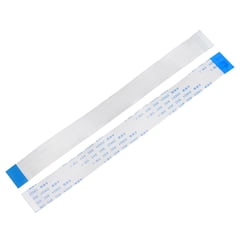
uxcell Flexible Flat Cable 28 Pins 0.5mm Pitch 150mm FPC FFC Ribbon Cable 20Pcs A Type
uxcell Flexible
It depends — It is a 28-pin, 0.5 mm, 150 mm Type A cable, but no official source confirms those dimensions for the RZ03-0498 TKL.
This is a candidate only after the original cable proves to have 28 contacts, 0.5 mm pitch and same-side terminals. Its 150 mm length exceeds the community-reported 137 mm cable, and the listing does not specify matching shielding.Available at Amazon(paid link) — opens Amazon in a new tab. Price and availability shown there.
iFixit Essential Electronics Toolkit IF145-348-5
iFixit Essential
It depends — The kit includes opening picks, angled tweezers, a spudger and 16 bits, but it does not establish the keyboard's exact screw type.
Useful if you need plastic opening picks, a spudger and tweezers to release the case and connector without metal prying. The included driver bits are not guaranteed to match every Huntsman screw.Available at Amazon(paid link) — opens Amazon in a new tab. Price and availability shown there.
Razer Huntsman V3 Pro Tenkeyless Esports Gaming Keyboard RZ03-0498
Razer Huntsman
Skip — A visibly torn removable cable with intact sockets and PCB pads is a cable-only fault, so replacing the entire RZ03-0498 discards functional assemblies.
A complete replacement is justified only after confirming connector, PCB or unavailable custom-FPC damage. It is wasteful when the fault is limited to a removable cable and both sockets remain intact.Available at Amazon(paid link) — opens Amazon in a new tab. Price and availability shown there.
Sources
Pages consulted while researching this article. None of these are affiliate links.
- Razer Huntsman V3 Pro Tenkeyless | RZ03-0498 Support & FAQs — mysupport.razer.com
- Razer Huntsman V3 Pro Tenkeyless Master Guide — dl.razerzone.com
- Disassembling the Razer Huntsman V3 Pro TKL — reddit.com
- Please Help Me Find the Right Ribbon Cable — reddit.com
- GCT FFC Cable Selection Guide — heilind.eu
- Analog Keyboard Specifications Don't Match Measurable Results — rtings.com
- Razer Warranty Policy — razer.com