Das Keyboard 4 Pro's Bottom Row: Why Alt Never Moves
The questionWhere do these come from?
Who makes keyboards where the right edge of the [Alt] lines up with the right edge of the [X] key?
Quality mechanical or scissor. I had a Keychron with the usual offset arrangement and I was always missing my shortcuts - even after months of use.
The Das Keyboard 4 Professional uses a fixed 104-key layout with Alt always beside the spacebar, unlike Keychron's switchable Mac/Windows bottom row.
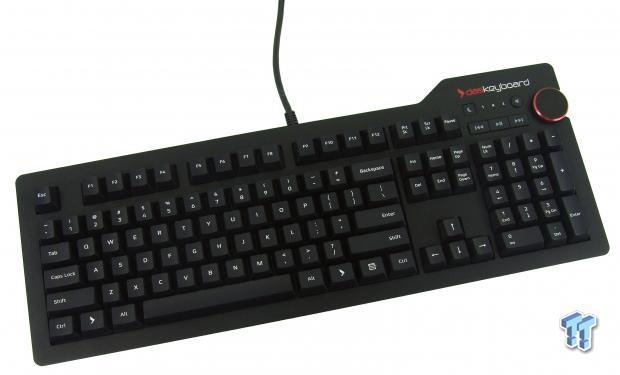
The Das Keyboard 4 Professional uses a fixed, full-size 104-key US ANSI layout (105-key on UK, Norwegian, and German versions), and its bottom row follows the traditional Windows order: left Ctrl, left Win, left Alt, spacebar, right Alt, right Win, Menu, right Ctrl. Alt sits directly beside the spacebar on both sides, and the Windows key is the outer key next to Ctrl — the arrangement every standard Windows keyboard has used for decades, per Das Keyboard’s own product specifications.
That fixed arrangement is the whole reason this question comes up. It doesn’t apply to every keyboard on the market, and the most common culprit for a mismatch is a Keychron.
Why some keyboards put Alt somewhere else
Keychron’s mainstream boards — the K-Pro and V-series lines, including full-size models — ship as dual-mode Mac/Windows keyboards with a physical switch on the side (or an Fn+Caps shortcut on some models) and dual-legend keycaps for the bottom row. Keychron’s own published layout reference lists the bottom row as: ctrl option/Windows command/alt space-bar command/alt option/windows fn ctrl, per Keychron’s keyboard layout reference.
Read that carefully and the swap becomes obvious: the key next to Ctrl is labeled Option in Mac mode and Windows key in Windows mode, while the key next to the spacebar is labeled Command in Mac mode and Alt in Windows mode. If the switch is left in Mac mode — which is how many Keychron boards ship out of the box — the key touch-typists reach for out of habit (the one beside the spacebar) sends a Windows-key code instead of Alt, and Alt moves one position further out. A Deskthority forum thread on this exact confusion put it plainly: “Macs have Command (which PCs see as Windows key) either side of spacebar, swapped with Alt,” in a discussion of Das Keyboard’s own Mac-layout model. Keychron’s support team documents the resulting confusion directly, in an article titled “The Caps lock key and left Ctrl are swapped. The left Windows key and left Alt key are also swapped. What should I do?” — a support topic that exists specifically because this mismatch trips people up often enough to warrant a help article.
This is exactly the failure mode behind muscle-memory complaints like Alt+Tab suddenly opening the Start menu, or Alt+F4 doing nothing: the physical key is in a different logical position than a standard Windows board puts it, and it depends on a mode switch the user may not have set — or may not have realized existed.
Just want the recommendation?
Skip to the picksWhere the Das Keyboard 4 Professional differs
The Das Keyboard 4 Professional has no Mac/Windows switch and no dual-legend bottom row. It ships as one fixed layout, built for “PC Windows, Linux,” with legends laser-etched rather than dual-printed, according to TechSpot’s hands-on review, which also confirms the 104-key layout and the home-row finger bumps on F and J. There’s nothing to toggle and nothing to get wrong: Alt is always the key beside the spacebar, on both sides, and Win is always the key beside Ctrl.
If you specifically want macOS-native positioning instead — Command beside the spacebar, matching how Mac keyboards have always been laid out — Das Keyboard sells a separate for-Mac version with keycaps and internal mapping built around that convention, described on its Das Keyboard 4 Professional for Mac product page as having “Command and Option keys positioned correctly” for macOS. That’s a different, and equally fixed, layout — not a compromise between the two.
How it holds up as a keyboard, not just a layout
Layout aside, reviewers treat the 4 Professional as a genuinely well-built board rather than just a safe, boring one. GoMechanicalKeyboard’s review calls it “one of the most complete mechanical keyboards” and specifically praises the consistent, low-profile key row heights for typing ergonomics, while flagging the bundled magnetic footbar ruler as a genuine weak point — it reduces the keyboard’s rear contact points from four rubber feet to two, and the printed measurements are too low-contrast to read easily. That’s a real trade-off worth knowing before you buy, even though it has nothing to do with the layout question.
On the mechanical side, the switches are Cherry MX2A (Blue, Brown, or Red depending on the current listing), the top panel is powder-coated aluminum rather than plastic, and the board includes a 2-port USB 3.0 hub, dedicated media keys, and a volume knob — features confirmed on Das Keyboard’s own shop listing. It also supports full N-key rollover over USB, toggled with Shift+Mute, per Das Keyboard’s own support documentation — useful if you also game on it and need every simultaneous key press to register.
What to check before you buy either one
If you’re deciding between the Das Keyboard 4 Professional and a Keychron board specifically over this layout question, the decision comes down to one thing: do you want a keyboard that only ever behaves one way, or one that’s flexible across Mac and Windows but requires you to get the switch position right every time you sit down?
- If you use only Windows or Linux and never touch macOS, the Das Keyboard 4 Professional’s fixed layout removes the failure mode entirely — there’s no switch to check and no dual legend to misread.
- If you regularly move between a Mac and a Windows machine, a Keychron’s switch is a genuine feature, not a defect — just confirm it’s set to Windows mode before you start relying on Alt+Tab, Alt+F4, or other Alt-based shortcuts, since the switch (not the keycap you’re looking at) determines what the key actually sends.
- If you’re on macOS full time, the Das Keyboard 4 Professional for Mac gives you the same fixed-layout reliability, just built around Command rather than Alt/Win in the outer position.
| Verdict | What decides it | The catch | |
|---|---|---|---|
| Das Keyboard 4 Professional | Buy | Fixed 104-key ANSI layout — Alt is always beside the spacebar, Win is always beside Ctrl, no mode switch involved | No RGB, no hot-swap sockets, and the bundled magnetic footbar is more gimmick than tool |
| Keychron K-Pro/V-series (dual-mode full-size boards) | Consider | Physical Mac/Windows switch and swappable keycaps make it genuinely useful across two operating systems | Left in Mac mode, the key beside the spacebar sends Windows-key, not Alt — the exact mismatch this question is about |
| Das Keyboard 4 Professional for Mac | Consider | Native Mac-correct positioning (Command beside spacebar) for readers who are on macOS full time | Wrong choice for a Windows-first workflow — it solves the same problem from the opposite direction |
For a reader whose main complaint is that Alt isn’t where a standard Windows keyboard puts it, the Das Keyboard 4 Professional is the safer buy: the layout can’t drift out of the expected position because there’s no mode to leave in the wrong state. A Keychron remains a fine keyboard, but only once the switch is confirmed set to Windows mode and you’ve swapped in the Windows keycap set — steps a fixed-layout board like the 4 Professional never asks you to take.
The bottom line
Two that fit, depending on the model you have:
Top pick
Buy this
Das Keyboard 4 Professional Mechanical Keyboard
Das
Its layout is fixed rather than switchable, so the exact modifier-position mismatch this question is about can't happen the way it can on a dual-mode board.
A full-size 104-key ANSI board with a fixed, standard Windows bottom row — Alt is always beside the spacebar and Win is always outboard, so there’s no mode switch that can put shortcuts in the wrong place.Available at Amazon(paid link) — opens Amazon in a new tab. Price and availability shown there.The alternative
It depends
Keychron K10 Pro QMK VIA Wireless Mechanical Keyboard
Keychron
Keychron's own layout reference shows the key beside the spacebar is Command in Mac mode and Alt in Windows mode, so the switch position — not the keycap printed on it — decides what Alt+Tab or Alt+F4 actually do.
A rival full-size board with a physical Mac/Windows switch and dual-legend keycaps — genuinely useful if you move between macOS and Windows, but the source of the exact Alt/Win mismatch this question describes when left in Mac mode.Available at Amazon(paid link) — opens Amazon in a new tab. Price and availability shown there.
Recommended products
Ordered by how well each one fits the situations above. Each link below is a paid link.
Das Keyboard 4 Professional Mechanical Keyboard
Das
Buy — Its layout is fixed rather than switchable, so the exact modifier-position mismatch this question is about can't happen the way it can on a dual-mode board.
A full-size 104-key ANSI board with a fixed, standard Windows bottom row — Alt is always beside the spacebar and Win is always outboard, so there’s no mode switch that can put shortcuts in the wrong place.Available at Amazon(paid link) — opens Amazon in a new tab. Price and availability shown there.
Keychron K10 Pro QMK VIA Wireless Mechanical Keyboard
Keychron
It depends — Keychron's own layout reference shows the key beside the spacebar is Command in Mac mode and Alt in Windows mode, so the switch position — not the keycap printed on it — decides what Alt+Tab or Alt+F4 actually do.
A rival full-size board with a physical Mac/Windows switch and dual-legend keycaps — genuinely useful if you move between macOS and Windows, but the source of the exact Alt/Win mismatch this question describes when left in Mac mode.Available at Amazon(paid link) — opens Amazon in a new tab. Price and availability shown there.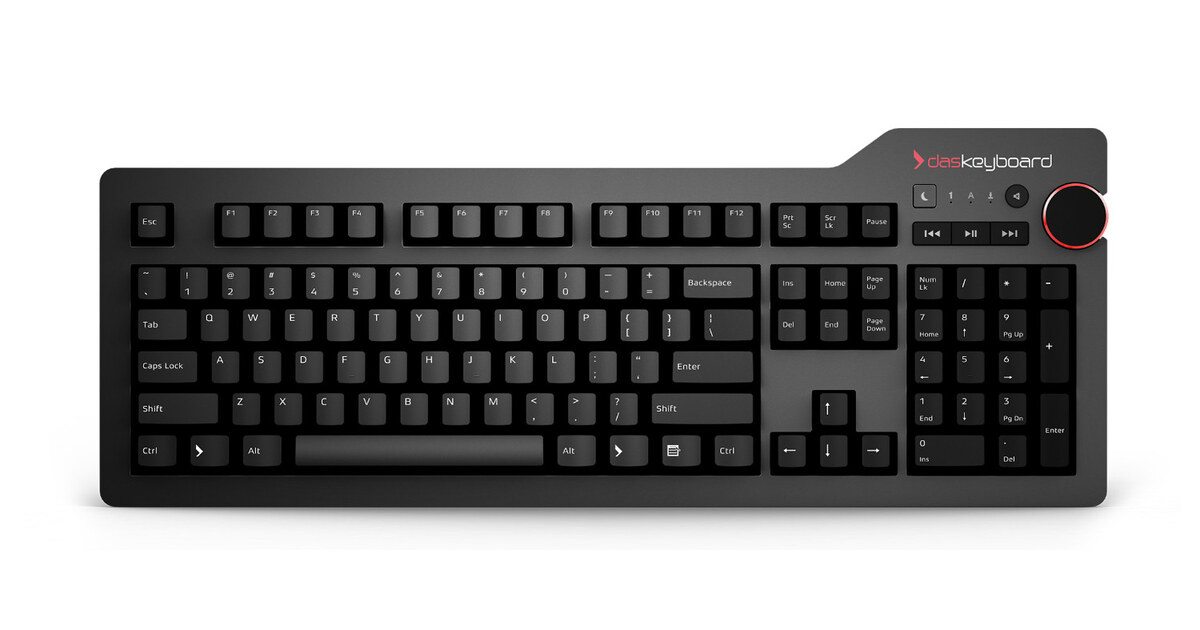
Das Keyboard 4 Professional for Mac Mechanical Keyboard
Apple
It depends — It solves the same layout-consistency problem from the Mac side, but is the wrong pick for a Windows-first workflow since Alt is no longer the key next to the spacebar.
The same board built around native macOS key positions (Command beside the spacebar) instead of the Windows convention — the right alternative if you’re on macOS full time rather than Windows.Available at Amazon(paid link) — opens Amazon in a new tab. Price and availability shown there.
Sources
Pages consulted while researching this article. None of these are affiliate links.
- Das Keyboard 4 Professional Mechanical Keyboard | Das Keyboard — daskeyboard.com
- Das Keyboard 4 Professional Review | TechSpot — techspot.com
- Keychron Keyboard Layout (Text version) — keychron.com
- The Caps lock key and left Ctrl are swapped. The left Windows key and left Alt key are also swapped. What should I do? – Keychron Support Center — keychronsupport.zendesk.com
- Das Keyboard 4 Professional for Mac on Linux/Windows - Deskthority — deskthority.net
- Das Keyboard 4 Professional for Mac Mechanical Keyboard | Das Keyboard — daskeyboard.com
- Das Keyboard 4 Professional Review – GoMK — gomechanicalkeyboard.com
- Das Keyboard 4 Professional Cherry MX Mechanical Keyboard — shop.daskeyboard.com