Gigabyte 9070 XT vs 5080: Pick the 5080
The questionWhere do these come from?
Should I go with Gigabyte GeForce RTX 5080 GAMING OC 16G for £915
Hi guys, I got a good eBay deal for Gigabyte GeForce RTX 5080 GAMING OC 16G for £915 from eBay. It is brand new. eBay seller can provide a copy of the invoice too.
Choose the RTX 5080 Gaming OC for ultrawide high-refresh gaming and streaming; the RX 9070 XT matches its VRAM, not its headroom.
Choose the Gigabyte GeForce RTX 5080 Gaming OC 16G for 1440p ultrawide high-refresh gaming, Battlefield, and regular YouTube streaming. The Gigabyte Radeon RX 9070 XT Gaming OC 16G is the sensible alternative when its smaller dimensions, conventional power connectors, or additional HDMI output solve a specific build problem—but it does not offer more VRAM.
This comparison uses the Gigabyte Radeon RX 9070 XT Gaming OC 16G, model GV-R9070XTGAMING OC-16GD, and the named Gigabyte GeForce RTX 5080 Gaming OC 16G, model GV-N5080GAMING OC-16GD.
| Specification | Gigabyte RX 9070 XT Gaming OC | Gigabyte RTX 5080 Gaming OC |
|---|---|---|
| Memory | 16GB GDDR6, 256-bit, 20 Gbps | 16GB GDDR7, 256-bit, 30 Gbps |
| Card dimensions | 288 × 132 × 56 mm | 340 × 140 × 70 mm |
| Power connection | Three 8-pin connectors | One 16-pin connector; three-8-pin adapter included |
| Recommended PSU | 850W | 850W |
| Display outputs | Two DisplayPort 2.1a, two HDMI 2.1b | Three DisplayPort 2.1b, one HDMI 2.1b |
Those figures come directly from Gigabyte’s RX 9070 XT Gaming OC specifications and RTX 5080 Gaming OC specifications. Core counts cannot be compared directly across AMD and NVIDIA architectures, so they are not useful buying shorthand here.
The RTX 5080 wins at high-refresh ultrawide
The RTX 5080 is the stronger choice. A 3440×1440 display places a substantially heavier load on the GPU than ordinary 2560×1440, and a high-refresh target leaves less room for compromises. The 5080’s higher performance tier, stronger ray-tracing platform, and DLSS support provide more headroom for raising settings while maintaining a high rendered frame rate.
Start competitive games with DLSS Quality on the 5080 or FSR Quality on the 9070 XT. Leave frame generation disabled initially and judge the native responsiveness and minimum frame rate first. Generated frames improve visible smoothness, but they do not make the game simulation or input processing run at the displayed generated-frame rate. Multi Frame Generation is therefore more attractive for visually demanding single-player games than for aiming in a competitive Battlefield match.
The RX 9070 XT remains capable of ultrawide play, but choosing it means accepting less performance headroom—not gaining extra memory. If the RTX 5070 Ti is also being considered, the broader 5070 Ti, 5080 and 9070 XT comparison covers that three-way decision.
Battlefield 6 favors the RTX 5080
For Battlefield 6, the RTX 5080 is the clearer choice, particularly when the target is a high-refresh ultrawide display. EA confirms that the game supports ultrawide monitors as well as NVIDIA DLSS 4 and AMD FSR 4, so neither card is excluded from the relevant upscaling path. EA’s Battlefield 6 FAQ confirms all three features.
EA also names the RTX 5080 in its official Ultra++ configuration: the published targets are 4K at 144 frames per second on High settings or 4K at more than 240 frames per second on Ultra using DLSS Performance and Multi Frame Generation. Those are EA configuration targets, not an independent Gigabyte-versus-Gigabyte benchmark, but they show which card the developer associates with its highest performance tier. The same guidance pairs the RTX 5080 with a Ryzen 7 9800X3D or Core Ultra 9 285K, illustrating how important the CPU becomes at extreme frame-rate targets. EA documents the complete Ultra++ configuration here.
For multiplayer, first run the game with frame generation off, select the Quality upscaling mode, enable NVIDIA Reflex when using the 5080, and cap the frame rate below the monitor’s refresh ceiling if sustained GPU saturation causes inconsistent latency. Only enable Multi Frame Generation after the base rendered performance is already comfortable.
No exact 3440×1440 margin is claimed here. Neither Gigabyte specification page provides a controlled Battlefield comparison using the same CPU, game patch, map, player count, and graphics preset. If a precise frame-rate difference will determine the purchase, only a current benchmark matching those conditions can settle it.
Just want the recommendation?
Skip to the picksBoth GPUs handle AV1 YouTube streaming
Both GPUs can encode AV1 in hardware. AMD’s official RX 9070 XT specification confirms AV1 encoding, while NVIDIA specifies two ninth-generation NVENC engines with AV1 support for the RTX 5080. Two encoder engines do not automatically double the quality of one livestream, but they give the 5080 a stronger foundation for simultaneous encoding or creator workloads.
The RTX 5080 is the lower-friction streaming choice because OBS supports NVENC directly and NVIDIA also supplies Broadcast features for microphone noise removal and background processing. Radeon is not disqualified: OBS supports AMD’s AMF hardware encoder as well. OBS specifically recommends using the encoder belonging to the primary discrete GPU—NVENC for NVIDIA or AMF for AMD—rather than shifting the job to the CPU or integrated graphics. OBS documents that hardware-encoding guidance.
For an SDR YouTube stream in OBS, open Settings → Output, change Output Mode to Advanced, select the Streaming tab, and choose NVIDIA NVENC AV1 or AMD HW AV1. Encoder wording can change slightly between OBS releases. Use CBR and a 2-second keyframe interval. YouTube officially accepts AV1 through RTMP/RTMPS and permits 1440p at 60 frames per second within a 6–30 Mbps ingestion range. YouTube does not support AV1 for HDR ingestion; choose HEVC when streaming HDR. These limits are listed in YouTube’s current encoder settings.
Do not stretch a 3440×1440 ultrawide capture directly into a 2560×1440 canvas: the aspect ratios differ. For a standard 16:9 YouTube presentation, create a 2560×1440 canvas and deliberately crop or compose the ultrawide game source within it.
VRAM is a tie at 16GB
There is no capacity difference: both Gigabyte cards have 16GB on a 256-bit interface. The RTX 5080 uses faster GDDR7 rated at 30 Gbps, while the RX 9070 XT uses GDDR6 rated at 20 Gbps. That memory-speed difference does not translate directly into an equivalent frame-rate percentage, but it does mean the Radeon card has no VRAM specification advantage to offset its lower performance tier.
No fixed VRAM capacity can guarantee every future game at maximum textures. For current ultrawide gaming, the relevant decision is therefore performance and feature support, not a false 16GB-versus-16GB “future-proofing” distinction.
Either GPU can move to a later platform
Either card can move into a later platform; both Gigabyte specifications list PCI Express 5.0, and neither requires a matching CPU brand. The practical issue is whether the current processor can feed the chosen GPU at the desired frame rate.
The RTX 5080 makes more sense when the plan genuinely includes a stronger gaming CPU later, because that upgrade can expose more of the GPU’s unused headroom. Until then, a CPU-limited Battlefield system may show a smaller difference between the cards than a GPU-limited single-player game. Do not interpret that temporary CPU limit as evidence that the GPUs are equal.
What to check before installing either card
Measure the case rather than relying on its advertised GPU limit alone. The RTX 5080 Gaming OC is 340 mm long and 70 mm thick, and it also needs space above its 140 mm width for the 16-pin cable. The RX 9070 XT Gaming OC is considerably shorter and thinner at 288 × 132 × 56 mm.
Both Gigabyte models call for an 850W PSU. The Radeon takes three 8-pin plugs directly. The 5080 uses a 16-pin input and includes an adapter for three 8-pin connections. When using an adapter, connect the required dedicated PSU cables, push the 16-pin plug in evenly until it sits fully flush, and avoid forcing the side panel against the connector. NVIDIA’s RTX 5080 installation guide specifically calls for three independent 8-pin cables with the adapter and a completely seated 16-pin plug.
The final decision is straightforward: choose the Gigabyte RTX 5080 Gaming OC for the best ultrawide, Battlefield, and streaming combination. Choose the Gigabyte RX 9070 XT Gaming OC only when the smaller board, direct 8-pin connections, or second HDMI output is the requirement that the larger 5080 cannot satisfy.
The bottom line
If you buy one, buy this:
Top pick
Buy this
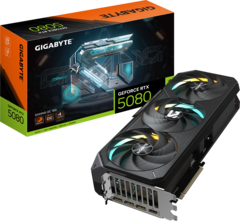
GIGABYTE GeForce RTX 5080 GAMING OC 16G
Gigabyte
The article recommends the RTX 5080 for high-refresh ultrawide gaming, Battlefield, and streaming, citing greater performance headroom, DLSS support, and two ninth-generation NVENC engines with AV1 encoding.
Available at Amazon(paid link) — opens Amazon in a new tab. Price and availability shown there.
Recommended products
Ordered by how well each one fits the situations above. Each link below is a paid link.
GIGABYTE GeForce RTX 5080 GAMING OC 16G
Gigabyte
Buy — The article recommends the RTX 5080 for high-refresh ultrawide gaming, Battlefield, and streaming, citing greater performance headroom, DLSS support, and two ninth-generation NVENC engines with AV1 encoding.
Available at Amazon(paid link) — opens Amazon in a new tab. Price and availability shown there.
Sources
Pages consulted while researching this article. None of these are affiliate links.
- Gigabyte GeForce RTX 5080 Gaming OC 16G Specifications — gigabyte.com
- Gigabyte Radeon RX 9070 XT Gaming OC 16G Specifications — gigabyte.com
- Battlefield 6 FAQ — ea.com
- Battlefield 6 PC and Ultra++ Specifications — ea.com
- NVIDIA GeForce RTX 5080 Specifications — nvidia.com
- AMD Radeon RX 9070 XT Specifications — amd.com
- YouTube Live Encoder Settings and Bitrates — support.google.com
- OBS Hardware Encoding Guide — obsproject.com