How to Install RX 9060 XT 16GB Gigabyte Drivers
The questionWhere do these come from?
Rx 9060xt 16gb options
Hi, so this is my first gaming Pc that I have bought used about 1 year ago for a pretty good price in my area.
Use AMD Adrenalin—not an old Gigabyte package—for the RX 9060 XT 16GB; Gigabyte software is only for board controls and firmware.
Install AMD Software: Adrenalin Edition from AMD’s own RX 9060 XT support page — there is no separate Gigabyte or 16GB-specific display driver. The same AMD package covers both the black and white Gigabyte three-fan variants; the steps below apply to either.
Install the correct driver
-
Download the current WHQL Recommended package from AMD’s Radeon RX 9060 XT driver page — for Windows 10 or Windows 11. As of August 23, 2026, that’s Adrenalin 26.8.1, released August 20, 2026, an 849MB installer.
-
Skip the Gigabyte-hosted driver for a fresh install. Gigabyte’s support page still lists AMD driver 32.0.21013.1000, dated June 6, 2025, but the page itself directs users to the GPU manufacturer for the latest version. Treat that older package as a fallback for diagnosing a regression, not the default. Gigabyte’s support listing confirms both the old package and the AMD redirect.
-
Run the installer and pick a configuration:
Install option AMD control interface Included feature level Default Full Gaming controls, recording, streaming and performance tuning Minimal Basic Core controls without recording or advanced tuning Driver Only None Display driver without the AMD Software interface Choose Default on a first installation for game profiles, FreeSync controls, updates and performance monitoring. Choose Minimal if recording and tuning are unnecessary. Driver Only suits a stripped-down installation, but it removes the interface used to change Radeon settings. These options and their exact functions are documented in AMD’s installation guide.
-
Confirm OS support before installing. AMD currently supports Windows 11 version 21H2 or later and Windows 10 64-bit version 1809 or later. On Linux, use the operating-system section of the same RX 9060 XT page rather than running Adrenalin’s Windows installer — AMD provides separate packages for supported Ubuntu and RHEL releases.
If the installer does not detect the card
Check the hardware before repeatedly reinstalling drivers:
- Connect the monitor to the RX 9060 XT’s DisplayPort or HDMI socket, not the motherboard. The Ryzen 5 3600 requires a discrete graphics card and has no integrated graphics output.
- Confirm the card is fully seated in the motherboard’s primary full-length PCIe slot.
- Connect one native 8-pin PCIe/VGA power lead from the PSU. Do not use a SATA-to-PCIe power adapter.
- Open
Device Manager > Display adapters. “Microsoft Basic Display Adapter” means Windows can see graphics hardware but the AMD driver is missing. No new display device at all points toward seating, power, motherboard BIOS or defective-hardware trouble. - Finish pending Windows updates and restart before rerunning the AMD installer. AMD documents dedicated error paths for conditions such as an active Windows update, unsupported Windows version or undetected AMD hardware.
If Windows replaces the AMD driver after installation, reinstall the current AMD package and check the installer’s reported error number — that’s a different problem from a card that never appears in Device Manager.
If replacing an Nvidia card or another Radeon
For a normal update from a working AMD driver, install the new Recommended package over the existing installation; a cleanup is not required for every routine update.
When replacing an Nvidia card:
- Uninstall the Nvidia graphics software through
Settings > Apps > Installed apps. - Shut down, then install the Gigabyte card.
- Install AMD Adrenalin using the steps above.
- Avoid downloading repackaged drivers or cleanup programs from unverified mirrors.
If an older AMD installation is corrupted instead, use the official AMD Cleanup Utility, reboot and reinstall Adrenalin. The utility removes AMD graphics and audio driver software but does not remove AMD chipset drivers; AMD recommends Safe Mode when the utility offers to restart there.
Use the installer’s Factory Reset option only when a clean installation is actually needed. It removes previous AMD Software packages, temporarily pauses Windows Update, and prevents rolling back to the removed driver through the usual Windows mechanism.
Just want the recommendation?
Skip to the picksIf the fans stay stopped or the RGB does not work
Fans remaining stationary on the desktop are not automatically a driver failure. Gigabyte describes its 3D Active Fan system as semi-passive: the fans stay off under low GPU load and start when cooling is needed.
RGB, fan-mode and power-target controls belong to Gigabyte Control Center, not the Radeon display driver. Gigabyte says GCC can adjust clock speed, voltage, fan mode and power target in real time; install it only from Gigabyte’s official product or utility page.
GPU firmware is also separate from the display driver. Do not flash firmware merely because a newer file appears on the support page. Verify the complete model number on the card label, read the firmware’s stated purpose, and apply it only to that exact model. Interrupting a firmware flash, or using a package for the black card on an unlisted ICE revision, can leave board functions unusable; unresolved firmware problems belong with Gigabyte support.
Choosing between the black and white three-fan cards
Fan count, cooler color and board branding do not change the display driver — both cards below install through the same steps. Gigabyte publishes these specifications for its standard Gaming OC 16G and white Gaming OC ICE 16G:
| Attribute | Gaming OC 16G | Gaming OC ICE 16G |
|---|---|---|
| Model number | GV-R9060XTGAMING OC-16GD | GV-R906XGAMINGOCICE-16GD |
| Finish | Black | White |
| Published clocks | 2780MHz game; 3320MHz boost | 2780MHz game; 3320MHz boost |
| Card dimensions | 281 × 118 × 40mm | 281 × 118 × 40mm |
| Power requirement | One 8-pin; 450W recommended PSU | One 8-pin; 450W recommended PSU |
The ICE model is the straightforward choice for a white build when both are otherwise equally suitable — Gigabyte publishes no clock, memory, size or connector advantage for one over the other. Both use 16GB of 20Gbps GDDR6 on a 128-bit interface, and both use the same AMD driver.
A three-fan cooler can offer more heatsink area than a compact two-fan card, but fan count alone does not establish actual temperature or noise performance. Without controlled measurements of the exact competing boards, claims that one is cooler or quieter would be speculation.
If pairing it with a Ryzen 5 3600 temporarily
The Ryzen 5 3600 is compatible with the RX 9060 XT and will not prevent the AMD graphics driver from installing. AMD specifies the processor as a six-core, 12-thread AM4 CPU with a PCIe 4.0 x16 interface and a discrete-GPU requirement. AMD’s Ryzen 5 3600 specifications provide those figures.
The actual PCIe generation will also be limited by the motherboard. An older AM4 board may connect the card at PCIe 3.0, while a supported B550 or X570 configuration can provide PCIe 4.0 — that changes link speed, not basic compatibility.
The Ryzen 5 3600 can limit maximum frame rates in CPU-heavy games, especially at 1080p with a high-refresh monitor. At higher resolutions or GPU-heavy settings, more of the workload shifts toward the RX 9060 XT, so it’s a reasonable temporary pairing, with the CPU and platform being the later upgrade target rather than a reason to reject the card.
Smart Access Memory has a narrower requirement: AMD lists Ryzen 3000-series CPUs as compatible, but also requires an AMD 500-series motherboard or later, a current motherboard BIOS, and platform support. Without the motherboard model, an exact BIOS menu path cannot be guaranteed; the relevant settings are commonly named Above 4G Decoding and Re-Size BAR Support.
What to check before returning it
A driver reinstall cannot repair a card that receives no power, never appears in Device Manager, or produces no display in another known-working PC. Before requesting an RMA, reseat the card, reconnect its 8-pin lead, try another GPU output and cable, restore any GPU overclock to default, and test the card in another compatible system if one is available.
If it’s detected but one game crashes, check that game’s files and AMD’s release notes before blaming the board. If it fails in multiple games after a clean Recommended-driver installation, at stock settings, and in a second system, stop troubleshooting software and contact Gigabyte or the retailer for warranty service.
The bottom line
Either works — what you already have picks one:
Top pick
Buy this
GIGABYTE Radeon RX 9060 XT Gaming OC 16G Graphics Card, PCIe 5.0, 16GB GDDR6, GV-R9060XTGAMING OC-16GD Video Card
Gigabyte
The black Gaming OC 16G uses the AMD driver covered by the guide and measures 281 × 118 × 40mm with one 8-pin power connector.
This is the exact black three-fan model covered by the guide, with a 281mm length and one 8-pin connector. Its drawback is the black finish in an otherwise white build.Available at Amazon(paid link) — opens Amazon in a new tab. Price and availability shown there.The alternative
Buy this
GIGABYTE Radeon™ RX 9060 XT Gaming OC ICE 16G Graphics Card (16GB GDDR6, 128-bit, PCIe 5.0, HDMI/DP 2.1, 2 Slot, Hawk Fan, Server-Grade Thermal Gel, Reinforced Structure)
Gigabyte
The white Gaming OC ICE 16G uses the same AMD driver and has the same published clocks, dimensions and power requirements as the black model.
This is the white version for a color-matched build and uses the same AMD driver, clocks and dimensions. Its drawback is that Gigabyte publishes no performance advantage over the standard black model.Available at Amazon(paid link) — opens Amazon in a new tab. Price and availability shown there.
Recommended products
Ordered by how well each one fits the situations above. Each link below is a paid link.
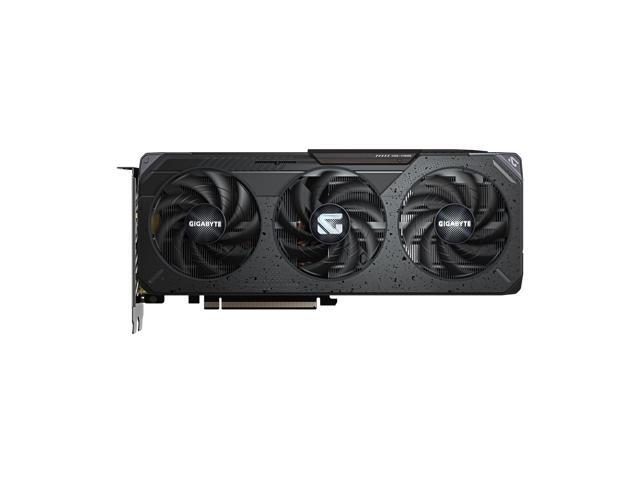
GIGABYTE Radeon RX 9060 XT Gaming OC 16G Graphics Card, PCIe 5.0, 16GB GDDR6, GV-R9060XTGAMING OC-16GD Video Card
Gigabyte
Buy — The black Gaming OC 16G uses the AMD driver covered by the guide and measures 281 × 118 × 40mm with one 8-pin power connector.
This is the exact black three-fan model covered by the guide, with a 281mm length and one 8-pin connector. Its drawback is the black finish in an otherwise white build.Available at Amazon(paid link) — opens Amazon in a new tab. Price and availability shown there.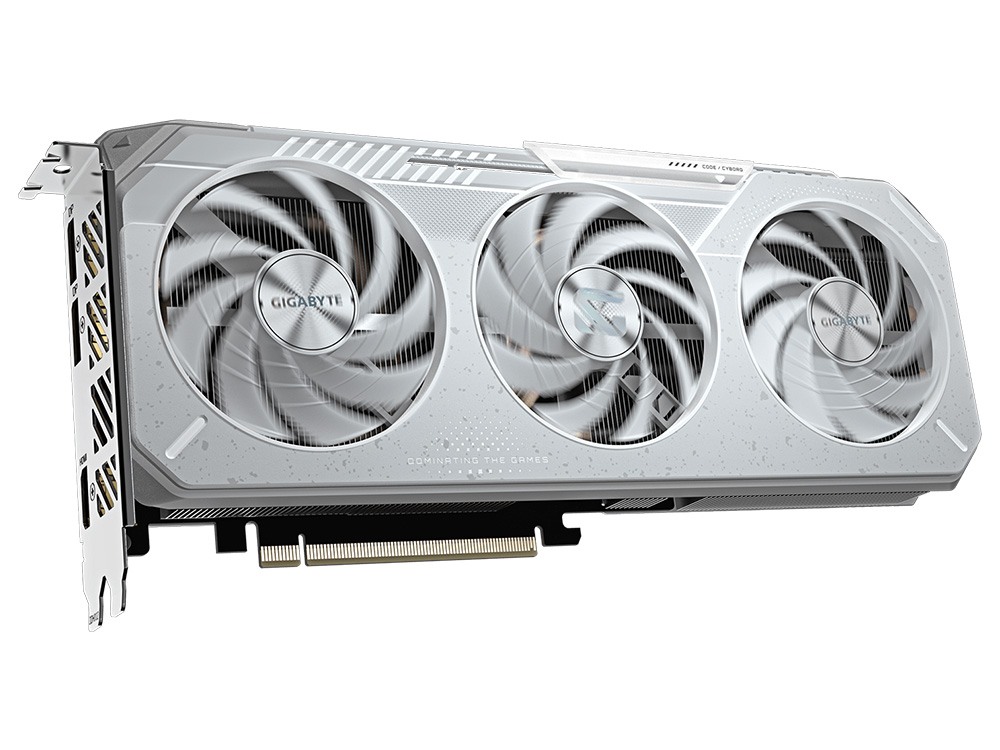
GIGABYTE Radeon™ RX 9060 XT Gaming OC ICE 16G Graphics Card (16GB GDDR6, 128-bit, PCIe 5.0, HDMI/DP 2.1, 2 Slot, Hawk Fan, Server-Grade Thermal Gel, Reinforced Structure)
Gigabyte
Buy — The white Gaming OC ICE 16G uses the same AMD driver and has the same published clocks, dimensions and power requirements as the black model.
This is the white version for a color-matched build and uses the same AMD driver, clocks and dimensions. Its drawback is that Gigabyte publishes no performance advantage over the standard black model.Available at Amazon(paid link) — opens Amazon in a new tab. Price and availability shown there.
Sources
Pages consulted while researching this article. None of these are affiliate links.
- AMD Radeon RX 9060 XT Review: Powerful desktop GPU with 16 GB VRAM in a price-performance check — notebookcheck.net
- Microsoft Basic Display Adapter in Windows — support.microsoft.com
- How to check power supply specification? — us.msi.com
- AMD Radeon RX 9060 XT Drivers and Downloads — amd.com
- Gigabyte RX 9060 XT Gaming OC 16G Support — gigabyte.com
- Install AMD Software: Adrenalin Edition — amd.com
- Gigabyte RX 9060 XT Gaming OC 16G Specifications — gigabyte.com
- Gigabyte RX 9060 XT Gaming OC ICE 16G Specifications — gigabyte.com
- AMD Cleanup Utility — amd.com
- AMD Ryzen 5 3600 Specifications — amd.com