Dell Precision 5560 Battery Collapsing? The OEM Fix
The questionWhere do these come from?
Battery suddenly drops from 50% to 10% under load. Calibration issue or dead battery?
Hey everyone, I’m facing a weird issue with my laptop battery ( dell precision 5560 4k) and need some advice. Lately, the battery percentage drops out of nowhere.
A percentage that craters under load on battery power points to a failing cell, not calibration — replace it with Dell's genuine 86Wh 69KF2 pack.
A percentage that craters under load — especially while running on battery power alone, with no charger attached — is rarely a calibration glitch. It’s the voltage signature of a pack whose internal resistance has climbed with age, and on the Precision 5560 the only replacement Dell itself sanctions is the genuine 86Wh 69KF2 “smart” battery, not a generic clone sold as “compatible.”
Two different things get lumped together under “battery drops under load” on this machine, and they need different fixes. One is completely normal and built into the design. The other means the pack is failing. Telling them apart takes about five minutes, and it decides whether you need a new battery or just a bigger charger.
What a Collapsing Percentage Under Load Actually Means
A lithium-ion pack’s reported charge isn’t a direct measurement of stored energy — the gas gauge chip inside a Dell “smart” battery estimates it from coulomb counting cross-checked against terminal voltage. Terminal voltage sags under current draw in proportion to the pack’s internal resistance: pull more current, and the voltage the gauge sees drops further below the cell’s true open-circuit voltage.
A healthy 86 Wh 6-cell pack has low internal resistance, so that sag is small even when the 11th Gen Tiger Lake-H processor and the RTX A2000/A3000 GPU are both boosting. As the cells age — through charge cycles, heat, or simple calendar time — internal resistance climbs, sometimes to several times its original value. At that point, the same current draw produces a much bigger voltage sag, one large enough to cross the gauge’s cutoff threshold even though coulomb counting would say 20–40% of the capacity is still there. The reported percentage doesn’t drift down gradually; it falls off a cliff the moment the load spikes, then the system may shut down or throttle hard to protect itself.
That’s a different failure mode from ordinary calibration drift, where the percentage is simply wrong relative to actual runtime but doesn’t crash suddenly when you open a render job or a game. If your Precision 5560 reads a plausible number at idle or light load and only collapses the instant CPU and GPU boost together, that’s the internal-resistance signature, not a number that needs recalibrating.
Rule Out Dell’s Hybrid Power Drain First
Before concluding the pack is failing, check whether the laptop is plugged in when it happens. Dell builds a feature called Hybrid Power into the Precision line specifically so it can ship a smaller adapter than a workstation chip and Ampere GPU would otherwise need. Dell’s own support documentation explains it plainly: when the system’s total power draw exceeds what the AC adapter can supply, the system pulls the shortfall from the battery instead of throttling performance — and Dell states this is normal, working-as-designed behavior, not a fault, as long as the drain stays around 5% per hour or less while the adapter stays connected. Hybrid Power only stays active while the battery has more than roughly 10% charge remaining, after which the system does throttle to protect the pack. Dell documents the identical mechanism on the related Precision 7540/7740 workstations, describing it the same way: the battery won’t visibly charge, may even discharge, while plugged in under a heavy load, and that’s by design.
So if your percentage is dropping while the charger is connected, under a sustained CPU+GPU workload, at something close to 5% an hour — that’s Hybrid Power, not a dying pack. It’s worth double-checking your adapter’s wattage before spending money on a battery; more on that below.
The Failure Signature That Actually Points to a Bad Pack
Hybrid Power can’t explain a collapse that happens while the laptop is running on battery alone, unplugged. If the charger is nowhere near the machine and the percentage still free-falls the moment a heavy task starts — or jumps from a reasonable number straight to single digits in a matter of seconds — that’s the failing-cell pattern, and it matches what owners of this chassis have reported in Dell’s own community forums. One Precision 5550 owner (the 5560’s direct predecessor, sharing the same 86 Wh pack and chassis) described a brand-new battery reaching only 71% of its rated design capacity, with the charge level jumping from 30–40% straight down to 4% under load, plus 10–15% drain overnight in sleep. A separate thread specific to the 5560 reports the same complete-drain-then-won’t-recover pattern. Neither thread reflects hands-on testing here — they’re cited as evidence the symptom is real and specific to this chassis, not a one-off.
The practical test: run the machine on battery only, load the CPU and GPU together (a game, a render, Cinebench), and watch what the percentage does in the first 60–90 seconds. A smooth, proportional decline is aging within normal limits. A sudden vertical drop is the cell telling you its internal resistance is no longer where it should be.
Just want the recommendation?
Skip to the picksRun Dell’s Own Battery Diagnostic Before You Buy Anything
Before ordering a replacement, run Dell’s built-in check: power on the machine, tap F12 at the Dell logo, choose Diagnostics from the One Time Boot Menu, and let ePSA (Enhanced Pre-Boot System Assessment) run. It tests the primary battery specifically, reporting its percentage of full-charge capacity and overall health, and flags a hardware fault with an error code if one exists. A “Pass” result means no safety-level fault was detected in the battery, charger, or charging circuit — it does not mean the runtime is still what it was new, so a Pass alongside the on-battery collapse described above still points at the cells, just not a safety fault. A Fail is unambiguous: replace it.
Confirm Which Battery Your Unit Actually Shipped With
Dell built the Precision 5560 with two battery options, and they are not interchangeable without also matching the rest of the configuration: a 56 Wh 3-cell pack and an 86 Wh 6-cell pack, both rated at 11.4V and both Dell’s “ExpressCharge”-capable smart Li-ion design. The 86 Wh pack is the one paired with discrete-GPU configurations; the 56 Wh pack typically ships on integrated-graphics builds. Check your unit’s exact original part by entering its service tag (printed on the bottom label) into Dell’s support site — it will list the battery your specific configuration left the factory with, which matters because ordering the wrong capacity means a different physical footprint and a charging profile the EC wasn’t configured for.
The Genuine Part Number: 69KF2
For the 86 Wh configuration, Dell’s factory part number is 69KF2 — confirmed consistently across independent listings from CDW, Walmart Business, and multiple parts resellers, all describing the identical 11.4V, 6-cell, 86 Wh smart battery. Because the Precision 5560 shares its chassis and battery bay with the XPS 15 9500/9510/9520 and Precision 5550/5570, the same 69KF2 pack is cross-listed for all of those models — that’s a function of shared engineering, not a coincidence to be suspicious of.
| Buy / Skip | The thing that decides it | The catch | |
|---|---|---|---|
| Genuine Dell 69KF2 (86Wh) OEM battery | Buy | Carries Dell’s authentication chip, so the embedded controller charges it at full rate and ePSA reads it correctly | Not a tool-free swap — see below |
| Generic/aftermarket “compatible” 69KF2 pack | Skip | Usually built without Dell’s ID/communication chip | Often triggers a “battery cannot be identified” fault that stops charging entirely |
| Dell 130W USB-C AC adapter (discrete-GPU config) | Consider | Only matters if your unit shipped with the discrete GPU and the 130W charger | Using a 90W or underpowered third-party charger forces Hybrid Power to lean harder on an already-degrading pack |
Why a Generic Replacement Is the Wrong Move Here
Dell’s own service manual is explicit on this point, in the section covering swollen and failing batteries: replace the battery only with a compatible battery purchased from Dell, specifically to avoid fire and explosion risk. That’s not boilerplate caution — Dell smart batteries carry a small identification and communication chip that the embedded controller reads at boot and during charging. A pack without a matching chip, or with one the firmware can’t authenticate, commonly triggers a “battery cannot be identified” warning or the BIOS 1A1W error code, and the system responds by refusing to charge it at all rather than risk an unregulated cell stack. That’s the exact opposite of what you want on a machine already showing a voltage-sag fault — a mismatched, lower-grade cell stack raises the odds of swelling or worse right where the internal resistance problem already lives. The same authentication behavior shows up across Dell’s laptop lineup, not just this chassis — see Dell Latitude 7310 Battery: Why a Generic One Won’t Fit for the same failure on a different model.
If you want a sense of what a genuinely healthy 86 Wh pack should still deliver, NotebookCheck’s measured figures for the Precision line give a working baseline: even under a continuous heavy load, a review unit in good health sustained roughly 1.8 hours of runtime before depleting. If your unit is unplugged, under sustained load, and dying in a fraction of that — well before the coulomb count says it should — that’s further confirmation the pack itself, not the readout, is the problem.
Where to Buy the Genuine 69KF2
The safest source is Dell’s own parts store, using the battery selector for Precision Mobile Workstations, or Dell’s support site with your service tag entered so it filters to parts verified against your exact configuration. Authorized parts resellers that explicitly sell pulled-and-tested or new-old-stock genuine Dell FRU parts (rather than aftermarket clones built to the same form factor) are the other legitimate route — the giveaway on a listing is whether it names the Dell part number (69KF2) as the actual manufacturer part rather than using it only as a “fits” cross-reference for a third-party cell.
Check Your Charger Wattage Before You Blame the Battery
The Precision 5560 shipped with two adapter options tied directly to configuration: a 90W USB-C adapter for integrated-graphics builds, and a 130W USB-C adapter for discrete-GPU builds carrying the RTX A2000 or A3000. If your unit has the discrete GPU but you’re charging it with a 90W adapter, a generic USB-C charger, or a dock rated below 130W, Hybrid Power will lean on the battery far more than 5% an hour under sustained load, because the adapter genuinely can’t cover the system’s peak draw — and that extra cycling accelerates the exact internal-resistance rise this whole diagnosis is about. Confirm the wattage stamped on your adapter against your configuration before assuming the pack alone is to blame; Dell is exact about these numbers for a reason, the same way it specifies an exact wattage rather than “close enough” on other models — see Dell Inspiron 3535 Charger: It’s 65W, Not 60W for how much a few watts of shortfall matters on this brand’s chargers.
Replacing It Isn’t a Tool-Free Swap
Unlike some ultraportables with a quick-release battery, the Precision 5560’s pack is held down by eight screws (four M2x4, four M2x3) and taped to the speaker cable beneath the palmrest, per Dell’s service manual. Before removal, Dell requires fully discharging the system on battery power with the AC adapter unplugged, and explicitly warns against prying on the pack with any tool — a swollen or high-resistance cell is more physically fragile than a healthy one. If you’re not comfortable opening the base panel, this is a reasonable job to hand to an authorized Dell technician rather than do cold; the part itself doesn’t change based on who installs it.
When to Stop Troubleshooting and File an RMA
If ePSA reports a battery fault, if the unit is still inside Dell’s warranty window, or if you see physical swelling (a battery that no longer sits flush, or resistance when closing the lid), stop here and open a support case with Dell rather than ordering a part yourself — a swollen pack should be discharged, left alone, and reported per Dell’s own handling guidance rather than pried at. Outside warranty, with ePSA confirming the fault and no swelling, the genuine 69KF2 is the correct part to order and install.
The bottom line
Two parts fix this, depending on which failed:
Top pick
Buy this
Dell 69KF2 86Wh 6-Cell Battery Precision 5560
Dell
Dell's service manual states the battery should be replaced only with a compatible battery purchased from Dell, specifically to avoid fire and explosion risk from an unauthenticated pack.
Dell’s own factory part for the 86Wh discrete-GPU configuration, carrying the authentication chip the embedded controller needs to charge it at full rate and report health correctly through ePSA.Available at Amazon(paid link) — opens Amazon in a new tab. Price and availability shown there.The alternative
Skip this
Vmaxxfanee 69KF2 86Wh Replacement Battery Dell Precision 5560
Vmaxxfanee
Packs without Dell's identification chip commonly trigger the BIOS 1A1W 'battery cannot be identified' fault and get refused charging entirely, which is the last thing you want on a unit already showing a voltage-sag fault.
A lower-cost ‘compatible’ clone built to the same form factor as the 69KF2, sold as an alternative to the genuine pack for owners trying to save money.Available at Amazon(paid link) — opens Amazon in a new tab. Price and availability shown there.
Recommended products
Ordered by how well each one fits the situations above. Each link below is a paid link.

Dell 69KF2 86Wh 6-Cell Battery Precision 5560
Dell
Buy — Dell's service manual states the battery should be replaced only with a compatible battery purchased from Dell, specifically to avoid fire and explosion risk from an unauthenticated pack.
Dell’s own factory part for the 86Wh discrete-GPU configuration, carrying the authentication chip the embedded controller needs to charge it at full rate and report health correctly through ePSA.Available at Amazon(paid link) — opens Amazon in a new tab. Price and availability shown there.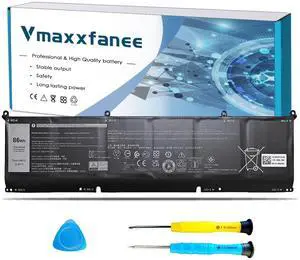
Vmaxxfanee 69KF2 86Wh Replacement Battery Dell Precision 5560
Vmaxxfanee
Skip — Packs without Dell's identification chip commonly trigger the BIOS 1A1W 'battery cannot be identified' fault and get refused charging entirely, which is the last thing you want on a unit already showing a voltage-sag fault.
A lower-cost ‘compatible’ clone built to the same form factor as the 69KF2, sold as an alternative to the genuine pack for owners trying to save money.Available at Amazon(paid link) — opens Amazon in a new tab. Price and availability shown there.Dell 130W USB-C AC Adapter Precision 5560 5550
Dell
It depends — Only relevant if your unit shipped with the discrete RTX A2000/A3000 and the 130W adapter — integrated-graphics configs use the 90W adapter and don't need it.
The correct-wattage charger for discrete-GPU 5560 configurations; needed alongside the new battery so Hybrid Power isn’t forced to draw more than its normal 5% per hour from the pack under load.Available at Amazon(paid link) — opens Amazon in a new tab. Price and availability shown there.

Sources
Pages consulted while researching this article. None of these are affiliate links.
- Precision 5560 Setup and Specifications — Battery — dell.com
- Precision 5560 Setup and Specifications — Power Adapter — dell.com
- Precision 5560 Service Manual — Removing the Battery — dell.com
- Precision 5560 Service Manual — Handling Swollen Rechargeable Li-ion Batteries — dell.com
- Performance Issue or Battery Drains While AC Adapter Is Connected — dell.com
- Precision 7540 and 7740: Battery Drains When Running Heavy Loading Applications With Adapter Connected — dell.com
- How to Check Battery Health Status on Dell Laptops — dell.com
- What Are the SupportAssist ePSA, ePSA and PSA Diagnostics — dell.com