Lenovo 65W vs Non-Lenovo 45W USB-C Charger: Is It Safe?
The questionWhere do these come from?
Seller had the original Lenovo charger but gave me a Chicony instead, claiming it’s better — is that true?
I bought a used ThinkPad X13 from a local seller. He actually had the original Lenovo charger available, but instead gave me a Chicony Power Technology 45W USB-C charger (model A19-045N1A), telling me it’s better than the Lenovo one.
A third-party 45W USB-C PD charger is safe on a ThinkPad shipped with 65W, but it can't keep up under load; a 65W charger is the better fit.
A non-Lenovo 45W USB-C Power Delivery charger will not harm a ThinkPad that shipped with a 65W brick, because the laptop only draws what the charger offers. It is, however, worse in one measurable way: it supplies roughly a third less power, so a busy laptop can discharge while plugged in. If the ThinkPad was sold with a 65W adapter, a 65W USB-C charger is the one to buy.
Why it is safe but not equivalent
USB Power Delivery is a negotiation. The charger advertises voltage and current profiles, the laptop picks one, and the laptop limits its own draw. A 45W charger typically offers 20V at 2.25A (45W) and lower-voltage steps such as 15V at 3A. A 65W charger adds 20V at 3.25A (65W). The wattage printed on a charger is a ceiling, not a push.
| 45W USB-C PD | 65W USB-C PD | |
|---|---|---|
| Top profile | 20V / 2.25A | 20V / 3.25A |
| Idle and light office work | Charges normally | Charges normally |
| Heavy CPU/GPU load while plugged in | Battery may still drain | Usually holds level |
| Safe on a 65W-rated ThinkPad | Yes, slower | Yes, as intended |
No independent lab that could be found has published bench measurements for this exact pairing. The behaviour above follows from the USB PD specification, and ThinkPad owners on the ThinkPads.com forum describe the same pattern: USB-C chargers work, with the rated wattage mattering most under load. Treat the “heavy load” point as expected behaviour, not a lab result.
What matters more than the wattage label
The charger’s quality and certification matter more than whether it says 45W or 65W. Look for:
- USB-IF PD support stated explicitly. A charger that only does basic 5V charging will not negotiate 20V and the laptop will refuse to charge or charge at a trickle.
- Safety marks (UL, CE, or equivalent) from a known brand. Unbranded units are where overheating and unstable voltage reports come from.
- A cable rated for the current. 65W at 20V is 3.25A, within what a standard USB-C cable carries, but a thin or damaged cable can cause dropouts. Use the cable that came with the charger or a 60W-or-higher rated one.
If the ThinkPad came with a 45W adapter originally
Then a 45W charger is not a downgrade at all. Some ThinkPads, including many thin-and-light and Core i3/i5 models, ship with 45W adapters. Check the model’s PSREF page (psref.lenovo.com) under the power adapter line, and the rating label on the original brick (Lenovo model numbers such as ADLX45YLC3D for 45W and ADLX65YLC3D for 65W). If the PSREF lists 65W, the machine was configured for it.
Just want the recommendation?
Skip to the picksIf the used ThinkPad has a discrete GPU or a high-power CPU
Models configured with a discrete graphics chip or a higher-power processor are the ones where 45W is most likely to fall short, and some of those use 90W-plus or the rectangular slim-tip connector rather than USB-C. A 65W USB-C charger is the minimum there, and where PSREF lists a larger adapter, a 65W charger will also run it in a reduced-power mode. Lenovo ThinkPads commonly show a low-wattage adapter warning at startup when the charger is under-spec, which is a quick way to tell.
What to do with a charger you already have
If you already own the 45W unit and the laptop is used for browsing, documents and video calls, keep using it. Switch to 65W if the battery percentage falls during heavy work, if the laptop throttles on battery-charging limits, or if the charger runs very hot. If it runs hot enough that you cannot hold it, stop using it.
Which one to buy
The Lenovo 65W USB-C adapter is the pick: it matches the 65W rating most mid-range ThinkPads ship with, and it is the profile set Lenovo designs the firmware around. The original Lenovo 45W is the right choice only if your PSREF lists 45W. A reputable third-party 65W GaN charger is a fair alternative if you also want to charge a phone from the same brick, with the caveat that port-sharing can drop the laptop’s share of power.
No product here is one to avoid in itself. The only warning is against unbranded chargers with no stated PD certification, which cannot be named as a single product.
Where this runs out: if a specific ThinkPad refuses to charge or shows a charging error with a known-good charger, that is a port, board or battery problem for Lenovo support, not a charger choice.
The bottom line
Neither is wrong; the use case separates them:
Top pick
Buy this
Lenovo 65w USB Type C Ac Adapter 4X20M26268 With 2 Prong Power Cord Included, Black In The Original Retail Packaging.
Lenovo
It offers the 20V/3.25A profile that a 45W charger lacks, so it covers both 45W and 65W ThinkPads.
The subject: a genuine 65W USB-C charger and the direct replacement if the ThinkPad shipped with 65W. Drawback: a larger brick than 45W units.Available at Amazon(paid link) — opens Amazon in a new tab. Price and availability shown there.The alternative
It depends
Lenovo 45 W USB-C AC Adapter, Black, for Thinkpad Laptop/Tablet 4X20M26252
Lenovo
Right only if PSREF lists a 45W adapter for your model; under load a 65W machine can still drain.
An alternative: the original 45W, which is equivalent only for ThinkPads whose PSREF lists 45W. It tops out at 20V/2.25A.Available at Amazon(paid link) — opens Amazon in a new tab. Price and availability shown there.
Recommended products
Ordered by how well each one fits the situations above. Each link below is a paid link.

Lenovo 65w USB Type C Ac Adapter 4X20M26268 With 2 Prong Power Cord Included, Black In The Original Retail Packaging.
Lenovo
Buy — It offers the 20V/3.25A profile that a 45W charger lacks, so it covers both 45W and 65W ThinkPads.
The subject: a genuine 65W USB-C charger and the direct replacement if the ThinkPad shipped with 65W. Drawback: a larger brick than 45W units.Available at Amazon(paid link) — opens Amazon in a new tab. Price and availability shown there.
Lenovo 45 W USB-C AC Adapter, Black, for Thinkpad Laptop/Tablet 4X20M26252
Lenovo
It depends — Right only if PSREF lists a 45W adapter for your model; under load a 65W machine can still drain.
An alternative: the original 45W, which is equivalent only for ThinkPads whose PSREF lists 45W. It tops out at 20V/2.25A.Available at Amazon(paid link) — opens Amazon in a new tab. Price and availability shown there.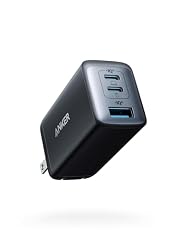
Anker 65W Max 3-Port USB C Charger Block, Compact Foldable Phone Charger
Anker
It depends — Full 65W is only available on a single port; extra devices reduce what the laptop receives.
A rival from a known third-party brand: a 65W multi-port GaN charger, handy if one brick should also charge a phone. Power is split when several ports are in use.Available at Amazon(paid link) — opens Amazon in a new tab. Price and availability shown there.
Sources
Pages consulted while researching this article. None of these are affiliate links.
- Lenovo PSREF product specifications reference — psref.lenovo.com
- USB Power Delivery specification overview (USB-IF) — usb.org
- ThinkPads.com forum: owners on USB-C vs 65W ThinkPad chargers — forum.thinkpads.com