Legion 5 Won't Charge From a 60W Monitor? Use 100W
The questionWhere do these come from?
Lenovo l27m-28 power delivery not working with Lenovo Legion 5
I bought a second-hand Lenovo l27m-28 monitor, intending to use it as a dock. My understanding is that the USB-C port has 60W of power delivery.
A Legion 5 often ignores a 60W USB-C monitor because its charging logic wants a higher-wattage profile; a 100W USB-C charger is the fix.
A 100W USB-C laptop charger is the fix for a Lenovo Legion 5 that ignores a 60W USB-C monitor, provided your Legion’s USB-C port accepts charging at all. The Legion is not broken: it is refusing a power source that sits below what its charging circuit is built to accept, while a Dell business laptop designed around 45W to 65W USB-C charging takes the same 60W happily.
Why the monitor works for a Dell but not the Legion
USB Power Delivery negotiates a voltage and current profile. A monitor’s “60W” port offers 20V at 3A at most (see the USB-IF overview of USB Power Delivery). A thin Dell or Lenovo ThinkPad is specced to run on that. A Legion 5 with a discrete RTX GPU is specced around a much larger barrel-style adapter, and Lenovo’s own spec listings (the PSREF entry for your exact model) show adapters well above 60W for gaming configurations. Firmware on these machines commonly treats a low-wattage source as inadequate and either does not charge or reports “plugged in, not charging”. That behaviour is a design threshold, not a fault you can toggle away.
Check the port before buying anything
Not every Legion 5 USB-C port is a charging input. Depending on generation and configuration, the port may be data and DisplayPort only, or may accept Power Delivery. Open the PSREF page for your exact machine type and look at the port line and the power adapter line. If the USB-C port does not list power input, no charger of any wattage will help, and the answer is the barrel adapter. This is the single check most threads skip, and it decides everything below.
What owners report about 100W USB-C on a Legion
In a Tecnoblog community thread on the Legion 5i RTX 2060, users report that a 20V/5A (100W) USB-C supply works on the machine’s rear USB-C port, but that charging is slow under gaming load and the battery can still drain. A Lenovo community post about a Legion Slim 5 notes that some USB-C chargers that work on most laptops do not work on Lenovo ones, so charger choice matters. These are owner reports, not lab measurements.
Just want the recommendation?
Skip to the picksWhat a 100W charger changes
If the port does accept power, a 100W USB-C PD charger offers 20V at 5A. That is about 67% more than the monitor’s 60W ceiling and sits above the likely minimum the Legion wants. Two conditions apply:
- The cable must be rated and e-marked for 5A. A basic 3A cable caps negotiation at 60W, which recreates the original problem.
- Expect a charger, not a power supply for gaming. Under heavy CPU and GPU load, the system can draw more than 100W and the battery will drain or hold flat. Owners generally report USB-C as fine for browsing, office work and light loads on these machines, and inadequate for sustained gaming.
| Option | Output | Right for | The catch |
|---|---|---|---|
| 100W USB-C PD charger | 20V / 5A | Travel, office work, USB-C-capable Legion | Needs a 5A cable; not enough for gaming loads |
| Legion slim-tip adapter (135W to 230W) | Barrel, model-specific | Gaming, full performance | Bulky, no single-cable monitor setup |
| 60W monitor PD port | 20V / 3A | Phones, thin laptops | Below the Legion’s threshold |
If the laptop charges from the 100W unit but only slowly
Slow or flat charging under load means the system is drawing close to or more than the adapter supplies. Switch to Balanced or Quiet mode (Fn+Q cycles Lenovo’s power modes on most Legions) and the battery should climb. If it still does not, try a different cable before suspecting the charger.
If nothing charges it at all
Update BIOS and Lenovo Vantage firmware, test with a known 65W or higher PD charger and a 5A cable, and if the battery is fully drained, charge briefly with the original barrel adapter first. If the port still does not respond, the USB-C port itself may be failing, which is a warranty repair rather than a settings problem. Nothing cited here documents a fix beyond that.
Should you buy it
Buy the 100W USB-C charger if your Legion’s port supports power input and you want one lightweight charger for travel or desk work. Skip it as your main supply if you game on battery-hungry settings; for that, the Legion’s own adapter is the right tool. The monitor is not at fault, and no firmware change is documented that makes a Legion accept a 60W source it was designed to reject. No independent lab has published a dedicated test of Legion 5 USB-C charging thresholds that this page could find, so the 60W behaviour is explained by the PD profile limits and owner reports, not by a measured cutoff.
The bottom line
Two parts fix this, depending on which failed:
Top pick
Buy this
100W Universal USB-C Power Adapter Fast Charger, Compatible with Mac Book Pro/Air 16, 15, 14, 13 Inch,Mac Book Air 13 Inch 2026 2025 2024, Lenovo, Acer, Dell, Asus
ELECBRAiN
100W USB-C PD is 20V at 5A, well above the 60W (20V/3A) a monitor port tops out at, which is the gap that makes the Legion refuse the monitor.
The fix itself: a 100W USB-C PD wall charger offers a 20V profile with enough headroom for a Legion whose USB-C port accepts power. Drawback: it still will not sustain a full gaming load on most Legion 5 models, so it suits travel and desk work, not heavy GPU sessions.Available at Amazon(paid link) — opens Amazon in a new tab. Price and availability shown there.The alternative
It depends
Lenovo 20V 11.5A 230W Slim Tip AC Adapter for Legion 5i Gen 9 Legion Slim 5 Gen 9 (16″ AMD) ThinkBook 16p Gen 4, Compatible P/N: ADL230SCC3A, SA10R16890, 02DL144., Black
Lenovo
Gaming Legion 5 configurations with an RTX GPU are specced for 135W to 230W adapters, so USB-C at 100W cannot fully power them under load.
The alternative for anyone who games on the Legion: the barrel-style slim-tip adapter the machine is designed around, rather than USB-C. Drawback: it is bulky and gives up the single-cable monitor setup.Available at Amazon(paid link) — opens Amazon in a new tab. Price and availability shown there.
Recommended products
Ordered by how well each one fits the situations above. Each link below is a paid link.
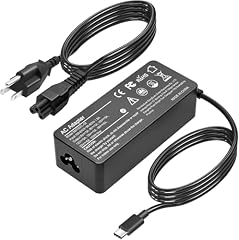
100W Universal USB-C Power Adapter Fast Charger, Compatible with Mac Book Pro/Air 16, 15, 14, 13 Inch,Mac Book Air 13 Inch 2026 2025 2024, Lenovo, Acer, Dell, Asus
ELECBRAiN
Buy — 100W USB-C PD is 20V at 5A, well above the 60W (20V/3A) a monitor port tops out at, which is the gap that makes the Legion refuse the monitor.
The fix itself: a 100W USB-C PD wall charger offers a 20V profile with enough headroom for a Legion whose USB-C port accepts power. Drawback: it still will not sustain a full gaming load on most Legion 5 models, so it suits travel and desk work, not heavy GPU sessions.Available at Amazon(paid link) — opens Amazon in a new tab. Price and availability shown there.
Lenovo 20V 11.5A 230W Slim Tip AC Adapter for Legion 5i Gen 9 Legion Slim 5 Gen 9 (16″ AMD) ThinkBook 16p Gen 4, Compatible P/N: ADL230SCC3A, SA10R16890, 02DL144., Black
Lenovo
It depends — Gaming Legion 5 configurations with an RTX GPU are specced for 135W to 230W adapters, so USB-C at 100W cannot fully power them under load.
The alternative for anyone who games on the Legion: the barrel-style slim-tip adapter the machine is designed around, rather than USB-C. Drawback: it is bulky and gives up the single-cable monitor setup.Available at Amazon(paid link) — opens Amazon in a new tab. Price and availability shown there.
Anker USB C to USB C Cable, 240W Fast Charging Cord (2-Pack, 6 ft, Black)
Anker
It depends — USB PD needs an e-marked cable for anything above 60W (20V/3A), so a generic cable can recreate the very 60W limit being escaped.
A complement to the 100W charger: a 5A e-marked cable is required to carry 100W, and a plain 3A cable silently caps the charger at 60W. Drawback: it adds cost and is irrelevant if the charger already bundles a 5A cable.Available at Amazon(paid link) — opens Amazon in a new tab. Price and availability shown there.
Sources
Pages consulted while researching this article. None of these are affiliate links.
- Lenovo PSREF product specifications reference — psref.lenovo.com
- USB-IF: USB Power Delivery overview — usb.org
- Tecnoblog community: Does the Lenovo Legion 5i RTX 2060 charge via USB-C? — tecnoblog.net
- Lenovo community: Portable USB-C charger that 100% works, Legion Slim 5 — education.lenovo.com