Can Edifier R1855DB Run a Turntable?
The questionWhere do these come from?
Speakers for AT-LPW40WN
I'm new to the vinyl scene and could use some help. Looking to buy a set of powered speakers with a budget of AUD$300 - AUD$500 for a new AT-LPW40WN. I listen to a wide range of different music and would like a setup with decent bass.
Yes, the R1855DB works well with a turntable, but only through line-level RCA unless your deck has or uses a phono preamp.
Yes, the Edifier R1855DB can be used with a turntable, and it is a sensible simple setup if the turntable has a built-in phono preamp. The important catch is that the R1855DB does not list a dedicated phono input; Edifier lists its inputs as Bluetooth, Line In, optical, and coaxial, so a raw PHONO-level turntable signal needs a phono preamp before it reaches the speakers (Edifier R1855DB product page).
Use LINE mode with either RCA input
Set the turntable to LINE, then connect it to either Line In 1 or Line In 2 on the back of the active R1855DB speaker with the red and white RCA plugs. On the Edifier remote, press LINE1 or LINE2. If using the rear master volume dial instead, press it to cycle through Line In 1 -> Line In 2 -> Optical -> Coaxial -> Bluetooth. Edifier’s manual says the LED turns green for line input: one flash for Line In 1, two flashes for Line In 2 (R1855DB user manual PDF).
That is the cleanest beginner setup: turntable RCA output into powered speakers, no receiver and no separate amplifier. The R1855DB is an active speaker system, so the amplifier is already inside the speaker cabinet. Do not run passive speaker wire from a turntable into the Edifier speaker terminals; those terminals are only for the cable between the active and passive Edifier speakers.
Many beginner Audio-Technica decks are designed for this kind of connection. For example, Audio-Technica says the AT-LP60X has a built-in switchable phono pre-amplifier for phono- or line-level output and includes a detachable 3.5 mm-to-dual-RCA cable (Audio-Technica AT-LP60X page). The model matters, though. Check the rear or underside of your exact turntable for a switch marked LINE/PHONO, Preamp, or Equalizer.
Use these settings:
- Turntable switch: LINE
- Speaker input: Line In 1 or Line In 2
- Cable: stereo RCA, red to right, white to left
- Speaker volume: start low, then raise gradually
- Bass dial: start at the center position, then adjust after placing the speakers
PHONO-only turntables need a preamp
A PHONO-only turntable will sound extremely quiet, thin, or wrong if plugged straight into the R1855DB. That is not a defect in the speakers. It means the cartridge signal has not been amplified and equalized to line level.
The fix is to put a moving-magnet phono preamp between the turntable and the Edifiers:
Turntable RCA + ground wire -> phono preamp input -> phono preamp RCA output -> R1855DB Line In 1 or Line In 2.
If the turntable has a ground wire, attach it to the ground screw on the phono preamp, not to the Edifier speakers. The R1855DB line inputs are expecting an already-corrected line-level signal. They are not a substitute for a PHONO input on a receiver.
Choose an MM phono preamp unless the turntable uses a moving-coil cartridge and the cartridge documentation explicitly says it needs MC gain/loading. Most beginner Audio-Technica turntables use moving-magnet-style output or a built-in phono stage, but the safe rule is to verify the exact model number printed on the deck.
Just want the recommendation?
Skip to the picksMedium-room bass is adequate, not deep
The R1855DB is reasonable for a medium room at normal listening levels, but it is still a compact 2.0 bookshelf system. Edifier’s published specifications list 70 W RMS total output, 116 mm mid-bass drivers, 19 mm silk-diaphragm tweeters, and a 60 Hz to 20 kHz frequency response (Edifier R1855DB product page). That tells you the useful limit: it can give bass presence, but it is not built for deep sub-bass.
For vinyl in a bedroom, study, apartment living room, or medium lounge, start with the speakers alone. Place them on firm stands or a stable shelf, roughly at ear height, and keep the turntable off the same flimsy surface if footfall or bass feedback becomes a problem. The R1855DB cabinet is angled upward, so desk placement is also plausible, but in a room setup the tweeters should still aim close to ear level.
If the bass feels weak, first move the speakers closer to the rear wall in small steps and raise the rear bass dial slightly. If records start sounding boomy, muddy, or uneven, back the bass dial down and pull the speakers away from corners. If the room needs real low-end weight, use the R1855DB’s Sub Out with a powered subwoofer. Edifier lists a sub-out connection for adding a subwoofer, but it does not turn these speakers into a full home-theater bass-management system; expect to tune the subwoofer’s own volume and crossover controls by ear.
Bluetooth requires a transmitting turntable
A Bluetooth turntable can pair to the R1855DB only if the turntable transmits Bluetooth audio. The R1855DB’s Bluetooth mode is selected from the remote or by cycling inputs with the rear volume dial; Edifier’s manual says to search for EDIFIER R1855DB from the Bluetooth source, and notes that Bluetooth pairing is available only after the speaker has been switched to Bluetooth mode (R1855DB user manual PDF).
For records, wired RCA is still the better default. Bluetooth adds pairing behavior, possible compatibility issues, and another volume/output stage. It can be convenient across a room, but it is not the simplest path for a new turntable setup sitting near the speakers.
The first checks for silence, hum, or distortion
For no sound, check the boring things first because they are the common failure points: the active speaker power switch, the wall outlet, the volume, the remote mute button, the selected input, and whether the RCA plugs are fully seated. Edifier’s own troubleshooting list says to confirm power, raise volume, check cable firmness/input selection, and verify the source is outputting signal (Edifier support page).
If the sound is very quiet, the turntable is probably set to PHONO or lacks a preamp. Set it to LINE if it has a built-in preamp, or add an external phono preamp.
If the sound is harsh and overloaded, the signal may be passing through two phono preamps. Use only one: either the turntable’s internal preamp set to LINE into the Edifier line input, or the turntable set to PHONO into an external phono preamp, then into the Edifier line input.
If there is hum, make sure any turntable ground wire is connected to the phono preamp when using an external preamp. Also keep the RCA cable away from power bricks and mains leads. If the speakers hum with every audio cable unplugged and the noise is clearly audible from normal listening distance, that becomes a support or return question rather than a setup issue.
The extras your turntable setup actually needs
The R1855DB is enough by itself only when the turntable can output line level. If your Audio-Technica deck has a LINE switch, the likely missing part is just the correct RCA cable. If the deck is PHONO-only, the required missing part is a phono preamp. If the room is medium-sized and bass is the main concern, the optional upgrade is a powered subwoofer connected to Sub Out.
The short answer: choose the Edifier R1855DB for a simple turntable system if your turntable has line output or you are willing to add a phono preamp. Do not choose it expecting a built-in PHONO input or deep subwoofer bass from the speakers alone.
The bottom line
Both fit — your exact model decides:
Top pick
It depends
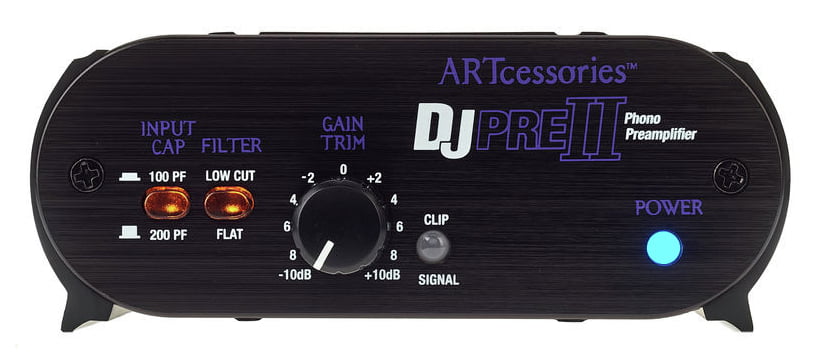
ART DJPREII Phono Preamplifier 14.1 x 7.3 x 2.3 inches
ART
An external MM phono preamp is needed for a PHONO-only turntable requiring MM gain, while a turntable with built-in line output can connect directly.
This is the missing link for a turntable that only outputs PHONO-level audio. The drawback is one more powered box and another pair of RCA cables in the setup.Available at Amazon(paid link) — opens Amazon in a new tab. Price and availability shown there.The alternative
Buy this
Monoprice 102864 6' Premium 2 RCA Plug to 2 RCA Plug 22AWG Cable - Black
Monoprice
The article recommends stereo RCA connections from the turntable’s line output or external preamp to either R1855DB line input.
A short stereo RCA cable keeps the turntable-to-speaker or preamp-to-speaker run tidy. The drawback is that 1.5 ft is too short if the turntable and active speaker are not on the same surface.Available at Amazon(paid link) — opens Amazon in a new tab. Price and availability shown there.
Recommended products
Ordered by how well each one fits the situations above. Each link below is a paid link.
ART DJPREII Phono Preamplifier 14.1 x 7.3 x 2.3 inches
ART
It depends — An external MM phono preamp is needed for a PHONO-only turntable requiring MM gain, while a turntable with built-in line output can connect directly.
This is the missing link for a turntable that only outputs PHONO-level audio. The drawback is one more powered box and another pair of RCA cables in the setup.Available at Amazon(paid link) — opens Amazon in a new tab. Price and availability shown there.Monoprice 102864 6' Premium 2 RCA Plug to 2 RCA Plug 22AWG Cable - Black
Monoprice
Buy — The article recommends stereo RCA connections from the turntable’s line output or external preamp to either R1855DB line input.
A short stereo RCA cable keeps the turntable-to-speaker or preamp-to-speaker run tidy. The drawback is that 1.5 ft is too short if the turntable and active speaker are not on the same surface.Available at Amazon(paid link) — opens Amazon in a new tab. Price and availability shown there.
Sources
Pages consulted while researching this article. None of these are affiliate links.
- Edifier R1855DB Product Page — edifier.com
- Edifier R1855DB User Manual PDF — usa-oss.edifier.com
- Edifier R1855DB Support Page — edifier.com
- Audio-Technica AT-LP60X Product Page — audio-technica.co.in