Brother MFC-L2750DW: Right Printer for Your Office?
The questionWhere do these come from?
Printer recommendation
My monthly print is around 1500-2000 prints Mostly invoices.
The Brother MFC-L2750DW earns its price with duplex ADF scanning and a 2,000-page monthly volume; skip it only if you need color.
The Brother MFC-L2750DW is worth buying if your office regularly scans or copies double-sided documents and prints somewhere in the range of a few hundred to 2,000 pages a month — that combination is exactly what its hardware is built around. Skip it if you need color output, or if you only print and never scan; both of those needs are better served by a different machine, covered below.
What You Actually Get for the Price
The MFC-L2750DW is a monochrome laser all-in-one: print, scan, copy, and fax from one machine, with automatic duplex on all four functions. That last part is the detail worth underlining, because it’s the thing most competitors in this bracket cut first. The automatic document feeder holds up to 50 sheets and scans both sides of a page without you flipping it — feed in a stapled two-sided contract and it comes out the other end as a complete, correctly-ordered digital file. According to Brother’s own specifications, the printer is rated for 36 pages per minute, a recommended monthly print volume of up to 2,000 pages, and a maximum duty cycle of 15,000 pages a month — headroom well above what a small inkjet or a basic laser printer is built to sustain.
Connectivity covers the ways people actually print from a phone or laptop in 2026: 802.11 b/g/n wireless, Wi-Fi Direct, Ethernet, USB 2.0, and NFC touch-to-connect for Android devices, plus support for AirPrint and Mopria so iOS and Android users don’t need a driver installed. A 2.7-inch color touchscreen handles menu navigation and scan-to-cloud destinations like Dropbox, Google Drive, and OneDrive directly from the panel. Toner comes in two sizes — the standard TN730 cartridge and the high-yield TN760, rated for roughly 3,000 pages — paired with a DR730 drum unit rated around 12,000 pages, which is the more expensive part to replace but also the one you’ll replace least often.
Where Independent Testing Found the Weak Points
Manufacturer specs describe what the machine is designed to do; independent testing describes what it actually does. TechGearLab’s hands-on testing measured real-world single-sided print speed at 18 pages per minute and duplex speed at 9 pages per minute — roughly half and a quarter of the 36 ppm rating, respectively, which is normal for laser printers rated under ideal conditions but worth knowing before you plan around the spec sheet number. The same testing scored text quality a middling 5 out of 10, describing characters as “dark and bold” but interspersed with small white blotches that reduced overall clarity, and scored graphics output 4 out of 10 as noticeably more pixelated than a color laser would produce. None of that disqualifies the printer for office documents, invoices, or contracts — the use case it’s built for — but it does mean this isn’t the machine to reach for if you’re printing anything image-heavy.
Brother MFC-L2750DW vs Three Alternatives
| Printer | Type | ADF & duplex scanning | Rated print speed | Max duty cycle |
|---|---|---|---|---|
| Brother MFC-L2750DW | Mono, print/scan/copy/fax | 50-sheet, automatic duplex | 36 ppm | 15,000 pages/mo |
| Canon imageCLASS MF264dw | Mono, print/scan/copy/fax | 35-sheet, simplex only | 30 ppm | 30,000 pages/mo |
| HP LaserJet Pro MFP M283fdw | Color, print/scan/copy/fax | 50-sheet, simplex only | 22 ppm | 40,000 pages/mo |
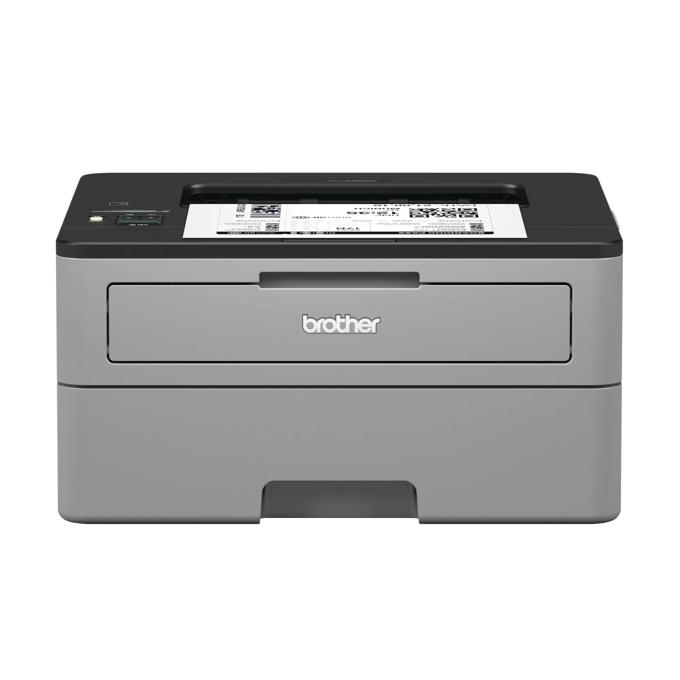
| Brother HL-L2350DW | Mono, print only | None | 32 ppm | 10,000 pages/mo |
The pattern across every alternative is the same trade: give up the duplex-scanning ADF and you get either a higher duty cycle, color output, or a lower entry point — never all three, and never duplex scanning alongside them.
Just want the recommendation?
Skip to the picksThe Color Rival: HP LaserJet Pro MFP M283fdw
Consider the M283fdw only if color output is a genuine requirement — client-facing charts, marketing sheets, anything where black-and-white isn’t acceptable. HP’s own specifications list a 50-sheet ADF and a substantially higher 40,000-page duty cycle, but the ADF scans one side at a time; HP’s support documentation confirms there’s no automatic duplex scanning, only automatic duplex printing. Rated speed also drops to 22 ppm for both color and mono output, well below the MFC-L2750DW’s 36 ppm. If color is not something you need weekly, paying for it here buys you a slower, simplex-scanning machine in exchange for a capability you’re not using.
Why the Canon imageCLASS MF264dw Falls Short Here
The MF264dw is the closest mono AIO rival on paper — similar footprint, similar function set, a higher duty cycle ceiling — and it’s the one to skip if double-sided scanning is the reason you’re buying an AIO at all. Its 35-sheet ADF only scans one side per pass; Canon’s own support documentation addresses this directly, walking users through the manual process of scanning the front sides, flipping the stack by hand, and rescanning the back sides. For a single two-page document that’s a minor annoyance. For a stack of two-sided contracts, tax records, or multi-page forms, it turns a five-second ADF job into a multi-step manual process — which defeats the point of having an automatic feeder. The MF264dw remains a reasonable pick if you almost never scan double-sided originals and want the extra duty-cycle headroom for a higher-print-volume environment; it’s the wrong pick if duplex scanning is a stated requirement.
The Print-Only Budget Option: Brother HL-L2350DW
Consider the HL-L2350DW only if scanning, copying, and faxing are things you genuinely don’t need. It’s a single-function laser printer — no ADF, no flatbed, no scan capability of any kind — rated at 32 ppm with automatic duplex printing and a 10,000-page duty cycle. It’s a legitimate alternative for a desk that only ever needs to print, but it answers a different question than the one this comparison is about. If there’s any chance you’ll need to scan or copy a document even occasionally, this isn’t the machine, because there’s no way to add that capability later without buying a separate scanner.
When to Skip Ahead to a Color Machine
If your monthly volume or your need for color is likely to grow past what a 2,000-page mono AIO comfortably handles, it’s worth looking at Brother’s own color step-up model rather than switching brands. Brother MFC-L3770CDW: The Cardstock Limit That Matters covers the same duplex-ADF design in a color laser body, along with the specific paper-weight ceiling that trips people up when they try to run cardstock or heavier stock through its feeder.
The Deciding Factor
The question this printer answers is narrow and specific: do you need automatic two-sided scanning, copying, and printing, at a monthly volume that would burn out a consumer inkjet, without paying for color you won’t use? If yes, the MFC-L2750DW’s 50-sheet duplex ADF and 2,000-page recommended volume are built for exactly that, and its weaker text and graphics scores in independent testing don’t matter much for standard office documents. If color is the requirement, move to the M283fdw and accept its simplex-only ADF and lower rated speed. If double-sided scanning almost never comes up and a higher duty cycle matters more, the MF264dw is the reasonable trade. And if scanning isn’t needed at all, the HL-L2350DW is the cheaper, simpler machine for a desk that only prints.
The bottom line
Two good answers to different versions of the question:
Top pick
Buy this
Brother MFC-L2750DW Monochrome Laser All-in-One Printer
Brother
It's the only printer in this comparison that scans, copies, and prints double-sided automatically while staying under a 2,000-page monthly volume, matching the exact combination most home offices ask for.
The subject of this comparison: a 50-sheet duplex-scanning ADF and a 2,000-page recommended monthly volume built for offices that regularly handle two-sided documents. Independent testing found text quality and duplex speed both fall well short of the spec sheet, so it’s not the pick for image-heavy or graphics-heavy print jobs.Available at Amazon(paid link) — opens Amazon in a new tab. Price and availability shown there.The alternative
It depends
HP Color LaserJet Pro MFP M283fdw
Color LaserJet
Right for a narrower case than the question asks about — its ADF is simplex-only, so it loses the duplex-scanning advantage the MFC-L2750DW is built around.
The color rival: needed only if client work genuinely requires color output in-house, since it shares the MFC-L2750DW’s price bracket but drops to 22 ppm and can’t scan double-sided.Available at Amazon(paid link) — opens Amazon in a new tab. Price and availability shown there.
Recommended products
Ordered by how well each one fits the situations above. Each link below is a paid link.
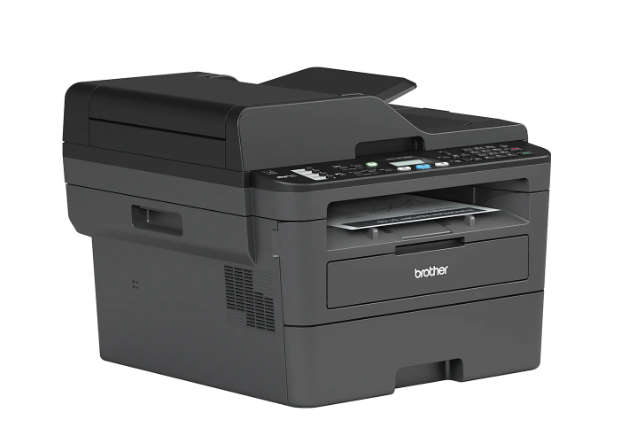
Brother MFC-L2750DW Monochrome Laser All-in-One Printer
Brother
Buy — It's the only printer in this comparison that scans, copies, and prints double-sided automatically while staying under a 2,000-page monthly volume, matching the exact combination most home offices ask for.
The subject of this comparison: a 50-sheet duplex-scanning ADF and a 2,000-page recommended monthly volume built for offices that regularly handle two-sided documents. Independent testing found text quality and duplex speed both fall well short of the spec sheet, so it’s not the pick for image-heavy or graphics-heavy print jobs.Available at Amazon(paid link) — opens Amazon in a new tab. Price and availability shown there.
HP Color LaserJet Pro MFP M283fdw
Color LaserJet
It depends — Right for a narrower case than the question asks about — its ADF is simplex-only, so it loses the duplex-scanning advantage the MFC-L2750DW is built around.
The color rival: needed only if client work genuinely requires color output in-house, since it shares the MFC-L2750DW’s price bracket but drops to 22 ppm and can’t scan double-sided.Available at Amazon(paid link) — opens Amazon in a new tab. Price and availability shown there.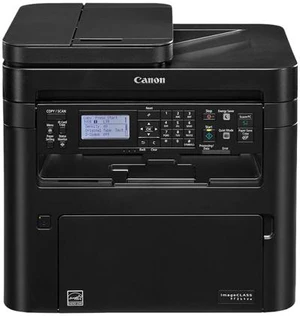
Canon imageCLASS MF264dw Wireless Monochrome Laser All-in-One
Canon
Skip — Its ADF cannot scan double-sided automatically, which defeats the specific requirement — automatic duplex scanning — that this comparison is built around.
The closest mono AIO rival on paper, with a higher duty cycle ceiling for busier offices. Its 35-sheet ADF scans one side per pass, so two-sided originals need to be flipped and re-fed by hand.Available at Amazon(paid link) — opens Amazon in a new tab. Price and availability shown there.Brother HL-L2350DW Compact Monochrome Laser Printer
Brother
It depends — Right for a narrower case — desks that only print — since it has no automatic document feeder and therefore can't scan, copy, or fax at all.
The print-only budget alternative: no ADF, no scanning, no copying, just a fast single-function laser printer for a desk that never needs to digitize documents.Available at Amazon(paid link) — opens Amazon in a new tab. Price and availability shown there.
Sources
Pages consulted while researching this article. None of these are affiliate links.
- Brother MFC-L2750DW Official Specifications — brother-usa.com
- Brother MFC-L2750DW Review | Tested & Rated - TechGearLab — techgearlab.com
- Brother MFC-L3770CDW Official Specifications — brother-usa.com
- Brother TN760 High-Yield Toner Cartridge — brother-usa.com
- Brother HL-L2350DW Specifications — support.brother.com
- HP Color LaserJet Pro MFP M283fdw Specifications — support.hp.com
- Canon imageCLASS MF264dw Support and Specifications — usa.canon.com
- imageCLASS MF264dw Manual Duplex Scanning Instructions - Canon Community — community.usa.canon.com