Epson ET-15000 for 11 × 17: Worth It?
The questionWhere do these come from?
Looking recommendations for an eco tank printer that can print ledger or tabloid size (11 x 17" ) and not break the bank
Looking recommendations for an eco tank printer that can print ledger or tabloid size (11 x 17" ) for home office printing for documents and engineering drawings that will not break the bank.
The Epson ET-15000 suits 500-page months and occasional 11 × 17 drawings, but its 20-sheet rear feed makes large tabloid runs tedious.
The Epson EcoTank ET-15000 is the right affordable refillable-ink printer for about 500 pages a month when 11 × 17 jobs are occasional and single-sided; choose the ET-16600 instead when tabloid paper is the main workload. The ET-15000’s printing engine can comfortably handle that volume, but its paper path—not its ink capacity or duty rating—is the limitation that decides this purchase.
This assessment rests on Epson’s documentation and independent testing, not hands-on use.
The decision in one table
| Printer | Ink system | What happens at 11 × 17 | Verdict |
|---|---|---|---|
| Epson EcoTank ET-15000 | User-refillable 502 ink bottles | Wide paper uses the 20-sheet rear feed; no automatic tabloid duplexing or tabloid scanning | Buy for occasional wide jobs |
| Epson EcoTank Pro ET-16600 | User-refillable 542 pigment-ink bottles | Front cassettes accept tabloid paper; automatic duplex printing and scanning extend to 11 × 17 | Consider for frequent wide-format work |
| Brother MFC-J6955DW | Proprietary LC406 cartridges feeding an internal reservoir | Excellent tabloid handling, including two 250-sheet trays and ledger-size scanning | Skip when refillable bottles are required |
Neither Epson deserves a blanket warning: both are sound refillable-ink choices, and the real difference is whether 11 × 17 paper is an occasional output format or the office’s normal working format.
The 20-sheet limit decides the ET-15000 verdict
The ET-15000 can print 11 × 17 documents and even 13 × 19 output, but wide sheets do not fit in its 250-sheet cassette. Epson limits that cassette to media no wider than 8.5 inches, while wide paper goes through the rear feed. The documented capacity for plain A3/A3+ stock in that feed is 20 sheets. Its automatic double-sided path is also limited to Letter, A4, or smaller paper. Epson’s ET-15000 user guide documents both restrictions.
That produces a much more useful buying test than the words “wide-format” on the box. Printing 500 tabloid sheets would require at least 25 paper loads. Printing 100 tabloid drawings among 400 Letter pages would require only five, which is far easier to tolerate. A 10- or 15-sheet drawing package fits the machine particularly well.
The scanner is not wide-format either. The flatbed accepts Letter-size originals, while the automatic document feeder reaches 8.5 × 14 inches and does not scan both sides automatically. RTINGS’ purchased-and-tested ET-15000 confirms those scanner limitations. You can print a digital 11 × 17 plan, but you cannot lay an 11 × 17 marked-up sheet on this machine and scan it at full size.
Five hundred pages a month is moderate, not excessive
Epson specifies a recommended monthly volume of up to 1,600 pages for the ET-15000, with a 33,000-page maximum duty cycle. A 500-page month is less than one-third of the recommended figure, so there is no volume-based reason to reject it. The maximum duty number should not be treated as a monthly target; the lower recommended volume is the relevant planning figure. Epson’s ET-15000 specifications list both figures.
Epson rates the printer at 17 ISO pages per minute in black and 9 in color. RTINGS measured up to 16 pages per minute for black documents, described its document output as sharp, and found color-document printing comparatively slow. That is adequate for 500 pages spread through a month; it is less attractive when an entire drawing package must be produced immediately.
The ink figures also fit moderate recurring use. Replacement bottles are rated for 7,500 black pages and 6,000 color pages under Epson’s ISO methodology. Five hundred pages per month equals 6,000 pages per year, so bottled ink is doing meaningful work at this volume rather than merely sitting in the tanks. However, those yields are not a promise of one year of 11 × 17 color output. A tabloid sheet has twice the area of a Letter sheet, and Epson warns that image coverage, settings, environment, maintenance, and printing frequency all change actual yield. Epson’s ET-15000 product documentation explains how its yield claims are calculated.
Just want the recommendation?
Skip to the picksThat is the sensible way to weigh the higher initial outlay against EcoTank savings: at 500 pages monthly, refill ink is likely to matter over several years, but no defensible break-even point can be stated without knowing how many pages are color, how much of each sheet is covered, and how many are twice-area tabloid pages.
Keep engineering drawings at the intended scale
For plans, schematics, and marked drawings, paper support is only half the job. Use the following setup for the first print from each application:
- Confirm that the source PDF or drawing is authored on an 11 × 17 sheet.
- Select 11 × 17, the rear paper feed, and the correct orientation in both the application and Epson driver.
- Choose Actual Size or 100%, not Fit or Shrink oversized pages.
- Leave borderless mode off. Epson’s guide says borderless output uses expansion at the edges, which is undesirable when scale and edge content matter.
- Print one page containing a known dimension and measure it before releasing the complete set.
These checks cannot turn an incorrectly exported drawing into a scaled one, but they prevent the common driver-level resizing errors. If exact scale is contractually important, the measured check page remains necessary regardless of printer model.
Where the ET-16600 earns its larger footprint
The Epson EcoTank Pro ET-16600 is the alternative for offices where most of those 500 monthly pages are tabloid sheets. Epson specifies 25 ISO ppm in black and 12 in color, a 500-sheet total front capacity, a 50-sheet document feeder, 11 × 17 scanning and copying, and automatic two-sided printing, copying, scanning, and faxing. Its recommended monthly volume rises to 3,300 pages. It also uses pigment-based ink in all four colors. Epson’s ET-16600 product page documents those differences.
More importantly, the ET-16600’s manual explicitly includes 11 × 17 among its automatic duplex sizes and allows 250 plain sheets in each front cassette, rather than forcing every tabloid job through a small rear stack. The ET-16600 user guide makes that workflow distinction clear.
Consider the ET-16600 when tabloid batches routinely exceed 20 sheets, when marked-up 11 × 17 originals must be scanned, or when automatic two-sided tabloid output matters. For short wide-format jobs and a 500-page total monthly workload, that heavier paper handling is useful but not necessary, which is why it is the conditional alternative rather than the default recommendation.
Skip the misleading Brother “Tank” option here
Skip the Brother MFC-J6955DW when user-refillable ink is a firm requirement: despite the INKvestment name, Brother specifies its consumable type as Ink Cartridge, and the printer ships with four starter cartridges. Brother’s official specifications also show why it will appear in this search—it prints, scans, copies, faxes, and automatically duplexes up to 11 × 17, with two 250-sheet trays and a 100-sheet multipurpose tray.
The Brother gets the ink requirement wrong for anyone specifically trying to leave proprietary cartridges behind. If cartridges are acceptable, it becomes a legitimate faster office rival; it simply is not an interchangeable substitute for an EcoTank bottle system.
The practical buying rule
Buy the Epson EcoTank ET-15000 when the monthly total is around 500 pages, most sheets are Letter or Legal, wide drawing sets stay near 20 pages, and neither tabloid scanning nor automatic tabloid duplexing is required. Its low refill frequency and documented 1,600-page recommended monthly volume make the workload reasonable.
Move to the Epson EcoTank Pro ET-16600 when 11 × 17 is the everyday paper rather than the occasional exception. The ET-15000 can produce the same sheet size, but repeated rear-feed loading turns a nominal capability into a recurring chore. That paper-handling distinction—not whether either printer can technically print an 11 × 17 page—is the fact that should settle the decision.
The bottom line
Both work; your situation picks one:
Top pick
Buy this
Epson EcoTank ET-15000 Wireless Color All-in-One Supertank Printer C11CH96201
Epson EcoTank
Its 1,600-page recommended monthly volume covers a 500-page workload, while its rear feed prints up to 13 × 19 but holds only 20 wide plain-paper sheets.
The subject printer and the best buy for this use: its refillable bottles and 1,600-page recommended monthly volume suit moderate document printing. Its drawback is that 11 × 17 sheets use a 20-sheet rear feed, with no automatic tabloid duplexing or tabloid scanning.Available at Amazon(paid link) — opens Amazon in a new tab. Price and availability shown there.The alternative
It depends
Epson EcoTank Pro ET-16600 Wide-Format All-in-One Supertank Printer C11CH72201
Epson EcoTank
It provides 500-sheet total front capacity, automatic 11 × 17 duplexing, 11 × 17 scanning, and a 3,300-page recommended monthly volume.
This is the office-oriented alternative when 11 × 17 is the routine workload rather than an occasional requirement. It adds much stronger wide-paper handling and scanning, but is a larger, heavier-duty machine than a mixed 500-page month normally requires.Available at Amazon(paid link) — opens Amazon in a new tab. Price and availability shown there.
Recommended products
Ordered by how well each one fits the situations above. Each link below is a paid link.

Epson EcoTank ET-15000 Wireless Color All-in-One Supertank Printer C11CH96201
Epson EcoTank
Buy — Its 1,600-page recommended monthly volume covers a 500-page workload, while its rear feed prints up to 13 × 19 but holds only 20 wide plain-paper sheets.
The subject printer and the best buy for this use: its refillable bottles and 1,600-page recommended monthly volume suit moderate document printing. Its drawback is that 11 × 17 sheets use a 20-sheet rear feed, with no automatic tabloid duplexing or tabloid scanning.Available at Amazon(paid link) — opens Amazon in a new tab. Price and availability shown there.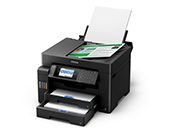
Epson EcoTank Pro ET-16600 Wide-Format All-in-One Supertank Printer C11CH72201
Epson EcoTank
It depends — It provides 500-sheet total front capacity, automatic 11 × 17 duplexing, 11 × 17 scanning, and a 3,300-page recommended monthly volume.
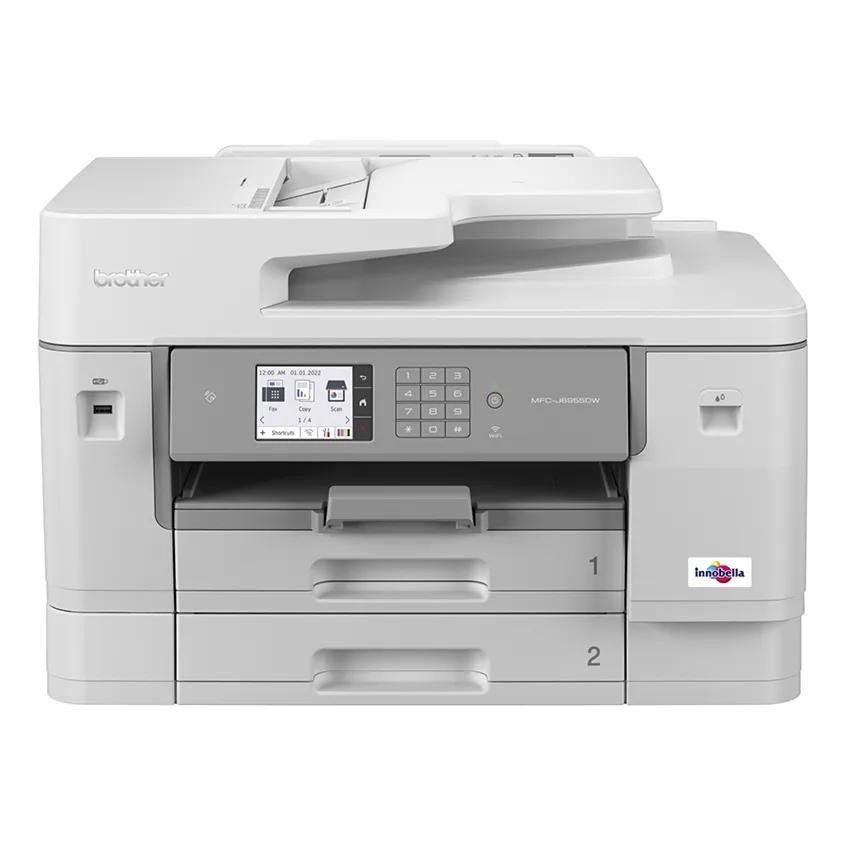
This is the office-oriented alternative when 11 × 17 is the routine workload rather than an occasional requirement. It adds much stronger wide-paper handling and scanning, but is a larger, heavier-duty machine than a mixed 500-page month normally requires.Available at Amazon(paid link) — opens Amazon in a new tab. Price and availability shown there.Brother MFC-J6955DW Wireless INKvestment Color Inkjet All-in-One Printer
Brother
Skip — Brother lists the consumable type as Ink Cartridge and supplies LC406 cartridges, so it does not meet a refillable-bottle requirement.
This is a fast, paper-capable rival that often appears beside EcoTank models, but its “INKvestment” name does not mean user-refillable bottles. It handles tabloid jobs better than the ET-15000 while retaining a proprietary cartridge supply system.Available at Amazon(paid link) — opens Amazon in a new tab. Price and availability shown there.
Sources
Pages consulted while researching this article. None of these are affiliate links.
- Epson EcoTank ET-15000 product specifications — epson.com
- Epson EcoTank ET-15000 User’s Guide — files.support.epson.com
- RTINGS Epson EcoTank ET-15000 review — rtings.com
- Epson EcoTank Pro ET-16600 product specifications — epson.com
- Epson EcoTank Pro ET-16600 User’s Guide — files.support.epson.com
- Brother MFC-J6955DW official specifications — brother-usa.com