Canon MF656Cdw: Reliable for Mac and PC?
The questionWhere do these come from?
Purchase Color Laser All-In-One for Mac and PC
I am looking for a solid color laser printer all-in-one that wirelessly connects easily with both Mac and PC. We don't print a ton, but would if we had a reliable printer.
Yes—the MF656Cdw is a strong Mac/PC document printer if its 22 ppm speed, recommended volume, size, and photo limits fit.
Yes—the Canon Color imageCLASS MF656Cdw is a sound color laser all-in-one for a mixed Mac-and-Windows office, especially when documents may sit unprinted for weeks and double-sided scanning matters. Buy it for office documents within Canon’s recommended 150–2,500-page monthly range; choose something else for photo-quality output, tabloid paper, or sustained higher-volume work.
“Reliable” needs one qualification: independent reviewers found predictable printing, low maintenance, and excellent text, but no public fleet-level study establishes its failure rate over five or ten years. The defensible finding is that the MF656Cdw is a low-maintenance document machine—not that every unit is guaranteed to last indefinitely.
| Model | Verdict | Deciding capability | Consumable platform |
|---|---|---|---|
| Canon Color imageCLASS MF656Cdw | Buy | 22 ppm, single-pass duplex ADF, fax | Canon 067 / 067H |
| Canon Color imageCLASS MF665Cdw | Consider | 26 ppm, single-pass duplex ADF, fax, PCL | Canon 075 family |
| Canon Color imageCLASS MF654Cdw | Consider | 22 ppm, one-sided ADF, no fax | Canon 067 / 067H |
Canon documents the MF656Cdw at 22 pages per minute, while its MF665Cdw successor reaches 26 ppm and adds PCL. Independent testing also confirms that the MF654Cdw is not functionally identical to the MF656Cdw: it cannot scan both sides automatically and omits fax. Canon’s specifications and RTINGS’ variant comparison provide the underlying differences.
None of these three deserves a blanket skip; the difference is duplex scanning, fax, printer language, and 22 versus 26 ppm—not basic document quality. The MF654Cdw does get the workflow wrong for anyone regularly scanning double-sided originals, because its feeder captures only one side.
Mac and Windows compatibility is real, but not identical
Canon lists Windows 11, Windows 10, Windows 8.1, and Mac OS X 10.11 or later. The support page supplies Canon’s UFR II printer driver, ScanGear MF for Mac, the MF Scan Utility for Windows, and fax drivers. The printer can connect through USB 2.0, gigabit Ethernet, 802.11b/g/n Wi-Fi, or Wi-Fi Direct.
For ordinary Mac printing, AirPrint is the simplest route because it avoids depending on a vendor print driver. Scanning is supported too: Canon’s AirPrint instructions say a Mac can scan over the same LAN or through USB. Network scanning requires Use Network Link Scan to be on, and the printer must be placed in its online remote-scanner state if Auto Online is disabled.
On Windows, install the model’s MF driver and MF Scan Utility when you need desktop-controlled scanning rather than printing alone. One caveat matters for newer PCs: Canon’s compatibility table names Windows releases but does not specify CPU architecture. That table therefore does not, by itself, prove full driver and scanner support for every Windows-on-Arm computer. If the PC uses a Snapdragon or another Arm processor, select the exact operating system on Canon’s download page and confirm that the offered package supports that architecture before buying.
For a printer shared by Macs and PCs, Ethernet is the least complicated connection when a cable is practical. It removes wireless signal quality from the troubleshooting chain while leaving the printer available to every machine on the network. USB is better treated as a direct connection to one computer, not the default for a mixed-computer office.
The all-in-one functions are unusually complete
The MF656Cdw prints, copies, scans, and faxes. Its most consequential feature is the 50-sheet automatic document feeder: Canon specifies an automatic two-sided feeder for this exact model, so both sides are captured in one pass. That is a substantial advantage when digitizing contracts, tax records, medical forms, or other two-sided packets.
The scanner tops out at 600 × 600 dpi. It can send documents through SMB, email, FTP, or USB and produce TIFF, JPEG, compact PDF, searchable PDF, encrypted PDF, and digitally signed PDF, subject to the selected workflow. Those formats and protocols are documented in Canon’s scan-function specifications.
Paper handling is appropriate for a small office rather than a production room: a 250-sheet drawer, one-sheet manual slot, and 100-sheet output tray. The largest supported sheet is 8.5 × 14 inches, so this is not a tabloid or A3 printer. Automatic two-sided printing is included.
What independent testing actually found
TechGearLab says it buys the printers it tests. In its MF656Cdw testing, the lab measured 18 ppm for a ten-page single-sided job and 13 ppm for a ten-page duplex job. That is more useful than Canon’s 22 ppm headline because short jobs include startup and processing time. The same test produced a full-page photo in 32 seconds.
Output quality split sharply by task. TechGearLab found crisp, dark text without visible smearing or bleed-through under magnification, but its photo and graphics samples showed some streaking, pixelation, and blended dark colors. RTINGS reached a compatible conclusion: documents and scans were strong, while photos had a narrow color gamut, weak fine detail, and no glossy-paper support.
Just want the recommendation?
Skip to the picksThat evidence supports “reliable for office documents.” It does not support “good photo printer,” despite the color laser engine.
The maintenance advantage has a hidden toner catch
Laser toner avoids the dried printhead and clogged nozzle problem associated with an inkjet left idle. RTINGS also notes that the MF656Cdw’s drums are incorporated into its toner cartridges, reducing the number of separately scheduled maintenance items.
Canon’s less-prominent consumable figures are useful here. The supplied cartridges are rated for 910 black pages and 680 pages per color. Standard 067 replacements are rated for 1,350 black and 1,250 color pages; 067H cartridges increase those figures to 3,130 black and 2,350 pages per color under the stated ISO method.
There is an important catch for mostly monochrome offices: Canon says calibration consumes toner and that the color cartridges are used even during black-and-white printing. Printing only black text therefore does not preserve the color cartridges indefinitely.
Canon’s U.S. warranty covers the original purchaser for three years under its stated conditions. That is meaningful protection, but it is regional and excludes ordinary consumables; buyers outside the United States need to check their local Canon terms.
Two documented issues matter more than anecdotes
The most relevant performance fault has apparently been corrected. RTINGS recorded that the printer previously reached full speed only over USB or Ethernet, then updated its review in November 2025 after a firmware update appeared to fix the wireless-speed problem. A newly installed unit should therefore be updated before Wi-Fi performance is judged.
There is also a concrete security history. A Canon notice updated in February 2026 lists the MF656Cdw among models affected by seven potential buffer-overflow vulnerabilities. Canon says direct Internet exposure could permit arbitrary-code execution or denial of service. Its remediation is to keep the printer on a private IP behind a firewall or wired/Wi-Fi router and install current firmware. On this touch-panel model, the documented route is Home → Update Firmware → Accept → OK. Canon’s security notice also lists the MF665Cdw as affected, so buying the successor does not remove the need for network hygiene.
These are documented firmware and security issues, not evidence of a systemic paper-path or engine failure. The cited independent tests do not publish a long-term hardware failure rate, so stronger durability claims would be guesswork.
Check the space and workload before buying
The MF656Cdw’s body measures 17.8 × 18.2 × 16.3 inches and weighs 48.5 pounds. The hidden number is its operating envelope: Canon’s manual specifies maximum occupied space of roughly 20 7/8 × 39 7/8 × 27 1/8 inches, with at least four inches of surrounding clearance. A shelf that fits the closed body can still be too shallow once trays, access panels, and the feeder are in use.
Canon’s 150–2,500-page monthly figure is a recommended operating range, not permission to run endless production jobs. An office repeatedly exceeding the upper end should move to a higher-volume class with expandable paper capacity. At the other extreme, occasional use is one of this laser model’s strengths because there are no liquid-ink nozzles to dry out.
The MF656Cdw is also the wrong machine when accurate photographs, borderless output, glossy media, or sheets wider than legal size are essential. Those are technology and paper-path limits, not settings that a driver update will solve.
MF656Cdw or its successor?
The MF665Cdw gets nothing fundamentally wrong. Canon rates it at 26 ppm, retains the 50-sheet duplex feeder and fax, and adds PCL. It is the better conditional choice when four additional pages per minute or PCL integration materially affects the workflow.
The drawback is a platform change: the MF665Cdw uses Canon 075 toner rather than the MF656Cdw’s 067 family. Existing 067 or 067H supplies do not transfer to the newer machine. For moderate document volumes where 22 ppm is sufficient, the MF656Cdw remains the more straightforward answer to this search.
The final buying test is simple: choose the MF656Cdw when you need shared Mac/Windows document printing, one-pass duplex scanning, fax, legal-size support, and a workload inside the recommended range. Confirm processor-specific driver support, reserve enough physical space, place it behind a router, and update its firmware during setup. With those conditions met, it is a well-supported and independently tested color laser all-in-one rather than a speculative reliability gamble.
The bottom line
Two good answers to different versions of the question:
Top pick
Buy this
Canon Color imageCLASS MF656Cdw Wireless All-in-One Laser Printer
Canon Color
Canon specifies Windows and Mac support, 22 ppm printing, a 50-sheet duplex ADF, gigabit Ethernet, and a recommended 150–2,500-page monthly range.
The best fit when a mixed Mac/Windows office needs printing, copying, fax, and true one-pass duplex scanning. It is heavy and produces office-grade rather than photo-grade color.Available at Amazon(paid link) — opens Amazon in a new tab. Price and availability shown there.The alternative
It depends
Canon Color imageCLASS MF665Cdw All-in-One Wireless Laser Printer
Canon Color
The MF665Cdw increases rated speed from 22 to 26 ppm and adds PCL while retaining the duplex ADF, but it changes from 067 to 075 toner.
Consider the successor when 26 ppm or PCL support matters. Its drawback is the switch to the Canon 075 toner family, so existing 067 supplies cannot be reused.Available at Amazon(paid link) — opens Amazon in a new tab. Price and availability shown there.
Recommended products
Ordered by how well each one fits the situations above. Each link below is a paid link.
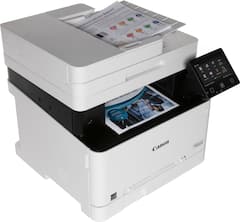
Canon Color imageCLASS MF656Cdw Wireless All-in-One Laser Printer
Canon Color
Buy — Canon specifies Windows and Mac support, 22 ppm printing, a 50-sheet duplex ADF, gigabit Ethernet, and a recommended 150–2,500-page monthly range.
The best fit when a mixed Mac/Windows office needs printing, copying, fax, and true one-pass duplex scanning. It is heavy and produces office-grade rather than photo-grade color.Available at Amazon(paid link) — opens Amazon in a new tab. Price and availability shown there.Canon Color imageCLASS MF665Cdw All-in-One Wireless Laser Printer
Canon Color
It depends — The MF665Cdw increases rated speed from 22 to 26 ppm and adds PCL while retaining the duplex ADF, but it changes from 067 to 075 toner.
Consider the successor when 26 ppm or PCL support matters. Its drawback is the switch to the Canon 075 toner family, so existing 067 supplies cannot be reused.Available at Amazon(paid link) — opens Amazon in a new tab. Price and availability shown there.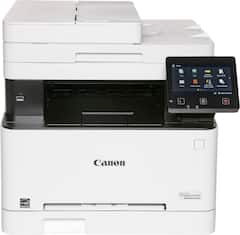
Canon Color imageCLASS MF654Cdw Wireless All-in-One Laser Printer
Canon Color
It depends — RTINGS documents that the MF654Cdw has an ADF and two-sided printing but lacks automatic duplex scanning and fax.
Consider this sibling only when fax and automatic double-sided scanning are unnecessary. It retains automatic duplex printing, but its ADF captures only one side of an original.Available at Amazon(paid link) — opens Amazon in a new tab. Price and availability shown there.

Sources
Pages consulted while researching this article. None of these are affiliate links.
- Canon Support for Color imageCLASS MF656Cdw — usa.canon.com
- Canon Color imageCLASS MF656Cdw Review: Tested & Rated — techgearlab.com
- Canon Color imageCLASS MF656Cdw/MF654Cdw Review — rtings.com
- Canon MF656Cdw Manual: Scanning with AirPrint — oip.manual.canon
- Canon MF656Cdw Manual: Feeder Specifications — oip.manual.canon
- Canon MF656Cdw Manual: Scan Function — oip.manual.canon
- Canon MF656Cdw Manual: Consumables — oip.manual.canon
- Canon MF656Cdw Manual: Main Unit Specifications — oip.manual.canon