Best FL Studio Home Studio Setup
The questionWhere do these come from?
Help - $3k Budget For A Set Up
A stable FL Studio rebuild should put the money into CPU, RAM, interface drivers, monitoring, and one clean vocal chain.
The balanced move is to buy one strong, quiet computer, a proper two-input interface, honest nearfield monitors, and one low-noise vocal mic instead of spreading the budget across flashy controllers and plugin bundles. For FL Studio, mixing, virtual instruments, and occasional vocals, performance problems are more likely to come from weak CPU headroom, too little memory, bad audio drivers, and slow storage than from not owning enough gear.
Start with the computer, not the toys
Your old setup probably felt bad for three reasons: buffer underruns, overloaded projects, and general system instability. FL Studio’s own guidance is blunt about this: CPU power determines how many instruments and effects you can run, and a solid-state drive matters for smoother work. It also says that on Windows, a manufacturer’s native ASIO driver is preferable to FL Studio ASIO when you care about recording timing and low latency.
That makes the computer the first purchase, not the last leftover line item.
For a modern FL Studio rebuild, the cleanest default is a Mac mini with M4 Pro, 48 GB unified memory, and enough internal storage that your active projects and core sample libraries live on the internal SSD. Apple lists the M4 Pro Mac mini as configurable up to 64 GB unified memory and up to 8 TB SSD, with Thunderbolt 5 on the M4 Pro model. That gives you a small, quiet machine with enough CPU headroom for synths, samplers, vocal chains, and mix buses without turning the room into a fan-noise problem.
The bad part: macOS is not the safest choice if your old sound depends on abandoned Windows-only VSTs, cracked legacy plugins, or ancient 32-bit instruments. FL Studio runs on macOS, but your plugin folder might not travel cleanly. If you have a hard attachment to old Windows plugins, buy a Windows tower instead. A Lenovo ThinkStation P3 Tower Gen 2 or Dell Precision 3680-class workstation makes more sense than a gaming PC because you get business-grade thermals, lots of USB, easier service, and less RGB-and-fan nonsense.
| Choice | Best fit | Main tradeoff |
|---|---|---|
| Mac mini M4 Pro | Quiet modern FL setup with current plugins | Poor fit for old Windows-only VST habits |
| Lenovo ThinkStation P3 Gen 2 | Windows FL setup with upgrade room | Bigger, less elegant, possible fan noise |
| Old laptop plus upgrades | Only if money is very tight | Does not solve crashes or CPU overload |
If you go Windows, use a tower with 64 GB RAM and at least one fast NVMe drive. Samsung’s 990 PRO 4TB is a strong internal library/project drive: Samsung lists it as a PCIe 4.0 M.2 2280 NVMe SSD with up to 7,450 MB/s sequential reads and a 2,400 TBW rating for the 4TB model. That is not because audio files need wild benchmark speed. It is because big sample libraries, project backups, renders, and video files punish tiny drives quickly.
Keep latency boring
Latency is not fixed by buying the fanciest interface. It is fixed by a stable computer, the right driver, sensible buffer settings, and a direct monitoring path while recording.
For FL Studio on Windows, select the interface manufacturer’s native ASIO driver. Image-Line’s manual puts native ASIO above ASIO4ALL and FL Studio ASIO for best performance. For tracking vocals or playing MIDI parts, aim for a small buffer that does not create underruns. For mixing, raise the buffer and stop pretending every session has to run at live-performance latency.
A Focusrite Scarlett 2i2 4th Gen is the sensible interface here. It gives you two mic preamps, phantom power, two line outputs, one headphone output, USB-C, 24-bit/192 kHz operation, and direct software control. It is enough for occasional vocals, guitar, a synth, and monitors. It is not enough for recording a full drum kit or a live band. If a full band or drum kit is actually the plan, buy more inputs now. If it is just you making beats, mixing, and cutting a vocal, the 2i2 is the right size.
Just want the recommendation?
Skip to the picksMonitoring matters more than another synth
Do not spend the rebuild on a premium synth bundle while listening through computer speakers. Mixing decisions come from the monitoring chain.
ADAM Audio T5V monitors are a good fit for a small production room because they are compact five-inch nearfields with balanced XLR inputs, RCA inputs, rear EQ switches, and a published 45 Hz to 25 kHz frequency response. MusicRadar’s current studio-monitor guide also places them as a strong affordable nearfield choice for small rooms, while warning that the rear port needs space from the wall.
That wall warning matters. If your desk is slammed against a wall, the T5V can exaggerate low end. Pull them forward, put them on isolation pads or stands, and use the low shelf control if the room gets boomy. You still need headphones for detail checks and low-end sanity. Monitors show you balance in the room; headphones show you edits, noise, clicks, and vocal breaths.
If your monitor situation gets weird with hum or USB noise, troubleshoot in order: balanced TRS or XLR cables first, one power strip for the computer/interface/speakers, then USB port changes, then ground-loop isolation. Do not start by blaming the preamp. The same logic applies if you are connecting a Mac mini to monitors through hubs and adapters; the interface should be the audio center, not the monitor headphone jack. For a broader computer-buying angle, the site’s budget Windows laptop guide is useful only if you decide you need portability instead of a fixed production desk.
For vocals, buy one forgiving mic chain
For occasional vocals, the RODE NT1 5th Generation is easier to recommend than a Shure SM7B for a setup like this one. The SM7B is a classic, but Shure’s own guide says it has -59 dBV/Pa sensitivity and may need more than 60 dB of gain or an inline booster with weaker preamps. That is one more thing to solve.
The NT1 5th Gen gives you XLR into the Scarlett and USB when you need a direct simple path. RODE lists a cardioid condenser design, 20 Hz to 20 kHz frequency range, 142 dB max SPL, 4 dBA self-noise, XLR, USB-C, and 32-bit float digital recording over USB. The bad part is the same thing that makes it useful: it is a sensitive condenser. In a reflective bedroom it will hear the room, the computer fan, the chair, the wall bounce, and your neighbor’s timing. Put the money you save by not buying a pile of mics into basic room control: a rug, thick curtains, a reflection filter only if placement demands it, and recording away from bare corners.
Raw vocals being quieter than tutorial examples usually is not a preamp-quality crisis. Tutorials often use compressed, normalized, processed audio. Track at a healthy level without clipping, then use clip gain, compression, and limiting in the mix. Chasing a louder raw waveform is how people record distorted takes.
The actual list to buy
Build the setup in this order: computer, interface, monitors, mic, storage. Skip a big MIDI controller unless you already know you need keys. Skip a subwoofer until the room is controlled. Skip boutique plugins until your current projects can run without crackles.
Choose the Mac mini M4 Pro route if you are basically starting fresh with current plugins and want the quietest, lowest-maintenance desk. Choose the Lenovo tower route if Windows compatibility matters more than desk neatness. Either way, 64 GB-class memory is not silly for modern sample libraries and big FL projects; it is the part that keeps the machine useful after the first year.
The recommendations below are intentionally boring. Boring is good here. You are rebuilding because you want FL Studio to open, play, record, and mix without turning every session into a tech-support night.
The bottom line
Which part you need depends on what broke:
Top pick
It depends
Apple 2024 MacBook Pro with Apple M4 Pro Chip (16-inch, 24GB RAM, 512GB SSD Storage) (QWERTY English) Space Black (Renewed)
Apple
The article recommends the Mac route for current plugins but warns that old Windows-only VSTs may not transfer cleanly; its specific recommendation is a Mac mini M4 Pro.
Best first choice if you are moving to current plugins and want a quiet, compact FL Studio workstation with serious CPU headroom.Available at Amazon(paid link) — opens Amazon in a new tab. Price and availability shown there.The alternative
It depends
Lenovo ThinkStation P3 Tower Gen 2 Workstation: Intel Core Ultra 9 285 vPro, 2TB NVMe Gen 5 SSD, 256GB 6400MHz DDR5 RAM, WiFi 7, Windows 11 Professional, Performance Desktop PC, AI Business Computer
Lenovo
The Lenovo tower is recommended when legacy Windows plugin compatibility or internal upgrade room matters, with size and possible fan noise as tradeoffs.
Choose this instead of the Mac if old Windows VST compatibility matters or you want internal upgrade room for drives and memory.Available at Amazon(paid link) — opens Amazon in a new tab. Price and availability shown there.
Recommended products
Ordered by how well each one fits the situations above. Each link below is a paid link.
Apple 2024 MacBook Pro with Apple M4 Pro Chip (16-inch, 24GB RAM, 512GB SSD Storage) (QWERTY English) Space Black (Renewed)
Apple
It depends — The article recommends the Mac route for current plugins but warns that old Windows-only VSTs may not transfer cleanly; its specific recommendation is a Mac mini M4 Pro.
Best first choice if you are moving to current plugins and want a quiet, compact FL Studio workstation with serious CPU headroom.Available at Amazon(paid link) — opens Amazon in a new tab. Price and availability shown there.
Lenovo ThinkStation P3 Tower Gen 2 Workstation: Intel Core Ultra 9 285 vPro, 2TB NVMe Gen 5 SSD, 256GB 6400MHz DDR5 RAM, WiFi 7, Windows 11 Professional, Performance Desktop PC, AI Business Computer
Lenovo
It depends — The Lenovo tower is recommended when legacy Windows plugin compatibility or internal upgrade room matters, with size and possible fan noise as tradeoffs.
Choose this instead of the Mac if old Windows VST compatibility matters or you want internal upgrade room for drives and memory.Available at Amazon(paid link) — opens Amazon in a new tab. Price and availability shown there.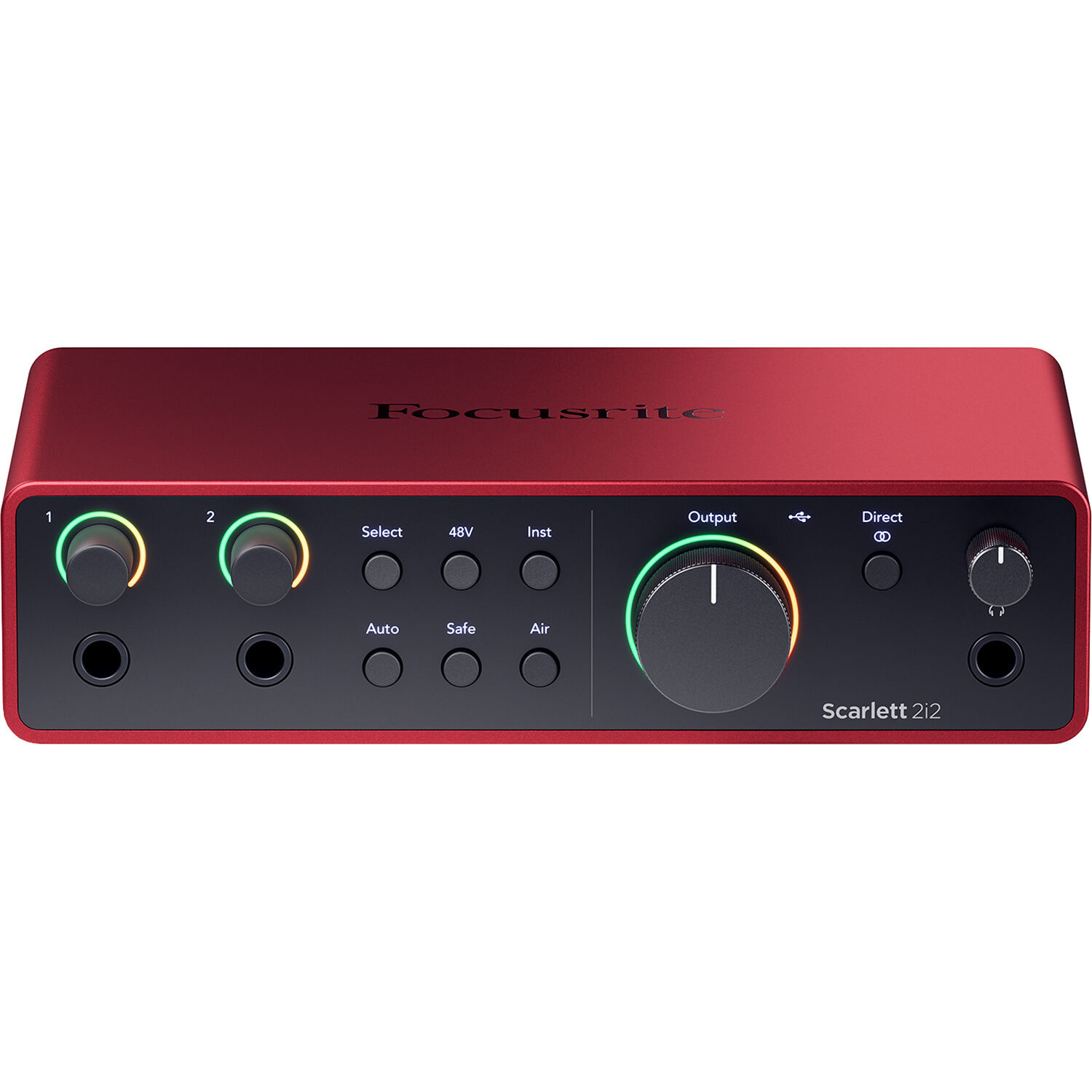
Focusrite Scarlett 2i2 4th Gen USB-C Audio Interface
Focusrite
Buy — The Scarlett 2i2 provides two mic preamps, phantom power and monitor outputs, which the article calls the right size for beats, mixing and occasional vocals.
A right-sized interface for vocals, instruments, monitors, and low-latency FL Studio work without paying for unused inputs.Available at Amazon(paid link) — opens Amazon in a new tab. Price and availability shown there.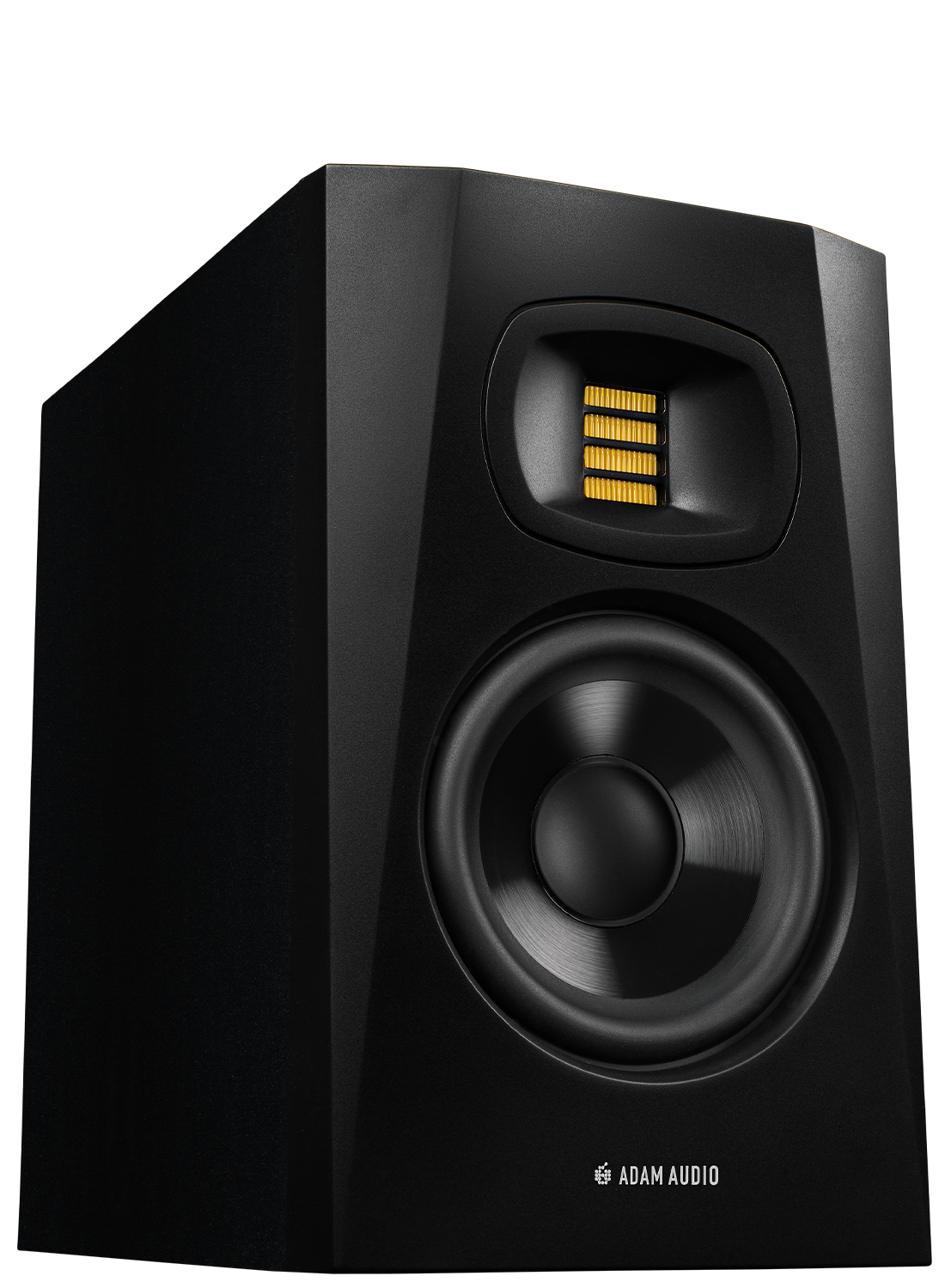
Adam Audio Professional T-Series T5V 5" 70W 2-Way Active Nearfield Monitor, Pair, Bundle with 2X 10' XLR Male to Female Microphone Cable
ADAM Audio
It depends — The T5V suits a small production room provided its rear ports have wall clearance, since placement against a wall can exaggerate low end.
Compact nearfields that make sense for a small production room, as long as you can give the rear ports some wall clearance.Available at Amazon(paid link) — opens Amazon in a new tab. Price and availability shown there.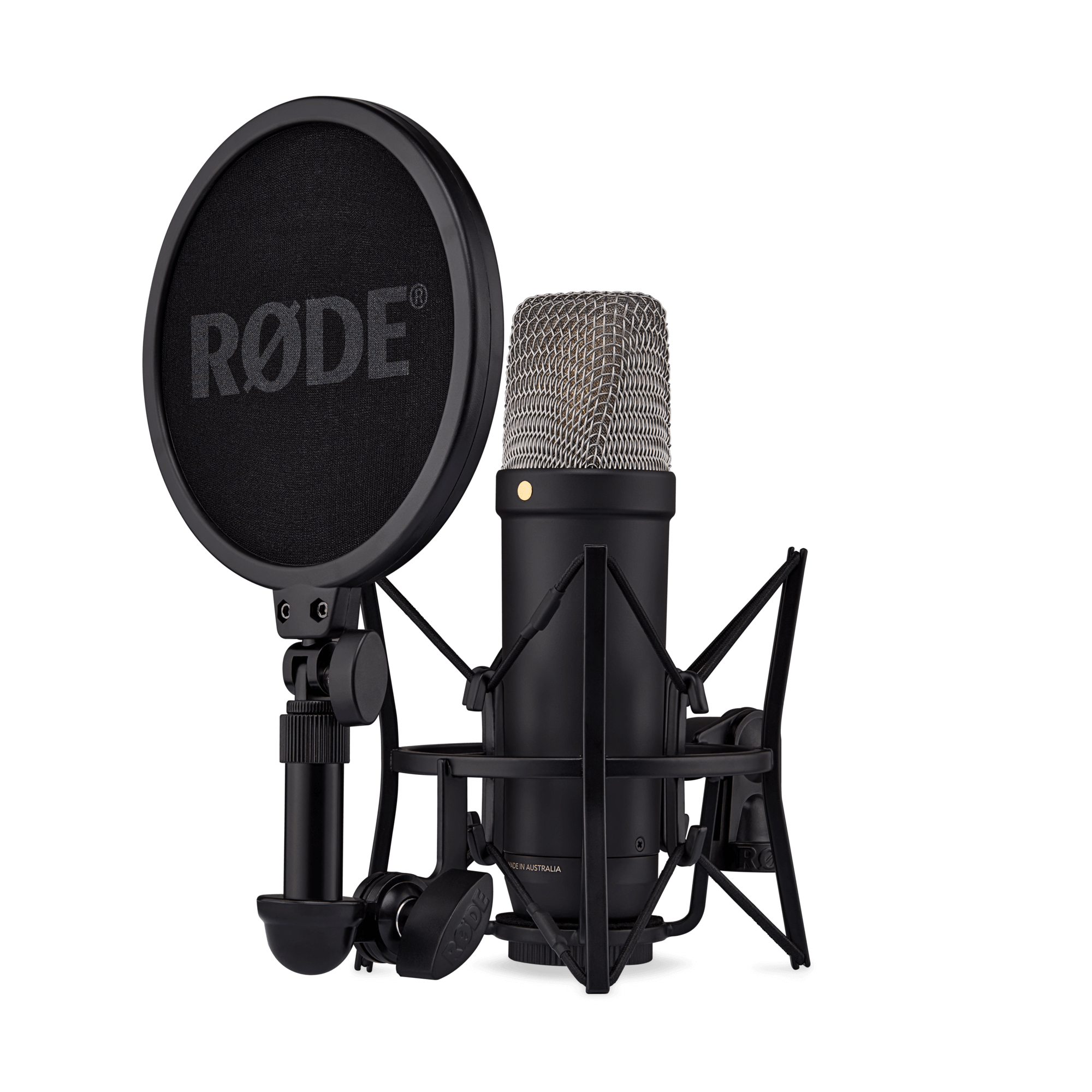
Rode NT1 5th Generation Condenser Microphone with SM6 Shockmount and Pop Filter,Silver
Rode
Buy — The NT1 offers XLR and USB connections with 4 dBA self-noise, making it the article's recommended occasional-vocal microphone.
A clean occasional-vocal mic with both XLR and USB options, easier to drive than an SM7B-style dynamic setup.Available at Amazon(paid link) — opens Amazon in a new tab. Price and availability shown there.Samsung SSD 990 PRO 4TB, PCIe 4.0 M.2 2280, Up to 7,450 MB/s
Samsung
It depends — The 990 PRO 4TB is recommended specifically as an internal library and project drive for the Windows tower route, using a PCIe 4.0 M.2 2280 connection.
The Windows-tower storage pick for large sample libraries, active FL projects, renders, and backups without juggling tiny drives.Available at Amazon(paid link) — opens Amazon in a new tab. Price and availability shown there.


Sources
Pages consulted while researching this article. None of these are affiliate links.
- What are the system requirements of FL Studio (Mac and Windows)? — support.image-line.com (accessed 2026-08-10)
- FL Studio Manual: Audio Settings — image-line.com (accessed 2026-08-10)
- Mac mini (2024) - Tech Specs — support.apple.com (accessed 2026-08-10)
- Scarlett 2i2 4th Generation | Focusrite — focusrite.com (accessed 2026-08-10)
- T5V Nearfield Monitor | ADAM Audio — shop.adam-audio.com (accessed 2026-08-10)
- Best studio monitors 2026: Studio speakers for production | MusicRadar — musicradar.com (accessed 2026-08-10)
- NT1 5th Generation | Studio Condenser Microphone | RODE — rode.com (accessed 2026-08-10)
- SM7B User Guide - Shure — shure.com (accessed 2026-08-10)
- Samsung Adds 4TB Capacity to 990 PRO Series — news.samsung.com (accessed 2026-08-10)
- ThinkStation P3 Tower Gen 2 Specifications — psref.lenovo.com (accessed 2026-08-10)