37-Inch LG or Samsung G7 for Triple Screens?
The questionWhere do these come from?
Quastion about triples lg or samsung 37
Hi. I would like to ask what do You think about those two monitors LG 37G800A-B 37 and samsung g7 37 inch. They are good for a triples? I want to buy somethink bigger than 32 and I am wonder if they are ok?
Of the two 37-inch 4K curved options, the LG 37G800A-B edges the Samsung G75F, but three of either is a huge, demanding triple-screen build.
The LG UltraGear 37G800A-B is the better pick of the two 37-inch options on paper, but the Samsung Odyssey G7 G75F is close, and neither suits three-across on a normal desk. If you are set on triple 37-inch screens, treat the size and the GPU load as the real decision, because the brand matters much less.
Nobody here tested these monitors. The comparison rests on the manufacturers’ specs and on coverage such as Notebookcheck’s launch write-up. We found no independent lab measurements (RTINGS or similar) for either model, so every figure below is the maker’s claim.
The two monitors side by side
| Verdict | Deciding spec | The catch | |
|---|---|---|---|
| LG UltraGear 37G800A-B | Buy | 95% DCI-P3, USB-C with 65W power delivery | LG’s own page contains a stray “3440x1440” typo; the real resolution is 3840x2160 |
| Samsung Odyssey G7 G75F | Consider | 90% DCI-P3, 350 cd/m2 typical | No USB-C; model code differs by region (LS37FG75DENXZA in the US) |
Both are 37-inch curved VA panels at 4K, 165Hz, 1000R, with DisplayHDR 600 and FreeSync Premium Pro. Both carry two HDMI 2.1 ports and one DisplayPort 1.4. The listings do not separate them much on motion or HDR, which is why the gamut, brightness and USB-C figures decide it. A Samsung 37-inch typical brightness of 350 cd/m2 is the one number that stands out, since an Italian write-up of the LG reports about 600 nits typical. Treat that comparison cautiously, because it comes from two different sources.
The Samsung is the one to skip only if you can buy the LG for a similar amount. If the Samsung is clearly cheaper where you live, the gap is small enough that it is a fair buy.
Just want the recommendation?
Skip to the picksWhy three 37-inch screens is the hard part
A 37-inch 16:9 panel is roughly 82 cm wide. Three side by side is about 2.5 m of screen before bezels. That needs a very deep rig and a wide room, and each screen sits much closer to your face than a 27-inch would.
- Desk depth: at the typical sim-rig viewing distance of 70 to 90 cm, a 37-inch 4K screen fills far more of your view than you need. Triple setups usually angle the side screens inward, which the 1000R curve already does a little.
- Weight: the LG weighs about 9.6 kg without its stand, so a triple needs a sturdy mount or three robust stands.
- Rig room: if your rig sits under 2.5 m wide, a triple of this size will not fit without overhang.
If space is limited, three smaller 27 to 32-inch panels fit the same field of view with less depth and far less GPU load. That is the answer for most people asking this question.
What an RTX 5080 can and cannot drive
Three 4K screens add up to roughly 25 million pixels, three times a single 4K display. An RTX 5080 has three DisplayPort and one HDMI output, so connecting three of these monitors is not the problem. The problem is rendering.
- Racing sims that span a triple setup render all three views at once, so expect to lower settings or use upscaling at 4K per screen. Many players instead run lower resolution on the side screens.
- 4K at 165Hz over DisplayPort 1.4 relies on display stream compression. It works, but it is worth knowing if you see odd behaviour with older cables, so use certified DP 1.4 cables.
- These panels have FreeSync Premium Pro and no G-Sync module. Nvidia cards generally run them as G-Sync Compatible, but verify in the Nvidia Control Panel for each screen.
When one of these is right
Choose the LG if you want one large 4K screen, or an immersive triple in a purpose-built room with the depth to match. Choose the Samsung if it undercuts the LG meaningfully and you do not need USB-C. If you are building a triple on a standard desk, skip both and look at smaller 4K or 1440p panels.
Be careful about regional model numbers too: the Samsung listing differs from market to market, so confirm that the 37-inch 165Hz 4K spec matches before ordering. If a unit arrives with a defective panel, that is a retailer or manufacturer warranty matter, not something to fix with settings.
The bottom line
Neither is wrong; the use case separates them:
Top pick
Buy this
LG 34G600A-B 34-inch Ultragear WQHD (3440 x 1440) Curved Gaming Monitor 160Hz, AMD FreeSync Premium, HDR10, Built-in Speaker, Reader Mode, HDMI 2.1, DisplayPort, Tilt/Height/Swivel Stand, Black
LG
LG's page lists 95% DCI-P3 coverage and USB-C with 65W power delivery, against 90% DCI-P3 and no USB-C on the Samsung's spec sheet.
The rival in this comparison and the stronger of the two on paper: same 37-inch 4K VA panel, 165Hz, 1000R and DisplayHDR 600, with a wider gamut and USB-C. Drawback: it is as wide as the Samsung, so the triple-screen size problem is identical.Available at Amazon(paid link) — opens Amazon in a new tab. Price and availability shown there.The alternative
It depends
Samsung 37” Odyssey G7 (G75F) Series 4K UHD Curved Gaming Monitor
Samsung
Its 350 cd/m2 typical brightness and 90% DCI-P3 are lower than LG's figures, and it has no USB-C, though it is otherwise the same 37-inch 4K 165Hz VA class.
The monitor the question is about. It makes sense if you find it at a better local price or want the pivot-capable stand, but nothing on the spec sheet beats the LG. Model numbers vary by region, so check the suffix.Available at Amazon(paid link) — opens Amazon in a new tab. Price and availability shown there.
Recommended products
Ordered by how well each one fits the situations above. Each link below is a paid link.
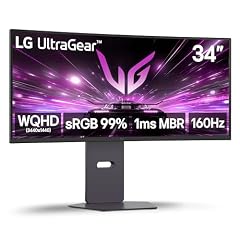
LG 34G600A-B 34-inch Ultragear WQHD (3440 x 1440) Curved Gaming Monitor 160Hz, AMD FreeSync Premium, HDR10, Built-in Speaker, Reader Mode, HDMI 2.1, DisplayPort, Tilt/Height/Swivel Stand, Black
LG
Buy — LG's page lists 95% DCI-P3 coverage and USB-C with 65W power delivery, against 90% DCI-P3 and no USB-C on the Samsung's spec sheet.
The rival in this comparison and the stronger of the two on paper: same 37-inch 4K VA panel, 165Hz, 1000R and DisplayHDR 600, with a wider gamut and USB-C. Drawback: it is as wide as the Samsung, so the triple-screen size problem is identical.Available at Amazon(paid link) — opens Amazon in a new tab. Price and availability shown there.
Samsung 37” Odyssey G7 (G75F) Series 4K UHD Curved Gaming Monitor
Samsung
It depends — Its 350 cd/m2 typical brightness and 90% DCI-P3 are lower than LG's figures, and it has no USB-C, though it is otherwise the same 37-inch 4K 165Hz VA class.
The monitor the question is about. It makes sense if you find it at a better local price or want the pivot-capable stand, but nothing on the spec sheet beats the LG. Model numbers vary by region, so check the suffix.Available at Amazon(paid link) — opens Amazon in a new tab. Price and availability shown there.
Sources
Pages consulted while researching this article. None of these are affiliate links.
- LG UltraGear 37G800A-B product page — lg.com
- Notebookcheck: Odyssey G7 G75F 37-inch curved 4K gaming monitor — notebookcheck.net
- SamMobile: Samsung launches Odyssey G7 G75F 37-inch — sammobile.com
- B&H spec listing, Samsung LS37FG75DENXZA — bhphotovideo.com