Wiring 3 Radiator Fans on One Noctua PWM Splitter
The questionWhere do these come from?
Seeking advice - swapping Arctic AIO fans with Noctua
Hi I have the Antec Flux case and an Arctic 360 AIO. I’m replacing all my case fans and AIO fans with Noctua to make my own version of the Antec x Noctua collab case.
Use one Noctua NA-SC1 Sx2 three-way splitter for three fans, and wire each low-noise adaptor between the splitter and its own fan, never on the trunk line.
Run three radiator fans off one Noctua PWM header with a single NA-SC1 Sx2 three-way splitter cable, and put each low-noise adaptor between the splitter and its own fan — never on the trunk line between the motherboard and the splitter. That single placement rule is the part most wiring diagrams skip, and it’s the one that determines whether the adaptors last.
How much current three fans actually pull
The concern behind this question is usually whether a motherboard header can carry three fans’ worth of current, and for standard Noctua A-series fans the answer is almost always yes with margin to spare. Noctua’s own datasheet lists the NF-A12x25 PWM at a maximum input power of 1.68W at 12V, which works out to roughly 0.14A per fan. Three of them draw about 0.42A combined. Noctua’s FAQ on connecting multiple fans to one header states that most motherboard fan headers support up to 1A, and that the number to check is the combined current draw of everything on that header against the limit printed in the motherboard manual — not the fan count. At 0.42A, three A-series fans use under half of a typical 1A header’s budget.
That margin shrinks fast with a different class of fan. Noctua’s industrial-grade iPPC line and other high-static-pressure models draw meaningfully more current per fan than the A-series, so check the specific model’s datasheet before assuming the same headroom applies — a header rated for 1A can be exceeded by three higher-draw fans in a way it never will be by three NF-A12x25s. If the motherboard manual doesn’t list a current rating for the header at all, that’s worth confirming with the board vendor directly rather than guessing, since running over the rated current is a documented way to damage the header’s driver circuitry.
One 3-way splitter beats two daisy-chained Y-cables
Noctua sells two different ways to get three fans onto one connector, and they aren’t identical. The NA-SC1 Sx2 is a 3-way splitter built specifically to power and control three fans from a single input, with the PWM signal forwarded from the input to all three outputs. The alternative — daisy-chaining two NA-SYC1 Y-cables, which Noctua explicitly supports — gets to the same three fans but does it through two 2-way splitters joined end to end.
| Fans off one connection | Power source | RPM feedback to the board | Best fit | |
|---|---|---|---|---|
| NA-SC1 Sx2 (3-way splitter) | 3 | Motherboard header | Output connector 1 only | Three fans, one cable, shortest signal path |
| Two NA-SYC1 Y-cables, chained | up to 4 | Motherboard header | Connector 1 of the first cable only | Fans mounted far apart, or one Y-cable already on hand |
| NA-FH1 fan hub | up to 8 | SATA (54W) or header (24W without SATA) | Port 1 only, with per-port status LEDs | A fourth fan later, or moving current load off the header entirely |
Both splitter options work electrically — Noctua rates the daisy-chain as supported, not a workaround — but the 3-way splitter reaches three fans with one connector and one join instead of two, which is one less crimp point for a PWM signal that already degrades somewhat over cable length. Reach for the daisy-chained Y-cables only when the fans are spread out enough that separate cable runs actually route better, or when a fan already shipped with a Y-cable in the box and buying a second cable is wasted money.
Where the low-noise adaptors go, and why the wrong spot cooks them
This is the part of the question that has an actual right and wrong answer. Noctua’s FAQ on using low-noise adaptors with Y-cables is direct about it: use one L.N.A. per fan, and place each one between the splitter and its individual fan — never a single L.N.A. shared between the motherboard and the splitter feeding all three fans. Wiring one adaptor on the trunk line runs all three fans’ combined current through a resistor sized for one fan’s load, and Noctua’s own guidance says that setup can overheat the adaptor.
For three fans on the NA-SC1 Sx2, that means three separate low-noise adaptors — a 3-pack such as the NA-SRC7 — each one sitting inline on an individual fan’s own cable, downstream of the splitter’s output connector. The splitter still carries the full PWM signal and RPM feedback exactly as before; the adaptor only drops the voltage reaching that one fan.
Just want the recommendation?
Skip to the picksWhat one adaptor actually does is on the same NF-A12x25 PWM datasheet: with the bundled L.N.A. installed, maximum speed drops from 2000 to 1700 RPM, noise falls from 22.6 to 18.8 dB(A), airflow drops from 102.1 to 84.5 m³/h, and static pressure drops from 2.34 to 1.65 mmH₂O. That’s the trade on a per-fan basis — a smaller drop in output than the noise reduction might suggest, since PWM control still varies speed within that lowered ceiling. Standalone NA-SRC7 adaptors are rated only for fans drawing under 2.5W each, which covers essentially every Noctua radiator fan but rules out substantially higher-draw industrial models.
The motherboard only hears one fan
Both the NA-SC1 Sx2 and daisy-chained NA-SYC1 cables forward the tachometer signal from only their first output connector back to the motherboard. Fans two and three still receive the same PWM duty cycle and spin at the same commanded speed, but the board has no RPM reading from them and no way to flag if one of them stalls. Whatever fan is plugged into output connector 1 is the one the motherboard’s fan-fail alarm and speed display are actually watching — pick that connector deliberately, and don’t assume the board would notice if fan two or three seized.
This is a limitation of the splitter itself, not a wiring mistake to fix — there’s no rewiring that recovers independent RPM signals from a passive splitter, since the cable was never built to carry three separate tach lines back to a single 4-pin header.
When a powered hub is the better call
The NA-FH1 changes two things a passive splitter can’t: it draws its own power from a SATA connector — up to 54W across all eight ports, or 24W if SATA isn’t connected and it pulls from the header instead — and it gives each port a status LED that lights when it’s receiving a valid RPM signal and goes dark if that fan stops. It still only reports one port’s tachometer reading back to the motherboard for software monitoring, so it doesn’t solve the per-fan RPM problem outright, but the status LEDs give a way to visually confirm all three fans are spinning without opening monitoring software.
The hub is worth it over the 3-way splitter in two situations: planning to add a fourth fan later without swapping cables again, or wanting the fans’ current draw off the motherboard header’s budget entirely by running it through SATA power instead. For exactly three standard-draw radiator fans on a header rated at 1A, neither is a necessity — it’s a convenience upgrade, not a fix for a real limit three A-series fans would hit.
The cable that looks right and isn’t
Noctua’s product names create one specific mistake worth flagging directly: the NA-SYC2 is a Y-cable set for 3-pin fans, and its name differs from the correct NA-SYC1 by a single digit. The NA-SYC2 has no PWM control pin at all — it’s wired for voltage-controlled 3-pin fans, not 4-pin PWM. Connecting 4-pin PWM radiator fans through it removes the PWM signal path entirely, so the motherboard can no longer vary fan speed by duty cycle; the fans run at whatever voltage the header supplies, controllable only through DC voltage-control mode if the header supports it, or a low-noise adaptor for a fixed reduction. Skip the NA-SYC2 for this build. If a splitter shows a 3-pin-only connector or a listing doesn’t mention PWM explicitly, confirm the pin count before ordering.
Put together, the wiring for three radiator fans comes down to a short list: one NA-SC1 Sx2 splitter run to a header confirmed to handle the combined current, three low-noise adaptors installed individually between the splitter and each fan, and connector 1 assigned to whichever fan you most want the motherboard actually watching.
The bottom line
Two ways to do it, depending on the kit you already own:
Top pick
Buy this
Noctua NA-SC1 Sx2 3-Way PWM Fan Splitter Cable
Noctua
It powers and forwards the PWM signal to all three fans from a single connector, so wiring three radiator fans needs one cable and one join instead of two daisy-chained Y-splitters.
The purpose-built way to wire exactly three PWM radiator fans off one header: three output connectors natively, with no need to daisy-chain a pair of two-way Y-cables together. Only the RPM signal from output connector 1 reaches the motherboard, so treat that port as the one you actually monitor.Available at Amazon(paid link) — opens Amazon in a new tab. Price and availability shown there.The alternative
It depends
Noctua NA-SYC1 4-Pin PWM Y-Cable 2-Pack
Noctua
Daisy-chaining two of these reaches the same three fans as the native 3-way splitter, but adds a second connector and cable join the purpose-built option doesn't need.
An alternative to the 3-way splitter: chain two of these together to reach three fans, which Noctua explicitly supports. Worth it if the fans sit far enough apart that separate cable runs route better than one splitter’s fixed connector spacing, or if a fan already shipped with one in the box.Available at Amazon(paid link) — opens Amazon in a new tab. Price and availability shown there.
Recommended products
Ordered by how well each one fits the situations above. Each link below is a paid link.
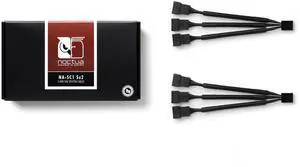
Noctua NA-SC1 Sx2 3-Way PWM Fan Splitter Cable
Noctua
Buy — It powers and forwards the PWM signal to all three fans from a single connector, so wiring three radiator fans needs one cable and one join instead of two daisy-chained Y-splitters.
The purpose-built way to wire exactly three PWM radiator fans off one header: three output connectors natively, with no need to daisy-chain a pair of two-way Y-cables together. Only the RPM signal from output connector 1 reaches the motherboard, so treat that port as the one you actually monitor.Available at Amazon(paid link) — opens Amazon in a new tab. Price and availability shown there.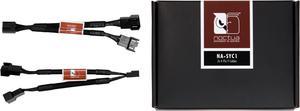
Noctua NA-SYC1 4-Pin PWM Y-Cable 2-Pack
Noctua
It depends — Daisy-chaining two of these reaches the same three fans as the native 3-way splitter, but adds a second connector and cable join the purpose-built option doesn't need.
An alternative to the 3-way splitter: chain two of these together to reach three fans, which Noctua explicitly supports. Worth it if the fans sit far enough apart that separate cable runs route better than one splitter’s fixed connector spacing, or if a fan already shipped with one in the box.Available at Amazon(paid link) — opens Amazon in a new tab. Price and availability shown there.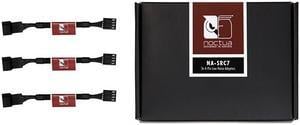
Noctua NA-SRC7 4-Pin Low-Noise Adaptor 3-Pack
Noctua
It depends — Three fans on one splitter need three separate adaptors — Noctua's guidance is one L.N.A. per fan between the splitter and the fan, never a single shared adaptor on the trunk line, or it can overheat.
The complement the splitter needs for quieter radiator fans: a 3-pack covers all three fans, each adaptor installed individually between the splitter and its own fan. On Noctua’s NF-A12x25 PWM, one adaptor drops noise from 22.6 to 18.8 dB(A) at the cost of dropping max speed from 2000 to 1700 RPM.Available at Amazon(paid link) — opens Amazon in a new tab. Price and availability shown there.
Sources
Pages consulted while researching this article. None of these are affiliate links.
- FAQ: Can I connect multiple fans to one fan header? | Noctua — noctua.at
- FAQ: Can I use Low-Noise Adaptors with Y-cables? | Noctua — noctua.at
- NA-SC1 Sx2: Specifications | Noctua — noctua.at
- NA-SYC1: Specifications | Noctua — noctua.at
- NA-SYC2: Specifications | Noctua — noctua.at
- NA-FH1 | Noctua — noctua.at
- FAQ: How many fans can I connect to the NA-FH1 fan hub? | Noctua — noctua.at
- NF-A12x25 PWM Datasheet | Noctua — cdn.noctua.at